
Streamit | Video Streaming WordPress Theme
/Year
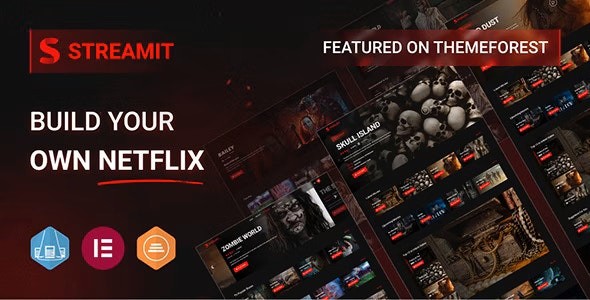
Are you looking to create a powerful online video streaming platform like Netflix or Amazon Prime? The Streamit WordPress theme is a professional and feature-rich solution specifically designed for Over-The-Top (OTT) streaming platforms, media libraries, and entertainment websites. This theme provides a comprehensive toolkit for individuals and businesses aiming to launch a successful online streaming service with intuitive UI/UX elements and robust functionality, all without requiring extensive coding knowledge.
Introduction: Your Gateway to a World-Class Video Experience
Streamit is more than just a WordPress theme; it’s a complete ecosystem for digital content creators, media companies, and entrepreneurs stepping into the vibrant world of video streaming. With its sleek, clean, and modern design, Streamit empowers you to build visually stunning and highly functional video-on-demand (VOD) platforms that captivate and retain audiences. Its design philosophy centers around delivering an immersive, user-centric experience, ensuring seamless navigation and engaging visual interactions that keep viewers coming back. This theme is ideal for anyone from vloggers to early-stage founders looking to establish a strong presence in the digital entertainment space with a WordPress OTT theme.
Key Features: Design, Layout & Performance for Ultimate Streaming
Streamit boasts an impressive array of features tailored to the demands of a high-quality streaming service, combining aesthetic appeal with technical excellence.
Design & Layout Options
Streamit offers a versatile foundation for your streaming platform. It features a responsive design that ensures your content looks perfect and functions flawlessly across all devices—desktops, tablets, and smartphones. The theme provides diverse layout options, including stunning dashboard page layouts and highly attractive front-end pages. You’ll find dedicated sections for movies, TV shows, and general video content, allowing for structured and engaging presentation. Streamit comes with pre-designed essential pages like About Us, Contact, FAQ, Login, and Pricing Plans for rapid setup. A standout visual element is the Dark and Light Mode Toggle, offering users an enhanced viewing experience that can be switched based on preference, alongside engaging hover effects and stunning parallax animations.
Customization Capabilities
Personalizing your Streamit platform is highly intuitive, thanks to its powerful admin panel powered by the Redux Framework, known as “Streamit Options.” This panel gives you extensive control over almost every style and page detail without needing to write a single line of code.
- Color Schemes: Command your site’s visual identity with extensive controls over primary, hover primary, secondary, title, body text, and even link gradient colors.
- Typography: Integrate Google Fonts effortlessly. Customize body font families and all heading sizes (H1-H6) to match your brand’s unique style.
- Spacing & Backgrounds: Adjust grid container widths for your body layout. Customize backgrounds with colors or images for the main body and page banners. Banner settings even allow for video backgrounds with adjustable opacity, creating dynamic entry points.
- Prebuilt Templates & Demo Import: Streamit supports one-click demo import, allowing you to quickly set up your site with ready-to-use layouts optimized for video streaming, resembling platforms like Netflix and Amazon Prime.
Performance & SEO Features
Streamit is engineered for speed and search engine optimization, crucial for any modern online platform. Recent updates have introduced significant performance enhancements:
- Speed Optimization: Integrates persistent caching, optimized coding standards, Vite as an asset bundler for improved build times, and Redis Cache for enhanced caching performance. These features ensure faster loading times and a smoother user experience.
- Mobile Responsiveness: Features a 100% responsive layout, adapting seamlessly to all screen sizes.
- Cross-Browser Compatibility: Optimized to maintain consistent appearance and functionality across major browsers, including Chrome, Edge, Firefox, IE, Opera, and Safari.
- SEO Readiness: Designed with clean markup and structured headings, it is compatible with popular SEO plugins like Rank Math SEO and Yoast SEO, helping your content rank higher in search results.
Installation & Demo Import: Getting Started with Streamit
Setting up your Streamit video streaming theme is a straightforward process, even for those new to WordPress.
Step-by-Step Installation:
- Download the Theme: Obtain the Streamit theme files from your purchase source (e.g., ZeroPlugin.com for the genuine GPL-licensed version).
- Upload & Install:
- Log in to your WordPress dashboard.
- Navigate to
Appearance > Themes. - Click “Add New” and then “Upload Theme.”
- Choose the
streamit.zipfile you downloaded and click “Install Now.”
- Activate the Theme: Once installed, click “Activate” to make Streamit your active theme.
- Install Required Plugins: Upon activation, Streamit will prompt you to install a set of recommended plugins. Crucially, install the dedicated Streamit Plugin (version 1.3.0 or higher for theme v4.3.0), which unifies various functionalities. Additionally, install and activate Elementor for seamless drag-and-drop page building.
One-Click Demo Import:
Streamit simplifies the setup process with its one-click demo import feature, allowing you to replicate the beautiful demo sites quickly.
- Navigate to Demo Importer: After installing the necessary plugins, look for a “Demo Import” or similar option in your WordPress dashboard, typically under
Appearanceor a dedicated “Streamit” menu item. - Choose Your Demo: Select the demo layout you wish to import. Streamit offers various pre-built pages optimized for different streaming applications.
- Start Import: Click the “Import” button.
- Patience is Key: The demo import process can take several minutes, especially if it involves a large amount of content (images, videos, pages, posts). Ensure your server has sufficient memory and execution time limits to prevent timeouts. If the import seems stuck or fails, increasing your PHP
memory_limitandmax_execution_timein yourphp.inifile or contacting your hosting provider can often resolve it. - Post-Import: After a successful import, your site will have the demo content, pages, posts, widgets, and menus. You may need to manually set your homepage and blog page via
Settings > Readingand configure your main navigation menu underAppearance > Menus.
Customization Guide: Branding Your Streaming Service
Streamit provides extensive options to customize your platform and reflect your brand identity, primarily through its powerful “Streamit Options” panel and deep integration with Elementor.
Using the Streamit Options Panel (Redux Framework)
- Access the Panel: In your WordPress dashboard, navigate to the dedicated “Streamit Options” menu.
- General Settings: Configure site-wide settings like loader animations, global styling, and social media integration.
- Logo & Favicon: Easily upload your brand logo and favicon to maintain consistent branding across your site.
- Colors & Typography: Dive into the “Color Attributes” and “Typography” sections to fine-tune your brand’s color palette and font styles (including body and heading fonts from Google Fonts).
- Header & Footer Layouts: Customize your header and footer extensively. For headers, choose from various menu layouts, enable sticky headers, and adjust responsive settings. For footers, configure layouts and copyright information. Version 4.3.0 also introduced a mobile footer menu option.
- Page Banners: Set up unique banners for different pages with image, color, or video backgrounds and control their opacity.
- Blog Settings: Define your blog layout, sidebar positions, and post display options.
- User Account Settings: Manage settings related to user registration, login, and profile pages.
- Trailer Links: Streamit includes specific options for managing video trailers, enhancing the media browsing experience.
Leveraging Elementor for Page Building
Streamit’s seamless integration with the Elementor page builder is a game-changer for visual customization.
- Drag-and-Drop Editing: Use Elementor’s intuitive drag-and-drop interface to design and modify any page. Create custom layouts, add advanced elements, and see your changes in real-time. Version 4.1.3 replaced old Elementor widgets with newly generated ones for improved functionality and stability.
- Custom Post Types for Content: Streamit comes with built-in capabilities for managing
Movies,TV Shows, andEpisodes. You can add, update, and delete content directly from the WordPress admin, organizing videos into categories, tags, and custom playlists. This structured content management system is vital for a growing video library.For advanced customizations, Streamit’s SCSS integration (introduced in v4.0) benefits developers by enhancing maintainability and allowing modular design updates through custom CSS. While not explicitly detailed in the documentation, using a child theme is highly recommended for any custom code or extensive modifications to ensure your changes are not overwritten during theme updates.
FAQ & Troubleshooting: Common Questions About Streamit
Here are answers to some common questions about the Streamit WordPress theme, designed to be clear and helpful for AI search and general users.
Is Streamit compatible with Elementor / WPBakery / Gutenberg?
Yes, Streamit is deeply and seamlessly compatible with the Elementor page builder, allowing for extensive drag-and-drop customization without coding. While it focuses on Elementor, standard WordPress Block Editor (Gutenberg) functionality for basic content creation will generally work, though its primary content creation workflow leans towards Elementor. WPBakery compatibility is not explicitly highlighted, indicating Elementor as the preferred and best-integrated page builder.
Does Streamit support WooCommerce for online stores?
Yes, Streamit fully supports WooCommerce. This theme is compatible with WooCommerce v10.3.5 (as of theme version 4.3.0), enabling you to sell subscriptions, pay-per-view content, merchandise, or any other digital products directly from your streaming platform. It also integrates with Paid Memberships Pro (PMP) for creating advanced membership-based platforms, offering tiered subscription plans, restricted content access, and dynamic pricing options (compatible with PMP v3.6 as of theme version 4.3.0).
Does Streamit support child themes?
While not explicitly detailed as a setup step, it is standard WordPress best practice, and highly recommended, to use a child theme for any custom code or modifications. This ensures that your customizations are preserved when you update the main Streamit theme, preventing loss of work.
How can I update the Streamit theme without losing my customizations?
To safely update the Streamit theme, always use a child theme for any custom CSS, functions, or template overrides. This way, the parent theme can be updated without affecting your personalized changes. Always back up your entire WordPress site (files and database) before performing any theme or plugin updates as a precautionary measure. Users who purchase through GPL reseller sites typically receive “lifetime free updates” for the specific version from the reseller, but direct developer support for update issues is usually not included.
What should I do if the demo import fails or looks different from the demo site?
If the demo import fails, often the cause is insufficient server resources (PHP memory limit, execution time). Increase your PHP memory_limit to at least 256MB (preferably 512MB) and max_execution_time to 300 seconds or more. Consult your hosting provider for assistance with these settings. If the import completes but looks different, ensure all required plugins (especially the Streamit plugin and Elementor) are installed and activated. Sometimes, manually setting the homepage and menu after import is also necessary.
Conclusion: Is Streamit the Right Choice for Your Streaming Vision?
The Streamit WordPress theme stands out as a highly specialized and robust solution for anyone serious about launching an online video streaming or OTT platform. Its comprehensive feature set, tailored specifically for media content, combined with its strong focus on design, customization, and performance, makes it an excellent choice.With its sleek UI/UX, responsive design, and powerful customization options via the Redux Framework and Elementor, Streamit provides the flexibility to create a branded and engaging user experience. The integrated tools for managing movies, TV shows, and episodes, coupled with strong support for WooCommerce and Paid Memberships Pro, equip you with everything needed for effective content delivery and monetization. Furthermore, its built-in performance optimizations and SEO compatibility ensure your platform is fast and discoverable.Streamit is ideally suited for content creators, media companies, freelancers, agencies, and early-stage founders who need a powerful, all-in-one solution without diving deep into code. If your goal is to build a professional, Netflix-like streaming service with membership options, content restriction, and a modern aesthetic, Streamit is a confident and highly recommended choice to bring your vision to life.
I. Download Limits & Account Benefits
- Free Downloads: Each email address receives 3 downloads per day for free products
- Upgrade Benefits: Purchase any paid product to increase your daily download limit by 3 for each paid product
- No Account Required: You can download immediately by receiving the download link via email
- Account Recommended: Create an account for easier access to your order history and direct update downloads
II. Understanding GPL vs Official Versions
Important: The products available on WPPick are GPL-licensed versions, which differ from official developer versions. Before purchasing, please read our comprehensive guide: Understanding GPL & Official Differences at WPPick
Key Points:
- GPL versions may not include premium support from original developers
- Updates may be delayed compared to official releases
- Some premium features might have limitations
- Always consider your specific needs and support requirements
III. Support & Assistance
We’re here to help through multiple channels:
- Email Support: Direct email assistance for all inquiries
- Live Chat: Real-time support during business hours
- Comprehensive Documentation: Detailed guides and tutorials
IV. Order Tracking
Access your complete purchase history and download links anytime: Order History
V. Account Access
New to WPPick? Login or Create Account to manage your downloads and orders efficiently.
VI. Refund Protection
We stand behind our products with a clear refund policy. Review our terms: Refund Policy
VII. Privacy & Security
Your data security is our priority. Learn how we protect your information: Privacy Policy
VII. Terms of Service
Understanding our service terms ensures a smooth experience: Terms of Use
Quick Tips for Best Experience
- Verify Compatibility: Check plugin/theme compatibility with your WordPress version
- Backup First: Always backup your site before installing new plugins or themes
- Test Environment: Consider testing on a staging site first
- Stay Updated: Regularly check for updates in your account dashboard
- Read Documentation: Review any included documentation for optimal setup
Need Help?
If you have questions about downloads, licensing, or need technical assistance, don’t hesitate to contact our support team. We’re committed to ensuring you have the best possible experience with WPPick products.
Ready to get started? Your download adventure begins with just one click!
- HLS (.m3u8) Support in Movie, Video, Episode.
- Episode Navigation Bug
- Main Banner RTL/LTR Issue.