
Striking – Multiflex & Ecommerce Responsive Wp Theme
/Year
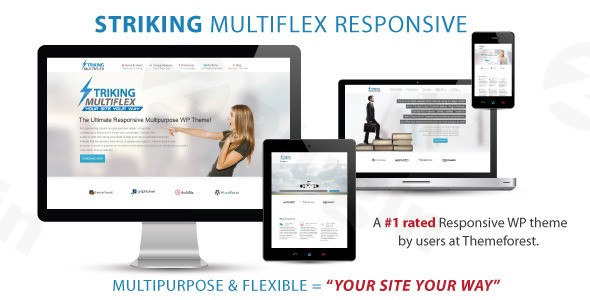
The Striking MultiFlex WordPress theme stands as a testament to enduring versatility and power in the ever-evolving world of web design. Designed for scalability and performance, this theme is an ideal solution for a broad spectrum of users, from small business owners and freelancers to large-scale eCommerce ventures and agencies. It champions a “MultiFlex Design” philosophy, aiming to provide an all-enincompassing toolkit for creating virtually any type of website imaginable, from sophisticated business portals and vibrant photography portfolios to dynamic blogs and fully-fledged online stores. Its robust framework and extensive customization options make it a reliable choice for those seeking a long-term, adaptable web solution.
Key Features: Design, Layout & Performance
Striking MultiFlex’s appeal lies in its comprehensive feature set, meticulously crafted to offer unparalleled control over your website’s aesthetics and functionality.
Design & Layout Options
Striking MultiFlex provides a rich palette of design and layout options, ensuring your website stands out:
- True Multipurpose Functionality: Whether you need a sleek automotive dealership site, a robust real estate platform, a creative portfolio, or a university website, Striking MultiFlex adapts with unmatched flexibility.
- Versatile Layouts: Choose from full-width, boxed layouts, and options for left or right sidebars. It includes 3 primary layouts and 6 predefined page templates, such as Fullwidth, Left Sidebar, Right Sidebar, Page with Comment, Landing Page, and Sitemap. You can even create and add your own custom templates.
- Prebuilt Demos & One-Click Import: To jumpstart your project, the theme includes multiple pre-built demos and a one-click demo import feature, including installable WooCommerce demo content, simplifying the initial setup.
- Unique Design Philosophy: The “MultiFlex Design” emphasizes highly flexible and customizable layouts, offering “unlimited abilities” and more options, settings, shortcodes, and sliders than many competitors. This includes specialized features like product carousel sliders and custom sidebars for product pages.
Customization Capabilities
The theme’s advanced admin interface is a powerhouse of customization, offering both beginner-friendly controls and professional-grade depth:
- Unlimited Color Schemes: Style your site with an infinite array of colors, utilizing a color picker for easy selection. Custom colors can be applied globally or on a per-page basis.
- Extensive Typography: With support for 840 fonts and over 400 icons (including full Font Awesome integration), you have complete control over your site’s textual presentation.
- Granular Spacing & Backgrounds: Adjust spacing, container sizes, sections, and set custom backgrounds per page or site-wide for different sections.
- Custom Featured Headers: Personalize each page, post, or portfolio item with its own unique featured header.
- Header, Footer, and Menu Customization: The theme offers extensive menu styling, including Font Awesome icons and multi-line menu items, and a top widget area. It supports unlimited sidebars for precise content placement.
Performance & SEO Features
Striking MultiFlex is built with performance and search engine optimization in mind, ensuring your site is fast and discoverable:
- Fast Loading Speed: The theme claims “Fast Loading Speed” achieved through “Fully Optimized Code” and “Minified CSS and JavaScript,” which reduces load times and improves user engagement.
- Responsive & Retina-Ready Design: It boasts a fully responsive and retina-ready design, guaranteeing optimal display and crisp visuals across all devices, from desktops to smartphones.
- SEO Readiness: While not explicitly detailing schema, the theme is designed to work seamlessly with any SEO plugin, offering 100% support for popular tools like Yoast SEO. Its clean markup and structured headings contribute to better search engine visibility.
- Robust Framework: Its “heavy-duty framework” is engineered to scale for large sites without performance degradation, a critical factor for growing businesses.
Installation & Demo Import Guide
Getting started with Striking MultiFlex is designed to be straightforward, even for those new to WordPress.
- Install & Activate the Theme:
- Log in to your WordPress admin dashboard.
- Navigate to Appearance > Themes.
- Click on “Add New” and then “Upload Theme.”
- Choose the
striking.zipfile (or similar, typically found in your download package) and click “Install Now.” - Once installed, click “Activate.”
- Install Required/Recommended Plugins:
- After activation, Striking MultiFlex might prompt you to install certain plugins (e.g., its own “advanced page builder,” WooCommerce, Revolution Slider, etc.). Follow the prompts to install and activate these. While the theme integrates with many, only install those essential for your site’s functionality to keep it lean.
- Use the One-Click Demo Import:
- Striking MultiFlex offers a one-click demo import functionality, often found under an “Import Demo Data” or “Theme Options” section in your WordPress dashboard.
- Select the demo that best matches your desired website type (e.g., a WooCommerce store demo).
- Initiate the import process.
- What to Expect: During demo import, the theme will create pages, posts, menus, widgets, and import placeholder images and content. This might take several minutes, depending on your server’s speed and the size of the demo. Ensure your server has sufficient memory and execution time to prevent timeouts. Once complete, your site will largely resemble the chosen demo, providing a solid foundation for customization.
Customization Guide: Branding & Layout
Personalizing Striking MultiFlex to reflect your brand identity is made easy through its intuitive admin interface and theme options panel.
- Accessing Theme Options: Most of your customization will be done through a dedicated Theme Options panel (often found directly under “Striking” or “Appearance” in your dashboard) or the native WordPress Customizer (Appearance > Customize).
- Changing Colors & Typography:
- In the Theme Options, navigate to sections for “Colors” or “Styling.” Here, you can use the color picker to set your brand colors globally or apply custom colors to specific elements.
- Find the “Typography” section to choose from the extensive font library and set font sizes, weights, and line heights for headings and body text.
- Uploading Your Logo:
- Locate the “Header” or “Branding” section within the Theme Options.
- Upload your logo image, and adjust its size and position as needed.
- Setting Up Headers & Footers:
- Striking MultiFlex provides various header styles and extensive options for the footer. Explore these sections in the Theme Options to configure layouts, widgets, and copyright information.
- Configuring Menus:
- Go to Appearance > Menus. Create or select your primary menu and assign it to the “Primary Navigation” location (or other available menu locations). Leverage the theme’s advanced menu styling options for icons and multi-line items.
- Homepage & Blog Page:
- To set a static homepage, navigate to Settings > Reading and choose “A static page.” Select an existing page (or create a new one) for your homepage and another for your blog posts.
- Advanced Customization:
- For deeper modifications, child theme support is fully integrated, allowing advanced users to safely alter core files without losing changes during theme updates.
- The theme also includes dedicated custom CSS and JavaScript (JS) fields in the admin panel, enabling quick style adjustments without directly editing theme files.The customization experience with Striking MultiFlex is highly intuitive. Its comprehensive options panel means you rarely need to touch code for visual changes, making it accessible for both beginners and experienced designers.
FAQ & Troubleshooting
Here are answers to common questions about the Striking MultiFlex WordPress theme:
Is Striking MultiFlex compatible with major page builders like Elementor or WPBakery?
Striking MultiFlex includes its own “advanced page builder for drag-and-drop layouts” and relies heavily on an extensive shortcode system for content creation. While it’s designed to be compatible with various plugins, specific integration with external page builders like Elementor or WPBakery is not explicitly stated as a core feature. Users typically leverage the theme’s built-in builder and shortcodes for layout design.
Does Striking MultiFlex support WooCommerce for online stores?
Yes, Striking MultiFlex is fully e-commerce ready and integrates effortlessly with WooCommerce. It includes custom WooCommerce-related settings, provides installable WooCommerce demo content, and supports custom sidebars for product pages and custom feature headers for e-commerce categories. This makes it an excellent choice for setting up a robust online store.
Does Striking MultiFlex support child themes?
Yes, Striking MultiFlex fully supports child themes. This is a crucial feature for WordPress design professionals and advanced users, allowing them to make extensive modifications to the theme’s code, templates, and styles without fear of losing their changes when the main theme receives updates.
How can I ensure Striking MultiFlex is updated safely?
If you purchased the theme from ThemeForest, you would typically receive updates directly through your WordPress dashboard. If you obtained a GPL-licensed version from a marketplace, you’ll generally download the latest version from that vendor and manually upload it via Appearance > Themes > Add New > Upload Theme, replacing the old version (ensure you have a backup first). Using a child theme is essential to preserve your customizations during any update process, regardless of the purchase source.
What types of websites is Striking MultiFlex best suited for?
Striking MultiFlex is a true multipurpose solution, best suited for a vast array of websites including:
- E-commerce stores that need deep WooCommerce integration.
- Business websites for companies, agencies, and corporate presences.
- Portfolios for creatives, designers, and photographers.
- Blogs and Magazines for content publishers.
- Specialized niches like gaming, automotive, real estate, and educational institutions.Its flexibility and robust framework make it ideal for sites requiring diverse functionalities.
Conclusion
The Striking MultiFlex WordPress theme from ZeroPlugin.com stands out as a formidable and highly flexible choice for anyone looking to build a powerful website. Its deep customization options, robust framework, and commitment to performance and SEO make it a strong contender in the multipurpose theme category.With its “MultiFlex Design” philosophy, it offers virtually unlimited possibilities for design and layout, catering to a wide range of niches including business, portfolio, and especially eCommerce with its seamless WooCommerce integration. While it emphasizes its own “advanced page builder” and extensive shortcode use, its comprehensive admin panel ensures that both beginners and advanced users can shape their site without complex coding.Its long-standing presence in the WordPress market and continuous updates underscore its reliability and the developer’s commitment, ensuring you won’t need to frequently swap themes. For agencies, freelancers, business owners, and online store proprietors seeking a dependable, highly customizable, and scalable WordPress theme that performs strongly in both traditional SEO and modern AI search, Striking MultiFlex presents a compelling and high-value proposition.
I. Download Limits & Account Benefits
- Free Downloads: Each email address receives 3 downloads per day for free products
- Upgrade Benefits: Purchase any paid product to increase your daily download limit by 3 for each paid product
- No Account Required: You can download immediately by receiving the download link via email
- Account Recommended: Create an account for easier access to your order history and direct update downloads
II. Understanding GPL vs Official Versions
Important: The products available on WPPick are GPL-licensed versions, which differ from official developer versions. Before purchasing, please read our comprehensive guide: Understanding GPL & Official Differences at WPPick
Key Points:
- GPL versions may not include premium support from original developers
- Updates may be delayed compared to official releases
- Some premium features might have limitations
- Always consider your specific needs and support requirements
III. Support & Assistance
We’re here to help through multiple channels:
- Email Support: Direct email assistance for all inquiries
- Live Chat: Real-time support during business hours
- Comprehensive Documentation: Detailed guides and tutorials
IV. Order Tracking
Access your complete purchase history and download links anytime: Order History
V. Account Access
New to WPPick? Login or Create Account to manage your downloads and orders efficiently.
VI. Refund Protection
We stand behind our products with a clear refund policy. Review our terms: Refund Policy
VII. Privacy & Security
Your data security is our priority. Learn how we protect your information: Privacy Policy
VII. Terms of Service
Understanding our service terms ensures a smooth experience: Terms of Use
Quick Tips for Best Experience
- Verify Compatibility: Check plugin/theme compatibility with your WordPress version
- Backup First: Always backup your site before installing new plugins or themes
- Test Environment: Consider testing on a staging site first
- Stay Updated: Regularly check for updates in your account dashboard
- Read Documentation: Review any included documentation for optimal setup
Need Help?
If you have questions about downloads, licensing, or need technical assistance, don’t hesitate to contact our support team. We’re committed to ensuring you have the best possible experience with WPPick products.
Ready to get started? Your download adventure begins with just one click!
- Support forum link available for updates and builds