

Swyft – Pagespeed Optimized WordPress Blog Theme
/Year
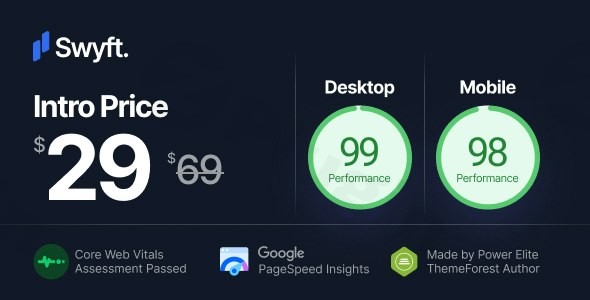
In an era where every millisecond counts toward your search engine ranking, the Swyft WordPress theme emerges as a top-tier contender for creators who refuse to compromise between aesthetics and performance. As a Pagespeed Optimized WordPress theme, Swyft is engineered specifically for bloggers, journalists, and niche content creators who need a website that loads instantly while maintaining a professional, high-end design.
This theme follows a “speed meets elegance” philosophy, stripping away the unnecessary bloat found in multipurpose themes to prioritize clean code and Core Web Vitals. Whether you are launching a travel blog, a tech news site, or a minimalist portfolio, Swyft provides a performance-first foundation that helps your content stand out to both human readers and AI search engines.
Key Features: Design, Layout & Performance
The core value of the Swyft WordPress theme lies in its refined simplicity. It doesn’t try to be everything for everyone; instead, it focuses on being the fastest, most readable home for your content.
Minimalist Design & Layout Options
Swyft offers a distraction-free user experience characterized by excellent visual hierarchy and generous whitespace.
- Multiple Blog Layouts: Choose from various grid and list styles to suit your content type, ensuring your articles are presented attractively across all devices.
- Dark Mode Support: Swyft includes a “unbelievably crisp” dark mode, allowing users to toggle their preferred viewing experience—a feature that enhances accessibility and user retention.
- Mobile-First Approach: The theme is fully responsive, ensuring that your high-resolution images and typography scale perfectly on smartphones and tablets.
Customization Capabilities
While Swyft champions “Page-Builder-Free Simplicity,” it does not lack personalization power. It utilizes the native WordPress Customizer for a real-time editing experience.
- Typography: With support for over 800 Google Fonts and Adobe Fonts integration, you can fine-tune font weight, line height, and letter spacing to match your brand identity.
- Advanced Color Controls: Every element is customizable via color picker controls, allowing for distinct branding for both light and dark modes.
- Header & Footer Flexibility: Multiple header styles and footer layouts allow you to structure your site navigation exactly how you want it.
Industry-Leading Performance & SEO
As a fast WordPress blog theme, Swyft is built with clean markup and optimized code.
- Core Web Vitals Ready: The theme consistently hits high marks (often reaching a 99 Performance score on desktop) in Google PageSpeed Insights.
- Adaptive Images: Swyft serves images at or near their original size to reduce data usage without sacrificing visual quality.
* SEO-Friendly Structure: The theme’s clean code makes it easy for search engine crawlers (and AI answer engines) to index your content, giving you a competitive edge in organic search rankings.
Installation & Demo Import
Setting up Swyft is designed to be a frictionless process, even for WordPress beginners. Follow these steps to get your site live:
- Theme Installation: Upload the Swyft theme file via Appearance > Themes > Add New in your WordPress dashboard.
- Plugin Setup: Upon activation, the theme may prompt you to install a few recommended companion plugins for SEO and performance.
- One-Click Demo Import: Navigate to the demo import section within the theme options. Swyft offers starter sites for various niches (Lifestyle, Travel, Food, Tech). Select your preferred demo and click “Import.”
- Final Checks: Once the import is complete, check your menus and widgets. The demo content will provide a framework that you can replace with your own articles and images.
Tip: Ensure your hosting environment has adequate memory (at least 256MB) to handle the demo import process smoothly without timeouts.
Customization Guide: Branding Your Site
To make the Swyft theme truly yours, you will primarily use the WordPress Customizer. This allows you to see changes live before hitting “Publish.”
- Setting the Global Style: Start with the “Global” settings to define your primary brand colors and typography. This ensures consistency across every page.
- Personalizing the Header: Upload your logo and choose a header layout that fits your menu size. If you have a large number of categories, look for the widget-based navigation options to “arrange widgets like a maestro.”
- Configuring Dark Mode: Ensure your logo has a transparent background or a dark-mode alternative so it remains visible when the user toggles the theme’s appearance.
* Gutenberg Integration: Since Swyft is fully compatible with the WordPress Block Editor, use Gutenberg blocks to create dynamic layouts within your posts without needing a heavy third-party page builder like Elementor.
FAQ & Troubleshooting
Is Swyft theme good for SEO?
Yes, Swyft is excellent for SEO. It is built with clean, lightweight code that adheres to Core Web Vitals standards. Fast loading times and mobile-first responsiveness are major ranking factors that Swyft addresses out of the box.
Does the Swyft WordPress theme support WooCommerce?
Yes, Swyft is optimized for eCommerce. It allows bloggers and content creators to monetize their sites by setting up a fully functional online store using the WooCommerce plugin, maintaining the same high-speed performance for product pages.
Is Swyft compatible with page builders like Elementor?
While Swyft emphasizes a “Page-Builder-Free” approach to maintain its extreme speed, it is fully compatible with the Gutenberg Block Editor. It is designed for users who want to avoid the bloat of heavy drag-and-drop builders, though it can work with most standard plugins.
How do I update the theme without losing my settings?
Swyft stores its customization settings in the WordPress database, so standard updates via the dashboard will not erase your colors or fonts. However, for advanced code-level changes, we recommend using a Child Theme to ensure your modifications remain intact after an update.
Conclusion
The Swyft WordPress theme is a masterclass in performance-driven design. It is the ideal choice for professional bloggers, SEO specialists, and small business owners who prioritize a lightweight WordPress blog theme that doesn’t sacrifice visual appeal. While it may offer fewer granular “drag-and-drop” design controls than multipurpose giants like Divi, its speed, Core Web Vitals compliance, and “crisp” dark mode make it a far superior choice for those looking to rank higher and provide a better user experience. If your goal is to build a fast, modern, and content-focused website, Swyft is a top-tier investment for your digital presence.Ready to build a faster blog? Explore more WordPress tips and reviews at wppick.com.
I. Download Limits & Account Benefits
- Free Downloads: Each email address receives 3 downloads per day for free products
- Upgrade Benefits: Purchase any paid product to increase your daily download limit by 3 for each paid product
- No Account Required: You can download immediately by receiving the download link via email
- Account Recommended: Create an account for easier access to your order history and direct update downloads
II. Understanding GPL vs Official Versions
Important: The products available on WPPick are GPL-licensed versions, which differ from official developer versions. Before purchasing, please read our comprehensive guide: Understanding GPL & Official Differences at WPPick
Key Points:
- GPL versions may not include premium support from original developers
- Updates may be delayed compared to official releases
- Some premium features might have limitations
- Always consider your specific needs and support requirements
III. Support & Assistance
We’re here to help through multiple channels:
- Email Support: Direct email assistance for all inquiries
- Live Chat: Real-time support during business hours
- Comprehensive Documentation: Detailed guides and tutorials
IV. Order Tracking
Access your complete purchase history and download links anytime: Order History
V. Account Access
New to WPPick? Login or Create Account to manage your downloads and orders efficiently.
VI. Refund Protection
We stand behind our products with a clear refund policy. Review our terms: Refund Policy
VII. Privacy & Security
Your data security is our priority. Learn how we protect your information: Privacy Policy
VII. Terms of Service
Understanding our service terms ensures a smooth experience: Terms of Use
Quick Tips for Best Experience
- Verify Compatibility: Check plugin/theme compatibility with your WordPress version
- Backup First: Always backup your site before installing new plugins or themes
- Test Environment: Consider testing on a staging site first
- Stay Updated: Regularly check for updates in your account dashboard
- Read Documentation: Review any included documentation for optimal setup
Need Help?
If you have questions about downloads, licensing, or need technical assistance, don’t hesitate to contact our support team. We’re committed to ensuring you have the best possible experience with WPPick products.
Ready to get started? Your download adventure begins with just one click!
- Added Header Custom Button target selection.