

Tailorist – Tailoring & Fashion WordPress Theme
/Year
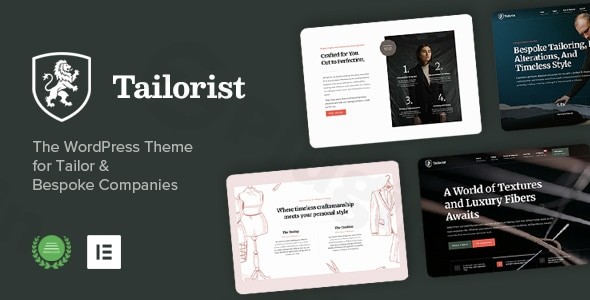
In the world of bespoke craftsmanship, first impressions are everything. The Tailorist WordPress theme is a premium solution specifically engineered for tailoring studios, fashion boutiques, and luxury ateliers that require an online presence as refined as their physical garments. Designed with an elegant, sophisticated aesthetic, this theme moves beyond generic layouts to provide niche-specific functionality that highlights the artistry of bespoke clothing and alteration services.Whether you are a master tailor looking to showcase a portfolio of custom suits or a fashion brand launching a boutique, Tailorist offers a high-performance framework that balances visual storytelling with robust e-commerce capabilities.
Key Features: Design, Layout & Performance
Tailorist distinguishes itself by focusing on the unique needs of the fashion industry. Rather than a “one-size-fits-all” approach, it provides specialized tools to demonstrate craftsmanship and quality.
Sophisticated Design & Layout Options
The theme offers a variety of pre-made layouts and homepage variations that lean into a clean, minimalist, and high-end aesthetic.
- Bespoke Portfolios: Use the “Projects & Works” custom post type to display high-resolution galleries of your creations, complete with detail-oriented descriptions.
- 70+ Design Options: The admin panel provides extensive control over backgrounds, borders, and hovers, ensuring your site aligns perfectly with your brand identity.
- Ready-Made Demos: With the one-click demo import, you can launch a professional fashion WordPress theme layout in minutes, saving hours of development time.
Powerful Customization Capabilities
Tailorist is built for the Elementor page builder, giving you a visual, drag-and-drop interface to modify every inch of your site.
- Typography & Color Systems: Access an integrated font selector supporting Google Fonts. You can adjust font weights, styles, and sizes globally to match your brand’s typography.
- Dynamic Widget Sections: Create unique sidebars and footer areas that adapt to the content of the page, enhancing the user journey.
- Header & Footer Flexibility: Use the advanced theme options to customize your navigation and branding areas without touching a single line of code.
High-Performance & SEO Readiness
A beautiful website is only effective if it loads quickly and ranks well. Tailorist is “Fast, Lightweight, and SEO-Ready.”
- Clean Source Code: Built with valid HTML5 and CSS3, the theme ensures search engines can easily crawl and index your content.
- Mobile Responsiveness: The theme is fully responsive and “Retina Ready,” meaning your fabric textures and stitch details will look stunning on high-definition mobile screens.
- Optimization Support: It is fully compatible with popular performance plugins like Autoptimize, W3 Total Cache, and EWWW Image Optimizer.
Installation & Demo Import: A Step-by-Step Guide
Setting up your tailoring WordPress theme is a straightforward process. Follow these steps to get your site looking like the professional demo:
- Install & Activate: Upload the
tailorist.zipfile via your WordPress Dashboard (Appearance > Themes > Add New). Once uploaded, click Activate. - Plugin Setup: Upon activation, you will see a prompt to install required plugins. This typically includes Elementor, Crafted Addons, Contact Form 7, and OCDI. Ensure all are installed and activated.
- One-Click Demo Import: Navigate to the “Import Demo Data” section under the Appearance menu. Choose your preferred layout and click Import.
- Note: Ensure your server has sufficient memory limits to prevent timeouts during the import of high-resolution images.
- Final Polish: After the import completes, your pages, menus, and widgets will be pre-configured. You can then go to Settings > Reading to ensure your homepage is correctly assigned.
Customization Guide: Personalizing Your Brand
Tailorist makes it easy to transition from a template to a unique brand experience.
- The Redux Admin Panel: This is the “brain” of your theme. Here, you can upload your logo, set global brand colors, and configure social media links.
- Elementor Editing: To change the layout of a specific page, click “Edit with Elementor.” This allows you to move sections, change background images of tailoring ateliers, and update service descriptions in real-time.
- WooCommerce Integration: If you are selling garments or booking alteration services, the WooCommerce tailoring theme compatibility allows you to set up a shop page effortlessly. You can manage products, fabric variations, and pricing through the standard WooCommerce interface.
FAQ & Troubleshooting
Is Tailorist compatible with Elementor?
Yes, Tailorist is fully built for the Elementor page builder. It provides a seamless drag-and-drop experience, allowing users to customize layouts visually without needing to know how to code.
Is Tailorist theme good for e-commerce?
Absolutely. Tailorist is fully compatible with WooCommerce. It includes styled shop pages and product layouts specifically designed for fashion items, accessories, and bespoke service packages.
How do I update the theme without losing my changes?
Always perform updates through the WordPress dashboard or via FTP using the latest files from ThemeForest. To keep your customizations safe, use the WordPress Customizer or the provided Theme Options panel. For deep code changes, it is recommended to use a child theme.
What should I do if the demo import fails?
Most demo import issues are caused by server limitations. Check your PHP max_execution_time and memory_limit settings. If the import looks different than the demo, ensure all required plugins (especially Elementor and Redux) are active.
Conclusion
The Tailorist WordPress theme is a top-tier choice for professionals who refuse to compromise on style or performance. By combining the niche-specific needs of the fashion industry with the power of Elementor and WooCommerce, it provides a flexible, high-converting platform for any tailoring business.Whether you are an agency building a site for a high-end client or a small business owner DIY-ing your first web presence, Tailorist offers the balance of elegance and ease-of-use required to succeed in the competitive fashion market. Ready to elevate your brand? Visit wppick.com for more insights on premium WordPress solutions.
I. Download Limits & Account Benefits
- Free Downloads: Each email address receives 3 downloads per day for free products
- Upgrade Benefits: Purchase any paid product to increase your daily download limit by 3 for each paid product
- No Account Required: You can download immediately by receiving the download link via email
- Account Recommended: Create an account for easier access to your order history and direct update downloads
II. Understanding GPL vs Official Versions
Important: The products available on WPPick are GPL-licensed versions, which differ from official developer versions. Before purchasing, please read our comprehensive guide: Understanding GPL & Official Differences at WPPick
Key Points:
- GPL versions may not include premium support from original developers
- Updates may be delayed compared to official releases
- Some premium features might have limitations
- Always consider your specific needs and support requirements
III. Support & Assistance
We’re here to help through multiple channels:
- Email Support: Direct email assistance for all inquiries
- Live Chat: Real-time support during business hours
- Comprehensive Documentation: Detailed guides and tutorials
IV. Order Tracking
Access your complete purchase history and download links anytime: Order History
V. Account Access
New to WPPick? Login or Create Account to manage your downloads and orders efficiently.
VI. Refund Protection
We stand behind our products with a clear refund policy. Review our terms: Refund Policy
VII. Privacy & Security
Your data security is our priority. Learn how we protect your information: Privacy Policy
VII. Terms of Service
Understanding our service terms ensures a smooth experience: Terms of Use
Quick Tips for Best Experience
- Verify Compatibility: Check plugin/theme compatibility with your WordPress version
- Backup First: Always backup your site before installing new plugins or themes
- Test Environment: Consider testing on a staging site first
- Stay Updated: Regularly check for updates in your account dashboard
- Read Documentation: Review any included documentation for optimal setup
Need Help?
If you have questions about downloads, licensing, or need technical assistance, don’t hesitate to contact our support team. We’re committed to ensuring you have the best possible experience with WPPick products.
Ready to get started? Your download adventure begins with just one click!