

Teeno – App Landing WordPress Theme
/Year
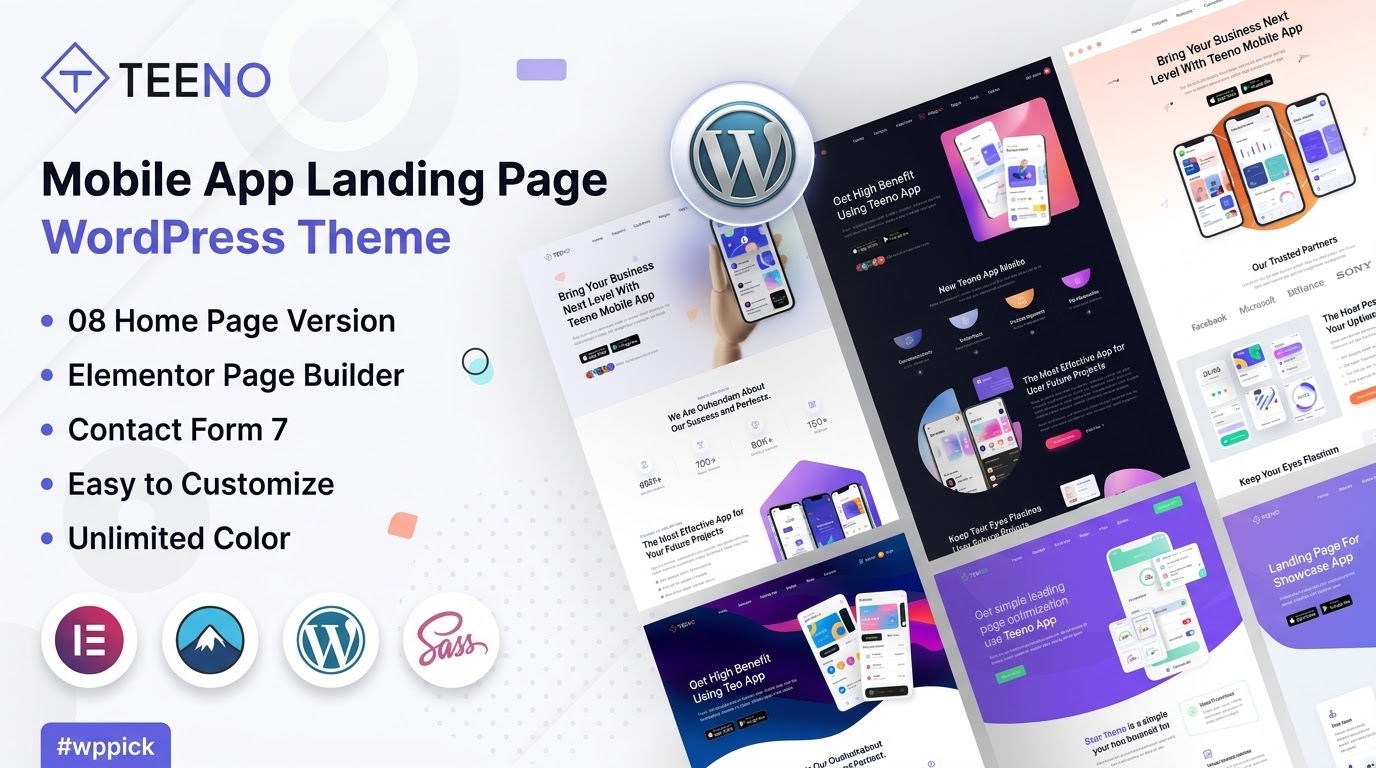
Launching a new mobile app, SaaS product, or digital service requires a stellar online presence. The Teeno App Landing WordPress Theme is engineered precisely for this purpose, offering a cutting-edge, conversion-optimized platform to showcase your innovation. It’s the best WordPress theme for app landing page design, blending modern aesthetics with powerful functionality. Teeno is ideal for app developers, digital agencies, startups, and marketing teams who need to create visually striking and high-performing landing pages quickly and efficiently.This theme boasts a clean, contemporary design philosophy, making your app the star of the show. With a focus on intuitive user experience and robust customization, Teeno empowers you to build professional-grade app landing pages without writing a single line of code, thanks to its deep integration with Elementor.
Key Features: Design, Layout & Performance
Teeno distinguishes itself with a suite of features designed to enhance both the visual appeal and the underlying technical strength of your app landing page.
Design & Layout Options
Teeno comes with a 100% Mobile Responsive Design, ensuring your content looks impeccable on any device, from desktops to tablets and smartphones. This commitment to responsiveness extends to its “Retina Ready” capabilities, providing crisp, high-resolution visuals on modern screens. The theme offers Multiple Pre-built Landing Page Templates, allowing you to kickstart your project with professionally designed layouts that are ready for your content. Its unique and modern aesthetic is characterized by clean lines, ample whitespace, and engaging animation capabilities for various elements, creating a dynamic user experience.
Customization Capabilities
At the heart of Teeno’s customization is its Drag-and-Drop Elementor Integration. This acclaimed page builder provides unparalleled flexibility, letting you visually craft every section of your page. Beyond Elementor, Teeno utilizes the Redux Theme Option panel, offering a comprehensive and easy-to-use interface for global styling. You’ll find Unlimited Color Styles to match your brand’s palette perfectly and extensive typography options with over 600 Google Fonts for body text, headings, and menus. This allows for complete control over your site’s visual identity, ensuring your app landing page reflects your unique brand.
Performance & SEO Features
In today’s competitive digital landscape, performance and search engine visibility are paramount. Teeno features an SEO Optimized Clean Code Structure, which is fundamental for achieving higher search engine rankings. While specific speed scores aren’t detailed, its clean codebase contributes to a faster loading site, a critical factor for user experience and SEO. The theme’s fully responsive nature is also a huge plus for SEO, as Google prioritizes mobile-friendly websites. Teeno’s layouts are specifically designed to be High Conversion Rate Optimized, incorporating elements like prominent call-to-action sections, clear feature highlights, and dedicated testimonial areas to guide visitors towards your desired outcome.
Installation & Demo Import
Getting started with Teeno is a streamlined process designed for efficiency, even for WordPress beginners.
- Install & Activate the Theme: After purchasing Teeno, download the theme files. Navigate to your WordPress dashboard, go to
Appearance > Themes > Add New > Upload Theme, choose the Teeno zip file, and click “Install Now.” Once uploaded, click “Activate.” - Install Required Companion Plugins: Upon activation, Teeno will likely prompt you to install recommended plugins, especially Elementor, as the theme is built to work seamlessly with it. Install and activate all suggested plugins.
- One-Click Demo Import: Teeno includes a One-Click Demo Importer, a powerful feature that allows you to replicate the beautiful demo sites instantly. Look for an option like “Demo Import” or “Import Demo Data” within the theme options panel. Select your desired demo and initiate the import.
- Post-Import Setup: After the demo import is complete, you’ll find pre-built pages, menus, and widgets already set up. You might need to assign your main menu under
Appearance > Menusand set your homepage underSettings > Reading. While Teeno’s demo import is generally robust, for very large imports, ensure your server has adequate PHP memory and execution time limits to prevent timeouts.
Customization Guide (Branding & Layout)
Teeno empowers you to transform a template into a truly unique representation of your app or service. The combination of Elementor and the Redux Theme Option panel provides extensive control.
- Global Styles with Redux Theme Options: Access the theme’s global settings via the Redux Theme Option panel (usually found under
Teeno OptionsorTheme Optionsin your WordPress dashboard). Here, you can define your Unlimited Color Styles, choose from 600+ Google Fonts for various text elements, and configure overall site settings like header and footer defaults. This panel acts as the central hub for your brand’s foundation. - Page-Level Customization with Elementor: For designing individual pages, Elementor is your go-to tool. Open any page with Elementor, and use its intuitive drag-and-drop interface to add sections, columns, and widgets. You can easily customize elements like:
- Call-to-Action Buttons: Adjust text, links, colors, and sizes to drive conversions.
- Feature Sections: Arrange icons, images, and text to highlight your app’s benefits.
- Testimonial Carousels: Showcase social proof with customizable sliders.
- Header and Footer Layouts: While global settings are in Redux, Elementor often allows for more granular control over specific header/footer content and layouts, especially for custom sections.
- Logo and Branding: Easily upload your logo through the Redux Theme Options panel or the WordPress Customizer. With Teeno, maintaining brand consistency across all elements is straightforward.The customization experience with Teeno is designed to be highly intuitive. Its well-commented code also offers flexibility for developers who might want to implement custom CSS/JS for advanced modifications.
FAQ & Troubleshooting
Here are answers to some common questions about the Teeno App Landing WordPress Theme:
Is Teeno compatible with Elementor / WPBakery / Gutenberg?
Teeno is built with and highly compatible with Elementor, making it the primary and recommended page builder for content creation and layout customization. While it functions within the WordPress environment, its reliance on Elementor means that Elementor will be your main tool for visual design, rather than Gutenberg or other page builders like WPBakery.
Does Teeno support WooCommerce for online stores?
Yes, Teeno mentions WooCommerce compatibility in its tags, suggesting it can integrate with WooCommerce. This means you can potentially use Teeno to create app landing pages that also feature e-commerce functionalities, such as selling premium versions of your app or related digital products directly from your site.
Does Teeno support child themes?
Yes, Teeno’s commented and well-decorated code structure facilitates customization, including the use of child themes. Using a child theme is the recommended practice for making custom code modifications to ensure your changes are not overwritten during theme updates.
How can I update the Teeno theme without losing my customizations?
To update Teeno without losing customizations, ensure you have made any custom code changes within a child theme. For general theme updates, if you purchased from an official source like ThemeForest, you will receive notifications for new versions through your WordPress dashboard. Always back up your website before performing any theme or plugin updates.
What should I do if the Teeno demo import fails or looks different from the demo site?
If the One-Click Demo Import fails, first check your server’s PHP memory limit and execution time. Increasing these values (e.g., PHP memorylimit to 256M or 512M, maxexecution_time to 300) often resolves import issues. If the demo looks different, ensure all recommended plugins are installed and activated, and that you have set your main menu and homepage correctly after the import.
Conclusion
The Teeno App Landing WordPress Theme stands out as an exceptional choice for anyone looking to launch a modern and effective online presence for their mobile application, SaaS product, or digital service. Its commitment to a 100% Mobile Responsive Design, powerful Drag-and-Drop Elementor Integration, and SEO Optimized Clean Code Structure makes it a robust foundation.Teeno’s pre-built templates and intuitive customization options via the Redux Theme Option panel allow for rapid deployment and easy branding. Its focus on High Conversion Rate Optimized Layouts provides a significant advantage for digital marketers and entrepreneurs alike.For app developers, startups, digital agencies, and marketing teams who prioritize a sleek design, effortless customization, and strong compatibility with Elementor, Teeno offers a streamlined and highly effective solution. If you’re aiming to create an impactful modern app showcase WordPress theme that converts visitors into users, Teeno is undoubtedly a strong contender.
I. Download Limits & Account Benefits
- Free Downloads: Each email address receives 3 downloads per day for free products
- Upgrade Benefits: Purchase any paid product to increase your daily download limit by 3 for each paid product
- No Account Required: You can download immediately by receiving the download link via email
- Account Recommended: Create an account for easier access to your order history and direct update downloads
II. Understanding GPL vs Official Versions
Important: The products available on WPPick are GPL-licensed versions, which differ from official developer versions. Before purchasing, please read our comprehensive guide: Understanding GPL & Official Differences at WPPick
Key Points:
- GPL versions may not include premium support from original developers
- Updates may be delayed compared to official releases
- Some premium features might have limitations
- Always consider your specific needs and support requirements
III. Support & Assistance
We’re here to help through multiple channels:
- Email Support: Direct email assistance for all inquiries
- Live Chat: Real-time support during business hours
- Comprehensive Documentation: Detailed guides and tutorials
IV. Order Tracking
Access your complete purchase history and download links anytime: Order History
V. Account Access
New to WPPick? Login or Create Account to manage your downloads and orders efficiently.
VI. Refund Protection
We stand behind our products with a clear refund policy. Review our terms: Refund Policy
VII. Privacy & Security
Your data security is our priority. Learn how we protect your information: Privacy Policy
VII. Terms of Service
Understanding our service terms ensures a smooth experience: Terms of Use
Quick Tips for Best Experience
- Verify Compatibility: Check plugin/theme compatibility with your WordPress version
- Backup First: Always backup your site before installing new plugins or themes
- Test Environment: Consider testing on a staging site first
- Stay Updated: Regularly check for updates in your account dashboard
- Read Documentation: Review any included documentation for optimal setup
Need Help?
If you have questions about downloads, licensing, or need technical assistance, don’t hesitate to contact our support team. We’re committed to ensuring you have the best possible experience with WPPick products.
Ready to get started? Your download adventure begins with just one click!