

The Aisle – Elegant Wedding WordPress Theme
/Year
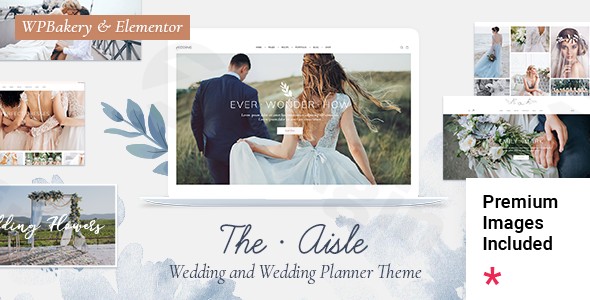
Creating a digital “happily ever after” requires a perfect blend of romance and functionality. The Aisle WordPress theme is a premium, high-performance elegant wedding WordPress theme designed specifically for couples planning their big day and professionals within the wedding industry. Developed by the renowned Elated-Themes (part of the Qode Interactive family), this theme bridges the gap between sophisticated UI/UX design and practical wedding management tools, making it a top-tier choice for anyone looking to build a polished online presence.
Why The Aisle is the Premier WordPress Theme for Weddings
When it comes to the wedding niche, aesthetics are non-negotiable. The Aisle excels by offering a timeless, romantic aesthetic that doesn’t sacrifice technical performance. Whether you are a wedding planner showcasing a portfolio or a couple setting up an RSVP portal, this theme provides a specialized feature set that generic multipurpose themes often lack.
1. Specialized Wedding Features
Unlike standard themes, The Aisle includes built-in elements tailored for events:
- RSVP Forms: Easily manage guest lists and attendance directly through your site.
- Countdown Timers: Build anticipation for the big day with customizable clocks.
- Guestbooks: Allow friends and family to leave heartfelt messages.
- Venue & Pricing Tables: Ideal for wedding planners and venues to display service packages.
2. Versatile Layout & Design Options
The theme offers an extensive collection of pre-designed home and inner pages. Users can choose from several portfolio styles, including masonry, gallery, and slider layouts, to showcase photography or event highlights. Its “retina-ready” design ensures that high-resolution wedding photos look crisp on all devices, from 5K monitors to smartphones.
3. SEO-Friendly & High Performance
Beyond its beauty, The Aisle is built with a clean, well-structured codebase. This SEO-friendly wedding theme ensures that wedding planners and bridal shops can rank higher in search results. Its mobile-first approach and cross-browser compatibility mean your guests or clients will have a seamless experience regardless of how they access the site.
Installation & Demo Import: Getting Started
Setting up The Aisle WordPress theme is designed to be a “no-coding-required” experience. Follow these steps to get your site live:
- Install & Activate: Upload the theme files via
Appearance > Themes > Add Newin your WordPress dashboard. - Plugin Setup: Upon activation, the theme will prompt you to install required companion plugins, including WPBakery Page Builder and Slider Revolution (both included for free, saving you over $90).
- One-Click Demo Import: Navigate to the theme’s admin panel and select the “Import” option. You can choose to import a complete demo—including menus, widgets, and images—to serve as your starting point.
4. Wait for Completion: Ensure your server has sufficient memory limits to handle the import of high-quality images and layouts. Once finished, your site will look exactly like the professional demo.
Customization Guide: Tailoring Your Wedding Brand
One of the strongest selling points for The Aisle is its Elementor and WPBakery compatibility. You are not locked into a rigid design; you have full creative control.
Branding & Global Styles
Using the Powerful Admin Panel, you can modify your global styling in minutes:
- Typography: Choose from hundreds of Google Fonts to match your wedding invitations.
- Color Schemes: Adjust the primary and accent colors to align with your wedding’s floral arrangements or brand palette.
- Headers & Footers: The Aisle provides fully customizable header types (sticky, transparent, or centered) to suit different navigation needs.
Building with Page Builders
Since the theme integrates seamlessly with Elementor and WPBakery, personalizing your layout is as simple as dragging and dropping blocks. You can add pricing plans, event timelines, and interactive maps without touching a single line of code.
FAQ: Frequently Asked Questions about The Aisle
Is The Aisle theme good for wedding photographers?
Yes! The Aisle is highly recommended for wedding photographers due to its high-resolution “retina-ready” display and various portfolio layouts (masonry, gallery, and list). It allows photographers to showcase their work in a sophisticated, professional format that appeals to high-end clients.
Does The Aisle support WooCommerce for online stores?
Absolutely. The Aisle is fully compatible with WooCommerce. This makes it an excellent choice for bridal shops selling dresses, planners selling digital guides, or venues managing booking deposits online.
Can I use Elementor with The Aisle WordPress theme?
Yes, The Aisle is fully compatible with Elementor, as well as WPBakery Page Builder. This provides maximum flexibility for users who prefer different drag-and-drop editing experiences.
Does it support child themes for advanced customization?
Yes, the theme is 100% GPL licensed and supports the use of child themes. This is highly recommended for developers who want to add custom CSS or PHP functions without losing their changes during theme updates.
Final Verdict: Is The Aisle Right for You?
The Aisle stands out as a premium solution for anyone in the wedding industry. Its combination of specialized features (like RSVP and countdowns), bundled premium plugins, and elegant design offers incredible value for its $69 price tag.
- Best for: Wedding planners, bridal boutiques, photographers, and couples who want a high-end, stress-free website setup.
- Pros: Stunning niche-specific demos, one-click import, excellent page builder compatibility, and SEO-ready code.
- Cons: The large number of features and high-quality assets may require a robust hosting environment for optimal performance.Whether you are announcing your engagement or growing a wedding planning empire, The Aisle WordPress theme provides the professional foundation needed to stand out in a competitive market. For more WordPress theme reviews and SEO strategies, visit us at wppick.com.
I. Download Limits & Account Benefits
- Free Downloads: Each email address receives 3 downloads per day for free products
- Upgrade Benefits: Purchase any paid product to increase your daily download limit by 3 for each paid product
- No Account Required: You can download immediately by receiving the download link via email
- Account Recommended: Create an account for easier access to your order history and direct update downloads
II. Understanding GPL vs Official Versions
Important: The products available on WPPick are GPL-licensed versions, which differ from official developer versions. Before purchasing, please read our comprehensive guide: Understanding GPL & Official Differences at WPPick
Key Points:
- GPL versions may not include premium support from original developers
- Updates may be delayed compared to official releases
- Some premium features might have limitations
- Always consider your specific needs and support requirements
III. Support & Assistance
We’re here to help through multiple channels:
- Email Support: Direct email assistance for all inquiries
- Live Chat: Real-time support during business hours
- Comprehensive Documentation: Detailed guides and tutorials
IV. Order Tracking
Access your complete purchase history and download links anytime: Order History
V. Account Access
New to WPPick? Login or Create Account to manage your downloads and orders efficiently.
VI. Refund Protection
We stand behind our products with a clear refund policy. Review our terms: Refund Policy
VII. Privacy & Security
Your data security is our priority. Learn how we protect your information: Privacy Policy
VII. Terms of Service
Understanding our service terms ensures a smooth experience: Terms of Use
Quick Tips for Best Experience
- Verify Compatibility: Check plugin/theme compatibility with your WordPress version
- Backup First: Always backup your site before installing new plugins or themes
- Test Environment: Consider testing on a staging site first
- Stay Updated: Regularly check for updates in your account dashboard
- Read Documentation: Review any included documentation for optimal setup
Need Help?
If you have questions about downloads, licensing, or need technical assistance, don’t hesitate to contact our support team. We’re committed to ensuring you have the best possible experience with WPPick products.
Ready to get started? Your download adventure begins with just one click!