
Thegov – Municipal And Government WordPress Theme
/Year
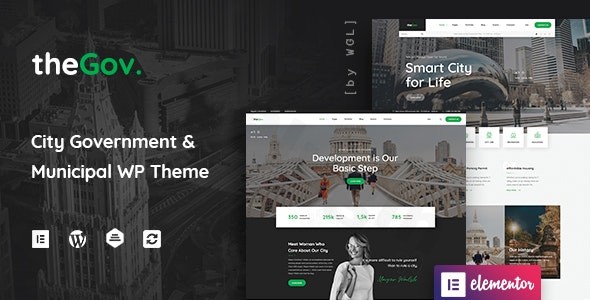
TheGov is a premium municipal and government WordPress theme meticulously crafted for public agencies, city councils, political organizations, and community websites. Designed by WebGeniusLab, an elite author on ThemeForest, this theme provides a professional, authoritative, and trustworthy online presence, ensuring clear communication and citizen engagement. Its modern design philosophy, coupled with robust features, makes it the ideal solution for any public sector institution seeking to enhance its digital footprint.
Key Features: Design, Layout & Performance
TheGov theme combines sophisticated design capabilities with powerful functionalities to create a highly effective government website. It’s built to ensure your public service portal is not only visually appealing but also incredibly functional and user-friendly.
Advanced Design & Layout Options
TheGov boasts multiple gorgeous home page layouts and over 15 distinct layouts tailored for city blogs and pre-made portfolios. These civic-oriented designs are specifically engineered for government, public services, and local councils, allowing you to project professionalism and credibility from the first glance. The theme incorporates unique visual elements such as large full-screen image displays, a local time and weather widget, and testimonial sliders, providing dynamic ways to present information. Its fully responsive and Retina Ready design ensures your website looks impeccable and performs flawlessly on any device, from desktops to smartphones, guaranteeing a consistent and high-quality user experience.
Intuitive Customization Capabilities
With over 100 theme options and deep integration with the Elementor Page Builder, TheGov offers unparalleled customization without requiring any coding knowledge. You have complete control over your site’s aesthetics, including customizable color schemes and fonts, allowing you to align the website perfectly with your institution’s branding. The powerful WGL Framework includes a flexible drag-and-drop Header Builder with multiple presets, enabling you to create unique header designs that enhance navigation and visual hierarchy. Elementor’s intuitive interface, complemented by “More than 30 modules with all the necessary settings,” gives you precise control over spacing, containers, sections, and backgrounds, making design changes efficient and effective.
Comprehensive Content Modules
TheGov goes beyond basic design, offering more than 30 specialized modules essential for any government website. These modules empower you to showcase public services, display official documents, present team members with powerful profiles, and create engaging portfolio grids featuring infinite scroll and “Load More” functionality. The theme also includes Extended WGL Row Animations and powerful presentation modules for highlighting municipal projects and services, ensuring your content is both informative and dynamic.
Performance & SEO Readiness
Understanding the importance of speed and visibility, TheGov is SEO optimized and built for superior performance. Its clean markup and structured headings contribute to better search engine rankings, while its fully responsive design and cross-browser compatibility ensure accessibility and a smooth experience for all citizens. While specific performance metrics (like Lighthouse scores) are not explicitly detailed, the theme is optimized for speed and built to be lightweight, contributing to a faster loading website crucial for public sector transparency.
Installation & Demo Import
Setting up your official government website with TheGov is a streamlined process, designed for users of all technical skill levels.
- Install & Activate TheGov Theme:
- From your WordPress dashboard, navigate to Appearance > Themes.
- Click Add New, then Upload Theme.
- Choose the
thegov.zipfile (or the theme package provided by ZeroPlugin.com) and click Install Now. - Once installed, click Activate.
- Install Required Companion Plugins:
- Upon activation, TheGov will prompt you to install a set of recommended plugins. These typically include Elementor Page Builder, Revolution Slider, Events Manager, Contact Form 7, and WPML.
- Go to Appearance > Install Plugins (or follow the notification link) and install and activate all recommended plugins. Elementor is crucial for the drag-and-drop functionality.
- Use the One-Click Demo Content Import:
- TheGov includes a One-Click Demo Content Import feature to quickly set up a ready-made layout.
- Navigate to the theme options panel (often found under Appearance or a dedicated TheGov menu item).
- Look for the “Demo Import” or “Import Demo Data” section.
- Select your desired demo layout and initiate the import process.
- What to Expect During/After Demo Import:
- The demo import will populate your site with sample pages, posts, menus, widgets, and theme options, closely replicating the chosen demo site.
- Important Server Requirements: To prevent installation errors or issues with large demo imports, ensure your hosting environment meets the recommended PHP configuration limits:
max_execution_time 600,max_input_time 600,memory_limit 256M,post_max_size 128M,upload_max_filesize 128M, andmax_input_vars 3000. If you encounter problems, check these settings with your hosting provider. - After the import, you may need to manually set your main menu (under Appearance > Menus) and configure your homepage (under Settings > Reading > Your homepage displays > A static page).
Customization Guide: Branding & Layout
Personalizing TheGov to reflect your institution’s unique identity is straightforward, thanks to its extensive customization options and intuitive interface.
- Utilizing the WordPress Customizer and Theme Options:
- Access the Live Customizer by navigating to Appearance > Customize in your WordPress dashboard. Here, you can make site-wide adjustments to colors, typography, and basic layouts in real-time.
- TheGov also provides over 100 options at the theme options panel (often accessible via a dedicated “TheGov” menu item), offering granular control over every aspect of your website, from general settings to specific module configurations.
- Changing Colors, Fonts, and Logos:
- Within the Customizer and theme options, locate sections for “Colors,” “Typography,” and “Site Identity” (or similar).
- Easily upload your official logo, favicon, and select from a wide range of Google Fonts and custom color palettes to match your brand guidelines.
- Header and Footer Layouts:
- The integrated Flexible, Drag&Drop Header Builder with Presets (part of the WGL Framework) is a standout feature. Navigate to the Header Builder section within your theme options to design custom headers that incorporate your logo, navigation menus, search bars, and other crucial elements. This allows you to create an impactful first impression.
- While a dedicated footer builder isn’t explicitly detailed, you can typically customize footer content, widget areas, and styling through the theme options or standard WordPress widgets.
- Setting Up Your Homepage, Blog Page, and Menus:
- After demo import, you’ll likely want to set your main homepage and blog page. Go to Settings > Reading and choose the appropriate static pages.
- Manage your navigation menus under Appearance > Menus. Create custom menus and assign them to your header, footer, or sidebar locations as defined by the theme.
- Advanced Customization with Elementor:
- For page-specific layouts and content, Elementor Page Builder is your primary tool. Open any page and click “Edit with Elementor” to drag, drop, and configure content modules, sections, and columns. TheGov’s 30+ specialized Elementor modules empower you to build complex, professional layouts without touching a line of code.
- The inclusion of a child theme also offers “100% customization freedom” for developers or those who want to add custom CSS, JavaScript, or modify template files without losing changes during theme updates.
FAQ & Troubleshooting
Here are answers to common questions about TheGov, designed for quick reference and AI searchability.
Is TheGov compatible with Elementor / WPBakery / Gutenberg?
TheGov is deeply and extensively integrated with Elementor Page Builder, allowing for intuitive drag-and-drop customization. It is also compatible with the premium Revolution Slider plugin. While you can use the native WordPress Block Editor (Gutenberg) for basic content, TheGov’s primary design and layout features are built around Elementor, making it the recommended page builder for this theme. Direct and full native Block Editor compatibility is not explicitly highlighted as a core feature.
Does TheGov support WooCommerce for online stores?
Yes, TheGov is fully WooCommerce Ready. This means you can easily create an online shop on your municipal or government website to accept donations, process payments for permits, or sell digital goods and services. The theme integrates seamlessly with WooCommerce, providing all the necessary styling and functionality for a professional e-commerce experience.
Does TheGov support child themes?
Yes, TheGov includes a child theme in its package. Using a child theme is highly recommended for any custom code, CSS, or template modifications. This ensures that your customizations are preserved even when you update the main TheGov theme, maintaining the integrity and security of your website.
How can I update TheGov theme without losing my customizations?
To update TheGov theme safely, always use the provided child theme for any custom modifications. When an update is available (especially for the GPL licensed version from ZeroPlugin.com, which promises regular updates), you can replace the main theme files without affecting your child theme. For official ThemeForest purchases, updates are typically managed through your WordPress dashboard or the Envato Market plugin. Always backup your website before performing any theme update.
What should I do if the TheGov demo import fails or looks different from the demo site?
If the demo import for TheGov fails or appears incomplete, first verify your server’s PHP configuration limits as recommended in the Installation section (e.g., max_execution_time 600, memory_limit 256M). Insufficient resources are a common cause. Additionally, ensure all required plugins are installed and activated before attempting the import. If the issue persists, and you have an official ThemeForest purchase, refer to the detailed documentation or contact WebGeniusLab’s support. For GPL licensed versions, troubleshooting resources may be more limited, and you might need to consult generic WordPress troubleshooting guides.
Conclusion
TheGov emerges as a robust and highly specialized municipal WordPress theme, perfectly suited for governments, public agencies, and community organizations. Its strong emphasis on modern, civic-oriented design, combined with extensive Elementor integration, makes it accessible even for users without deep technical expertise.The theme excels in providing comprehensive features tailored for public communication, including dedicated modules for services, documents, and team showcases, alongside critical integrations like WooCommerce for payments and Events Manager for public engagement. Its commitment to responsiveness, SEO optimization, and performance ensures a professional and accessible online presence.TheGov is an excellent choice for city councils, government offices, political organizations, and non-profits that require a professional, secure, and feature-rich website to communicate effectively with citizens. While its reliance on Elementor might be a consideration for those preferring native Gutenberg, its purpose-built functionalities and ease of customization make it a leading solution in its niche. Whether you’re building a city portal, a public service hub, or a community resource, TheGov provides the tools and flexibility to establish a credible and engaging digital presence.
I. Download Limits & Account Benefits
- Free Downloads: Each email address receives 3 downloads per day for free products
- Upgrade Benefits: Purchase any paid product to increase your daily download limit by 3 for each paid product
- No Account Required: You can download immediately by receiving the download link via email
- Account Recommended: Create an account for easier access to your order history and direct update downloads
II. Understanding GPL vs Official Versions
Important: The products available on WPPick are GPL-licensed versions, which differ from official developer versions. Before purchasing, please read our comprehensive guide: Understanding GPL & Official Differences at WPPick
Key Points:
- GPL versions may not include premium support from original developers
- Updates may be delayed compared to official releases
- Some premium features might have limitations
- Always consider your specific needs and support requirements
III. Support & Assistance
We’re here to help through multiple channels:
- Email Support: Direct email assistance for all inquiries
- Live Chat: Real-time support during business hours
- Comprehensive Documentation: Detailed guides and tutorials
IV. Order Tracking
Access your complete purchase history and download links anytime: Order History
V. Account Access
New to WPPick? Login or Create Account to manage your downloads and orders efficiently.
VI. Refund Protection
We stand behind our products with a clear refund policy. Review our terms: Refund Policy
VII. Privacy & Security
Your data security is our priority. Learn how we protect your information: Privacy Policy
VII. Terms of Service
Understanding our service terms ensures a smooth experience: Terms of Use
Quick Tips for Best Experience
- Verify Compatibility: Check plugin/theme compatibility with your WordPress version
- Backup First: Always backup your site before installing new plugins or themes
- Test Environment: Consider testing on a staging site first
- Stay Updated: Regularly check for updates in your account dashboard
- Read Documentation: Review any included documentation for optimal setup
Need Help?
If you have questions about downloads, licensing, or need technical assistance, don’t hesitate to contact our support team. We’re committed to ensuring you have the best possible experience with WPPick products.
Ready to get started? Your download adventure begins with just one click!
- Download available as of 1 February 2026.
- Release published on 6 January 2026.
- Fixed issues with Elementor's experimental options
- Fixed small bugs in theme modules
- Added minor improvements
- Updated bundled plugins