

Themify Event WordPress Theme
/Year
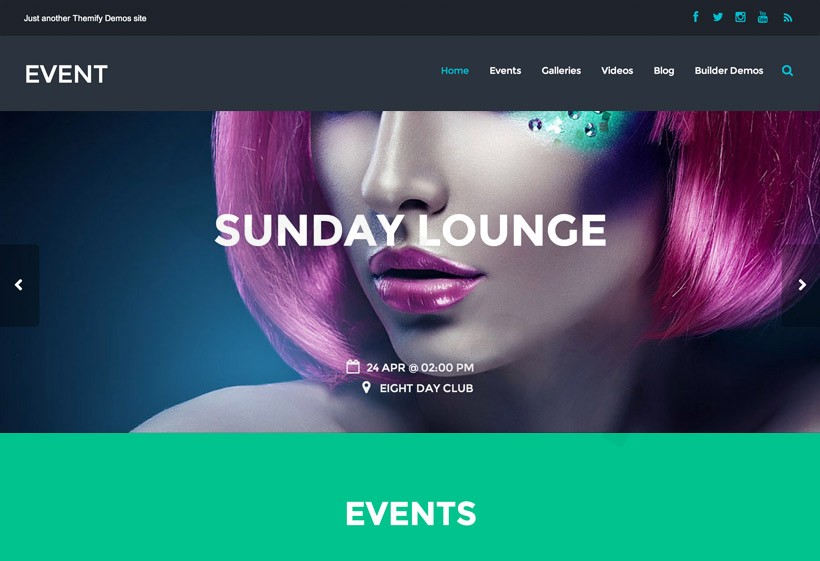
The Themify Event WordPress Theme is a specialized, high-performance solution designed specifically for organizers of conferences, festivals, concerts, and webinars. While many multipurpose themes require a mountain of third-party plugins to handle event data, this event WordPress theme is built from the ground up with dedicated functionality to showcase schedules, speaker profiles, and venue details. Whether you are a small business owner hosting a local workshop or a large-scale agency managing a global summit, this theme provides a professional, “app-like” experience for your attendees.
Key Features: Design, Layout & Performance
The core value of the Themify Event WordPress Theme lies in its ability to turn a standard website into a functional event hub. Its design philosophy centers on clarity and urgency, ensuring users find exactly what they need—from ticket links to session times—in seconds.
Specialized Custom Post Types
Unlike generic themes, Themify Event includes built-in support for:
- Events: Manage listings with dates, times, and direct ticket links.
- Speakers: Create professional profiles for presenters or performers.
- Venues: Integrated map support to help attendees find your location.
- Schedules: Clear, organized layouts for multi-day or multi-track programming.
Customization & Layout Flexibility
The theme is powered by the Themify Builder, a robust drag-and-drop interface that allows for deep visual customization without touching a line of code. You can choose between full-width or boxed layouts and utilize advanced design effects like parallax scrolling and entrance animations to make your event feel dynamic. With the WordPress Customizer, you have live-preview control over typography (Google Fonts), color palettes, and spacing.
Performance and SEO Readiness
In the world of event marketing, speed is a ranking factor. This WordPress event website theme is built on the optimized Themify framework, which is engineered for high PageSpeed scores. The clean markup and structured headings ensure that search engines can easily index your event details, while the fully responsive and retina-ready design ensures your site looks stunning on everything from a 4K monitor to a smartphone.
Installation & Demo Import: Getting Started Fast
Setting up your event site shouldn’t take longer than the event itself. Follow these steps to get the Themify Event theme up and running:
- Install & Activate: Upload the theme zip file via Appearance > Themes > Add New. Once activated, you will be prompted to install the Themify Builder and the Themify Event Post Type plugin.
- Required Plugins: Ensure you activate the Event Post Type plugin; this is what enables the speaker and venue management features.
- One-Click Demo Import: Navigate to the Themify settings and use the Demo Import tool. This will populate your site with sample events, speakers, and layouts, giving you a perfect visual baseline.
- Final Polish: After the import, check your menus and widgets. The demo content will include pre-configured layouts for your homepage and schedule pages, which you can then swap with your own content.
Note: Ensure your hosting environment is running PHP 7.4 or higher to prevent timeouts during the demo import process.
Customization Guide: Branding Your Event
Personalizing the Themify Event WordPress Theme is intuitive thanks to the dual-layer customization approach:
Global Styles via Customizer
Use the WordPress Customizer to set your brand’s “Global Styles.” This includes:
- Logo & Favicon: Upload your event branding.
- Color Systems: Set primary and secondary colors for buttons, countdown timers, and links.
- Typography: Choose readable fonts for your schedules and bold headings for your headers.
Layout Building with Themify Builder
For specific pages like the “About the Conference” or “Sponsors” page, the Themify Builder allows you to drag rows and modules into place. You can use Animated Countdown Timers to build hype for ticket sales or use Gallery/Video modules to showcase highlights from previous years.
FAQ & Troubleshooting
Is Themify Event compatible with WooCommerce?
Yes, the Themify Event WordPress Theme supports WooCommerce integration. This allows you to sell event merchandise or tickets directly through your website without needing a third-party registration platform.
How do I update the theme without losing my customizations?
To protect your design changes, always use the built-in Themify Update tool or a Child Theme. Since most visual customizations are stored in the database via the Builder or Customizer, they will remain intact after an update.
Does this theme support other page builders like Elementor?
While the theme is designed to work seamlessly with the integrated Themify Builder, it is generally compatible with Elementor and the Block Editor (Gutenberg). However, for the best experience with the event-specific post types, using the native Themify Builder is recommended.
How can I build an event website if I have multiple venues?
The theme features a dedicated Venues Custom Post Type. You can create individual pages for each venue, complete with Google Maps integration, address details, and a list of events happening at that specific location.
Verdict: Is it Right for You?
The Themify Event WordPress Theme is a powerhouse for anyone whose primary goal is to promote a gathering. Its strengths lie in its niche-specific features—you won’t have to struggle with “hacking” a blog theme to look like a conference site. Ideal for:
- Event Planners & Agencies: Who need to spin up professional sites for clients quickly.
- Musicians & Venues: Who want to showcase tour dates and ticket links.
- Corporate Organizers: Who require clean, professional schedule and speaker layouts.While there is a slight learning curve if you are new to the Themify Builder, the performance benefits and the “all-in-one” nature of the event features make it one of the most cost-effective and reliable choices on the market today. For more themes and WordPress resources, visit wppick.com.
I. Download Limits & Account Benefits
- Free Downloads: Each email address receives 3 downloads per day for free products
- Upgrade Benefits: Purchase any paid product to increase your daily download limit by 3 for each paid product
- No Account Required: You can download immediately by receiving the download link via email
- Account Recommended: Create an account for easier access to your order history and direct update downloads
II. Understanding GPL vs Official Versions
Important: The products available on WPPick are GPL-licensed versions, which differ from official developer versions. Before purchasing, please read our comprehensive guide: Understanding GPL & Official Differences at WPPick
Key Points:
- GPL versions may not include premium support from original developers
- Updates may be delayed compared to official releases
- Some premium features might have limitations
- Always consider your specific needs and support requirements
III. Support & Assistance
We’re here to help through multiple channels:
- Email Support: Direct email assistance for all inquiries
- Live Chat: Real-time support during business hours
- Comprehensive Documentation: Detailed guides and tutorials
IV. Order Tracking
Access your complete purchase history and download links anytime: Order History
V. Account Access
New to WPPick? Login or Create Account to manage your downloads and orders efficiently.
VI. Refund Protection
We stand behind our products with a clear refund policy. Review our terms: Refund Policy
VII. Privacy & Security
Your data security is our priority. Learn how we protect your information: Privacy Policy
VII. Terms of Service
Understanding our service terms ensures a smooth experience: Terms of Use
Quick Tips for Best Experience
- Verify Compatibility: Check plugin/theme compatibility with your WordPress version
- Backup First: Always backup your site before installing new plugins or themes
- Test Environment: Consider testing on a staging site first
- Stay Updated: Regularly check for updates in your account dashboard
- Read Documentation: Review any included documentation for optimal setup
Need Help?
If you have questions about downloads, licensing, or need technical assistance, don’t hesitate to contact our support team. We’re committed to ensuring you have the best possible experience with WPPick products.
Ready to get started? Your download adventure begins with just one click!
- Builder: Video: Overlay image rounded corners styling not working
- Builder: Video: Rounded corner styling doesn't work on video container
- Builder: Active module excerpt line-height
- Framework: Update get Cloudflare Turnstile API doc link
- WordPress 6.9 inline CSS override body font size making overall font larger