

Themify Fullscreen WordPress Theme
/Year
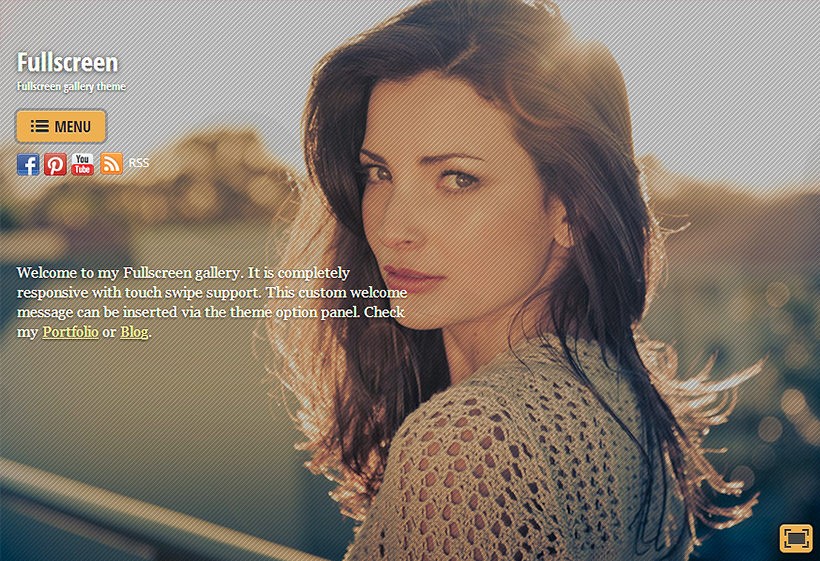
The Themify Fullscreen WordPress theme is a visually-driven powerhouse designed specifically for creatives who want their work to take center stage. Built on a philosophy of immersive user experience, this theme eliminates traditional layout clutter, allowing high-resolution imagery and video to fill the screen entirely. Whether you are a professional photographer, a digital artist, or a creative agency, the Fullscreen theme provides the sophisticated, minimal backdrop needed to turn a standard portfolio into a cinematic experience.
Key Features: Design, Layout & Performance
The core appeal of the Themify Fullscreen WordPress theme lies in its ability to handle complex visual media with minimalist elegance. Unlike generic multipurpose themes that require extensive tweaking to achieve a “hero” look, Fullscreen is engineered for this aesthetic out of the box.
Visual-First Design & Layout Options
- Fullscreen Galleries: The standout feature is the fullscreen gallery with native swipe support for mobile devices and autoplay functionality. Users can easily toggle between a standard view and an immersive fullscreen mode.
- Flexible Grids: Beyond the fullscreen slider, the theme supports various list and grid layouts (2, 3, or 4 columns) for blog posts and portfolio items.
- Responsive & Mobile-First: The layout is fully responsive, ensuring that your high-impact visuals look just as stunning on an iPhone as they do on a 5K monitor.
- Transparent Headers: To maintain the immersive feel, the theme supports transparent headers and menus that can be set to hide until hovered, keeping the focus entirely on your content.
Customization Capabilities
Powered by the Themify Builder, the theme offers a drag-and-drop interface with a live frontend preview.
- Typography: Access to over 1500+ Google Fonts. Crucially for EU-based businesses, these can be hosted locally on your server to ensure GDPR compliance.
- Dynamic Backgrounds: Support for parallax scrolling and background video options adds a layer of depth to static pages.
- Styling via Customizer: Every element—from colors and borders to spacing—can be adjusted through the WordPress Customizer, providing instant visual feedback.
Performance & SEO Readiness
Themify has optimized this theme for speed, which is critical for image-heavy sites.
- Fast Loading: The theme features a lightweight design and optimized architecture to improve Google PageSpeed Insights scores.
- Modern Image Support: Built-in WebP image support and caching features help reduce load times without sacrificing image quality.
- SEO Friendly: Clean markup and structured headings ensure that while your site looks artistic, search engines like Google can still easily index your content.
Installation & Demo Import
Setting up the Fullscreen WordPress theme is a straightforward process, even for beginners. Follow these steps to get your site looking like the professional demo in minutes:
- Upload and Activate: Once purchased from Themify, upload the theme zip file via Appearance > Themes > Add New in your WordPress dashboard.
- Install Required Plugins: Upon activation, the theme will prompt you to install the Themify Builder. This is essential for the drag-and-drop functionality.
- One-Click Demo Import: Navigate to the Themify settings to find the Demo Import tool. This will import sample content, menus, widgets, and theme settings.
- Pro Tip: Ensure your server has sufficient memory limits to prevent timeouts during the import of high-resolution images.
- Final Polish: Once the import is complete, your site will mirror the demo. You can then replace the placeholder images with your own work.
Customization Guide: Personalizing Your Brand
Personalizing the Themify Fullscreen WordPress theme to match your brand identity is intuitive thanks to the global styling options.
- Setting Up the Portfolio: Use the dedicated “Portfolio” custom post type to organize your work. For the homepage slider, utilize the “BG Gallery” post type to manage which images or videos appear in the fullscreen rotation.
- Header & Navigation: You can customize the header through the Customizer. For a truly minimal look, experiment with the “hidden menu” option, which keeps the navigation tucked away until the user interacts with the site.
- WooCommerce Integration: If you plan to sell prints or digital assets, the theme is fully compatible with WooCommerce. You can style your shop to match the rest of your portfolio seamlessly.
- Advanced Tweaks: For developers, the theme supports child themes and provides hooks and filters (like
themify_gallery_plugins_args) to modify gallery behavior without touching the core code.
FAQ & Troubleshooting
Is the Themify Fullscreen theme good for portfolios?
Yes, it is specifically designed for portfolios. It features a dedicated portfolio custom post type and a fullscreen gallery engine that makes it one of the best WordPress themes for photographers and visual artists who want an immersive showcase.
Is the theme compatible with the WordPress Block Editor (Gutenberg)?
Yes, while the theme includes the powerful Themify Builder for complex layouts, it is fully compatible with the WordPress Block Editor, allowing you to use standard blocks for blog posts and simple pages.
Does Themify Fullscreen support WooCommerce?
Absolutely. The theme is fully integrated with WooCommerce, allowing you to transform your visual portfolio into a professional online store with ease.
What should I do if the demo import fails?
Demo imports usually fail due to server “Execution Time” or “Memory Limit” restrictions. If you encounter an error, contact your hosting provider to increase your PHP limits or check the Themify documentation for manual import steps.
Conclusion
The Themify Fullscreen WordPress theme is a top-tier choice for any creative professional who prioritizes visual impact over text-heavy layouts. Its combination of a lightweight framework, built-in performance optimizations (like WebP support), and the flexible Themify Builder makes it both powerful for developers and accessible for beginners.While it is highly specialized for imagery—and might not be the first choice for data-heavy corporate sites—it excels remarkably in its niche. If you want a website that feels like a premium digital gallery, Fullscreen is a reliable, SEO-optimized investment for your brand. Visit wppick.com for more insights on optimizing your WordPress experience with premium themes.
I. Download Limits & Account Benefits
- Free Downloads: Each email address receives 3 downloads per day for free products
- Upgrade Benefits: Purchase any paid product to increase your daily download limit by 3 for each paid product
- No Account Required: You can download immediately by receiving the download link via email
- Account Recommended: Create an account for easier access to your order history and direct update downloads
II. Understanding GPL vs Official Versions
Important: The products available on WPPick are GPL-licensed versions, which differ from official developer versions. Before purchasing, please read our comprehensive guide: Understanding GPL & Official Differences at WPPick
Key Points:
- GPL versions may not include premium support from original developers
- Updates may be delayed compared to official releases
- Some premium features might have limitations
- Always consider your specific needs and support requirements
III. Support & Assistance
We’re here to help through multiple channels:
- Email Support: Direct email assistance for all inquiries
- Live Chat: Real-time support during business hours
- Comprehensive Documentation: Detailed guides and tutorials
IV. Order Tracking
Access your complete purchase history and download links anytime: Order History
V. Account Access
New to WPPick? Login or Create Account to manage your downloads and orders efficiently.
VI. Refund Protection
We stand behind our products with a clear refund policy. Review our terms: Refund Policy
VII. Privacy & Security
Your data security is our priority. Learn how we protect your information: Privacy Policy
VII. Terms of Service
Understanding our service terms ensures a smooth experience: Terms of Use
Quick Tips for Best Experience
- Verify Compatibility: Check plugin/theme compatibility with your WordPress version
- Backup First: Always backup your site before installing new plugins or themes
- Test Environment: Consider testing on a staging site first
- Stay Updated: Regularly check for updates in your account dashboard
- Read Documentation: Review any included documentation for optimal setup
Need Help?
If you have questions about downloads, licensing, or need technical assistance, don’t hesitate to contact our support team. We’re committed to ensuring you have the best possible experience with WPPick products.
Ready to get started? Your download adventure begins with just one click!
- Builder: Video: Overlay image rounded corners styling not working
- Builder: Video: Rounded corner styling doesn't work on video container
- Builder: Active module excerpt line-height
- Framework: Update get Cloudflare Turnstile API doc link
- WordPress 6.9 inline CSS override body font size making overall font larger