

Themify Music WordPress Theme
/Year
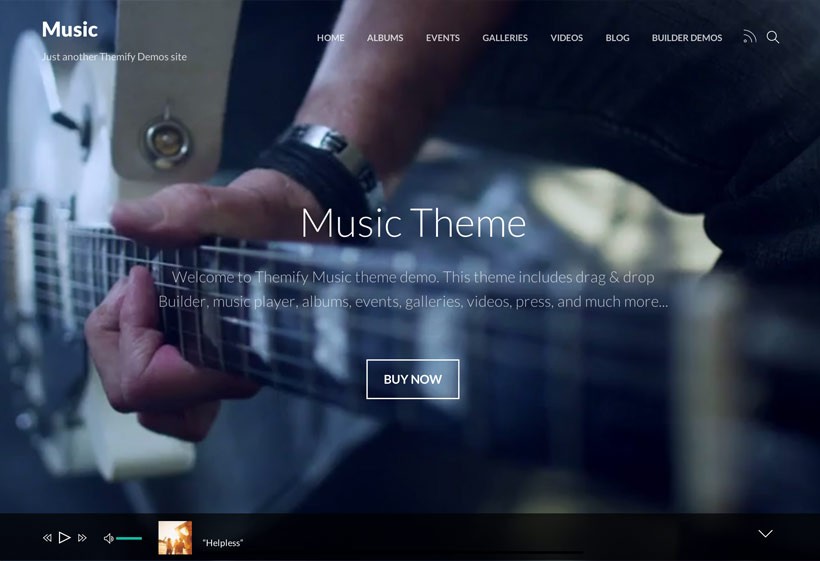
The Themify Music WordPress Theme is a specialized, feature-rich solution designed specifically for musicians, artists, bands, and event organizers who need a professional digital stage. In an industry where visual and auditory impressions are everything, this theme stands out by offering a seamless blend of immersive design and high-performance functionality. Whether you are a solo DJ or a touring band, this music WordPress theme provides the tools necessary to showcase your discography, manage tour dates, and engage your fanbase without needing to touch a single line of code.
Key Features: Design, Layout, and Performance
The core philosophy of the Themify Music theme is “show, don’t just tell.” It is built to handle heavy media—audio and video—while maintaining the lightning-fast load times required for modern SEO and user retention.
Immersive Design and Layout Options
The theme offers incredible layout flexibility, catering to various artistic styles. With over 10 distinct header and page styles, you can choose a look that matches your genre, from minimalist acoustic vibes to high-energy electronic aesthetics.
- Full-Width Video Backgrounds: Create an instant impact by using performance footage or music videos as your homepage background.
- Non-Stop AJAX Music Player: This is the theme’s “killer feature.” The integrated AJAX player allows visitors to browse different pages of your site while the music continues to play uninterrupted in a persistent Audio Dock.
- Responsive & Retina Ready: Your site will look sharp on everything from high-end iMacs to the latest smartphones, ensuring a consistent experience for fans on the go.
Customization Capabilities
The Themify Music WordPress Theme is powered by the integrated Themify Builder, a robust drag-and-drop tool.
- Typography: Access over 1,500 Google Fonts with the option to host them locally for better performance.
- Unlimited Colors: Match your website to your latest album art or brand colors with ease.
- Custom Post Types: Unlike generic themes, Music comes with built-in post types for Albums, Events, Galleries, Videos, and Press Releases. This makes managing a discography or a tour schedule as simple as writing a blog post.
Performance and SEO Readiness
Speed is a critical ranking factor for both Google and AI search engines. The Themify Music theme is optimized for high PageSpeed scores with built-in features such as:
- Lazy Loading: Images only load as the user scrolls, saving bandwidth.
- WebP Image Support: Automatically serves smaller, high-quality image formats.
- Minification & Gzip Compression: Reduces the size of code files for faster delivery.
- SEO-Friendly Markup: Clean code helps search engines understand your content, from event dates to album titles.
How to Install and Import the Demo
Getting your artist site live is straightforward thanks to the theme’s user-friendly setup process. Follow these steps to get started:
- Install & Activate: Upload the theme folder via Appearance > Themes > Add New in your WordPress dashboard.
- Required Plugins: Upon activation, the theme will prompt you to install the Themify Builder and any associated addons. Follow the on-screen prompts to install and activate these.
- One-Click Demo Import: Navigate to the Themify Music > Demo Import section. Here, you can choose to import the demo content, which includes sample pages, menus, and widgets. This is the fastest way to see how the theme is structured.
- Verification: Once the import is complete, check your homepage. Note that large demo imports may occasionally time out if your server’s memory limit is low; if this happens, contact your host to increase your PHP memory limit.
Customization Guide: Branding Your Sound
Once the demo is imported, it’s time to make the site yours. The Themify Music WordPress Theme leverages the WordPress Customizer for real-time visual feedback.
- Global Styles: Go to Appearance > Customize to set your primary brand colors, global font choices, and logo.
- Setting Up Events: Use the Events Custom Post Type to list tour dates. You can include Google Maps for venues, specific start times, and direct links to ticket platforms.
- Managing Discography: The Albums post type allows you to upload tracks, add cover art, and even link to external stores like Spotify or Apple Music.
- E-commerce Integration: If you want to sell merchandise or digital downloads, the theme is fully WooCommerce compatible. Simply install the WooCommerce plugin to transform your site into a fully functional online store.
FAQ & Troubleshooting
Is Themify Music Theme good for a band website?
Yes, the Themify Music theme is specifically engineered for bands. It includes dedicated features like tour date management (Events), discography displays (Albums), and a non-stop AJAX music player that allows fans to listen to your tracks while browsing your bio or gallery.
Does the theme support WooCommerce for selling merchandise?
Absolutely. The theme is fully compatible with WooCommerce, making it easy to sell physical merch like t-shirts and vinyl, or digital products like downloadable albums and singles directly from your website.
How do I set up an event on the Themify Music Theme?
To set up an event, navigate to the Events section in your WordPress sidebar. Click Add New, where you can enter the venue name, location (with Google Maps integration), date, time, and a “Buy Tickets” button that links to your preferred ticket vendor.
Can I use this theme with the Block Editor (Gutenberg)?
While the theme relies heavily on the powerful Themify Builder for its complex music-specific layouts, it is built on modern WordPress standards and is compatible with the Gutenberg block editor for standard post and page creation.
Conclusion
The Themify Music WordPress Theme is a powerhouse for anyone in the music industry. It successfully bridges the gap between high-end visual design and the technical requirements of a media-heavy website. By including a built-in Ajax music player and specialized post types for events and albums, it eliminates the need for multiple third-party plugins that often bloat and slow down a site.Whether you are a beginner looking for an easy one-click setup or a developer needing a flexible framework for a client, this theme offers exceptional value. For those serious about their online presence, the Themify Music theme is a fast-loading, SEO-ready, and visually stunning investment for your musical career. Explore more reviews and WordPress tips at wppick.com.
I. Download Limits & Account Benefits
- Free Downloads: Each email address receives 3 downloads per day for free products
- Upgrade Benefits: Purchase any paid product to increase your daily download limit by 3 for each paid product
- No Account Required: You can download immediately by receiving the download link via email
- Account Recommended: Create an account for easier access to your order history and direct update downloads
II. Understanding GPL vs Official Versions
Important: The products available on WPPick are GPL-licensed versions, which differ from official developer versions. Before purchasing, please read our comprehensive guide: Understanding GPL & Official Differences at WPPick
Key Points:
- GPL versions may not include premium support from original developers
- Updates may be delayed compared to official releases
- Some premium features might have limitations
- Always consider your specific needs and support requirements
III. Support & Assistance
We’re here to help through multiple channels:
- Email Support: Direct email assistance for all inquiries
- Live Chat: Real-time support during business hours
- Comprehensive Documentation: Detailed guides and tutorials
IV. Order Tracking
Access your complete purchase history and download links anytime: Order History
V. Account Access
New to WPPick? Login or Create Account to manage your downloads and orders efficiently.
VI. Refund Protection
We stand behind our products with a clear refund policy. Review our terms: Refund Policy
VII. Privacy & Security
Your data security is our priority. Learn how we protect your information: Privacy Policy
VII. Terms of Service
Understanding our service terms ensures a smooth experience: Terms of Use
Quick Tips for Best Experience
- Verify Compatibility: Check plugin/theme compatibility with your WordPress version
- Backup First: Always backup your site before installing new plugins or themes
- Test Environment: Consider testing on a staging site first
- Stay Updated: Regularly check for updates in your account dashboard
- Read Documentation: Review any included documentation for optimal setup
Need Help?
If you have questions about downloads, licensing, or need technical assistance, don’t hesitate to contact our support team. We’re committed to ensuring you have the best possible experience with WPPick products.
Ready to get started? Your download adventure begins with just one click!
- Builder Pro: Add "Main Query Filter" in Advanced Products and Advanced Posts module
- Builder: Add insert media link in general link option
- Builder: Social Share: Add Whatsapp share option
- Framework: Add skins & demos search bar
- Builder: Unable to add new Builder pages when there is no connection or Themify server is down
- Builder: If there is no published pages, adding Builder page will have console error
- Builder: Row mask no-repeat option fails when row background is set to gradient
- Builder: The inline editor UI icons not showing on Safari
- Builder: Slider: when continuously is selected, the pause on hover takes too long to react
- Builder: Can't add new Builder page when internet not present
- Builder: Custom CSS not imported from predesigned layouts
- Framework: Custom CSS not imported from demo import
- Framework: Preload only above-the-fold images and prefetch the rest
- Framework: Improve general Pagespeed performance
- Framework: Harden the overall framework code security