

Themify Shoppe WordPress Theme
/Year
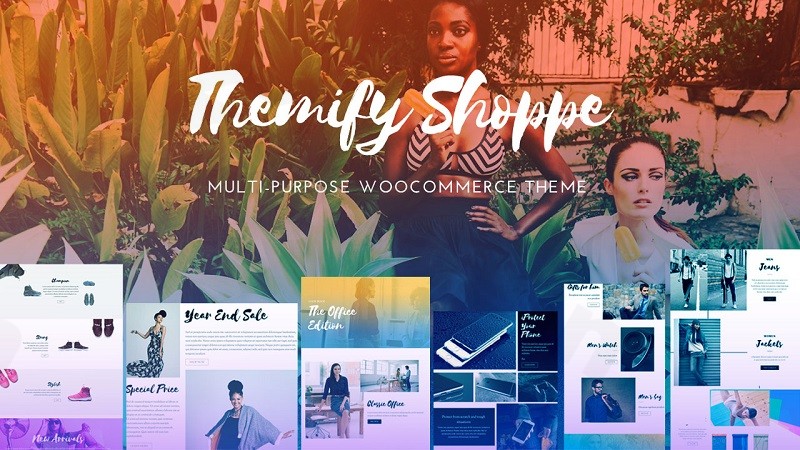
Building a professional online store requires a delicate balance between aesthetic appeal and technical performance. The Themify Shoppe WordPress theme is a robust, multipurpose WooCommerce theme specifically engineered to help entrepreneurs and web designers create high-converting eCommerce sites without touching a single line of code. Whether you are launching a boutique fashion label or a large-scale digital marketplace, Shoppe provides the tools necessary to compete in the modern retail landscape.
Key Features: Design, Layout, and Performance
Themify Shoppe is more than just a skin; it is a comprehensive design system. Its philosophy centers on “conversion-focused design,” ensuring that visitors aren’t just browsing but are guided toward making a purchase.
Versatile Layout Options
One of Shoppe’s greatest strengths is its sheer variety of structural options. Unlike many themes that lock you into a single look, Shoppe offers:
- Header & Footer Styles: Over 14 header layouts and 6 footer configurations that can be assigned globally or to specific pages.
- Archive Views: 9 different layout options for post archives, including masonry, grid, and list views.
- Shop Landing Pages: Access to 20+ specialized shop landing page layouts and 60+ regular layouts to kickstart your project.
The Power of the Themify Builder
At the heart of this drag and drop eCommerce theme is the integrated Themify Builder. This eliminates the need for third-party plugins like Elementor or WPBakery, reducing bloat and improving compatibility. You can visually arrange product grids, sliders, and call-to-action banners with real-time previews.
Performance and SEO Optimization
Speed is a critical ranking factor for both Google and AI search engines. Shoppe is built for performance, often achieving scores of 90+ on Google PageSpeed Insights and GTmetrix. Key performance features include:
- Built-in Optimization: Native support for lazy loading, WebP image conversion, Gzip compression, and minification.
- Local Google Fonts: Choose from over 1,500 Google Fonts and store them locally on your server to boost page load times and comply with privacy regulations.
- SEO-Friendly Structure: The theme uses clean markup and structured headings to ensure your products are easily discoverable by search engines.
Installation and Demo Import Guide
Setting up your store with Shoppe is designed to be a frictionless experience. Follow these steps to get started:
- Install & Activate: Upload the theme ZIP file via Appearance > Themes > Add New in your WordPress dashboard.
- Plugin Setup: Upon activation, the theme will prompt you to install required companion plugins, most notably the Themify Builder and WooCommerce.
- One-Click Demo Import: Navigate to the Shoppe “Skins” tab. Here, you can browse professionally crafted demos for niches like fashion, furniture, or tech gear. Click “Import” on your chosen skin to bring in the demo content, menus, and widgets.
- Verification: After the import, check your homepage and shop pages. Most skins include pre-configured product filters and mega menus that serve as a perfect foundation for your brand.Note: Ensure your hosting environment has sufficient memory (at least 256MB recommended) to prevent timeouts during the demo data import process.
Customization Guide: Branding Your Store
Themify Shoppe provides a highly intuitive customization experience through its own settings panel and the WordPress Customizer.
- Global Styling: Use the Customizer to set your brand’s primary colors, typography, and container widths. These settings apply site-wide, ensuring a consistent UI/UX.
- Advanced Shop Features: To maximize sales, leverage the “Quick View” feature, which allows customers to see product details without leaving the gallery page. You can also implement a “Wishlist” and a specialized Shop Sidebar using the Themify Product Filter plugin.
- Mega Menus: For stores with large catalogs, Shoppe includes a built-in Mega Menu builder. This allows you to display product categories, images, and even promotional banners directly within the navigation.
FAQ & Troubleshooting
Does Themify Shoppe theme include a page builder?
Yes, the Themify Shoppe WordPress theme includes the built-in Themify Builder. This is a powerful drag-and-drop tool that allows you to create complex layouts visually without needing to install additional plugins like Elementor.
Is Themify Shoppe theme good for multi-vendor stores?
Absolutely. Shoppe is fully compatible with popular multi-vendor plugins like Dokan and WC Vendors. Its layout flexibility makes it an ideal choice for building a marketplace platform where multiple sellers can list products.
Does it support child themes?
Yes, Shoppe supports child themes. Using a child theme is recommended for developers who want to add custom code or hooks while ensuring their modifications aren’t lost during theme updates.
How can I improve the speed of my Shoppe site?
Shoppe comes with built-in performance settings. Go to the Themify settings panel to enable lazy loading, WebP images, and script minification. Additionally, using a quality hosting provider and a caching plugin will further enhance your load times.
Conclusion
The Themify Shoppe WordPress theme stands out as a top-tier solution for anyone serious about eCommerce. Its deep integration with WooCommerce, combined with the proprietary Themify Builder, offers a level of design flexibility that few competitors can match.By balancing high-end aesthetic features (like mega menus and 14+ header styles) with rigorous performance optimization, Shoppe caters to both the visual needs of a brand and the technical needs of SEO. Whether you are a solo entrepreneur looking for an affordable, high-value theme or an agency building a complex multi-vendor marketplace, Shoppe provides a reliable, fast, and highly customizable foundation.For more WordPress theme reviews and expert design tips, visit us at wppick.com.
I. Download Limits & Account Benefits
- Free Downloads: Each email address receives 3 downloads per day for free products
- Upgrade Benefits: Purchase any paid product to increase your daily download limit by 3 for each paid product
- No Account Required: You can download immediately by receiving the download link via email
- Account Recommended: Create an account for easier access to your order history and direct update downloads
II. Understanding GPL vs Official Versions
Important: The products available on WPPick are GPL-licensed versions, which differ from official developer versions. Before purchasing, please read our comprehensive guide: Understanding GPL & Official Differences at WPPick
Key Points:
- GPL versions may not include premium support from original developers
- Updates may be delayed compared to official releases
- Some premium features might have limitations
- Always consider your specific needs and support requirements
III. Support & Assistance
We’re here to help through multiple channels:
- Email Support: Direct email assistance for all inquiries
- Live Chat: Real-time support during business hours
- Comprehensive Documentation: Detailed guides and tutorials
IV. Order Tracking
Access your complete purchase history and download links anytime: Order History
V. Account Access
New to WPPick? Login or Create Account to manage your downloads and orders efficiently.
VI. Refund Protection
We stand behind our products with a clear refund policy. Review our terms: Refund Policy
VII. Privacy & Security
Your data security is our priority. Learn how we protect your information: Privacy Policy
VII. Terms of Service
Understanding our service terms ensures a smooth experience: Terms of Use
Quick Tips for Best Experience
- Verify Compatibility: Check plugin/theme compatibility with your WordPress version
- Backup First: Always backup your site before installing new plugins or themes
- Test Environment: Consider testing on a staging site first
- Stay Updated: Regularly check for updates in your account dashboard
- Read Documentation: Review any included documentation for optimal setup
Need Help?
If you have questions about downloads, licensing, or need technical assistance, don’t hesitate to contact our support team. We’re committed to ensuring you have the best possible experience with WPPick products.
Ready to get started? Your download adventure begins with just one click!
- Builder Pro: Add "Main Query Filter" in Advanced Products and Advanced Posts module
- Builder: Add insert media link in general link option
- Builder: Social Share: Add Whatsapp share option
- Framework: Add skins & demos search bar
- Builder: Unable to add new Builder pages when there is no connection or Themify server is down
- Builder: If there is no published pages, adding Builder page will have console error
- Builder: Row mask no-repeat option fails when row background is set to gradient
- Builder: The inline editor UI icons not showing on Safari
- Builder: Slider: when continuously is selected, the pause on hover takes too long to react
- Builder: Can't add new Builder page when internet not present
- Builder: Custom CSS not imported from predesigned layouts
- Framework: Custom CSS not imported from demo import
- Framework: Preload only above-the-fold images and prefetch the rest
- Framework: Improve general Pagespeed performance
- Framework: Harden the overall framework code security