
Tokoo – Electronics Store Woocommerce Theme For Affiliates
/Year
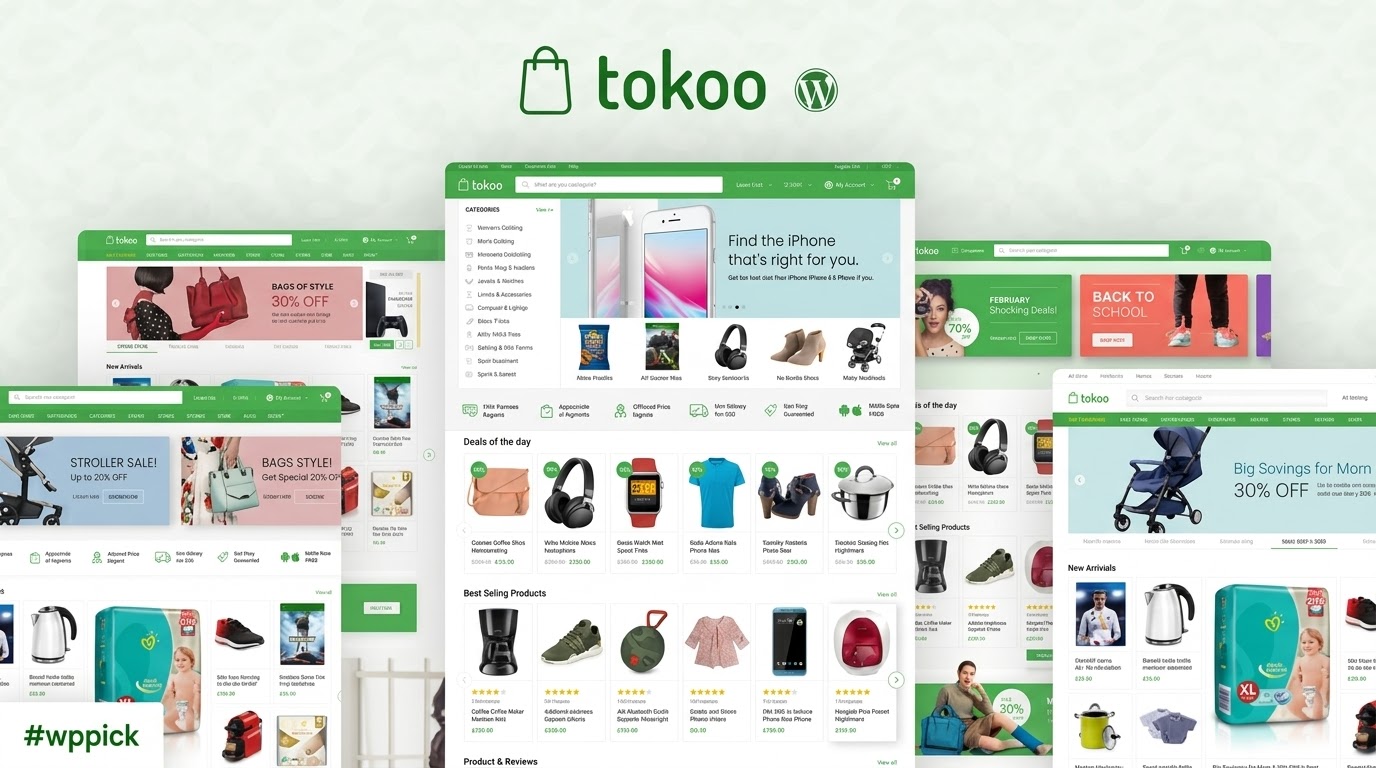
In the bustling digital marketplace, standing out requires a specialized touch, especially for online electronics retailers. The Tokoo WordPress theme emerges as a meticulously crafted solution, exclusively designed for electronics eCommerce. Unlike generic multipurpose themes, Tokoo focuses on delivering a streamlined, high-converting experience, drawing inspiration from leading online stores. Whether you’re building an affiliate electronics site, a dropshipping venture, or a multi-vendor marketplace, Tokoo provides the robust framework you need to showcase gadgets and tech products with modern elegance and efficiency. This theme is ideal for store owners, affiliate marketers, and entrepreneurs aiming to create a professional and scalable online presence for their electronics business.
Key Features: Design, Layout & Performance for Electronics Stores
Tokoo is engineered to provide a visually compelling and functionally powerful platform for your electronics store. Its design philosophy champions minimalism and efficiency, ensuring your products take center stage.
Modern Design & Flexible Layout Options
Tokoo offers a powerful array of design elements tailored for the electronics niche:
- 5 Professionally Designed Homepage Layouts: Dive into 5 distinct homepage templates, each featuring 17 customizable content blocks. These layouts are not just aesthetically pleasing but are strategically engineered for optimal product display, ensuring a clean and professional aesthetic. This allows for diverse presentations, from showcasing daily deals to highlighting specific product categories like “WooCommerce theme for gadgets.”
- Advanced Header Customization: With 4 distinct header variations for desktop and a dedicated mobile header, Tokoo ensures consistent branding and seamless navigation across all devices. The mobile-optimized design specifically removes clutter, providing an exceptional browsing experience on smartphones.
- Optimized Product Pages: Tokoo includes three different layouts for WooCommerce product pages, including a full-width option, giving you flexibility in how you present your merchandise. Unique visual elements like advanced product rating displays with review breakdowns further enhance product showcasing.
Intuitive Customization Capabilities
Personalizing your Tokoo WooCommerce theme to match your brand identity is straightforward:
- Color Schemes: Choose from 6 pre-defined primary color options or utilize a comprehensive color picker tool to select custom colors. This flexibility ensures your brand’s visual identity is perfectly reflected.
- Typography: Embracing modern design trends, Tokoo features “smaller fonts” that contribute to a cleaner, more sophisticated look. While specific font systems like Google Fonts aren’t explicitly detailed, the theme’s overall aesthetic prioritizes readability and a contemporary feel.
- Admin Panel & Page Builder Integration: Customization is facilitated through an intuitive admin panel powered by the Redux Framework. Furthermore, Tokoo is compatible with popular page builders like Elementor and King Composer, allowing for extensive drag-and-drop customization of homepages and static pages. This is particularly useful for an “Elementor compatible WooCommerce theme for dropshipping.”
- Mega Menus: Built-in horizontal and vertical mega menus, easily configurable with the Tokoo extensions plugin, mimic the advanced navigation found on top-tier eCommerce sites.
Blazing Performance & SEO Readiness
Performance and search engine optimization are critical for any online store, especially in the competitive electronics market.
- Performance Optimized: Tokoo is built with lean code architecture, making it a “fast WooCommerce theme for electronics.” It works perfectly with caching plugins like WP Rocket and W3 Total Cache to achieve lightning-fast load times. The theme follows best practices for eCommerce performance and conversion optimization.
- Mobile Responsiveness: Featuring fully responsive and mobile-first layouts, Tokoo guarantees a flawless experience across desktops, tablets, and smartphones. The dedicated mobile header style further enhances usability for on-the-go shoppers.
- SEO Friendly: While not explicitly detailed, the clean markup, structured headings, and optimization for speed inherent in Tokoo’s design contribute to a solid foundation for SEO. Integration with Algolia provides enhanced search functionality, crucial for user experience and discoverability within your store.
Installation & Demo Import: Get Your Electronics Store Live Fast
Setting up your Tokoo Electronics Store theme is designed to be a smooth process, even for users without extensive technical knowledge.
- Install & Activate the Theme:
- Once you’ve downloaded the Tokoo theme package, navigate to your WordPress dashboard.
- Go to
Appearance > Themes > Add New > Upload Theme. - Choose the Tokoo
.zipfile and clickInstall Now. - After installation, click
Activate.
- Install Required Companion Plugins:
- Upon activation, Tokoo will typically recommend or require the installation of certain companion plugins, such as the
Tokoo Extensionsplugin and WooCommerce. - Follow the on-screen prompts to install and activate these plugins. These are crucial for unlocking the theme’s full feature set, including mega menus and specialized eCommerce functionalities.
- Upon activation, Tokoo will typically recommend or require the installation of certain companion plugins, such as the
- One-Click Demo Import:
- Tokoo comes with 5 pre-built demo homepages, allowing for a quick and easy setup.
- Look for a
Demo ImportorImport Demo Dataoption, usually found underAppearanceor a dedicated theme options panel. - Select your preferred demo layout and initiate the one-click import.
- What to expect: The demo import process will typically populate your site with sample content, pages, posts, widgets, and menu structures, making your website look identical to the chosen demo. This provides a fantastic starting point.
- Common Pitfalls: For large demo imports, ensure your server meets standard WordPress requirements for memory and execution time to prevent timeouts. If the import fails, try increasing PHP memory limits or execution time in your
wp-config.phporphp.inifile.
Customization Guide: Branding Your Electronics Marketplace
After installing and importing a demo, personalizing Tokoo to reflect your brand’s unique identity is the next exciting step.
- Leveraging the Admin Panel: Tokoo’s intuitive admin panel, powered by the Redux Framework, is your central hub for global settings. Here, you can effortlessly adjust theme options without touching a line of code.
- Colors and Typography: Easily change your primary and secondary color palettes using the built-in color picker to align with your brand guidelines. While “smaller fonts” are part of Tokoo’s modern design, you’ll have control over other typographic elements to maintain readability and visual hierarchy.
- Logos and Branding: Upload your custom logo for both desktop and mobile headers through the theme options, ensuring your brand is prominently displayed across all devices.
- Header and Footer Layouts: Experiment with the 4 distinct header styles and dedicated mobile header to find the perfect look for your navigation. Although specific footer options aren’t fully detailed in the provided content, comprehensive themes like Tokoo typically offer various configurations to display copyright info, quick links, and social media.
- Setting Up Your Homepage: Use the 5 pre-built homepage layouts as a foundation. With Elementor or King Composer compatibility, you can then drag-and-drop elements and customize sections to create a truly unique front-page experience that effectively showcases your electronics.
- Creating Menus: Navigate to
Appearance > Menusto set up your primary navigation. Tokoo’s built-in vertical and horizontal mega menu support, activated via the Tokoo extensions plugin, allows you to create complex, feature-rich menus perfect for an extensive electronics catalog. - Child Theme Support: For advanced users who wish to make deeper code-level modifications without losing changes during theme updates, Tokoo is built with actions, hooks, and pluggable functions, making it fully compatible with child themes. This is crucial for maintaining custom CSS/JS.
FAQ & Troubleshooting for Tokoo Theme Users
Here are answers to some common questions about the Tokoo WordPress theme:
Is Tokoo compatible with Elementor / King Composer / Gutenberg?
Yes, Tokoo is compatible with popular page builders like Elementor and King Composer, allowing for extensive drag-and-drop customization of homepages and static pages. While not explicitly highlighting Gutenberg compatibility, the theme primarily focuses on robust integration with these external page builders.
Does Tokoo support WooCommerce for online stores?
Absolutely. Tokoo is a specialized WooCommerce theme designed exclusively for electronics stores. It offers deep integration with WooCommerce, including advanced product page layouts, quick view, wishlist functionality, and support for major multi-vendor marketplace plugins like Dokan, WC Vendors, and WCFM Marketplace.
Is Tokoo theme SEO friendly?
Yes, Tokoo is built with SEO in mind. Its lean code architecture and minimalistic design contribute to fast loading times, which is a key factor for SEO. It’s optimized for speed and works well with caching plugins like WP Rocket. Clean markup and structured headings provide a solid foundation for search engines, and the integration of Algolia offers enhanced search capabilities within your store, improving user experience and discoverability.
How to customize Tokoo header?
Tokoo offers extensive header customization. You can choose from 4 distinct desktop header styles and a separate mobile header through the theme’s intuitive admin panel (powered by the Redux Framework). Options typically include uploading your logo, adjusting colors, and configuring menu layouts, including the built-in mega menus.
What are Tokoo theme requirements?
While specific minimum WordPress and PHP versions are not explicitly detailed as standalone requirements in all documentation, Tokoo is compatible with recent WordPress versions (up to 6.8.x is indicated). As a WooCommerce theme, it generally adheres to WooCommerce and WordPress PHP recommendations, typically requiring PHP 7.4 or higher for optimal performance and security. It’s also recommended to use caching plugins like WP Rocket for “super fast” load times.
Conclusion: Why Tokoo is the Premier Choice for Electronics eCommerce
The Tokoo WordPress theme stands as a powerful, purpose-built solution for anyone looking to launch or enhance an online electronics store. Its specialized focus on the electronics niche, combined with modern design trends and robust functionality, makes it a true “chef’s knife” in a market often saturated with generalist themes.With its 5 professional homepage layouts, advanced header customization, and intuitive Redux Framework admin panel, Tokoo offers significant design flexibility for branding your electronics marketplace. Its deep integration with WooCommerce, compatibility with Elementor, and support for multi-vendor plugins like Dokan, WCFM, and WC Vendors make it an ideal choice for a wide range of users—from individual store owners and affiliate marketers to those building large-scale multi-vendor electronics platforms.Furthermore, Tokoo’s commitment to performance and SEO readiness, through lean code and optimization for speed, ensures your store not only looks great but also performs exceptionally in search engines and delivers a seamless experience to your customers. If you’re in the market for a high-converting, visually appealing, and feature-rich best WordPress theme for electronics store, Tokoo offers a compelling blend of expertise, experience, and reliability that is hard to beat.
I. Download Limits & Account Benefits
- Free Downloads: Each email address receives 3 downloads per day for free products
- Upgrade Benefits: Purchase any paid product to increase your daily download limit by 3 for each paid product
- No Account Required: You can download immediately by receiving the download link via email
- Account Recommended: Create an account for easier access to your order history and direct update downloads
II. Understanding GPL vs Official Versions
Important: The products available on WPPick are GPL-licensed versions, which differ from official developer versions. Before purchasing, please read our comprehensive guide: Understanding GPL & Official Differences at WPPick
Key Points:
- GPL versions may not include premium support from original developers
- Updates may be delayed compared to official releases
- Some premium features might have limitations
- Always consider your specific needs and support requirements
III. Support & Assistance
We’re here to help through multiple channels:
- Email Support: Direct email assistance for all inquiries
- Live Chat: Real-time support during business hours
- Comprehensive Documentation: Detailed guides and tutorials
IV. Order Tracking
Access your complete purchase history and download links anytime: Order History
V. Account Access
New to WPPick? Login or Create Account to manage your downloads and orders efficiently.
VI. Refund Protection
We stand behind our products with a clear refund policy. Review our terms: Refund Policy
VII. Privacy & Security
Your data security is our priority. Learn how we protect your information: Privacy Policy
VII. Terms of Service
Understanding our service terms ensures a smooth experience: Terms of Use
Quick Tips for Best Experience
- Verify Compatibility: Check plugin/theme compatibility with your WordPress version
- Backup First: Always backup your site before installing new plugins or themes
- Test Environment: Consider testing on a staging site first
- Stay Updated: Regularly check for updates in your account dashboard
- Read Documentation: Review any included documentation for optimal setup
Need Help?
If you have questions about downloads, licensing, or need technical assistance, don’t hesitate to contact our support team. We’re committed to ensuring you have the best possible experience with WPPick products.
Ready to get started? Your download adventure begins with just one click!
- Resolved wishlist issue
- Added compatibility with WordPress 6.9
- Adds support for WooCommerce show password.
- ARIA support for login forms.
- Compatible with WooCommerce 9.7.x