

Tonda – Elegant Woocommerce Theme
/Year
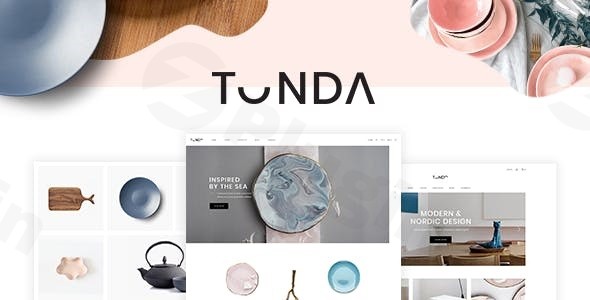
When it comes to launching a high-end online boutique, the visual presentation is just as important as the products themselves. The Tonda WordPress theme is a sophisticated and elegant WooCommerce theme specifically designed for artisans, handicraft businesses, and luxury retailers. Whether you are selling handmade ceramics, boutique beauty products, or high-end jewelry, Tonda provides a refined aesthetic that prioritizes detail and user experience without requiring a single line of code.Developed by Select-Themes (a Power Elite Author), Tonda strikes a rare balance between artistic flair and robust e-commerce functionality. In this review and setup guide, we’ll explore how this theme can transform your WordPress site into a professional, conversion-ready storefront.
Key Features: Design, Layout, and Performance
Tonda isn’t just another generic multipurpose theme; it is a curated design experience. It focuses on “slow design” principles—clean lines, generous whitespace, and a modern layout that lets your products breathe.
Sophisticated Layout Options
The theme comes packed with 6 pre-designed homepages and 9 inner pages, all of which are fully customizable. For shop owners, Tonda offers versatile shop list layouts, including Masonry for a creative, artistic look and Standard layouts for more traditional retail.
- Header & Footer Flexibility: Choose from multiple header types (Centered, Minimal, Vertical, or Standard). Tonda also supports different logo versions for sticky and mobile headers, ensuring your branding is crisp on every device.
- Unique Visual Elements: Features like video background sections, smooth page transitions, and smooth scroll functionality add a premium “high-fashion” feel to the browsing experience.
- Mega Menu & Side Area: For stores with large inventories, the customizable Mega Menu and dedicated Side Area provide organized navigation without cluttering the screen.
Performance and SEO Readiness
While Tonda focuses heavily on aesthetics, it doesn’t sacrifice technical quality. It is a modern online store theme built with a clean, well-structured codebase.
- Mobile Responsiveness: The theme is 100% responsive, meaning your store will look perfect on everything from a 27-inch iMac to an iPhone.
- SEO Friendly: With clean markup and support for schema, Tonda helps your products rank higher in search results.
- Technical Compatibility: The theme is updated for WordPress 6.x and is compatible with PHP 8.2, ensuring long-term stability.
Installation and Demo Import: Get Started in Minutes
One of the biggest strengths of the Tonda WordPress theme is how quickly you can go from a blank site to a fully functional store using the Tonda theme demo import feature.
Step 1: Install and Activate
After purchasing the theme, upload the tonda.zip file via your WordPress Dashboard (Appearance > Themes > Add New > Upload). Once uploaded, click Activate.
Step 2: Install Required Plugins
Upon activation, you will see a prompt to install required and recommended plugins. This includes:
- Tonda Core Plugin: Enables custom post types and core theme features.
- WPBakery Page Builder: Included for free to handle drag-and-drop layouts.
- Slider Revolution: Included for free for high-impact hero sections.
- WooCommerce: Essential for e-commerce functionality.
Step 3: One-Click Demo Import
Navigate to the Tonda Import section in your dashboard. Select your preferred demo and click Import. This will pull in all the homepages, shop layouts, and sample products seen in the live preview.
- Pro Tip: Ensure your hosting environment has sufficient memory (at least 256M) to prevent the import process from timing out.
Customization Guide: Branding Your Store
Customizing Tonda is handled through the “Powerful Admin Interface” and “Select Options” panel, giving you global control over your site’s identity.
Typography and Color Schemes
Tonda supports Google Fonts, allowing you to choose typography that matches your brand’s voice. You can choose from pre-selected color schemes or create a custom palette to match your artisan brand’s visual identity.
Personalizing the Header and Navigation
You can set up unique header behaviors, such as Sticky only on scroll up or Fixed headers. By utilizing the Anchor Functionality, you can even create one-page layouts where the menu links to specific sections on the homepage.
Specialized Shop Features
Tonda integrates deeply with the YITH WooCommerce ecosystem. You can easily enable:
- Quick View: Let customers see product details without leaving the shop page.
- Wishlist: Allow shoppers to save items for later.
- Color & Label Variations: Perfect for beauty products or apparel where customers need to see different styles.
FAQ & Troubleshooting
Is the Tonda theme compatible with Elementor?
Yes, Tonda is fully compatible with Elementor, though it comes bundled with WPBakery Page Builder. You can use either tool to design your pages, giving you maximum flexibility depending on your preferred workflow.
Does Tonda support WooCommerce for online stores?
Absolutely. Tonda is a dedicated elegant WooCommerce theme. It includes specialized shortcodes for product lists, banners, and info sections, specifically designed to enhance the WooCommerce shopping experience.
How do I update the Tonda theme without losing my customizations?
Tonda includes a child theme in the purchase package. Always install and activate the child theme before making any code changes. When a theme update is released, you can update the parent theme safely while your custom CSS and functions remain intact in the child theme.
What should I do if the demo import fails?
Most demo import issues are caused by low server resources. Increase your max_execution_time and memory_limit in your PHP settings. If problems persist, the Tonda documentation provides a manual import method.
Conclusion
The Tonda WordPress theme is an exceptional choice for anyone looking to build an artisan WooCommerce theme based on elegance and precision. It moves away from the “cluttered” look of many e-commerce sites, offering instead a gallery-like experience that is ideal for ceramics, beauty products, and handmade goods.While it offers deep customization for power users via WPBakery and custom CSS, its “no coding knowledge required” philosophy makes it accessible for small business owners and beginners. If you want a modern, professional, and SEO-friendly online store that stands out from the competition, Tonda is a premium investment that pays off in visual authority and user trust.Ready to build your dream store? Visit wppick.com for more WordPress theme reviews and SEO strategies.
I. Download Limits & Account Benefits
- Free Downloads: Each email address receives 3 downloads per day for free products
- Upgrade Benefits: Purchase any paid product to increase your daily download limit by 3 for each paid product
- No Account Required: You can download immediately by receiving the download link via email
- Account Recommended: Create an account for easier access to your order history and direct update downloads
II. Understanding GPL vs Official Versions
Important: The products available on WPPick are GPL-licensed versions, which differ from official developer versions. Before purchasing, please read our comprehensive guide: Understanding GPL & Official Differences at WPPick
Key Points:
- GPL versions may not include premium support from original developers
- Updates may be delayed compared to official releases
- Some premium features might have limitations
- Always consider your specific needs and support requirements
III. Support & Assistance
We’re here to help through multiple channels:
- Email Support: Direct email assistance for all inquiries
- Live Chat: Real-time support during business hours
- Comprehensive Documentation: Detailed guides and tutorials
IV. Order Tracking
Access your complete purchase history and download links anytime: Order History
V. Account Access
New to WPPick? Login or Create Account to manage your downloads and orders efficiently.
VI. Refund Protection
We stand behind our products with a clear refund policy. Review our terms: Refund Policy
VII. Privacy & Security
Your data security is our priority. Learn how we protect your information: Privacy Policy
VII. Terms of Service
Understanding our service terms ensures a smooth experience: Terms of Use
Quick Tips for Best Experience
- Verify Compatibility: Check plugin/theme compatibility with your WordPress version
- Backup First: Always backup your site before installing new plugins or themes
- Test Environment: Consider testing on a staging site first
- Stay Updated: Regularly check for updates in your account dashboard
- Read Documentation: Review any included documentation for optimal setup
Need Help?
If you have questions about downloads, licensing, or need technical assistance, don’t hesitate to contact our support team. We’re committed to ensuring you have the best possible experience with WPPick products.
Ready to get started? Your download adventure begins with just one click!
- Added WPML config file
- Added WooCommerce 10.x compatibility
- Added Google social login feature and options
- Updated Revolution Slider to 6.7.40
- Updated WPBakery Page Builder to 8.7.2
- Updated Tonda Core to 2.2
- Updated Tonda Membership to 2.1
- Updated TGMPA class file
- Updated Google Fonts list
- Updated jquery.prettyPhoto.js library
- Updated pot files
- Improved Google Map API compatibility
- Improved social icon widget performance
- Improved social icon vcMap performance
- Improved framework UI/dashboard scripts calls
- Improved tonda_select_get_attachment_id_from_url helper function
- Improved facebook social login
- Improved theme security
- Fixed Welcome Page permissions and $title deprecated notice
- Removed unnecessary tonda_select_user_del_image function
- Removed Google+ social login
- Minor fixes