
Toolband – Tools Store WordPress Woocommerce Theme
/Year
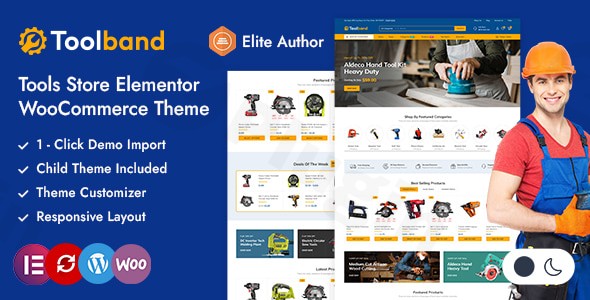
Building a professional online presence for a hardware or industrial business requires more than just a generic template; it demands a layout that can handle heavy inventories and technical specifications. The Toolband WordPress theme is a robust, purpose-built solution designed specifically for the tools and hardware e-commerce sector. With a clean design philosophy and deep WooCommerce integration, it provides the perfect foundation for mega-stores and local retailers alike to showcase power tools, safety gear, and industrial equipment.
Key Features: Professional Design, Layout, and High Performance
The Toolband theme stands out as a top contender for the best WooCommerce theme for hardware store owners who prioritize clarity and speed. It avoids unnecessary visual clutter, focusing instead on a professional “square-box” design that makes product browsing intuitive for customers.
Design & Layout Options
Toolband offers incredible flexibility with its layout, ensuring your store looks professional regardless of the device your customers use.
- 14+ Pre-built Demos: You can jumpstart your project using one of the many ready-to-import demos tailored for different sub-niches in the tool industry.
- Fully Responsive & Retina Ready: The theme ensures a seamless shopping experience on desktops, tablets, and smartphones.
- Header & Footer Variety: Choose from four unique header layouts and eight footer designs. It includes options for sticky headers, AJAX search for quick product discovery, and specialized shop icons.
- Light/Dark Mode: A modern toggle allows users to switch between light and dark layouts, enhancing user experience and accessibility.
Performance & SEO Readiness
In the competitive world of e-commerce, speed is a ranking factor. Toolband is engineered for efficiency:
- Optimized Code: Built with clean markup to ensure fast load times and better visibility in search engines.
- CSS Sprites: The theme utilizes CSS Sprites to reduce the number of server requests, significantly boosting page speed.
* SEO Friendly: Toolband is Gutenberg-optimized and follows SEO best practices, making it easier for your tool shop to rank on Google and AI search engines.
Installation & One-Click Demo Import
Setting up the Toolband Tools Store theme is straightforward, even for those with limited technical knowledge. Follow these steps to get your store live:
- Theme Installation: Upload the Toolband zip file via your WordPress Dashboard under Appearance > Themes > Add New.
- Plugin Activation: After activation, the theme will prompt you to install required plugins, including Elementor, WooCommerce, and Revolution Slider (which is included for free).
- One-Click Demo Import: Navigate to the theme options panel and select the “Sample Data Import.” Choose your preferred demo from the 14+ available options.
- Finalize Setup: Once the import is complete, your menus, widgets, and homepage settings will be configured automatically to match the demo site.
Tip: Ensure your hosting environment has sufficient PHP memory limits (at least 256M) to avoid timeouts during the demo data import process.
Customization Guide: Personalizing Your Tool Shop
One of the core strengths of this Elementor theme for tool shop owners is how easily it can be personalized. You don’t need to touch a single line of code to make the site your own.
Branding with the Customizer
Using the built-in Admin Options Customized Panel, you can control global styles across your entire site:
- Unlimited Colors: Change your primary and secondary brand colors to match your logo (e.g., Bosch Blue or Makita Teal).
- Typography: Access the full library of Google Fonts to choose readable, professional typefaces.
- Banners & Carousels: Easily add unlimited banners to highlight seasonal sales or new arrivals in hand tools and machinery.
Building with Elementor
Toolband is fully compatible with the Elementor Page Builder. This means you can use drag-and-drop functionality to:
- Create custom product grids (Featured, Latest, On Sale).
- Design unique landing pages for specific brands.
- Adjust spacing, containers, and backgrounds with real-time visual feedback.
Advanced Navigation
For stores with massive inventories, Toolband provides both Horizontal and Vertical Mega Menus. This allows you to categorize your products efficiently—organizing by category (e.g., Plumbing, Power Tools, Gardening) so customers can find what they need in two clicks or less.
FAQ & Troubleshooting
Is Toolband theme good for Elementor users?
Yes, Toolband is fully compatible with Elementor and Elementor Pro. It is designed to work seamlessly with the drag-and-drop builder, allowing users to customize every section of their website without coding knowledge.
Does Toolband support WooCommerce for online stores?
Absolutely. Toolband is a dedicated Toolband WooCommerce theme with deep integration. It supports advanced features like AJAX search, product quick view, product comparison, and specialized filters essential for hardware stores.
Can I use Toolband theme for a hardware store?
Yes, Toolband is specifically designed for hardware stores, tool shops, and industrial equipment retailers. Its design philosophy and feature set are tailored to the technical and professional needs of the hardware niche.
Does it support child themes?
Yes, a child theme is included in the package. Using a child theme is highly recommended as it allows you to make custom code changes that won’t be overwritten when the parent theme is updated.
Conclusion: A Specialized Solution for Tool Retailers
The Toolband WordPress theme is a highly specialized, performance-oriented solution for anyone in the hardware and machinery industry. By moving away from “one-size-fits-all” multipurpose themes, Toolband provides niche-specific features like vertical mega menus, square-box product layouts, and optimized code that industrial customers expect.Whether you are a beginner looking for an easy-to-use Elementor theme for tool shop setups or a developer building a high-performance mega-store for a client, Toolband offers the flexibility, speed, and aesthetic appeal to succeed. With its one-click demo import and robust customization panel, you can transform a standard WordPress installation into a professional-grade tool empire in hours.Verdict: If you are selling tools, hardware, or industrial equipment, Toolband is a top-tier choice that balances professional design with technical efficiency. Visit wppick.com for more WordPress theme reviews and e-commerce growth strategies.
I. Download Limits & Account Benefits
- Free Downloads: Each email address receives 3 downloads per day for free products
- Upgrade Benefits: Purchase any paid product to increase your daily download limit by 3 for each paid product
- No Account Required: You can download immediately by receiving the download link via email
- Account Recommended: Create an account for easier access to your order history and direct update downloads
II. Understanding GPL vs Official Versions
Important: The products available on WPPick are GPL-licensed versions, which differ from official developer versions. Before purchasing, please read our comprehensive guide: Understanding GPL & Official Differences at WPPick
Key Points:
- GPL versions may not include premium support from original developers
- Updates may be delayed compared to official releases
- Some premium features might have limitations
- Always consider your specific needs and support requirements
III. Support & Assistance
We’re here to help through multiple channels:
- Email Support: Direct email assistance for all inquiries
- Live Chat: Real-time support during business hours
- Comprehensive Documentation: Detailed guides and tutorials
IV. Order Tracking
Access your complete purchase history and download links anytime: Order History
V. Account Access
New to WPPick? Login or Create Account to manage your downloads and orders efficiently.
VI. Refund Protection
We stand behind our products with a clear refund policy. Review our terms: Refund Policy
VII. Privacy & Security
Your data security is our priority. Learn how we protect your information: Privacy Policy
VII. Terms of Service
Understanding our service terms ensures a smooth experience: Terms of Use
Quick Tips for Best Experience
- Verify Compatibility: Check plugin/theme compatibility with your WordPress version
- Backup First: Always backup your site before installing new plugins or themes
- Test Environment: Consider testing on a staging site first
- Stay Updated: Regularly check for updates in your account dashboard
- Read Documentation: Review any included documentation for optimal setup
Need Help?
If you have questions about downloads, licensing, or need technical assistance, don’t hesitate to contact our support team. We’re committed to ensuring you have the best possible experience with WPPick products.
Ready to get started? Your download adventure begins with just one click!