

Tour Package – WordPress Travel/tour Theme
/Year
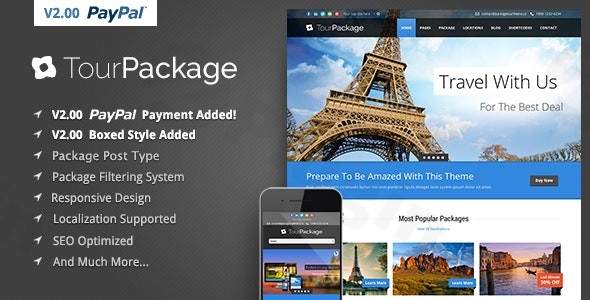
Building an online presence for your travel agency or tour operation demands a specialized platform that beautifully showcases destinations and seamlessly handles bookings. The Tour Package WordPress theme emerges as a robust solution, meticulously crafted by GoodLayers to meet the unique demands of the tourism sector. This theme is designed for travel companies, tour operators, and adventure planners who seek a professional, visually appealing, and feature-rich website without delving into complex coding.At its core, the Tour Package theme focuses on visual appeal and efficient tour management. Its design philosophy emphasizes clean layouts and responsive elements, making it ideal for presenting captivating travel packages and inspiring wanderlust across all devices.
Key Features: Design, Layout & Performance
The Tour Package theme is engineered with a comprehensive suite of features that prioritize aesthetics, user experience, and technical excellence, making it a powerful WordPress travel theme for any tourism business.
Design & Layout Options
The theme offers significant flexibility to craft a compelling online storefront for your travel offerings:
- Responsive and Retina Ready: Your website will look impeccable on any screen size, from large desktop monitors to tablets and smartphones, thanks to its responsive design and retina-ready graphics. This ensures a consistent, high-quality viewing experience for all potential customers.
- Flexible Layouts: Choose between a classic boxed-style layout or a full-width presentation to best suit your brand. For blog content, the theme provides three distinct styles with options for left, right, both, or no sidebars, giving you granular control over content presentation.
- Diverse Footer Options: With six distinct footer layouts, you can elegantly display essential information, contact details, or calls to action at the bottom of every page.
- One-Click Demo Import: Get your site up and running quickly with pre-designed demo content. This feature allows you to import a fully functional starter site with a single click, providing an excellent foundation to build upon.
Customization Capabilities
Personalizing your travel website to reflect your brand’s unique identity is effortless with the Tour Package theme:
- Unlimited Color Schemes: The integrated “Live Color Changer” gives you extensive control over your site’s aesthetics. Almost every element’s color can be adjusted via a color picker directly in the admin panel or theme customizer, allowing for real-time visual feedback.
- Advanced Typography: Access over 500+ Google Fonts to fine-tune your website’s typography, ensuring perfect readability and brand alignment. Additionally, a font uploader allows you to incorporate your own Cufon fonts for truly unique textual elements.
- Drag Drop Slider Manager: Create engaging visual presentations for your tours and packages with the intuitive drag-and-drop slider manager, making it easy to highlight your most attractive offerings.
Performance & SEO Features
Beyond its visual prowess, the Tour Package theme is built with performance and search engine optimization in mind, crucial for any WordPress tour booking theme:
- SEO Optimized Structure: The theme employs best practices for SEO, utilizing proper heading tags (H1, H2, H3) for titles and structuring content to place main content above sidebars. This helps search engines easily identify and rank your core offerings.
- Image Alt Tags Support: Crucial for both SEO and accessibility, the theme supports ‘alt’ tags for images, aiding search engines in understanding your visual content and improving user experience for those with visual impairments.
- Mobile-First Approach: Its responsive and retina-ready design not only enhances user experience but also satisfies modern search engine requirements for mobile-friendliness.
- Cross-Browser Compatibility: The theme is rigorously tested to ensure flawless operation across major web browsers, including IE11, Firefox, Safari, Chrome, and Edge, providing a consistent experience for all visitors.
- PHP 8+ Compatible: Regular updates ensure compatibility with the latest WordPress and PHP versions, guaranteeing optimal performance and security.
Installation & Demo Import
Getting started with the Tour Package theme is a straightforward process, even for those new to WordPress.
- Download and Upload the Theme: After purchasing the theme from ThemeForest, download the theme files. Then, navigate to your WordPress Dashboard -> Appearance -> Themes -> Add New -> Upload Theme. Choose the theme’s
.zipfile and click “Install Now.” - Activate the Theme: Once installed, click “Activate” to make the Tour Package theme live on your website.
- Install Required Plugins: The Tour Package theme’s booking form functionality relies on Contact Form 7. You will be prompted to install any necessary plugins after activation. Ensure Contact Form 7 is installed and activated for booking features to function correctly.
- One-Click Demo Import: To replicate the beautiful demo sites, navigate to the theme’s options panel (usually found under Appearance or a dedicated “Tour Package” menu item). Look for the “Demo Import” or “Import Demo Data” option. With a single click, the theme will import pre-designed pages, posts, widgets, and menus.
- What to expect: After a successful demo import, your site will resemble the live demo. You’ll find pre-populated menus, sample tour packages, and pages ready for customization.
- Common Pitfalls: For larger demo imports, ensure your server’s PHP memory limit and execution time are sufficiently high to prevent timeouts. If issues arise, increasing
memory_limitandmax_execution_timein yourphp.inifile can help.
Customization Guide: Branding & Layout
The Tour Package theme provides intuitive tools to brand your travel website and customize its layout to perfection.
Utilizing the WordPress Customizer and Theme Options
The Live Color Changer, integrated with the WordPress Customizer, is your primary tool for visual branding.
- Access the Customizer: Go to Appearance -> Customize from your WordPress dashboard.
- Color Schemes: Within the Customizer, navigate to the color options. Here, you can experiment with unlimited color options, changing backgrounds, text colors, link colors, and specific element hues. The changes are previewed in real-time, allowing you to instantly see how your brand colors transform the site.
- Typography: Explore the typography settings to select from over 500+ Google Fonts for different text elements (headings, body text, navigation). Adjust font sizes, weights, and line heights to enhance readability and align with your brand’s aesthetic. If you have custom Cufon fonts, use the built-in font uploader.
- Logo & Favicon: Easily upload your company logo and favicon through the Customizer or theme options to reinforce brand identity.
- Header & Footer Layouts: While the theme provides six distinct footer layouts to choose from, you can configure these options via the theme’s dedicated options panel. This usually includes settings for content within the footer (widgets, copyright text).
- Sidebar Management: The theme supports unlimited sidebar options. You can create and assign specific sidebars to different pages or posts, tailoring the content shown alongside your main packages or blog articles.
Setting Up Your Tour Packages and Pages
The “packages” custom post type is a standout feature for travel agencies.
- Create Packages: Navigate to the “Packages” section in your WordPress dashboard. Here, you can add new tour packages, each with its own details, images, itineraries, pricing, and booking information. This structured approach helps in organizing your offerings.
- Homepage and Blog Page: Set your desired homepage and blog page from Settings -> Reading. You can use one of the imported demo pages or create new ones using the theme’s robust options.
- Menus: Configure your main navigation menus via Appearance -> Menus. Organize your tour categories, service pages, and contact information for easy visitor navigation.
FAQ & Troubleshooting
Here are answers to common questions about the Tour Package WordPress theme, designed for quick and clear understanding.
Is the Tour Package WordPress theme compatible with Elementor or other major page builders?
The Tour Package theme, developed by GoodLayers, includes a “Drag Drop Slider Manager” for creating engaging sliders. However, the primary ThemeForest listing does not explicitly state it includes a full drag-and-drop page builder for general page layout. Customization is primarily managed through the theme’s robust admin panel and the WordPress Customizer. While it is regularly updated to work with Gutenberg (the WordPress Block Editor), users accustomed to third-party visual page builders like Elementor or WPBakery might find the content layout process more reliant on theme options and shortcodes.
Does the Tour Package WordPress theme support WooCommerce for online stores?
Yes, the Tour Package WordPress theme is compatible with WooCommerce. However, it’s crucial to note that the theme’s dedicated “package” system for tours and bookings runs independently and is not built on WooCommerce. This means you can use WooCommerce to sell travel-related merchandise or other products, but the core tour booking functionality operates separately through the theme’s built-in system, often requiring Contact Form 7 for the booking form.
Does the Tour Package theme support child themes?
While not explicitly detailed on the primary ThemeForest page, GoodLayers themes generally support child themes. It is highly recommended to use a child theme for any custom CSS, functions, or template modifications to ensure your changes are not lost during theme updates. The theme also provides a .pot file for localization, indicating readiness for translation and custom code.
How can I update the Tour Package theme without losing my customizations?
To update the Tour Package theme safely, always use a child theme for any custom code or styling. Before updating, it’s good practice to create a full backup of your website. Most premium themes like this one can be updated directly from your WordPress dashboard (Appearance -> Themes) if you have activated your license. Alternatively, you can download the latest version from ThemeForest and manually update it via FTP, replacing the old theme files (but never delete the theme folder if you don’t use a child theme, as this will remove your customizations).
What should I do if the demo import fails or looks different from the demo site?
If the demo import fails, first check your server’s PHP configuration for sufficient memory_limit and max_execution_time. High-resolution images and extensive content in demos can be resource-intensive. If the import seems successful but looks different, ensure all required plugins (like Contact Form 7) are installed and activated. Also, verify that your reading settings (Settings -> Reading) correctly point to the imported homepage and blog page. Sometimes, regenerating thumbnails after import can resolve image display issues. Contacting GoodLayers support with your system status can also provide quick resolution.
Conclusion
The Tour Package WordPress theme by GoodLayers is a highly specialized and capable solution for anyone in the travel and tourism industry. Its dedicated “package” custom post type, robust filtering system, and integrated booking form (via Contact Form 7) provide out-of-the-box functionality that generic multipurpose themes often lack.With its responsive and retina-ready design, extensive customization options through the Live Color Changer and Google Fonts, and strong SEO foundations, the theme empowers users to create a professional and engaging online presence. While it doesn’t feature a full drag-and-drop page builder for general content (relying instead on its robust theme options and a specialized slider manager) and its package system operates independently of WooCommerce, these aspects are transparently communicated, allowing users to make an informed choice.The Tour Package theme is an excellent choice for travel agencies, tour operators, adventure travel companies, and freelancers seeking a niche-specific, visually appealing, and SEO-friendly platform to showcase their tours and attract customers. It strikes a fine balance between powerful features and ease of use, making it ideal for both beginners and experienced WordPress users focused on the travel sector.
I. Download Limits & Account Benefits
- Free Downloads: Each email address receives 3 downloads per day for free products
- Upgrade Benefits: Purchase any paid product to increase your daily download limit by 3 for each paid product
- No Account Required: You can download immediately by receiving the download link via email
- Account Recommended: Create an account for easier access to your order history and direct update downloads
II. Understanding GPL vs Official Versions
Important: The products available on WPPick are GPL-licensed versions, which differ from official developer versions. Before purchasing, please read our comprehensive guide: Understanding GPL & Official Differences at WPPick
Key Points:
- GPL versions may not include premium support from original developers
- Updates may be delayed compared to official releases
- Some premium features might have limitations
- Always consider your specific needs and support requirements
III. Support & Assistance
We’re here to help through multiple channels:
- Email Support: Direct email assistance for all inquiries
- Live Chat: Real-time support during business hours
- Comprehensive Documentation: Detailed guides and tutorials
IV. Order Tracking
Access your complete purchase history and download links anytime: Order History
V. Account Access
New to WPPick? Login or Create Account to manage your downloads and orders efficiently.
VI. Refund Protection
We stand behind our products with a clear refund policy. Review our terms: Refund Policy
VII. Privacy & Security
Your data security is our priority. Learn how we protect your information: Privacy Policy
VII. Terms of Service
Understanding our service terms ensures a smooth experience: Terms of Use
Quick Tips for Best Experience
- Verify Compatibility: Check plugin/theme compatibility with your WordPress version
- Backup First: Always backup your site before installing new plugins or themes
- Test Environment: Consider testing on a staging site first
- Stay Updated: Regularly check for updates in your account dashboard
- Read Documentation: Review any included documentation for optimal setup
Need Help?
If you have questions about downloads, licensing, or need technical assistance, don’t hesitate to contact our support team. We’re committed to ensuring you have the best possible experience with WPPick products.
Ready to get started? Your download adventure begins with just one click!
- Update layer slider