

Tourex – Tour & Travel Booking WordPress Theme
/Year
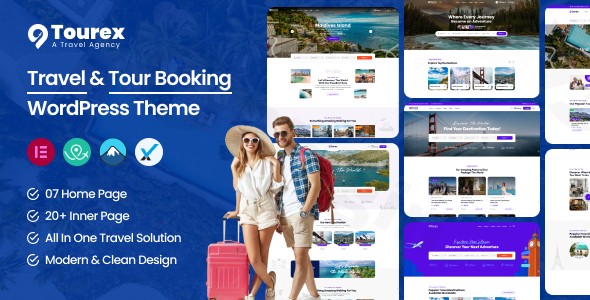
Embark on a journey to transform your online travel business with Tourex, a premium WordPress theme meticulously designed for tour operators, travel agencies, and adventure companies. This comprehensive review and setup guide will explore how the Tourex tour booking theme offers an all-in-one solution for creating visually stunning and highly functional travel booking websites that captivate visitors and convert them into loyal customers. With its focus on user experience, robust booking capabilities, and SEO-friendly structure, Tourex is an ideal choice for any travel business looking to establish a powerful online presence.
Introduction: Inspire Wanderlust with Tourex
The digital landscape for travel businesses demands not just beauty, but also intelligent functionality. The Tourex WordPress theme steps up as a leading contender, specifically crafted to meet these unique demands. It’s a modern and powerful tool for tour operators, travel agencies, and adventure companies alike, offering a compelling online presence that inspires wanderlust and simplifies the booking process. Tourex combines a clean, visually captivating design with a robust booking system, ensuring that your tours and destinations are presented beautifully and are effortlessly bookable.
Key Features: Design, Layout & Performance for Travel Excellence
Tourex is engineered to provide a seamless blend of aesthetics and functionality, delivering a superior experience for both website administrators and potential travelers.
Design & Layout Options: Showcase Your Destinations
Tourex prioritizes stunning destination showcases with breathtaking visual layouts designed to highlight unique travel experiences. The theme’s design philosophy emphasizes clear lines, vibrant colors, and organized sections, making it easy for visitors to browse tours and services.
- 100% Fluid Responsive Design: Crucial for modern travelers, Tourex ensures your website looks exceptional and performs flawlessly on all devices—from desktops to tablets and smartphones. This mobile-optimized experience is essential for conversion optimization.
- 7 Pre-built Homepages: Get a head start with multiple ready-to-use starting points. Tourex offers 7 distinct homepages tailored for various travel niches, providing flexible layout options that can be used as-is or customized to create unique visual experiences.
- Stunning Destination Showcases: Utilize high-quality image galleries, video integrations, and immersive content displays to create emotional connections with potential travelers, presenting your tours with impact.
- Flexible Blog Layouts: The theme includes blog sidebars and custom page templates, giving you flexibility in how you share travel stories, updates, and helpful guides.
Customization Capabilities: Brand Your Travel Experience
Tourex empowers you to personalize every aspect of your website to match your brand identity, largely thanks to its integration with Elementor and a powerful theme options panel.
- Comprehensive Theme Options Panel: Powered by the Redux Framework, this advanced admin panel gives you granular control over your website’s elements, including brand color, logo, typography, and blog/page options.
- Color Schemes & Typography: Control the complete color scheme of your website, with preloaded brand color options. Dive into advanced typography with access to over 600 Google Fonts, allowing you to set a unique and memorable style for your brand.
- Elementor Builder Integration: Tourex is deeply integrated with Elementor Builder, a fast, intuitive, and smart page builder that simplifies customization. This drag-and-drop functionality means extensive control over spacing, containers, sections, and backgrounds without touching a single line of code.
- Header and Footer Flexibility: While not a dedicated “builder,” the theme options, combined with Elementor, allow for significant control and editing of header and footer content, including managing different headers and footers for various homepages.
Performance & SEO Features: Get Discovered and Convert
Beyond visual appeal, Tourex is built for performance and discoverability, ensuring your travel agency WordPress theme ranks higher and delivers a smooth user experience.
- SEO-Optimized Structure: Built with search engine visibility in mind, the theme helps your travel offerings rank higher in search results for tour-related keywords, destination searches, and travel service queries. This clean markup and structured heading hierarchy are key for better search engine rankings.
- Clean and Commented Code: The theme features clean and commented code, which contributes to better site performance and ease of maintenance, making the WordPress theme easy to edit for developers.
- Mobile-Optimized Experience: As noted, the responsive design ensures exceptional performance across all devices, a critical factor for both user experience and search engine ranking.
- Security Verified Source: All files are rigorously scanned through third-party verification services like VirusTotal, ensuring comprehensive protection against vulnerabilities and malicious code, adding a layer of trust.
Installation & Demo Import: Launch Your Travel Site Quickly
Getting your Tourex tour booking theme up and running is designed to be straightforward, allowing you to quickly launch your professional travel booking website.
- Install & Activate the Theme:
- After purchasing Tourex, download the theme package.
- From your WordPress dashboard, navigate to
Appearance > Themes > Add New > Upload Theme. - Choose the Tourex theme
.zipfile and click “Install Now.” - Once installed, click “Activate.”
- Install Required Companion Plugins:
- Upon activation, Tourex will typically prompt you to install any recommended plugins. Key integrations include WP Travel Engine (for tour and booking management), Elementor Builder (for page customization), and Contact Form 7 (for forms). Install and activate these as prompted.
- Import Demo Content:
- While explicit “one-click demo import” steps are not detailed, Tourex comes with 7 pre-built homepages. Themes with this feature usually provide an option within the theme options panel or a dedicated plugin to import demo content. Look for an “Import Demo” or “Starter Sites” option under
Appearanceor a new menu item created by the theme. - Select the demo homepage or layout that best fits your business model and initiate the import. This process will populate your site with pages, posts, images (placeholders), menus, and widgets, mimicking the live demo.
- While explicit “one-click demo import” steps are not detailed, Tourex comes with 7 pre-built homepages. Themes with this feature usually provide an option within the theme options panel or a dedicated plugin to import demo content. Look for an “Import Demo” or “Starter Sites” option under
- After Demo Import:
- Once the import is complete, check your pages, menus (
Appearance > Menus), and widgets (Appearance > Widgets). You’ll likely need to assign your primary menu and set your desired homepage (Settings > Reading) to display the imported content correctly. - Replace placeholder images and text with your own high-quality content to truly brand your site.
- Once the import is complete, check your pages, menus (
Customization Guide: Personalize Your Brand and Layout
Tourex offers significant flexibility to personalize your travel website, making it truly your own.
- Leverage the Theme Options Panel (Redux Framework): This central hub, accessible via your WordPress dashboard (often under
Appearance > Theme Optionsor a dedicated Tourex menu item), is where you’ll control global settings. Here, you can easily:- Change Colors: Adjust your brand colors, accents, and background colors to match your corporate identity.
- Manage Typography: Select from over 600 Google Fonts for headings and body text, setting the perfect tone for your content.
- Upload Logo & Favicon: Replace the default branding with your own logo and site icon.
- Configure Blog & Page Options: Define default layouts for your blog posts and static pages.
- Edit with Elementor Builder: For page-specific layouts and content, Elementor is your go-to tool.
- Build Your Homepage: Start with one of the 7 pre-built homepages, then open it with Elementor to drag, drop, and customize sections, add new elements, and arrange your content exactly how you envision it.
- Customize Headers & Footers: While the theme options allow basic header/footer content editing, Elementor integration provides flexibility to modify these areas on a page-by-page basis if needed, giving you more granular control over specific page layouts.
- Adjust Spacing and Layouts: Elementor allows precise control over margins, padding, column structures, and section backgrounds, enabling you to fine-tune the visual hierarchy and aesthetics of every page.
- Set Up Menus and Widgets:
- Navigate to
Appearance > Menusto create and assign your primary navigation menus. - Use
Appearance > Widgetsto customize sidebars (e.g., blog sidebars) with custom widgets for advertisements, social links, or popular tours.
- Navigate to
- Child Theme for Safe Customizations: Tourex includes a child theme in the package. Always use a child theme for any custom CSS or PHP modifications to ensure your changes are not overwritten during theme updates.
FAQ & Troubleshooting: Common Questions About Tourex
Here are answers to common questions about the Tourex WordPress theme, designed to be clear and helpful for users.
Is Tourex theme Gutenberg compatible?
Yes, the Tourex WordPress theme is fully compatible with the Block Editor (Gutenberg), allowing you to leverage the modern WordPress editing experience for your posts and pages. It also works seamlessly with the legacy editor if preferred.
Does Tourex support WooCommerce for online stores?
Yes, Tourex is WooCommerce ready, allowing you to integrate a complete online store for selling travel-related products, merchandise, or additional services alongside your tours. This makes it an excellent choice for a comprehensive travel booking website WordPress solution.
Does the Tourex theme support child themes?
Yes, a child theme is included in the Tourex theme package. It is highly recommended to use the child theme for any custom code or styling modifications to ensure your changes are preserved during theme updates.
How to customize Tourex theme header and footer?
You can customize the Tourex theme header and footer primarily through the theme options panel (powered by Redux Framework) for global settings like logo and basic content. For more specific layout adjustments and content within these areas, especially on different homepages, you can utilize the Elementor Builder due to its deep integration.
What key plugins seamlessly integrate with the Tourex theme?
Tourex integrates seamlessly with several powerful plugins crucial for a travel booking website. It is specifically designed to work with the WP Travel Engine plugin for comprehensive tour, booking, and payment management. Additionally, it integrates with Elementor Builder for page creation and customization, and Contact Form 7 for custom forms.
Conclusion: Elevate Your Travel Business with Tourex
The Tourex – Premium Tour & Travel Booking WordPress Theme is an exceptional choice for any travel agency, tour operator, or adventure company aiming to build a high-converting, visually stunning, and SEO-optimized online presence. It skillfully combines sophisticated design with powerful, niche-specific booking functionality, making it a professional solution that truly inspires wanderlust.With its 100% fluid responsive design, conversion-focused elements, and SEO-optimized structure, Tourex is engineered for discoverability and user satisfaction. The deep integration with Elementor Builder provides intuitive customization, allowing both beginners and experienced users to craft a unique brand experience without coding complexities. Furthermore, its specialized integration with the WP Travel Engine plugin ensures that managing tours, bookings, and payments is streamlined and efficient, setting it apart from generic multipurpose themes.Tourex is more than just a beautiful theme; it’s a comprehensive travel business management tool that offers robust features, regular updates, and professional support. For businesses seeking a ready-to-use, specialized tour operator WordPress theme that promises a seamless booking journey and a powerful online platform, Tourex stands out as a confident and reliable choice. It’s time to elevate your travel business and convert visitors into loyal customers with Tourex.
I. Download Limits & Account Benefits
- Free Downloads: Each email address receives 3 downloads per day for free products
- Upgrade Benefits: Purchase any paid product to increase your daily download limit by 3 for each paid product
- No Account Required: You can download immediately by receiving the download link via email
- Account Recommended: Create an account for easier access to your order history and direct update downloads
II. Understanding GPL vs Official Versions
Important: The products available on WPPick are GPL-licensed versions, which differ from official developer versions. Before purchasing, please read our comprehensive guide: Understanding GPL & Official Differences at WPPick
Key Points:
- GPL versions may not include premium support from original developers
- Updates may be delayed compared to official releases
- Some premium features might have limitations
- Always consider your specific needs and support requirements
III. Support & Assistance
We’re here to help through multiple channels:
- Email Support: Direct email assistance for all inquiries
- Live Chat: Real-time support during business hours
- Comprehensive Documentation: Detailed guides and tutorials
IV. Order Tracking
Access your complete purchase history and download links anytime: Order History
V. Account Access
New to WPPick? Login or Create Account to manage your downloads and orders efficiently.
VI. Refund Protection
We stand behind our products with a clear refund policy. Review our terms: Refund Policy
VII. Privacy & Security
Your data security is our priority. Learn how we protect your information: Privacy Policy
VII. Terms of Service
Understanding our service terms ensures a smooth experience: Terms of Use
Quick Tips for Best Experience
- Verify Compatibility: Check plugin/theme compatibility with your WordPress version
- Backup First: Always backup your site before installing new plugins or themes
- Test Environment: Consider testing on a staging site first
- Stay Updated: Regularly check for updates in your account dashboard
- Read Documentation: Review any included documentation for optimal setup
Need Help?
If you have questions about downloads, licensing, or need technical assistance, don’t hesitate to contact our support team. We’re committed to ensuring you have the best possible experience with WPPick products.
Ready to get started? Your download adventure begins with just one click!
No changelog available.