

Tourze – Tour & Travel Agency Gutenverse Fse WordPress Block Theme
/Year
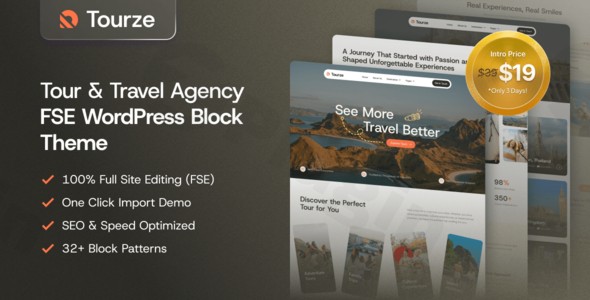
If you are looking to build a high-converting, visually stunning website for your tourism business, the Tourze WordPress theme is a premier choice. As a dedicated Tour & Travel Agency WordPress theme, Tourze is built specifically to meet the needs of tour operators, destination managers, and travel bloggers who want to inspire wanderlust through immersive storytelling and seamless user experiences. By leveraging the power of WordPress Full Site Editing (FSE) and the Gutenverse ecosystem, it offers a future-proof solution for anyone wanting to create a professional travel platform without the bloat of traditional page builders.
Key Features: Design, Layout & Performance
Tourze isn’t just a skin; it is a comprehensive design system tailored for the tourism industry. It prioritizes large, captivating visuals and structured content flow to turn visitors into travelers.
Modern Layout & Design Options
The theme utilizes a block-based architecture, which means every part of your site—from the hero section to the blog archives—is a customizable block.
- Immersive Visuals: Designed with a focus on high-impact imagery and clear typography to showcase destinations.
- Flexible Templates: It includes specialized templates for single tour posts, category archives, and search results, ensuring your itineraries look organized and professional.
- Prebuilt Starter Sites: Tourze comes with a collection of ready-to-use demo websites that can be imported instantly, covering various niches like adventure trekking, luxury cruises, and city tours.
Advanced Customization with Gutenverse
Unlike older themes that rely on a rigid “Options Panel,” Tourze integrates deeply with the Gutenverse FSE WordPress Block Theme framework. This provides:
- Global Styles Control: Easily manage your brand’s color palette (from tropical blues to earthy tones) and typography across the entire site from one central interface.
- Advanced Wrapper Blocks: Gutenverse extends the native editor with advanced controls for backgrounds (gradients, videos), spacing, and positioning.
- Custom Header & Footer Builder: Use the drag-and-drop block editor to create unique navigation menus and footers without needing a separate plugin.
Performance & SEO Optimization
In the travel industry, speed is a ranking factor. Tourze is built with clean, block-native code that ensures fast loading times.
- Lightweight Foundation: By avoiding heavy third-party page builders, the theme stays lean and mobile-responsive.
- SEO-Ready Markup: The theme follows semantic HTML5 standards, making it easier for search engines to crawl your tour packages and itineraries.
- Mobile-First Design: Tourze is 100% responsive, adapting flawlessly to smartphones and tablets, which is critical since most travel searches happen on mobile devices.
Installation & Demo Import: Getting Started
Setting up your Tour & Travel Agency WordPress theme is a straightforward process. Follow these steps to get your site looking like the professional demo in minutes:
- Install & Activate: Upload the Tourze theme folder via Appearance > Themes in your WordPress dashboard and click Activate.
- Install Required Plugins: Upon activation, you will be prompted to install the Gutenverse plugin. This is essential as it provides the advanced blocks and FSE capabilities the theme relies on.
- One-Click Demo Import: Navigate to the Gutenverse dashboard within WordPress. Select the “Demo Import” option, choose your preferred travel starter site, and click import.
- Finalize Setup: Once the import is complete, your menus, widgets, and homepage layouts will be populated automatically.Note: Ensure your hosting environment meets modern standards (PHP 7.4+ and sufficient memory limits) to avoid timeouts during the demo content import.
Customization Guide: Personalizing Your Brand
Personalizing Tourze to match your travel brand is handled through the WordPress Site Editor (FSE).
Branding & Global Styles
To change your logo, colors, or fonts, go to Appearance > Editor. Click on the Styles icon (the half-filled circle) to access Global Styles. Here, you can define your brand’s primary colors and select typography that reflects your agency’s personality—whether that’s a rugged font for adventure tours or a refined serif for luxury travel.
Editing Layouts and Templates
Because Tourze is a Gutenverse FSE WordPress Block Theme, you can edit the “Single Tour” template just as easily as a standard page. You can drag and drop blocks for pricing tables, photo galleries, and booking inquiry forms directly into your layout. This flexibility allows you to highlight the most important details of your travel packages exactly where you want them.
FAQ & Troubleshooting
Is Tourze compatible with Elementor or WPBakery?
Tourze is specifically designed for the WordPress Block Editor (Gutenberg) and Full Site Editing. While you can technically install page builders, the theme’s primary strength and performance benefits come from its native block-based workflow, which eliminates the need for heavy third-party builders.
Does Tourze support WooCommerce for online bookings?
Yes, Tourze is compatible with WooCommerce. This allows you to sell tour packages, travel gear, or digital guidebooks directly through your website with a fully integrated checkout system.
Can I use Tourze for a travel blog instead of an agency?
Absolutely. While it is a robust Tour & Travel Agency WordPress theme, its clean layout and FSE capabilities make it an excellent choice for travel bloggers who want a high-performance, visually-driven site.
Does the theme support child themes?
Yes, Tourze supports child themes. However, since most customizations (colors, fonts, and layouts) are saved via the Site Editor and Global Styles, the need for a child theme is significantly reduced for most users.
Conclusion
The Tourze WordPress theme represents the future of travel website design. By embracing Full Site Editing and the Gutenverse ecosystem, it offers a rare balance of aesthetic beauty and technical performance. For tour operators and agencies, it provides the tools necessary to build a professional, SEO-friendly presence that converts visitors into customers. If you are looking for a lightweight, highly customizable, and niche-specific solution, Tourze is a top-tier contender for your next travel project.For more WordPress theme reviews and SEO strategies, visit wppick.com.
I. Download Limits & Account Benefits
- Free Downloads: Each email address receives 3 downloads per day for free products
- Upgrade Benefits: Purchase any paid product to increase your daily download limit by 3 for each paid product
- No Account Required: You can download immediately by receiving the download link via email
- Account Recommended: Create an account for easier access to your order history and direct update downloads
II. Understanding GPL vs Official Versions
Important: The products available on WPPick are GPL-licensed versions, which differ from official developer versions. Before purchasing, please read our comprehensive guide: Understanding GPL & Official Differences at WPPick
Key Points:
- GPL versions may not include premium support from original developers
- Updates may be delayed compared to official releases
- Some premium features might have limitations
- Always consider your specific needs and support requirements
III. Support & Assistance
We’re here to help through multiple channels:
- Email Support: Direct email assistance for all inquiries
- Live Chat: Real-time support during business hours
- Comprehensive Documentation: Detailed guides and tutorials
IV. Order Tracking
Access your complete purchase history and download links anytime: Order History
V. Account Access
New to WPPick? Login or Create Account to manage your downloads and orders efficiently.
VI. Refund Protection
We stand behind our products with a clear refund policy. Review our terms: Refund Policy
VII. Privacy & Security
Your data security is our priority. Learn how we protect your information: Privacy Policy
VII. Terms of Service
Understanding our service terms ensures a smooth experience: Terms of Use
Quick Tips for Best Experience
- Verify Compatibility: Check plugin/theme compatibility with your WordPress version
- Backup First: Always backup your site before installing new plugins or themes
- Test Environment: Consider testing on a staging site first
- Stay Updated: Regularly check for updates in your account dashboard
- Read Documentation: Review any included documentation for optimal setup
Need Help?
If you have questions about downloads, licensing, or need technical assistance, don’t hesitate to contact our support team. We’re committed to ensuring you have the best possible experience with WPPick products.
Ready to get started? Your download adventure begins with just one click!