

Transx | Transportation & Logistics WordPress Theme
/Year
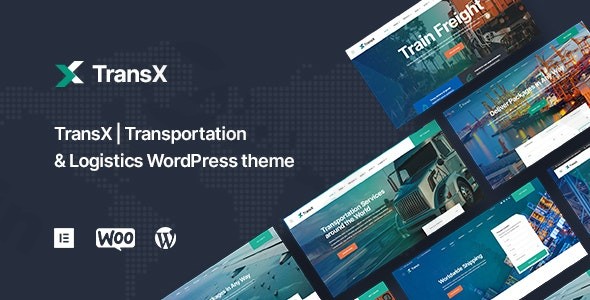
In today’s fast-paced world, transportation and logistics businesses need a robust online presence to connect with clients, showcase services, and streamline operations. The TransX WordPress theme is specifically designed to meet these demands, offering a premium solution for cargo shipping, freight delivery, trucking, moving companies, and storage solutions. With its professional design and specialized features, TransX helps you build a credible and high-converting website that truly reflects your business’s efficiency and reliability.
Introduction: Your Digital Hub for Logistics and Transportation
TransX is a powerful, visually appealing, and feature-rich transportation and logistics WordPress theme crafted for companies in the freight, cargo, moving, and delivery sectors. Developed by Artureanec, an “elite author” on ThemeForest, this theme provides a clean, elegant, and modern aesthetic combined with robust functionality. It’s built for businesses of all sizes, from local moving services to large international shipping enterprises, providing a comprehensive toolkit to highlight your services, manage your fleet, and attract more customers online.
Key Features: Design, Layout & Performance
TransX is engineered to give your transportation business a cutting-edge online presence, focusing on both aesthetic appeal and practical functionality.
Design & Layout Options for Every Logistics Need
The theme boasts a highly responsive design that ensures your website looks impeccable and performs flawlessly on any device, from desktops to tablets and smartphones. This mobile-first approach is crucial for clients on the go, making it a truly logistics WordPress theme responsive solution.TransX simplifies website creation with:
- Multiple Pre-Built Homepage Layouts: Choose from 6 niche homepage layouts specifically tailored for different transportation business types, allowing you to quickly launch a site that resonates with your services.
- Extensive Inner Pages: Beyond homepages, the theme includes over 30 pre-designed inner pages covering essential aspects like services, fleet, team, testimonials, and contact, saving you significant development time.
- Service Showcase Sections: Dedicated areas to detail your offerings, from cargo transportation and freight delivery to logistics storage and moving services, often complemented by clear pricing tables.
- Vehicle Fleet Display Options: Showcase your trucks, ships, or other vehicles through engaging galleries and sliders, building trust and demonstrating capability.
- Testimonials and Client Showcase: Build social proof by featuring client feedback and successful projects, establishing your company’s credibility.
Customization Capabilities: Brand Your Business Effortlessly
TransX provides extensive customization options, enabling you to align your website perfectly with your brand identity without needing any coding expertise.
- Unlimited Colors: A comprehensive color picker allows for endless possibilities to match your corporate branding.
- Advanced Typography: With over 650 Google Fonts integrated, you have a vast selection to choose the perfect typeface for your site, enhancing readability and visual appeal.
- Custom Logo Options: Easily upload your own logo (image or text) and make it retina-ready for crystal-clear display on high-resolution screens.
- Elementor Page Builder Integration: The theme is notably compatible with Elementor – Intuitive Live Page Builder, providing a powerful drag-and-drop interface for real-time visual customization of every aspect of your pages, from spacing and containers to sections and backgrounds.
Performance & SEO Features for Enhanced Visibility
Understanding the importance of online visibility, TransX is built with a strong foundation for performance and search engine optimization.
- SEO Optimized Structure: The theme’s clean markup and structured headings ensure search engines can easily crawl and index your content, boosting your search rankings. This makes TransX an SEO friendly WordPress theme right out of the box.
- Performance Enhancements: Designed for fast and reliable websites, TransX includes various optimizations to ensure quick loading times, which is vital for user experience and SEO.
- Mobile-Friendly and Retina Ready: Beyond responsiveness, the theme ensures high-quality visuals on all screens and provides sharp, crisp images on retina displays.
- Cross-Browser Compatibility: Your website will perform consistently across all major web browsers, guaranteeing a uniform experience for all visitors.
Installation & Demo Import: Get Your Site Running Fast
Getting started with the TransX theme is designed to be straightforward, even for users without extensive technical knowledge.
- Install & Activate the Theme:
- First, download the TransX theme package from your purchase source (e.g., ThemeForest).
- Log in to your WordPress dashboard, navigate to
Appearance > Themes > Add New > Upload Theme. - Choose the
transx.zipfile (or similar, typically found within the main downloaded folder) and clickInstall Now. - Once installed, click
Activate.
- Install Required Companion Plugins:
- Upon activation, TransX will likely prompt you to install a few recommended or required plugins (e.g., Elementor, Contact Form 7, and potentially a theme-specific plugin for custom post types or theme options).
- Follow the on-screen instructions to install and activate these plugins. Elementor is crucial for leveraging the theme’s visual editing capabilities.
- Use One-Click Demo Content Import:
- TransX features a One-Click Demo Content Import tool, which is the fastest way to set up your site to look like one of the theme’s demo sites.
- Typically, you’ll find this option under
Appearance > Import Demo Dataor a similar menu item in your WordPress dashboard. - Select the demo layout you prefer and initiate the import process.
- What to Expect During/After Demo Import:
- The demo import will populate your site with pre-built pages, posts, menus, widgets, and images, replicating the chosen demo’s structure and content.
- Common Pitfalls: Large demo imports can sometimes time out on shared hosting environments with low PHP memory limits or short execution times. If you encounter issues, consider temporarily increasing your
memory_limitandmax_execution_timein yourwp-config.phporphp.inifile, or contact your hosting provider for assistance. After a successful import, remember to reset your permalinks (Settings > Permalinks > Save Changes) to ensure all links work correctly.
Customization Guide: Branding Your Transportation Business
Personalizing your TransX website to reflect your unique brand is made easy, primarily through its deep integration with the Elementor Page Builder and WordPress’s native customization options.
- Using Elementor for Layout and Content:
- For page-specific layouts and content, Elementor is your go-to tool. Simply navigate to any page or post and click
Edit with Elementor. - Here, you can drag-and-drop elements, customize text, images, and videos, adjust column and section settings, and fine-tune every visual detail in real-time. This is how you’ll typically customize the beautiful service showcase and fleet display sections.
- For page-specific layouts and content, Elementor is your go-to tool. Simply navigate to any page or post and click
- WordPress Customizer for Global Styles:
- For sitewide changes like colors, typography, and logo, the WordPress Customizer (
Appearance > Customize) provides a central hub. - Utilize the “Unlimited Colors” options to set your primary, secondary, and accent colors.
- Explore the “Advanced Typography with 650+ Google Fonts” to define your headings and body text styles.
- Upload your custom logo for the header and favicon for browser tabs.
- For sitewide changes like colors, typography, and logo, the WordPress Customizer (
- Setting Up Homepage, Blog Page, and Menus:
- After demo import, your main menu should be set up, but you can manage it under
Appearance > Menus. - To set your static homepage, go to
Settings > Readingand select your desired page (often named “Home” or a specific layout from the demo) as your “Homepage display.” You can also designate a page for your blog posts.TransX offers an intuitive customization experience, making it accessible for business owners and freelancers to create a professional online presence without needing extensive coding knowledge. For advanced users and developers, the theme is Child Theme Compatible (a basic child theme is included), allowing for safe modifications via Custom CSS and JS without affecting future theme updates.
- After demo import, your main menu should be set up, but you can manage it under
FAQ & Troubleshooting
Here are answers to common questions about the TransX WordPress theme:
Is TransX compatible with Elementor for page building?
Yes, TransX is fully compatible with Elementor – the intuitive live page builder. This integration allows users to easily create and customize page layouts using a drag-and-drop interface without needing any coding skills.
Does TransX support WooCommerce for online stores?
Yes, TransX is compatible with WooCommerce, making it an excellent choice for transportation and logistics businesses that wish to offer booking services, sell merchandise, or accept payments directly through their website.
How can I update the TransX theme without losing my customizations?
To update the TransX theme safely, ensure you are using a child theme for any custom code or styling changes. The official purchase from ThemeForest usually includes “Free Lifetime Updates” via the Envato Market Plugin, which simplifies the update process within your WordPress dashboard.
What should I do if the demo import fails or looks different from the demo site?
If the demo import fails, check your server’s PHP memory limit and execution time. You might need to temporarily increase them. If the imported content looks different, ensure all recommended plugins are installed and activated, and that your WordPress and theme versions are up-to-date. Clearing your site and browser cache can also help.
Is TransX theme SEO friendly?
Yes, TransX features an SEO-optimized structure with clean markup and proper heading hierarchy. It is designed to be search engine friendly, helping your transportation and logistics business achieve better visibility on Google, Bing, and AI search platforms.
Conclusion: The Ideal Choice for Transportation & Logistics Websites
The TransX WordPress theme stands out as a premier solution for transportation, logistics, and moving companies looking to establish a professional and functional online presence. Its blend of a modern, responsive design, coupled with specialized features like pre-built service showcases and fleet displays, makes it an exceptionally strong contender in its niche.With deep Elementor integration for effortless visual customization, WooCommerce compatibility for business transactions, and an SEO-optimized structure, TransX is ready to help your business attract more clients and streamline operations. It’s ideal for:
- Freelancers and Agencies building sites for transportation clients.
- Beginners and Business Owners who need a powerful, yet easy-to-use platform without coding.
- Store Owners in the logistics sector needing e-commerce capabilities.Overall, TransX offers a high-converting, visually aware, and SEO-optimized foundation, making it an excellent choice for any transportation business aiming to build a credible, efficient, and successful website.
I. Download Limits & Account Benefits
- Free Downloads: Each email address receives 3 downloads per day for free products
- Upgrade Benefits: Purchase any paid product to increase your daily download limit by 3 for each paid product
- No Account Required: You can download immediately by receiving the download link via email
- Account Recommended: Create an account for easier access to your order history and direct update downloads
II. Understanding GPL vs Official Versions
Important: The products available on WPPick are GPL-licensed versions, which differ from official developer versions. Before purchasing, please read our comprehensive guide: Understanding GPL & Official Differences at WPPick
Key Points:
- GPL versions may not include premium support from original developers
- Updates may be delayed compared to official releases
- Some premium features might have limitations
- Always consider your specific needs and support requirements
III. Support & Assistance
We’re here to help through multiple channels:
- Email Support: Direct email assistance for all inquiries
- Live Chat: Real-time support during business hours
- Comprehensive Documentation: Detailed guides and tutorials
IV. Order Tracking
Access your complete purchase history and download links anytime: Order History
V. Account Access
New to WPPick? Login or Create Account to manage your downloads and orders efficiently.
VI. Refund Protection
We stand behind our products with a clear refund policy. Review our terms: Refund Policy
VII. Privacy & Security
Your data security is our priority. Learn how we protect your information: Privacy Policy
VII. Terms of Service
Understanding our service terms ensures a smooth experience: Terms of Use
Quick Tips for Best Experience
- Verify Compatibility: Check plugin/theme compatibility with your WordPress version
- Backup First: Always backup your site before installing new plugins or themes
- Test Environment: Consider testing on a staging site first
- Stay Updated: Regularly check for updates in your account dashboard
- Read Documentation: Review any included documentation for optimal setup
Need Help?
If you have questions about downloads, licensing, or need technical assistance, don’t hesitate to contact our support team. We’re committed to ensuring you have the best possible experience with WPPick products.
Ready to get started? Your download adventure begins with just one click!
- Added fixes to make the dropdown menu work correctly after a Wordpress update
- Minor fixes
- Fixed small issues
- Added functionality that when the logo is removed, the title of the site is displayed instead
- Gutenberg optimized
- Added output of category names in the header block for standard archives
- Fixed a bug with list markers in Chrome on mobile devices
- Raised the plugin version in core/tgm
- Added the ability to display links with the target attribute in copyright
- Fixed small issues with TransX Plugin
- All forms have been replaced with Contact Form 7. Styles have been added for them. Also added the ability to display tags in copyright
- Fixed Mega Menu
- Added meta tags for the correct display of posts when sharing on social networks
- Updated TransX Plugin (fixed translation errors)
- Added an option to the Customizer that allows you to disable the display of the Tagline menu
- Redesigned the search output in the header
- Added a third level output to the menu and styles for it
- Made the changes necessary for the normal work of the new version of Elementor 3.4.0, and other minor fixes
- Added a check so that if the Tagline Menu isn't enabled, nothing is displayed
- Fixed small issues with TransX Plugin
- Returned connection of css files via get_template_directory_uri()
- Added preloader. It is enabled optionally in the Customizer
- Fixed small issues with demo data
- Initial release