
Tripgo – Tour Booking WordPress Theme
/Year
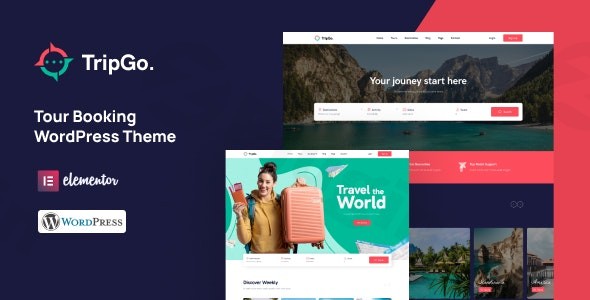
Embark on a digital journey to create an exceptional online presence for your travel business with Tripgo, a premium tour booking WordPress theme. Designed meticulously for travel agencies, tour operators, and booking platforms, Tripgo offers an elegant, feature-rich solution to showcase your services and manage reservations seamlessly. Its design philosophy centers on presenting stunning travel experiences and simplifying the booking process, making it an ideal choice for businesses looking to elevate their online travel offerings.
Key Features: Design, Layout & Performance for Your Travel Site
Tripgo isn’t just a theme; it’s a comprehensive platform built to highlight your tours and streamline your operations. It combines aesthetic appeal with powerful functionality to provide an excellent user experience.
Design & Layout Options: Visually Captivating Travel Showcases
Tripgo comes equipped with a range of specialized layouts tailored for the travel industry:
- Diverse Homepage Demos: Get started quickly with 3 unique homepage demo designs, each crafted to immediately grab visitors’ attention and encourage exploration of your travel packages.
- Comprehensive Tour Listings: Showcase your tours with dedicated listing and detail pages, designed to present all necessary information clearly, including itineraries, pricing, and stunning imagery.
- Travel Destination Pages: Create captivating pages to highlight specific destinations, inspiring potential travelers and providing in-depth information.
- Integrated Blog: Share travel stories, tips, and updates with an integrated blog, enhancing your content marketing and SEO efforts.
- Mobile-Responsive Design: With a mobile-first approach, Tripgo ensures your website looks flawless and performs optimally on any device, from desktops to smartphones, providing a consistent user experience.
Customization Capabilities: Tailor Your Brand’s Identity
Personalizing your travel website to match your brand’s unique identity is straightforward with Tripgo:
- Unlimited Color Settings: Take full control of your site’s aesthetics with unlimited color options, allowing you to align the theme perfectly with your brand palette.
- Diversified Typography: Choose from a wide range of typography options to ensure your content is not only readable but also reflects your brand’s voice and style.
- Intuitive Page Building with Elementor: Built with the Elementor Drag & Drop Page Builder, Tripgo offers unparalleled flexibility in designing and customizing your pages without needing to write a single line of code. This visual interface makes tweaking layouts, sections, and content a breeze.
Performance & SEO Features: Speed, Stability & Search Visibility
In the competitive online travel market, performance and search engine visibility are paramount. Tripgo is engineered to deliver:
- Fast Loading Performance: Optimized for speed, Tripgo ensures your site loads quickly, reducing bounce rates and improving user satisfaction. This is crucial for retaining visitors and enhancing conversion rates.
- SEO Readiness: The theme is built with clean, semantic code and structured layouts that are favorable for search engine optimization. This helps your travel agency rank higher in search results, attracting more organic traffic.
- Robust Technical Foundation: Tripgo is compatible with the latest WordPress versions (6.x and above recommended) and supports PHP 7.x and 8.x (PHP 8.1.x recommended), ensuring a stable and secure environment for your booking platform.
Installation & Demo Import: Launch Your Travel Site Effortlessly
Getting your Tripgo-powered travel website up and running is designed to be a smooth process, even for those new to WordPress.
- Install & Activate the Theme:
- Once you’ve purchased Tripgo from ZeroPlugin.com, download the theme files.
- Navigate to your WordPress dashboard: Appearance > Themes > Add New > Upload Theme.
- Choose the
tripgo.zipfile, install, and then Activate the theme.
- Install Required Companion Plugins:
- Upon activation, Tripgo will prompt you to install its recommended plugins. The most crucial for its core functionality is the BRW Booking Rental Plugin. This powerful booking system handles all your tour reservations.
- Install and activate all required plugins to ensure full theme functionality.
- One-Click Demo Import:
- Tripgo features a one-click demo import option, allowing you to replicate one of the stunning demo sites on your own installation. This is a fantastic way to quickly set up a professional-looking site.
- Look for an option like “Demo Import” or “Import Sample Data” in your WordPress dashboard, usually found under Appearance or a dedicated theme menu.
- Select your preferred demo and initiate the import.
- Post-Import Expectations:
- After the import completes, your site will have the demo content, layouts, menus, and widgets already configured.
- You’ll then replace the demo content with your own tours, destinations, images, and text. Be aware that large demo imports may require adequate server memory and execution time. If you encounter issues, increase your PHP limits (e.g.,
max_execution_time,memory_limit) via your hosting provider orwp-config.php.
Customization Guide: Branding & Layout with Ease
Tailoring Tripgo to perfectly represent your travel brand is made intuitive through its integration with the WordPress Customizer and the Elementor page builder.
- WordPress Customizer: For global styles like colors, typography, and site identity, head to Appearance > Customize. Here, you can experiment with unlimited color schemes, choose from diversified typography options (including Google Fonts), and upload your logo in real-time.
- Elementor Page Builder: For specific page layouts and content, Elementor is your primary tool. You can open any page in Elementor to drag-and-drop elements, customize sections, and fine-tune every visual aspect. This includes customizing headers and footers to some extent, and leveraging the theme’s MegaMenu support for advanced navigation.
- Setting Your Homepage and Blog Page: After demo import, these pages should be set. If not, go to Settings > Reading to select your static homepage and posts page (for your blog).
- Menu Management: Configure your navigation menus under Appearance > Menus. You can assign different menus to various locations, including the primary navigation that might feature Tripgo’s MegaMenu capabilities.
FAQ & Troubleshooting
Here are some common questions about the Tripgo WordPress theme:
Is Tripgo compatible with Elementor, Gutenberg, and WooCommerce?
Yes, Tripgo is primarily built with Elementor Drag & Drop Page Builder, ensuring full compatibility and easy visual customization. While its primary page builder is Elementor, it is tested with the latest WordPress versions, which generally implies basic compatibility with the Gutenberg Block Editor for standard content. Additionally, Tripgo seamlessly integrates with WooCommerce for secure payment processing and e-commerce functionalities, making it ideal for selling tour packages.
Does Tripgo support child themes?
Yes, Tripgo includes a child theme (tripgo-child.zip) in its theme package. Using a child theme is highly recommended for making any custom code modifications, as it ensures that your changes will not be overwritten when you update the main Tripgo theme.
How can I update Tripgo without losing my customizations?
To update Tripgo without losing your customizations, always perform your modifications within a child theme. For other content or settings, ensure you have a backup of your website before performing any updates. Most theme updates can be done directly from your WordPress dashboard, or by manually uploading the new theme files via FTP, overwriting the old ones (if using a child theme).
What should I do if the demo import fails or looks different from the demo site?
If the demo import fails, first check your server’s PHP configuration. Ensure max_execution_time, max_input_time, post_max_size, and upload_max_filesize are set to recommended values (e.g., 180, 600, 60M, 60M respectively) by contacting your hosting provider. If the import looks different, it’s often due to missing plugins (ensure all recommended plugins are installed and active) or image licensing/placeholder differences. You may need to manually assign menus or set a static homepage after import.
What is the BRW Booking Rental Plugin included with Tripgo?
The BRW Booking Rental Plugin is a premium, powerful booking system seamlessly integrated with Tripgo. It provides comprehensive reservation management features, including calendar availability, flexible pricing options (adults, children, seasonal), deposit options, and secure payment processing through WooCommerce. It allows you to manage tours, orders, and customer bookings efficiently directly from your WordPress dashboard.
Conclusion: Your Ultimate Partner for Online Travel Booking
Tripgo stands out as an exceptionally designed and functionally robust tour booking WordPress theme for any travel business aiming for a professional online presence. Its elegant layouts, coupled with the integrated BRW Booking Rental Plugin, provide a complete solution for showcasing tours, managing bookings, and accepting payments.With Elementor integration for effortless customization, a mobile-responsive design for universal accessibility, and a focus on fast loading performance and SEO readiness, Tripgo offers a solid foundation for high conversions and strong search engine visibility.Whether you are a bustling travel agency, an independent tour operator, or a growing booking platform, Tripgo offers the tools and aesthetic appeal to attract and convert customers effectively. It’s an excellent choice for users who prioritize a specialized, all-in-one solution for the travel and tourism industry, offering a powerful, ready-to-use booking system without the complexity of integrating multiple third-party plugins. Elevate your travel business with Tripgo’s beautiful design and powerful functionality.
I. Download Limits & Account Benefits
- Free Downloads: Each email address receives 3 downloads per day for free products
- Upgrade Benefits: Purchase any paid product to increase your daily download limit by 3 for each paid product
- No Account Required: You can download immediately by receiving the download link via email
- Account Recommended: Create an account for easier access to your order history and direct update downloads
II. Understanding GPL vs Official Versions
Important: The products available on WPPick are GPL-licensed versions, which differ from official developer versions. Before purchasing, please read our comprehensive guide: Understanding GPL & Official Differences at WPPick
Key Points:
- GPL versions may not include premium support from original developers
- Updates may be delayed compared to official releases
- Some premium features might have limitations
- Always consider your specific needs and support requirements
III. Support & Assistance
We’re here to help through multiple channels:
- Email Support: Direct email assistance for all inquiries
- Live Chat: Real-time support during business hours
- Comprehensive Documentation: Detailed guides and tutorials
IV. Order Tracking
Access your complete purchase history and download links anytime: Order History
V. Account Access
New to WPPick? Login or Create Account to manage your downloads and orders efficiently.
VI. Refund Protection
We stand behind our products with a clear refund policy. Review our terms: Refund Policy
VII. Privacy & Security
Your data security is our priority. Learn how we protect your information: Privacy Policy
VII. Terms of Service
Understanding our service terms ensures a smooth experience: Terms of Use
Quick Tips for Best Experience
- Verify Compatibility: Check plugin/theme compatibility with your WordPress version
- Backup First: Always backup your site before installing new plugins or themes
- Test Environment: Consider testing on a staging site first
- Stay Updated: Regularly check for updates in your account dashboard
- Read Documentation: Review any included documentation for optimal setup
Need Help?
If you have questions about downloads, licensing, or need technical assistance, don’t hesitate to contact our support team. We’re committed to ensuring you have the best possible experience with WPPick products.
Ready to get started? Your download adventure begins with just one click!
- Update theme to version 1.6.0
- Update Travel and Tour Booking plugin version 2.0.2
- Update the HTML tags for the product title.
- Update theme to version 1.5.3
- Update OvaTheme Events plugin version 1.3.0
- Fix search events
- Update Travel and Tour Booking plugin version 1.9.5
- Fix elements
- Update theme to version 1.4.8
- Update Travel and Tour Booking plugin version 1.4.0
- Add new date picker
- Add header & footer options for each product
- Add quantity for resources & services
- Add quantity for custom checkout fields
- Add guest information options
- Add insurance by each guest
- Add new menu in dashboard
- Add booking calendar
- Add enquiry form shortcode option
- Validation product meta-boxes
- Update validation for booking & request forms
- Update cart & checkout blocks
- Update elements
- Update tour booking settings
- Fix security
- Fix create new booking
- Fix CSS
- Update Ovatheme MegaMenu plugin version 1.0.1
- Update OvaTheme Events plugin version 1.0.2
- Update OvaTheme Destination plugin version 1.1.2
- Fix security