

Truth – Full Site Editing (fse) Blog WordPress Theme
/Year
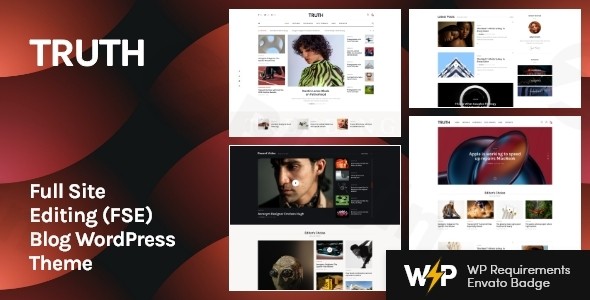
The Truth WordPress Theme is a cutting-edge Full Site Editing (FSE) WordPress Theme designed specifically for creators who want total control over their digital footprint. Built from the ground up to leverage the power of the WordPress block editor (Gutenberg), Truth offers a clean, sophisticated aesthetic that prioritizes content readability and visual hierarchy. Whether you are a professional journalist, a niche blogger, or a small business owner, this theme provides a “source of truth” for your brand by combining high-end design with the technical flexibility of modern WordPress standards.
Key Features: Design, Layout & Performance
As a premier FSE Blog Theme, Truth moves away from the restrictive settings of traditional themes and embraces the freedom of blocks. This means every element you see on the screen can be moved, edited, or removed without touching a single line of code.
1. Advanced Layout Options
The Truth theme is 100% responsive and mobile-friendly, ensuring your site looks impeccable on smartphones, tablets, and desktops. It supports both boxed and full-width layouts, giving you the flexibility to create a tight, professional corporate blog or an expansive, immersive magazine experience.
2. Full Site Editing (FSE) & Global Styles
Because Truth is a Gutenberg Compatible Theme, it utilizes the Site Editor (formerly known as the Full Site Editing interface). You can manage your global styles—such as color palettes and typography—in one centralized location. With integration for over 750 Customizer options and Google Fonts, branding your site is limited only by your imagination.
3. Performance & SEO Readiness
Performance is not an afterthought with Truth. It is built to be a Lightweight FSE WordPress Theme, optimized for fast loading speeds and high scores on Google PageSpeed Insights.
- Clean Markup: The theme uses semantic HTML5 and CSS3 code.
- SEO Friendly: It features a structured heading hierarchy and is compatible with major SEO plugins like Yoast or Rank Math.
- Mobile First: Optimized for the “Core Web Vitals” that search engines prioritize today.
4. Comprehensive Plugin Compatibility
While Truth shines as a standalone blog theme, it is fully compatible with:
- WooCommerce: Perfect for bloggers looking to sell merchandise or digital products.
- Kadence Blocks: Adds even more advanced layout capabilities to the Gutenberg editor.
- MailChimp for WordPress: For seamless newsletter integration.
– ThemeREX Addons: Enhances the core functionality with proprietary tools for post management and social integration.
Installation & Demo Import Guide
Setting up the Truth WordPress Theme is designed to be a frictionless experience, even for beginners. Follow these steps to get your site live:
- Install & Activate: Upload the theme folder via Appearance > Themes > Add New in your WordPress dashboard.
- Required Plugins: Upon activation, you will be prompted to install required companion plugins like ThemeREX Addons and Kadence Blocks. Ensure these are active to unlock the full feature set.
- One-Click Demo Import: Navigate to the theme’s dashboard (usually under Appearance or a dedicated ThemeREX menu). Use the One-Click Demo Installation feature to import pre-designed pages, posts, and media.
- Configuration: Once the import is complete, your menus, widgets, and homepage will be configured to match the live demo.
Pro Tip: Ensure your hosting environment has sufficient memory (at least 256MB) to avoid timeouts during the demo content import process.
Customization Guide: Personalizing Your Blog
Customizing a Modern FSE theme for a personal blog is different from the old WordPress way. Instead of hunting through endless tabs in the Customizer, you will spend most of your time in the Site Editor.
How to Customize Header Truth Theme
To modify your header, go to Appearance > Editor. Click on the Header area to open the template part. Here, you can:
- Swap the logo for your own.
- Change the background color or add a transparency effect.
- Rearrange navigation menus using the “Navigation Block.”
- Add social media icons or a search bar directly into the header layout.
Global Styles and Typography
Within the Site Editor, click the “Styles” (half-moon) icon. This allows you to set a universal font family and color scheme. These settings will automatically apply to every page on your site, ensuring visual consistency across your blog posts, archive pages, and contact forms.
FAQ & Troubleshooting
Is Truth theme good for WooCommerce?
Yes, the Truth theme is fully compatible with WooCommerce. It includes styled templates for shop pages, single product views, and checkout flows, making it an excellent choice for a blog-shop hybrid.
Is Truth compatible with page builders like Elementor?
While Truth is built primarily for the Gutenberg Block Editor and Full Site Editing, it can work with major page builders. However, to get the most out of its lightweight performance, we recommend using the native Block Editor and Kadence Blocks.
Does the Truth theme support child themes?
Yes. Supporting child themes is a standard practice for ThemeREX themes. Using a child theme is highly recommended if you plan to make advanced code-level customizations, as it prevents your changes from being overwritten during theme updates.
What should I do if the demo import looks different?
If your site doesn’t match the demo after import, check if all required plugins (especially ThemeREX Addons) are active. Additionally, ensure your “Reading Settings” are set to display a “Static Page” for your homepage.
Conclusion: Is Truth the Right Choice for You?
The Truth WordPress Theme stands out as a top-tier choice for users who want to embrace the future of WordPress. Its deep integration with Full Site Editing provides a level of design flexibility that was previously only available through heavy, bloat-prone page builders.The Verdict:
- For Bloggers: It is arguably one of the best WordPress themes for bloggers who value a clean, modern aesthetic.
- For Agencies: Its performance and SEO-ready code make it a reliable foundation for client projects.
- For Beginners: The one-click demo import and intuitive block-based editing reduce the learning curve significantly.If you are looking for a fast, responsive, and future-proof theme that lets your content take center stage, Truth is a compelling “source of truth” for your next web project. Visit wppick.com for more insights into the latest WordPress trends and tools.
I. Download Limits & Account Benefits
- Free Downloads: Each email address receives 3 downloads per day for free products
- Upgrade Benefits: Purchase any paid product to increase your daily download limit by 3 for each paid product
- No Account Required: You can download immediately by receiving the download link via email
- Account Recommended: Create an account for easier access to your order history and direct update downloads
II. Understanding GPL vs Official Versions
Important: The products available on WPPick are GPL-licensed versions, which differ from official developer versions. Before purchasing, please read our comprehensive guide: Understanding GPL & Official Differences at WPPick
Key Points:
- GPL versions may not include premium support from original developers
- Updates may be delayed compared to official releases
- Some premium features might have limitations
- Always consider your specific needs and support requirements
III. Support & Assistance
We’re here to help through multiple channels:
- Email Support: Direct email assistance for all inquiries
- Live Chat: Real-time support during business hours
- Comprehensive Documentation: Detailed guides and tutorials
IV. Order Tracking
Access your complete purchase history and download links anytime: Order History
V. Account Access
New to WPPick? Login or Create Account to manage your downloads and orders efficiently.
VI. Refund Protection
We stand behind our products with a clear refund policy. Review our terms: Refund Policy
VII. Privacy & Security
Your data security is our priority. Learn how we protect your information: Privacy Policy
VII. Terms of Service
Understanding our service terms ensures a smooth experience: Terms of Use
Quick Tips for Best Experience
- Verify Compatibility: Check plugin/theme compatibility with your WordPress version
- Backup First: Always backup your site before installing new plugins or themes
- Test Environment: Consider testing on a staging site first
- Stay Updated: Regularly check for updates in your account dashboard
- Read Documentation: Review any included documentation for optimal setup
Need Help?
If you have questions about downloads, licensing, or need technical assistance, don’t hesitate to contact our support team. We’re committed to ensuring you have the best possible experience with WPPick products.
Ready to get started? Your download adventure begins with just one click!
No changelog available.