

Turitor – Lms & Education WordPress Theme
/Year
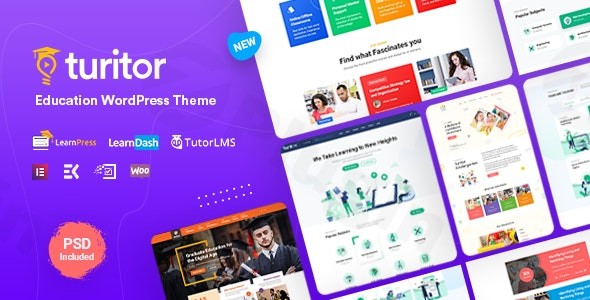
Building a professional educational platform requires a delicate balance between complex functionality and an inviting user interface. The Turitor WordPress theme is a specialized LMS WordPress theme designed to meet these exact needs, offering a modern, feature-rich environment for schools, universities, and independent course creators. With its unique aesthetic and deep integration with leading learning management systems, Turitor positions itself as a premier choice for anyone looking to launch a high-quality e-learning portal.
1. Introduction: Modern Design for Modern Educators
Turitor is not just another multipurpose skin; it is a dedicated education WordPress theme meticulously crafted for the digital classroom. Developed by ThemeXpert, it caters to a wide audience ranging from kindergartens and K-12 schools to large-scale universities and corporate training hubs. The design philosophy behind Turitor centers on a stylish Isometric Design, which provides a fresh, professional, and tech-forward look that sets it apart from traditional, flat-style educational sites. This visual hierarchy ensures that while the site looks sophisticated, the focus remains squarely on the user experience (UX) and the ease of accessing educational content.
2. Key Features: Design, Layout & Performance
Turitor combines visual flexibility with technical robustness, ensuring your site is both beautiful and functional.
Specialized Layout Options
- 6 Unique Home Variations: Whether you are running a university or a niche online academy, there is a pre-built homepage layout to match your brand.
- Multiple Course Layouts: Choose between two distinct course styles to present your curriculum in an organized and engaging manner.
- Flexible Header and Footer: With six header layouts and customizable footers, you can control the navigation flow and branding from the top down.
- Sidebar Versatility: Options for left, right, or no sidebars allow you to maximize content space where it matters most.
Deep LMS & Plugin Compatibility
Unlike generic themes, Turitor is built to work seamlessly with the “Big Three” of WordPress learning management:
- Tutor LMS, LearnDash, and LearnPress: Full compatibility with these plugins ensures you can manage quizzes, assignments, and student progress without technical friction.
- Elementor & WPBakery: Built primarily with Elementor, it allows for true drag-and-drop customization.
- WooCommerce Ready: Easily monetize your expertise by selling courses or educational materials directly through your site.
Performance & SEO Optimization
The Turitor WordPress theme is built on the Bootstrap 4 framework, ensuring a clean and lightweight codebase. It is recognized as a fast-loading WordPress education theme, which is critical for retaining students on mobile devices and improving your search engine rankings. Its SEO-friendly structure helps your courses appear higher in Google search results, making it easier for new learners to find your platform.
3. Installation & Demo Import Guide
Setting up Turitor is designed to be beginner-friendly, even for those without a development background.
- Install & Activate: Upload the Turitor theme via the WordPress Dashboard (Appearance > Themes) and activate it.
- Required Plugins: Upon activation, you will be prompted to install companion plugins, including Elements Kit, Metform, and your preferred LMS (LearnPress or Tutor LMS).
- One-Click Demo Import: Navigate to the theme options and use the One-Click Demo Import tool. This allows you to replicate the professional look of the demo sites in minutes.
- Final Checks: Once the import is complete, check your menus and widgets. Turitor typically handles the page assignments automatically, but it is always good practice to verify your homepage settings in the Customizer.Note: Ensure your server has adequate memory limits (WP Memory Limit of 256M or higher) to prevent timeouts during the demo content import process.
4. Customization Guide: Branding & Personalization
Customizing the Turitor WordPress theme to match your institution’s brand is intuitive thanks to its integration with the WordPress Customizer and Elementor.
- Global Styling: Access the Customizer to change global color schemes, typography (via Google Fonts), and logo settings. The isometric design elements can be accented with your brand’s primary colors for a cohesive look.
- Header & Footer Builder: Use the built-in builders to create bespoke navigation menus. This is particularly useful for universities that require complex mega-menus for different departments.
- Elementor Integration: Since Turitor is an Elementor compatible LMS theme, you can edit almost any section of your site visually. You can drag and drop course grids, instructor profiles, and testimonials onto any page without touching a line of code.
- Child Theme Support: Turitor is child theme compatible, which is essential for developers who want to add custom CSS or PHP functions while maintaining the ability to update the parent theme safely.
5. FAQ & Troubleshooting
Is Turitor compatible with Elementor and WPBakery?
Yes, the Turitor WordPress theme is fully compatible with both Elementor and WPBakery. Most users prefer the Elementor integration for its modern drag-and-drop interface and the included Elements Kit addons.
Does Turitor support WooCommerce for selling courses?
Yes, Turitor is fully compatible with WooCommerce. This allows you to treat your courses as digital products, use various payment gateways, and manage sales reports directly within WordPress.
Is Turitor a good theme for universities?
Absolutely. Turitor is an ideal WordPress theme for universities because of its professional isometric design, support for multiple departments via custom headers, and its ability to handle large volumes of course data through LearnDash or Tutor LMS.
How can I update the theme without losing my customizations?
To keep your customizations safe, always use a Child Theme for any code-level changes. For design changes made via the Customizer or Elementor, these are stored in the database and will remain intact when you update the parent theme.
What should I do if the demo import fails?
If a demo import fails, it is usually due to server constraints. Check your PHP “maxexecutiontime” and “memory_limit” settings. Increasing these values in your hosting control panel often resolves import issues.
6. Conclusion: The Verdict on Turitor
The Turitor WordPress theme stands out in a crowded market by offering a specific, visually distinct aesthetic—the Isometric Design—combined with deep functional support for the education sector. Who is it for?
- Agencies & Freelancers: Building high-end educational sites for clients quickly.
- Independent Instructors: Looking for a professional, “non-template” look to sell their courses.
- Schools & Academies: Needing a robust, SEO-optimized platform to manage student enrollment and curriculum.With its focus on performance, SEO readiness, and ease of use through Elementor, Turitor is a top-tier choice for anyone serious about e-learning. Whether you are building a simple course site or a complex university portal, Turitor provides the tools to succeed in the competitive online education space.For more WordPress theme reviews and SEO strategies, visit wppick.com.
I. Download Limits & Account Benefits
- Free Downloads: Each email address receives 3 downloads per day for free products
- Upgrade Benefits: Purchase any paid product to increase your daily download limit by 3 for each paid product
- No Account Required: You can download immediately by receiving the download link via email
- Account Recommended: Create an account for easier access to your order history and direct update downloads
II. Understanding GPL vs Official Versions
Important: The products available on WPPick are GPL-licensed versions, which differ from official developer versions. Before purchasing, please read our comprehensive guide: Understanding GPL & Official Differences at WPPick
Key Points:
- GPL versions may not include premium support from original developers
- Updates may be delayed compared to official releases
- Some premium features might have limitations
- Always consider your specific needs and support requirements
III. Support & Assistance
We’re here to help through multiple channels:
- Email Support: Direct email assistance for all inquiries
- Live Chat: Real-time support during business hours
- Comprehensive Documentation: Detailed guides and tutorials
IV. Order Tracking
Access your complete purchase history and download links anytime: Order History
V. Account Access
New to WPPick? Login or Create Account to manage your downloads and orders efficiently.
VI. Refund Protection
We stand behind our products with a clear refund policy. Review our terms: Refund Policy
VII. Privacy & Security
Your data security is our priority. Learn how we protect your information: Privacy Policy
VII. Terms of Service
Understanding our service terms ensures a smooth experience: Terms of Use
Quick Tips for Best Experience
- Verify Compatibility: Check plugin/theme compatibility with your WordPress version
- Backup First: Always backup your site before installing new plugins or themes
- Test Environment: Consider testing on a staging site first
- Stay Updated: Regularly check for updates in your account dashboard
- Read Documentation: Review any included documentation for optimal setup
Need Help?
If you have questions about downloads, licensing, or need technical assistance, don’t hesitate to contact our support team. We’re committed to ensuring you have the best possible experience with WPPick products.
Ready to get started? Your download adventure begins with just one click!
- Patchstack File Inclusion Vulnerability Fixed