

Typology – Text Based Minimal WordPress Blog Theme
/Year
Introduction: The Power of Words with Typology
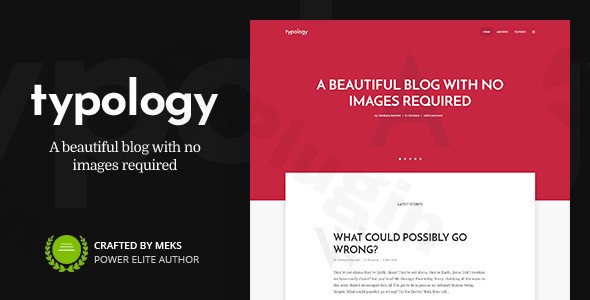
In a digital landscape often dominated by visual excess, the Typology WordPress theme stands out as a sophisticated, minimalist WordPress theme crafted for those who believe in the enduring power of the written word. Designed for writers, journalists, authors, and content creators, Typology transforms your blog into an elegant, highly readable experience by prioritizing exceptional typography and a clean, distraction-free aesthetic. If your content is king, Typology provides the throne it deserves, ensuring your message resonates without visual clutter.This theme is ideal for professional bloggers, content-focused publications, educational platforms, and authors showcasing their work, offering a streamlined platform where words take center stage.
Key Features: Design, Layout & Performance for Content Creators
Typology is meticulously engineered to provide a superb reading experience and flexible design options while maintaining optimal performance.
Design & Layout Options
Typology offers remarkable design flexibility, allowing you to tailor your site’s appearance without compromising its minimalist ethos. You can choose between material design and flat aesthetics, giving you control over the visual depth and style. The theme provides multiple post layouts to present your articles engagingly, whether you prefer classic blog lists, grid formats, or other text-centric arrangements. The homepage is fully customizable with various sections to highlight different content types, ensuring your most important articles are always visible. Critically, its responsive design guarantees a flawless display across all devices, from large desktop monitors to tablets and mobile phones, adapting seamlessly to any screen size.
Customization Capabilities
One of Typology’s strongest suits is its comprehensive customization toolkit, empowering you to brand your site without needing to code.
- Typography Controls: As a “typography-first” theme, Typology provides unlimited font combinations and granular control over font sizes, weights, and line spacing for both body text and headings, ensuring optimal readability and a unique brand voice.
- Color Customization: Beyond fonts, you have comprehensive color customization options, allowing you to perfectly match your brand identity with a refined, minimalist palette.
- Advanced Options Panel: An intuitive theme options panel makes deep customization accessible for users of all skill levels, enabling you to fine-tune your site’s appearance and functionality with ease.
Performance & SEO Features
A truly effective blog must also be fast and searchable. Typology is built with performance in mind:
- Lightweight & Fast-Loading: Its minimalist nature and clean code contribute to a lightweight WordPress theme that boasts excellent Core Web Vitals scores, ensuring quick loading times and a smooth user experience.
- SEO-Friendly Structure: The theme incorporates schema markup and semantic HTML, providing a robust foundation for better search engine visibility. Its structure helps search engines understand your content, making it a truly SEO-friendly choice.
- Mobile Responsiveness: Beyond just scaling, Typology is designed to be touch-friendly, delivering a desktop-like browsing experience on mobile devices.
Installation & Demo Import: Get Started Quickly
Setting up your Typology WordPress theme is a straightforward process designed for efficiency.
- Install & Activate the Theme:
- First, purchase and download the Typology theme package from a trusted provider like ZeroPlugin.com.
- Log in to your WordPress dashboard.
- Navigate to
Appearance > Themes > Add New > Upload Theme. - Select the
typology.zipfile from your download and clickInstall Now. - Once installed, click
Activate.
- Install Required Companion Plugins:
- Upon activation, Typology will likely recommend installing a few companion plugins (e.g., for demo import functionality or specific theme features). Follow the on-screen prompts to install and activate these.
- Use One-Click Demo Content Import:
- Typology features a one-click demo content import. This is crucial for quickly mirroring the beautiful layouts you see in the theme’s live demos.
- Navigate to the theme’s dedicated options panel (often under
Appearance > Theme Optionsor a similar menu item). - Look for an option labeled
Demo ContentorImport Demo. Follow the instructions to import the demo data. - Tip: If you encounter issues during demo import (e.g., timeouts), ensure your server’s PHP memory limit and execution time are sufficient. Check your host’s documentation or contact their support.
- What to Expect:
- After a successful import, your website will be populated with demo posts, pages, menus, and widgets, replicating the theme’s demonstration site. This provides an excellent starting point, ready for you to replace with your own content and personalize further.
Customization Guide: Branding & Layout for Your Content
Typology simplifies the branding and layout customization process, allowing you to personalize your site without needing extensive technical knowledge.
- WordPress Customizer: The primary hub for customization is the native WordPress Customizer (
Appearance > Customize). Here, you can intuitively adjust:- Colors: Fine-tune your site’s color scheme, including accent colors, text colors, and background hues, to perfectly match your brand.
- Fonts: Leverage Typology’s advanced typography options to select from unlimited font combinations and set sizes, weights, and line heights for headings and body text, ensuring optimal readability and aesthetic appeal. This makes it a truly typography-focused WordPress theme.
- Logo & Site Identity: Easily upload your logo and set your site title and favicon.
- Header/Footer Layouts: While specific builders are not mentioned, the theme provides options to display search and social menus in the header, contributing to a clean and functional design.
- Setting Up Your Homepage and Blog Page: Typology offers flexible options to create dynamic homepages with customizable sections. You can easily designate a static page as your homepage or display your latest posts, using the theme’s built-in content presentation tools to highlight different content types.
- Intuitive Experience: The overall customization experience is designed to be user-friendly, allowing you to see changes in real-time within the Customizer. This makes it easy to experiment and achieve your desired look and feel, even for those new to WordPress.
FAQ & Troubleshooting
Is Typology compatible with page builders like Elementor or WPBakery?
Typology is a text-based WordPress theme that focuses on its own integrated customization options and flexible shortcodes for complex layouts. While it supports styling for WordPress blocks (Gutenberg), it is not prominently advertised as being optimized for or heavily reliant on third-party page builders like Elementor or WPBakery. Users heavily reliant on these page builders for design might find its approach different from themes built specifically around them.
Is Typology theme good for WooCommerce for online stores?
Yes, Typology fully supports WooCommerce, allowing you to integrate a complete e-commerce solution into your website. This makes it suitable for authors selling books, content creators offering digital products, or any minimalist store owner who prioritizes clean product presentation alongside blog content.
How do I update the Typology theme without losing my customizations?
To update the Typology theme without losing your customizations, it is highly recommended to use a child theme. A child theme inherits all the functionality and styling of the parent Typology theme but allows you to make modifications (CSS, functions, templates) in the child theme’s files. When you update the main Typology theme, your customizations in the child theme remain untouched. Always back up your site before performing any updates.
How to set up homepage in Typology theme?
To set up your homepage in the Typology theme, you typically navigate to Settings > Reading in your WordPress dashboard. Here, you can choose whether your homepage displays your latest posts or a static page. If you select a static page, you’ll then choose which page acts as your homepage and which one serves as your blog posts page. Typology also offers customizable homepage sections via its theme options, allowing you to feature different content types dynamically.
What is the Typology theme GPL license?
The Typology theme is distributed under the GNU General Public License (GPL) v3.0. This means that once acquired, you have the freedom to use, modify, and redistribute the theme on an unlimited number of websites. When you acquire Typology through authorized providers like ZeroPlugin.com, you receive genuine GPL-licensed software with regular updates and security patches.
Conclusion: Your Content, Unfiltered and Beautiful
The Typology WordPress theme is an exemplary choice for anyone seeking a sophisticated, clean blog WordPress theme that puts content first. Its commitment to a typography-focused WordPress theme design, coupled with its lightweight nature and SEO readiness, makes it an ideal platform for authors, journalists, and content marketers who want their words to shine.With its intuitive customization options, including extensive font and color controls, and its seamless mobile responsiveness, Typology empowers users to create a professional online presence with minimal fuss. While it may not cater to those heavily reliant on visual page builders, its focused approach ensures unparalleled readability and elegant presentation for text-heavy sites. For bloggers, writers, and publishers who appreciate refined aesthetics and powerful content delivery, Typology offers a compelling and highly effective solution.
I. Download Limits & Account Benefits
- Free Downloads: Each email address receives 3 downloads per day for free products
- Upgrade Benefits: Purchase any paid product to increase your daily download limit by 3 for each paid product
- No Account Required: You can download immediately by receiving the download link via email
- Account Recommended: Create an account for easier access to your order history and direct update downloads
II. Understanding GPL vs Official Versions
Important: The products available on WPPick are GPL-licensed versions, which differ from official developer versions. Before purchasing, please read our comprehensive guide: Understanding GPL & Official Differences at WPPick
Key Points:
- GPL versions may not include premium support from original developers
- Updates may be delayed compared to official releases
- Some premium features might have limitations
- Always consider your specific needs and support requirements
III. Support & Assistance
We’re here to help through multiple channels:
- Email Support: Direct email assistance for all inquiries
- Live Chat: Real-time support during business hours
- Comprehensive Documentation: Detailed guides and tutorials
IV. Order Tracking
Access your complete purchase history and download links anytime: Order History
V. Account Access
New to WPPick? Login or Create Account to manage your downloads and orders efficiently.
VI. Refund Protection
We stand behind our products with a clear refund policy. Review our terms: Refund Policy
VII. Privacy & Security
Your data security is our priority. Learn how we protect your information: Privacy Policy
VII. Terms of Service
Understanding our service terms ensures a smooth experience: Terms of Use
Quick Tips for Best Experience
- Verify Compatibility: Check plugin/theme compatibility with your WordPress version
- Backup First: Always backup your site before installing new plugins or themes
- Test Environment: Consider testing on a staging site first
- Stay Updated: Regularly check for updates in your account dashboard
- Read Documentation: Review any included documentation for optimal setup
Need Help?
If you have questions about downloads, licensing, or need technical assistance, don’t hesitate to contact our support team. We’re committed to ensuring you have the best possible experience with WPPick products.
Ready to get started? Your download adventure begins with just one click!
- Tested for WordPress 6.9+ compatibility
- Tested for PHP 8.2+ compatibility
- Several minor styling issues