

Ubella – Model Agency WordPress Theme
/Year
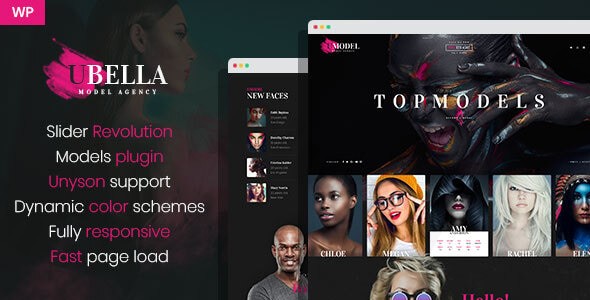
In the highly competitive world of fashion and talent management, a striking digital presence isn’t just an asset—it’s a necessity. The Ubella WordPress Theme is a premium, visually-driven solution designed specifically to meet the needs of the modern Model Agency WordPress Theme market. Whether you are managing a high-end agency roster or building a personal portfolio, Ubella provides the elegant, high-performance framework required to showcase visual talent with professional flair.
Key Features: Design, Layout, and Performance
Ubella is engineered for industries where aesthetics are paramount. Its design philosophy centers on “visual storytelling,” ensuring that high-resolution imagery and model portfolios take center stage without being overshadowed by cluttered UI.
Versatile Layout Options
Ubella stands out with its large set of portfolio styles, allowing agencies to display their talent in various formats, from classic grids to more experimental creative layouts. The theme offers:
- Light and Dark Demo Versions: Choose a sleek, high-fashion dark aesthetic or a clean, editorial light theme to match your brand identity.
- Customizable Sidebars: Includes options for left, right, or no-sidebar layouts to maximize the focus on your galleries.
- Dynamic Color Schemes: Easily adjust the visual tone of your site to align with specific branding or seasonal fashion campaigns.
Tailored for Talent Management
Unlike generic business themes, Ubella is built with the specific needs of modeling and talent agencies in mind. It supports custom post types specifically for model profiles, making it easy to categorize talent by gender, age, or specialty.
Performance and SEO Readiness
In an era of AI-driven search (SGE and Perplexity), speed and technical optimization are critical. Ubella is a lightweight WordPress theme for agencies that prioritizes clean markup. It is:
- SEO-Ready: Built with a structure that helps search engines index your portfolio items and model profiles efficiently.
- Mobile-Friendly: Fully responsive and cross-browser compatible, ensuring your site looks flawless on iPhones, tablets, and desktops.
* Cross-Browser Compatible: Tested across all modern browsers to guarantee a consistent user experience.
Installation & Demo Import: Getting Started
Setting up the Ubella theme is designed to be accessible for both beginners and experienced developers. To recreate the professional look seen in the official demos, follow these steps:
- Theme Upload: After purchasing Ubella, navigate to your WordPress Dashboard > Appearance > Themes > Add New > Upload. Select the
ubella.zipfile. - Plugin Activation: Upon activation, the theme will prompt you to install required companion plugins, including the theme’s specific “drag and drop builder” and portfolio extensions.
- One-Click Demo Import: Ubella includes a demo content importer. Go to the theme options panel and select your preferred demo (Light or Dark).
- Wait for Completion: The importer will fetch images, menus, and page layouts. Pro Tip: Ensure your server’s PHP execution time and memory limit are set high enough (256M+) to avoid timeouts during the import process.
Customization Guide: Branding & Layout
The Ubella theme customization options are robust yet intuitive, centered around a drag-and-drop workflow that requires no coding knowledge.
Branding Your Agency
To personalize your site, visit the WordPress Customizer. Here, you can upload your agency logo, set your primary brand colors using the dynamic color picker, and select typography that reflects your agency’s “vibe”—whether it’s a bold serif for high-fashion or a minimalist sans-serif for commercial talent.
Building Your Model Roster
The heart of Ubella is its portfolio system. When setting up your homepage:
- Use the Drag-and-Drop Builder to create sections for “Featured Models,” “New Faces,” or “Latest Projects.”
- Utilize Custom Post Types to ensure each model has a dedicated profile page containing their stats (height, eye color, etc.) and a high-quality gallery.
FAQ & Troubleshooting
Is the Ubella WordPress Theme compatible with Elementor or WPBakery?
Ubella includes its own integrated drag-and-drop builder designed specifically for its portfolio styles. While it focuses on its proprietary system for maximum performance, its clean code generally allows for high compatibility with other block-based tools and standard WordPress editing.
Does Ubella support WooCommerce for selling services or merchandise?
While Ubella is primarily a portfolio and agency theme, it can be extended. Basic WooCommerce integration is possible for agencies looking to sell merchandise or photo packages; however, specialized features like booking systems or VIP memberships can be integrated by contacting the support team for custom extensions.
Is Ubella good for SEO?
Yes. Ubella is built with clean, semantic markup, making it SEO-ready. This ensures that search engines can easily crawl your model profiles and portfolio items, giving your agency a better chance of ranking for niche-specific keywords.
Does it support child themes?
Yes, using a child theme with Ubella is highly recommended. This allows you to make custom CSS or PHP changes that will not be overwritten when the main theme is updated.
Conclusion: Is Ubella Right for You?
The Ubella WordPress Theme is a powerhouse for anyone in the fashion, modeling, or creative agency space. Its standout feature is its ability to balance high-end visual design with functional talent management tools. Why choose Ubella?
- For Agencies: It provides the professional infrastructure needed to manage a large roster of talent effectively.
- For Models & Photographers: It offers a “digital portfolio” feel that mimics high-end fashion magazines.
- For Developers: It provides a clean, performance-oriented foundation that is easy to customize.If you are looking for a fashion WordPress theme that combines elegance with ease of use, Ubella is a top-tier choice. Its high user rating (4.91 stars) and specialized focus on the modeling industry make it a reliable investment for building a world-class agency website.For more WordPress theme reviews and SEO strategies, visit wppick.com.
I. Download Limits & Account Benefits
- Free Downloads: Each email address receives 3 downloads per day for free products
- Upgrade Benefits: Purchase any paid product to increase your daily download limit by 3 for each paid product
- No Account Required: You can download immediately by receiving the download link via email
- Account Recommended: Create an account for easier access to your order history and direct update downloads
II. Understanding GPL vs Official Versions
Important: The products available on WPPick are GPL-licensed versions, which differ from official developer versions. Before purchasing, please read our comprehensive guide: Understanding GPL & Official Differences at WPPick
Key Points:
- GPL versions may not include premium support from original developers
- Updates may be delayed compared to official releases
- Some premium features might have limitations
- Always consider your specific needs and support requirements
III. Support & Assistance
We’re here to help through multiple channels:
- Email Support: Direct email assistance for all inquiries
- Live Chat: Real-time support during business hours
- Comprehensive Documentation: Detailed guides and tutorials
IV. Order Tracking
Access your complete purchase history and download links anytime: Order History
V. Account Access
New to WPPick? Login or Create Account to manage your downloads and orders efficiently.
VI. Refund Protection
We stand behind our products with a clear refund policy. Review our terms: Refund Policy
VII. Privacy & Security
Your data security is our priority. Learn how we protect your information: Privacy Policy
VII. Terms of Service
Understanding our service terms ensures a smooth experience: Terms of Use
Quick Tips for Best Experience
- Verify Compatibility: Check plugin/theme compatibility with your WordPress version
- Backup First: Always backup your site before installing new plugins or themes
- Test Environment: Consider testing on a staging site first
- Stay Updated: Regularly check for updates in your account dashboard
- Read Documentation: Review any included documentation for optimal setup
Need Help?
If you have questions about downloads, licensing, or need technical assistance, don’t hesitate to contact our support team. We’re committed to ensuring you have the best possible experience with WPPick products.
Ready to get started? Your download adventure begins with just one click!
No changelog available.