

Unidrone – Aerial Drone Photo And Video Services Elementor Template Kit
/Year
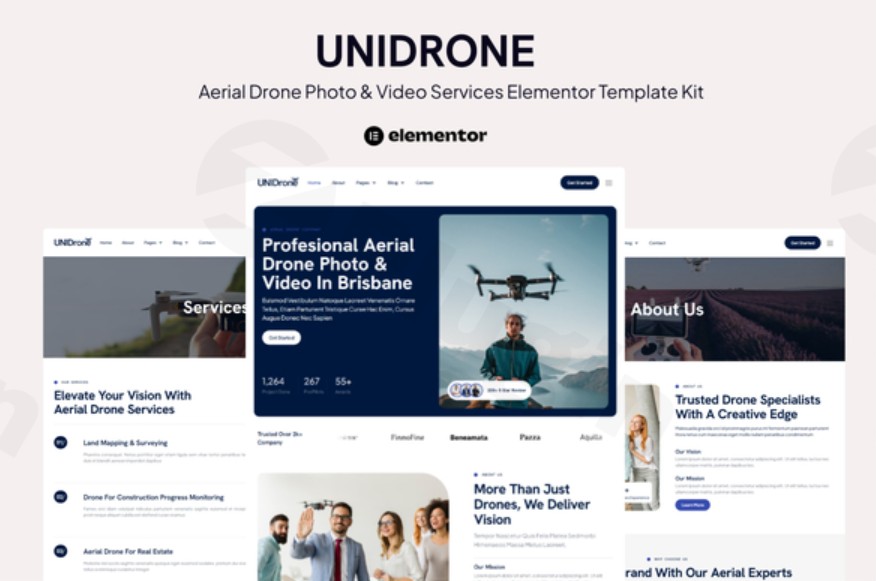
In the rapidly growing world of UAV technology, a high-quality online presence is no longer optional—it is your digital storefront. Whether you provide cinematic wedding footage, real estate surveys, or industrial inspections, the Unidrone Elementor Template Kit provides a streamlined, no-code solution to launch a high-converting aerial drone photo and video services website.
Designed specifically for the WordPress platform and the Elementor page builder, Unidrone eliminates the need for expensive web developers while maintaining a premium, modern aesthetic. By utilizing this kit, drone operators can focus on their flight maneuvers while their website handles lead generation and portfolio showcasing.
Key Features and Benefits of Unidrone
The Unidrone kit is more than just a collection of layouts; it is a strategic framework for a professional drone services website. It combines visual impact with functional sections that guide potential clients through the sales funnel.
10+ Ready-to-Use Templates
The kit includes every page necessary to run a full-scale drone business:
- Dynamic Home Page: High-impact hero sections designed to showcase stunning 4K drone footage.
- Service & Pricing Pages: Clearly define your offerings (e.g., mapping, cinematography, or roof inspections) and price points.
- Portfolio/Project Pages: Display your best work with grids that emphasize visual quality.
- Blog & Single Post Layouts: Essential for SEO and sharing industry insights or “behind-the-scenes” content.
- Contact & Team Pages: Build trust and make it easy for clients to request a quote.
Drag-and-Drop Customization
Built on the Elementor framework, Unidrone allows for complete visual editing. You can move elements, change colors to match your branding, and swap out images without writing a single line of code.
Responsive and Cross-Browser Compatible
Since many clients will browse your portfolio on tablets or smartphones, Unidrone is fully responsive. It ensures your drone videography looks just as crisp on a mobile device as it does on a desktop monitor.
Technical Specifications
Before installing, ensure your WordPress environment meets the following requirements:
- Platform: WordPress (Latest version recommended).
- Required Plugin: Elementor Pro (This kit utilizes advanced global styles and features exclusive to the Pro version).
- Supporting Plugins: ElementsKit Lite (usually bundled or prompted during import).
- Compatibility: Optimized for Chrome, Firefox, Safari, and Opera.
How to Install the Unidrone Elementor Template Kit
Setting up your drone photography WordPress template is straightforward. Follow these steps to get your site live in minutes.
- Install Necessary Plugins: Navigate to Plugins > Add New in your WordPress dashboard. Install and activate Elementor, Elementor Pro, and the Envato Elements plugin.
- Download the Kit: Obtain your Unidrone kit file (usually a .zip) from your provider.
- Import the Template Kit: Go to Elements > Installed Kits. Click the “Upload Template Kit” button and select your Unidrone zip file.
- Install Requirements: If prompted by a red banner, click “Install Requirements” to ensure all necessary global styles and supporting plugins are active.
- Import Global Styles: Import the “Global Kit Styles” first. This ensures your fonts and colors are consistent across all pages.
- Import Individual Pages: One by one, click “Import” on the Home, About, Services, and Contact templates.
- Create Your Pages: Go to Pages > Add New. Set the template to “Elementor Full Width,” click “Edit with Elementor,” and then click the folder icon to select your imported Unidrone template from “My Templates.”
Practical Usage & Best Practices
To get the most ROI from the Unidrone Elementor Template Kit, consider these real-world workflows:
- For Real Estate Photographers: Use the “Project Page” to create dedicated galleries for specific properties. Highlighting a “Before & After” section can demonstrate the value of aerial perspectives in selling homes.
- For Industrial Surveyors: Utilize the “Services” page to detail technical specs like thermal imaging or 3D mapping capabilities. Use the FAQ section to answer common questions about FAA compliance or insurance.
- For Wedding Videographers: The “Testimonials” template is your best friend. Social proof is critical in the wedding industry; ensure this section is prominent on your homepage.
- SEO Tip: When building your aerial videography website, ensure all your high-resolution drone photos have descriptive “Alt Text” containing keywords like “Aerial Drone Photography” and your local city name.
FAQ & Troubleshooting
Is Unidrone compatible with Elementor Free?
No, the Unidrone Elementor Template Kit requires Elementor Pro for its full functionality. Many of the advanced layout features and global theme styles rely on Pro-level widgets and the Theme Builder.
Can I customize the colors and fonts to match my brand?
Yes. Because Unidrone is built for Elementor, you can easily change global colors and typography through the Site Settings menu. Any changes made there will update across the entire kit automatically.
What should I do if the demo images are missing or different?
Template kits often use placeholder images due to licensing restrictions. You should replace these with your own high-quality drone footage and photography to ensure your site is unique and showcases your actual skill level.
How do I build a drone videography website with Elementor if I’m not a designer?
Unidrone is specifically designed for non-designers. By importing the pre-made layouts, the “design” work is already done. Your task is simply to replace the text and images with your business-specific content.
Conclusion: Final Verdict
The Unidrone Elementor Template Kit is an exceptional value for drone professionals who need a high-end website without the high-end price tag. Its clean, modern design and focus on service-based features make it one of the best Elementor template kits for aerial photography services available today.
If you are looking for a way to stand out in a competitive market, providing a polished, professional experience for your clients starts with your website. For more reviews and WordPress tutorials, visit wppick.com.
I. Download Limits & Account Benefits
- Free Downloads: Each email address receives 3 downloads per day for free products
- Upgrade Benefits: Purchase any paid product to increase your daily download limit by 3 for each paid product
- No Account Required: You can download immediately by receiving the download link via email
- Account Recommended: Create an account for easier access to your order history and direct update downloads
II. Understanding GPL vs Official Versions
Important: The products available on WPPick are GPL-licensed versions, which differ from official developer versions. Before purchasing, please read our comprehensive guide: Understanding GPL & Official Differences at WPPick
Key Points:
- GPL versions may not include premium support from original developers
- Updates may be delayed compared to official releases
- Some premium features might have limitations
- Always consider your specific needs and support requirements
III. Support & Assistance
We’re here to help through multiple channels:
- Email Support: Direct email assistance for all inquiries
- Live Chat: Real-time support during business hours
- Comprehensive Documentation: Detailed guides and tutorials
IV. Order Tracking
Access your complete purchase history and download links anytime: Order History
V. Account Access
New to WPPick? Login or Create Account to manage your downloads and orders efficiently.
VI. Refund Protection
We stand behind our products with a clear refund policy. Review our terms: Refund Policy
VII. Privacy & Security
Your data security is our priority. Learn how we protect your information: Privacy Policy
VII. Terms of Service
Understanding our service terms ensures a smooth experience: Terms of Use
Quick Tips for Best Experience
- Verify Compatibility: Check plugin/theme compatibility with your WordPress version
- Backup First: Always backup your site before installing new plugins or themes
- Test Environment: Consider testing on a staging site first
- Stay Updated: Regularly check for updates in your account dashboard
- Read Documentation: Review any included documentation for optimal setup
Need Help?
If you have questions about downloads, licensing, or need technical assistance, don’t hesitate to contact our support team. We’re committed to ensuring you have the best possible experience with WPPick products.
Ready to get started? Your download adventure begins with just one click!