

Unita – Marble & Tiles WordPress Theme
/Year
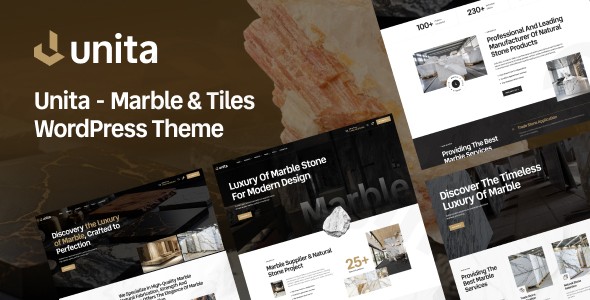
Unita is a sophisticated Marble & Tiles WordPress Theme specifically engineered for marble suppliers, tile manufacturers, flooring contractors, and interior design studios. This premium solution transforms how you present natural stone collections, ceramic tiles, and architectural surfaces to potential clients and design partners. With its elegant aesthetics and conversion-focused design, Unita provides the complete toolkit to establish a visually compelling and professional online presence without requiring any coding expertise.
Key Features: Design, Layout & Performance
Unita is built to make your building materials shine online, combining stunning design with robust functionality crucial for the competitive construction and design market.
Design & Layout Options
Unita offers a sleek, “to the point” design philosophy that expertly showcases high-quality images of marble slabs, tile patterns, and finished projects.
- Specialized Product Presentation: Dedicated sections allow you to highlight material characteristics, including finishes, applications, technical specifications, and installation recommendations. This is perfect for showcasing diverse varieties of marble, porcelain tiles, natural stone, and engineered surfaces.
- Project Portfolio Management: Display completed installations with powerful features like before/after comparisons, location details, and precise material specifications. This is ideal for demonstrating real-world applications of your marble and tile products.
- Client-Focused Layouts: The theme includes features designed with both B2B and B2C customers in mind, such as sample requests, quote inquiries, and appointment scheduling, streamlining the path from browsing to purchase.
- Pre-built Demos: Unita provides multiple pre-made demo layouts (Home 1, Home 2, Home 3, Home 4) specifically designed for the stone and tile industry. These can be imported with a one-click feature, offering a quick start to your website.
- Flexible Shop Page Layouts: For those leveraging WooCommerce, Unita offers various shop page layouts, including sidebar, list view, and full-width options, complemented by top filters, offcanvas filters, and dropdown filters for enhanced user experience.
Customization Capabilities
The theme’s deep integration with Elementor empowers users to create stunning layouts with drag-and-drop simplicity, no technical expertise required.
- Elementor-Powered Design Flexibility: Customize every aspect of your marble gallery, tile collections, and project portfolios using the intuitive Elementor page builder.
- Unlimited Color Options: Brand your website precisely with unlimited color choices, ensuring your site perfectly matches your company’s aesthetic.
- Advanced Typography: With full support for Google Fonts, you have extensive font customization options to create a unique and professional look.
- Header and Footer Builders: Unita includes built-in options and theme builder capabilities using Elementor templates for creating custom headers and footers, giving you complete control over these crucial site elements.
Performance & SEO Features
Unita isn’t just about looks; it’s engineered for speed and visibility in search engines, which is vital for any professional tile business website design.
- Lightning-Fast Performance: The theme is described as having “lightning-fast performance” and a “lightweight, clean code,” contributing to a superior user experience and better search engine rankings.
- SEO-Optimized Structure: Unita is designed to rank for industry-specific search terms like “premium marble suppliers,” “luxury tile collections,” and “natural stone distributors.” It includes structured data markup for products and projects, significantly enhancing visibility in specialized search results and AI search tools.
- Mobile-Responsive Material Display: Every marble slab and tile pattern displays beautifully and responsively across all devices, ensuring architects and designers can review your materials during site visits and client meetings, whether on a desktop, tablet, or smartphone.
- Cross-Browser Compatibility: Rest assured that your website will perform consistently and look great across all major web browsers.
Installation & Demo Import Guide
Getting your Unita website up and running is designed to be straightforward, even for beginners.
- Download and Install the Theme:
- After purchasing Unita from ZeroPlugin.com (or ThemeForest), download the theme package.
- From your WordPress dashboard, navigate to
Appearance > Themes > Add New > Upload Theme. - Choose the
unita.zipfile (or the main theme file within the downloaded package) and clickInstall Now. - Once installed, click
Activate.
- Install Required Plugins:
- Upon activation, Unita will likely prompt you to install a set of recommended plugins. Crucially, this will include Elementor Page Builder and any other essential plugins like WooCommerce for e-commerce functionality, Revolution Slider, or Contact Form 7.
- Follow the prompts to install and activate these plugins.
- One-Click Demo Import:
- Unita comes with a powerful One-Click Demo Import feature. Look for an option like
Appearance > Import Demo Dataor a similar menu item under the theme options. - Select the demo layout that best suits your needs (e.g., Home 1, Home 2).
- Click “Import.”
- What to Expect: The demo import process will populate your site with pre-designed pages, posts, widgets, menus, and images (placeholders, usually). This can take several minutes, depending on your server’s speed and the size of the demo content.
- Common Pitfall: For larger demo imports, ensure your server has sufficient PHP memory limit and execution time to prevent timeouts. If you encounter issues, contact your hosting provider to increase these limits.
- Unita comes with a powerful One-Click Demo Import feature. Look for an option like
- After Import:
- Once the import is complete, navigate to
Appearance > Menusto assign your primary navigation menu. - Check
Settings > Readingto set your newly imported homepage as the static front page. - Review your imported pages and content, replacing placeholder text and images with your own.
- Once the import is complete, navigate to
Customization Guide: Branding & Layout
Unita provides extensive options to personalize your website and align it with your brand identity, primarily through Elementor.
- WordPress Customizer & Global Styles:
- Access basic theme settings via
Appearance > Customize. Here, you can typically adjust global settings like site title, tagline, logo, and basic color schemes. - While Elementor handles most layout and styling, the Customizer might offer global controls for header/footer elements or site-wide typography.
- Access basic theme settings via
- Using Elementor for Layout and Content:
- For detailed page customization, navigate to any page and click “Edit with Elementor.”
- Here, you can drag and drop elements, customize sections, columns, and widgets, and finely tune spacing, backgrounds, and content.
- To customize Unita theme header and footer, utilize Elementor’s Theme Builder feature. This allows you to create custom header and footer templates and assign them globally or to specific pages.
- Colors and Typography:
- Elementor offers global color palettes and typography settings. Define your brand colors and fonts once, and apply them consistently across your site.
- You can override these global settings at the section, column, or widget level for granular control.
- Setting up Your Homepage, Blog, and Menus:
- Homepage: As mentioned, after demo import, go to
Settings > Readingand set your desired imported page as the static homepage. - Blog Page: Create a new page (e.g., “Blog”) and set it as your Posts page under
Settings > Reading. Unita will then display your blog posts on this page using its designed blog layout. - Menus: Go to
Appearance > Menusto organize your navigation. Create new menus or modify the imported ones, then assign them to the appropriate menu locations (e.g., Primary Menu, Footer Menu).
- Homepage: As mentioned, after demo import, go to
- Child Theme for Custom Code:
- Unita typically includes a child theme or can generate one during demo import. It is highly recommended to use a child theme for any custom CSS or PHP modifications. This ensures your customizations are not lost when the main theme is updated.
FAQ & Troubleshooting
Q1: Is Unita compatible with Elementor, WPBakery, or Gutenberg?
A1: Yes, Unita is primarily built for and deeply integrated with the Elementor Page Builder, offering drag-and-drop flexibility for all layouts. It is also compatible with WPBakery Page Builder and fully supports the native WordPress Block Editor (Gutenberg) for content creation.
Q2: Does Unita support WooCommerce for online stores?
A2: Absolutely. Unita is fully compatible with WooCommerce, allowing you to create a robust online store to sell marble slabs, tiles, flooring materials, or related products. The theme includes specialized shop layouts and features to enhance the e-commerce experience.
Q3: How can I update the Unita theme without losing my customizations?
A3: To safely update Unita, always ensure you are using a child theme for any custom CSS, functions, or template overrides. When an update is available (usually via your WordPress dashboard), simply update the parent Unita theme. Your customizations in the child theme will remain intact.
Q4: What should I do if the Unita demo import fails or looks different from the demo site?
A4: If the Unita demo import fails, first check your server’s PHP memory limit and execution time. Increasing these (e.g., PHP memory limit to 256MB or 512MB, max execution time to 300 seconds) often resolves the issue. If the imported demo looks different, ensure all recommended plugins were installed and activated, and that your images match the aspect ratios used in the demo content. Clearing your website and browser cache can also help.
Q5: Is Unita theme good for interior designers who specialize in material selection?
A5: Yes, Unita is an excellent choice for interior designers specializing in material selection. Its project portfolio management, client-focused layouts, and specialized product presentation sections are perfectly suited to showcase your expertise, material palettes, and completed design projects involving natural stone and tiles.
Conclusion
The Unita WordPress Theme is a highly specialized and powerful solution for anyone in the marble, tile, flooring, or related interior design industries. Its combination of elegant design, deep Elementor integration, and conversion-focused features makes it stand out from generic multipurpose themes.Design Flexibility & Customization: With its intuitive Elementor integration, unlimited color options, and extensive typography controls, Unita offers unparalleled flexibility to create a website that truly reflects your brand. The inclusion of multiple pre-built demos provides a rapid starting point for diverse business models.Performance & SEO Readiness: Unita’s commitment to clean, lightweight code ensures fast loading times, while its SEO-optimized structure and structured data markup significantly boost visibility in both traditional and AI-powered search results. Its mobile responsiveness guarantees a flawless experience across all devices.Ideal User Profile: Unita is ideal for marble suppliers, tile manufacturers, flooring contractors, and interior design firms looking for a professional, visually rich online presence. It caters to business owners, showroom managers, and designers who need a robust platform to showcase materials and projects without diving into code.For businesses aiming to establish their brand as a leader in quality materials and professional service within the competitive building materials market, Unita provides the perfect digital showroom. Whether you’re showcasing luxurious Carrara marble, imported ceramics, or innovative surface solutions, Unita empowers you to connect with your target audience and grow your business with confidence.
I. Download Limits & Account Benefits
- Free Downloads: Each email address receives 3 downloads per day for free products
- Upgrade Benefits: Purchase any paid product to increase your daily download limit by 3 for each paid product
- No Account Required: You can download immediately by receiving the download link via email
- Account Recommended: Create an account for easier access to your order history and direct update downloads
II. Understanding GPL vs Official Versions
Important: The products available on WPPick are GPL-licensed versions, which differ from official developer versions. Before purchasing, please read our comprehensive guide: Understanding GPL & Official Differences at WPPick
Key Points:
- GPL versions may not include premium support from original developers
- Updates may be delayed compared to official releases
- Some premium features might have limitations
- Always consider your specific needs and support requirements
III. Support & Assistance
We’re here to help through multiple channels:
- Email Support: Direct email assistance for all inquiries
- Live Chat: Real-time support during business hours
- Comprehensive Documentation: Detailed guides and tutorials
IV. Order Tracking
Access your complete purchase history and download links anytime: Order History
V. Account Access
New to WPPick? Login or Create Account to manage your downloads and orders efficiently.
VI. Refund Protection
We stand behind our products with a clear refund policy. Review our terms: Refund Policy
VII. Privacy & Security
Your data security is our priority. Learn how we protect your information: Privacy Policy
VII. Terms of Service
Understanding our service terms ensures a smooth experience: Terms of Use
Quick Tips for Best Experience
- Verify Compatibility: Check plugin/theme compatibility with your WordPress version
- Backup First: Always backup your site before installing new plugins or themes
- Test Environment: Consider testing on a staging site first
- Stay Updated: Regularly check for updates in your account dashboard
- Read Documentation: Review any included documentation for optimal setup
Need Help?
If you have questions about downloads, licensing, or need technical assistance, don’t hesitate to contact our support team. We’re committed to ensuring you have the best possible experience with WPPick products.
Ready to get started? Your download adventure begins with just one click!