

Urban Mag – News & Magazine WordPress Theme
/Year
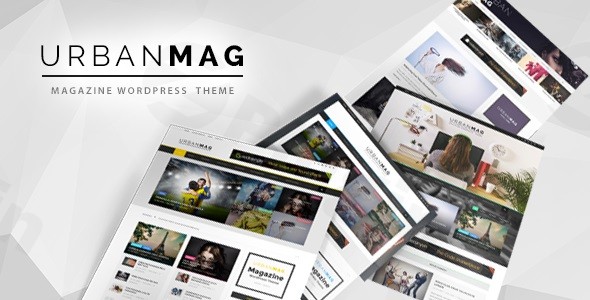
In the fast-paced world of digital journalism, the way you present stories is just as important as the stories themselves. The Urban Mag WordPress theme is a robust, high-performance solution specifically crafted for news publications, online magazines, and editorial platforms that need to balance high content density with a clean, modern aesthetic. Whether you are running a high-traffic news portal or a niche lifestyle blog, this News & Magazine WordPress theme provides the structural integrity and visual flair required to keep readers engaged.Designed by the reputable team at GoodLayers, Urban Mag moves away from the “one-size-fits-all” approach of multipurpose themes. Instead, it offers specialized tools—like breaking news tickers and category-specific layouts—that cater directly to the needs of editors and media companies.
Key Features: Design, Layout & Performance
Urban Mag stands out by offering a highly flexible framework that doesn’t sacrifice page speed for functionality. Here is a breakdown of how it handles design and technical performance.
Versatile Layout Options
The theme features a flexible homepage layout builder, allowing you to drag and drop elements to create a unique front-page hierarchy. Unlike many themes that force a global sidebar setting, Urban Mag allows you to change the layout for individual categories. This means your “Tech” section can have a different visual structure than your “Lifestyle” section.
- Scalable Container: You can set the site width to any pixel value, ensuring your content looks perfect on ultra-wide monitors and standard laptops alike.
- Boxed vs. Full-Width: Switch between a traditional boxed look or a modern full-width edge-to-edge design for headers and containers.
Customization & Branding
Branding is effortless with the Super Powerful Admin Panel. You have access to “Unlimited Color” options, allowing you to modify every element from the top bar to the footer.
- Typography: Deep integration with Google Fonts ensures your editorial voice is reflected in your site’s typefaces.
- Advanced Sidebars: Choose from five distinct sidebar widths (16%, 25%, 33%, 41%, and 50%) and even utilize dual sidebars for maximum ad placement or secondary navigation.
- Built-in Mega Menu: Enhance user experience (UX) with a native Mega Menu that organizes complex navigation without the need for third-party plugins.
Performance & SEO Optimization
Urban Mag is an SEO optimized news magazine theme built with clean markup and schema readiness. To ensure fast loading times—crucial for core web vitals and Google rankings—the theme includes:
- Lazy Image Loading: Images only load as the user scrolls, significantly reducing initial page weight.
- High-Traffic Optimization: The code is lightweight and optimized to handle the server strain of viral news cycles.
Installation & Demo Import Guide
Setting up Urban Mag is straightforward, thanks to the proprietary GoodLayers Importer. Follow these steps to get your site looking like the demo in minutes:
- Theme Installation: Upload the
urbanmag.zipfile via Appearance > Themes > Add New in your WordPress dashboard. - Plugin Activation: Upon activation, the theme will prompt you to install required companion plugins. Ensure these are active to unlock the page builder and importer features.
- One-Click Demo Import: Navigate to the theme’s admin panel and use the GoodLayers Importer. You can choose from four predefined styles to instantly populate your site with layouts, menus, and widgets.
- Configuration: Once the import is complete, check your Settings > Reading to ensure the homepage is set correctly, and verify your menus in Appearance > Menus.Note: Ensure your server’s
post_max_sizeandmemory_limitare set to recommended levels (256M or higher) to prevent timeouts during the demo content import.
Customization Guide: Personalizing Your News Portal
Once the foundation is laid, you can fine-tune Urban Mag to match your brand identity through the central admin hub.
- Header & Footer Control: Urban Mag includes a Landing Page Template option. This allows you to disable headers and footers on specific pages—ideal for dedicated marketing campaigns or long-form investigative pieces that require a “distraction-free” reading experience.
- Category Blocks: Use the front-page builder to create “Category Blocks.” This organizes your news by topic (e.g., Politics, Sports, Design) using different grid styles.
- Breaking News Ticker: Enable the ticker in the header to highlight urgent stories or trending topics. This is a critical feature for increasing click-through rates (CTR) on new articles.
- Monetization: The theme includes dedicated ad zones within the layout, making it easy to integrate Google AdSense or direct banners without breaking the visual hierarchy.
FAQ & Troubleshooting
Is Urban Mag compatible with the latest WordPress and WooCommerce versions?
Yes, Urban Mag WooCommerce compatibility is a core feature. It is compatible with WooCommerce versions 6.x through 9.x, making it an excellent choice for magazines that sell merchandise or digital subscriptions. It also supports the latest WordPress versions (up to 6.8.x).
Does Urban Mag support the Gutenberg Block Editor?
While Urban Mag features a proprietary Page Builder Setting Shortcut for layout construction, it is fully compatible with the standard WordPress Block Editor (Gutenberg) for post creation and general content management.
Can I use this theme for a multilingual news site?
Absolutely. Urban Mag is WPML compatible, meaning you can easily translate your content and reach a global audience using the WordPress Multilingual Plugin.
What should I do if the demo import fails?
Most import issues are caused by server limitations. Check your PHP “Max Execution Time” and “Upload Max Filesize.” If the site looks different than the demo after import, ensure that all recommended plugins were successfully activated.
Conclusion: Is Urban Mag Right for You?
The Urban Mag WordPress theme is a professional-grade tool designed for those who take content seriously. Its blend of high-end customization—such as the scalable container and five sidebar options—with performance features like lazy loading makes it a top-tier contender in the magazine niche.Who is this for?
- News Agencies: Who need a “Breaking News” infrastructure.
- Professional Bloggers: Who want a modern, “urban” aesthetic for lifestyle or design content.
- eCommerce Store Owners: Who want to combine a high-traffic blog with a WooCommerce shop.If you are looking for a theme that offers more than just a pretty layout, Urban Mag provides the technical depth to grow with your publication. For more WordPress theme reviews and expert web design tips, visit us at wppick.com.
I. Download Limits & Account Benefits
- Free Downloads: Each email address receives 3 downloads per day for free products
- Upgrade Benefits: Purchase any paid product to increase your daily download limit by 3 for each paid product
- No Account Required: You can download immediately by receiving the download link via email
- Account Recommended: Create an account for easier access to your order history and direct update downloads
II. Understanding GPL vs Official Versions
Important: The products available on WPPick are GPL-licensed versions, which differ from official developer versions. Before purchasing, please read our comprehensive guide: Understanding GPL & Official Differences at WPPick
Key Points:
- GPL versions may not include premium support from original developers
- Updates may be delayed compared to official releases
- Some premium features might have limitations
- Always consider your specific needs and support requirements
III. Support & Assistance
We’re here to help through multiple channels:
- Email Support: Direct email assistance for all inquiries
- Live Chat: Real-time support during business hours
- Comprehensive Documentation: Detailed guides and tutorials
IV. Order Tracking
Access your complete purchase history and download links anytime: Order History
V. Account Access
New to WPPick? Login or Create Account to manage your downloads and orders efficiently.
VI. Refund Protection
We stand behind our products with a clear refund policy. Review our terms: Refund Policy
VII. Privacy & Security
Your data security is our priority. Learn how we protect your information: Privacy Policy
VII. Terms of Service
Understanding our service terms ensures a smooth experience: Terms of Use
Quick Tips for Best Experience
- Verify Compatibility: Check plugin/theme compatibility with your WordPress version
- Backup First: Always backup your site before installing new plugins or themes
- Test Environment: Consider testing on a staging site first
- Stay Updated: Regularly check for updates in your account dashboard
- Read Documentation: Review any included documentation for optimal setup
Need Help?
If you have questions about downloads, licensing, or need technical assistance, don’t hesitate to contact our support team. We’re committed to ensuring you have the best possible experience with WPPick products.
Ready to get started? Your download adventure begins with just one click!
- limit term display to 99
- fix page builder appearance
- – framework/stylesheet/page-builder.css