

Valenti – WordPress Hd Review Magazine News Theme
/Year
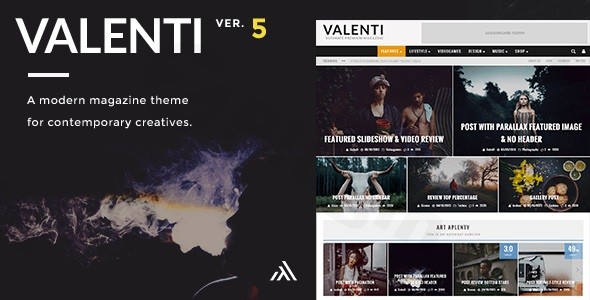
The Valenti WordPress Theme is a cutting-edge, high-definition (HD) editorial platform designed specifically for review magazines, news portals, and content-rich blogs. In an era where visual impact and structured data are paramount, Valenti stands out by offering a bold, retina-ready aesthetic paired with a powerful, integrated review system. Whether you are building a tech review site, a high-traffic news hub, or an affiliate marketing blog, this theme provides the professional toolkit needed to engage readers and convert visitors.
Key Features: Premium Design, Layout Flexibility & Performance
Valenti is not just another multipurpose theme; it is a specialized tool for digital publishers. Its design philosophy centers on “power without bloat,” ensuring that your site remains fast while offering deep customization.
Professional Review System
The standout feature of the best WordPress review theme options like Valenti is the built-in rating system. Unlike other themes that require external plugins, Valenti allows authors to include detailed review boxes with stars, percentages, or points. This is ideal for affiliate marketers and critics who need to present pros, cons, and final scores in a visually compelling way.
Exclusive Drag-and-Drop Homepage Builder
Valenti moves away from confusing shortcodes by offering an exclusive drag-and-drop homepage builder. This allows you to:
- Create Custom Layouts: Mix and match 4 different modern grid modules (4, 5, or 6 articles).
- Showcase Featured Content: Utilize a full-width slider or parallax featured images to grab attention.
- Choose Your Blog Style: Select from four distinct blog styles (A, B, C, or D) to display your latest posts.
High-Definition & Responsive Performance
Built with a “Mobile-First” approach, Valenti is fully responsive and Retina Ready (HD). It ensures that high-resolution images and typography look crisp on 5K monitors and smartphones alike. Furthermore, the theme emphasizes optimized architecture, ensuring that the heavy editorial layouts do not compromise page loading speeds—a critical factor for SEO and user retention.
Deep Plugin Integration
Valenti is designed to scale with your business. It features:
- WooCommerce Compatibility: Full support with custom layouts (left/right sidebar or full-width) for online stores.
- Community Ready: Deep integration and custom styling for BuddyPress and bbPress.
- Multilingual Support: Fully compatible with WPML for global reach.
- Page Builder Friendly: While it has its own builder, it is also compatible with Elementor and Elementor Pro for those who want even more design control.
Valenti Theme Installation & Demo Setup Guide
Setting up a magazine WordPress theme can often feel daunting, but Valenti simplifies the process through its intuitive admin panel.
- Theme Installation: Log in to your WordPress Dashboard, navigate to Appearance > Themes > Add New, and upload the
valenti.zipfile. - Activate Required Plugins: Upon activation, Valenti will prompt you to install necessary components, such as the Login With Ajax or WooCommerce if you plan to run a shop.
- Child Theme Usage: It is highly recommended to install the included child theme immediately. This allows you to make code-level customizations without losing them during future theme updates.
- Configure the Homepage: Navigate to the Valenti Homepage Builder in the admin menu. Here, you can drag and drop modules to replicate the demo layout or create something entirely unique.
- Menu Setup: Use the unique mega menu system to add featured images and recent posts directly into your navigation drop-downs for an “app-like” user experience.
Advanced Customization: Branding & Layout
The Valenti theme customization options are extensive, allowing you to align the website perfectly with your brand identity without writing a single line of CSS.
- Typography: Access over 600 Google Fonts with a curated “hand-picked” list for better design decisions.
- Color Systems: Modify global colors, border styles, and review box accents via the theme options panel.
- Backgrounds: Set custom background colors or images. Valenti supports a “full-width stretch” or parallax effect for background images, adding a layer of depth to your editorial pieces.
- Headers & Navigation: Choose from multiple header layouts and utilize the mega menu to keep users engaged with your most important categories.
FAQ & Troubleshooting
Is the Valenti theme good for SEO?
Yes, the Valenti WordPress theme is built with clean, semantic markup and follows WordPress coding standards. Its fast loading times and mobile-responsive design are key ranking factors for Google. Additionally, the integrated review system uses structured data patterns that help search engines understand your ratings.
Does Valenti support WooCommerce for online stores?
Absolutely. Valenti is fully compatible with WooCommerce and includes specific layout options for shop pages, ensuring your e-commerce section matches the high-definition look of your editorial content.
Can Valenti theme be used for affiliate marketing?
Valenti is excellent for affiliate marketing. Its built-in review system allows you to create professional product comparisons, while the drag-and-drop builder makes it easy to place “Call to Action” ad blocks in high-conversion areas of the homepage.
How do I update Valenti without losing my settings?
As long as you use the provided Child Theme for any manual code changes, your settings in the Admin Options panel will remain intact during updates. Always back up your site before performing a major theme update.
Is Valenti compatible with Elementor?
Yes, Valenti is compatible with Elementor and Elementor Pro, giving you the flexibility to use a modern page builder alongside Valenti’s native editorial features.
Conclusion
The Valenti WordPress Theme remains a top-tier choice for publishers who prioritize a “bold and beautiful” aesthetic without sacrificing technical performance. Its unique combination of a dedicated review system, an HD-focused design, and deep integration with community tools like BuddyPress makes it far more than just a standard blog template.Whether you are a professional reviewer or a news agency, Valenti provides a sophisticated, high-performance foundation that is both easy for beginners to set up and flexible enough for advanced developers to customize. For those looking to build a high-impact, content-driven website, Valenti is a powerhouse solution.Visit wppick.com for more WordPress theme reviews and expert design strategies.
I. Download Limits & Account Benefits
- Free Downloads: Each email address receives 3 downloads per day for free products
- Upgrade Benefits: Purchase any paid product to increase your daily download limit by 3 for each paid product
- No Account Required: You can download immediately by receiving the download link via email
- Account Recommended: Create an account for easier access to your order history and direct update downloads
II. Understanding GPL vs Official Versions
Important: The products available on WPPick are GPL-licensed versions, which differ from official developer versions. Before purchasing, please read our comprehensive guide: Understanding GPL & Official Differences at WPPick
Key Points:
- GPL versions may not include premium support from original developers
- Updates may be delayed compared to official releases
- Some premium features might have limitations
- Always consider your specific needs and support requirements
III. Support & Assistance
We’re here to help through multiple channels:
- Email Support: Direct email assistance for all inquiries
- Live Chat: Real-time support during business hours
- Comprehensive Documentation: Detailed guides and tutorials
IV. Order Tracking
Access your complete purchase history and download links anytime: Order History
V. Account Access
New to WPPick? Login or Create Account to manage your downloads and orders efficiently.
VI. Refund Protection
We stand behind our products with a clear refund policy. Review our terms: Refund Policy
VII. Privacy & Security
Your data security is our priority. Learn how we protect your information: Privacy Policy
VII. Terms of Service
Understanding our service terms ensures a smooth experience: Terms of Use
Quick Tips for Best Experience
- Verify Compatibility: Check plugin/theme compatibility with your WordPress version
- Backup First: Always backup your site before installing new plugins or themes
- Test Environment: Consider testing on a staging site first
- Stay Updated: Regularly check for updates in your account dashboard
- Read Documentation: Review any included documentation for optimal setup
Need Help?
If you have questions about downloads, licensing, or need technical assistance, don’t hesitate to contact our support team. We’re committed to ensuring you have the best possible experience with WPPick products.
Ready to get started? Your download adventure begins with just one click!
- Setup wizard to help you set up new Valenti sites in under 5 clicks. Can also be opened manually in Appearance > Theme setup.
- Setup wizard: Import Valenti demo with one click
- Theme Options > General: Output Open Graph Meta option
- Theme Options > Posts > Advertisement: Before Content Ad location
- Valenti Builder: By Author filter
- Valenti Builder: Multiple new block designs added to various sections
- Valenti Builder: Set each block’s title tag type, i.e. H1/H2/H3/H4/H5/P/DIV
- Theme Options > General > Site Width: Max site width
- Theme Options > Default Layouts > Search: Pagination Style (Numbers, Load more button, Infinite scroll)
- Valenti Layout Builder: By Post IDs option now also allows page ids
- Social Icons now open in new tab
- Lazy loading
- Core Web Vitals: LCP
- Core Web Vitals: CLS
- XSS vulnerability in embed shortcode when not using youtube/vimeo
- PHP Object vulnerability inside Option Tree plugin
- Show View Counts when using basic stats option weren’t appearing
- BuddyPress: Layout option (sidebar/no sidebar) was not applying
- Posts > Assigning “Custom Sidebar” option wasn’t creating new sidebar option in Appearance > Widget Areas
- Author Box: Author website wasn’t showing
- Plugin: Let’s Review 3.4.0
- Plugin: Valenti Engine 1.0.8
- Updated Google Font list