

Vasia – Multipurpose Ecommerce WordPress Theme
/Year
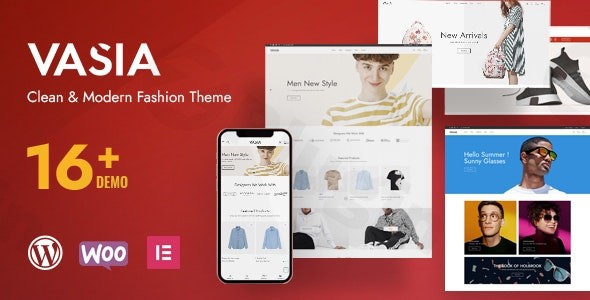
Building a modern online store requires a delicate balance between aesthetic elegance and technical efficiency. The Vasia WordPress theme is a multipurpose ecommerce solution designed to bridge that gap, offering a clean, conversion-focused environment for businesses ranging from fashion boutiques to electronics outlets. Built with a mobile-first philosophy, this theme provides the foundation needed for a professional digital storefront without requiring extensive coding knowledge.
Why Vasia is the Ideal Ecommerce WordPress Theme for Your Store
The Vasia – Multipurpose Ecommerce WordPress Theme is engineered specifically for high-growth online retailers. Its design philosophy leans toward a “clean and classy” aesthetic, ensuring that your products remain the focal point. Whether you are a beginner looking for an intuitive setup or an agency building a scalable platform for a client, Vasia provides a robust framework that integrates seamlessly with the industry’s most powerful tools.
Key Features: Design, Layout, and Performance
The true value of an ecommerce theme lies in its ability to convert visitors into customers. Vasia achieves this through a suite of high-end design and technical features:
- Versatile Layout Options: Users can toggle between boxed and full-width layouts. The theme includes 4 pre-defined homepage layouts, multiple blog styles, and varied shop views (grid and list) to suit different product niches.
- Deep WooCommerce Integration: Beyond simple compatibility, Vasia includes specialized ecommerce tools like AJAX Product Filters, a Quick View feature, and an AJAX shopping cart to reduce page reloads and friction during the checkout process.
- Elementor & Visual Composer Support: Vasia is a fully Elementor compatible theme, allowing for real-time, drag-and-drop page building. It also supports Visual Composer for those who prefer legacy header and footer customization.
- Ultra-Fast Performance: Performance is a core pillar of the Vasia architecture. It is lightweight, cache-friendly, and optimized for PHP 8.x, ensuring your site achieves high scores on Core Web Vitals.
- SEO & GEO Optimization: The theme is built with clean markup and structured headings, helping your store rank higher in search engines and target specific local markets effectively.
Step-by-Step Installation and One-Click Demo Import
Setting up your website with Vasia is a streamlined process. By following these steps, you can move from a fresh WordPress install to a fully functioning demo site in minutes.
- Install & Activate: Upload the Vasia theme folder via Appearance > Themes > Add New in your WordPress dashboard. Once uploaded, click Activate.
- Plugin Setup: Upon activation, a prompt will appear requesting the installation of required companion plugins. This typically includes WooCommerce, Elementor, and the Redux Framework. Install and activate all recommended plugins for full functionality.
- One-Click Demo Import: Navigate to the theme options panel (powered by Redux). Locate the One-Click Demo Import feature. Select one of the 4 niche demos (e.g., Organic, Fashion, or Electronics) and click import.
- Final Polish: Once the import is complete, your menus, widgets, and sample products will be populated. You can then begin replacing the placeholder content with your own branding.Pro Tip: Ensure your server’s memory limit is set to at least 256MB and execution time is increased to prevent timeouts during the demo data import process.
Customization Guide: Tailoring Vasia to Your Brand
Personalizing the Vasia WordPress theme is handled through two main interfaces: the Redux-powered Theme Options and the Elementor Page Builder.
Global Styles and Branding
Using the Redux Framework, you can control the “DNA” of your site. This includes setting unlimited color schemes to match your brand identity and choosing from hundreds of Google Fonts to refine your typography. You can also manage global container widths and background images from this central hub.
Header, Footer, and Navigation
Vasia supports Mega Menus, which are essential for ecommerce stores with large categories. Headers and footers can be customized via Visual Composer or Elementor, allowing you to place logos, search bars, and social icons exactly where you need them for optimal UX.
Sidebar Management
The theme offers unlimited custom sidebars. You can create unique sidebars for specific product categories or blog sections, ensuring that the most relevant upsells or information are always visible to the user.
FAQ: Common Questions About the Vasia Theme
Is Vasia compatible with the latest version of WordPress?
Yes, Vasia is compatible with WordPress 6.x and later. It is also optimized for PHP 8.x, ensuring it runs on the most secure and fastest server environments available.
Does Vasia support WooCommerce for online stores?
Absolutely. Vasia is a dedicated WooCommerce optimized theme. It supports advanced features like AJAX wishlists, product image zoom, and filtered search out of the box.
Is the Vasia WordPress theme SEO-friendly?
Vasia is designed with a focus on SEO and GEO optimization. Its clean code and fast loading times provide a strong foundation for ranking in search engine results and targeting local audiences.
Can I use Elementor with Vasia?
Yes, Vasia is an Elementor compatible theme. Most of its page layouts can be edited using the Elementor drag-and-drop builder, making it very accessible for beginners.
Does Vasia support RTL languages and translation?
Yes, the theme is translation-ready and supports RTL (Right-to-Left) layouts. It is also compatible with the WPML plugin for creating multilingual ecommerce stores.
Verdict: Is Vasia Right for You?
The Vasia WordPress theme is a powerful, budget-friendly solution for anyone looking to launch a high-performance ecommerce site. Its blend of Elementor compatibility, deep WooCommerce integration, and ultra-fast loading speeds makes it a top contender for fashion, electronics, and beauty retailers.While its design is modern and clean, its true strength lies in its flexibility—allowing both beginners and agencies to build reliable, scalable websites. If you prioritize speed, SEO readiness, and a seamless shopping experience, Vasia is an excellent choice for your next project.For more WordPress theme reviews and SEO strategies, visit us at wppick.com.
I. Download Limits & Account Benefits
- Free Downloads: Each email address receives 3 downloads per day for free products
- Upgrade Benefits: Purchase any paid product to increase your daily download limit by 3 for each paid product
- No Account Required: You can download immediately by receiving the download link via email
- Account Recommended: Create an account for easier access to your order history and direct update downloads
II. Understanding GPL vs Official Versions
Important: The products available on WPPick are GPL-licensed versions, which differ from official developer versions. Before purchasing, please read our comprehensive guide: Understanding GPL & Official Differences at WPPick
Key Points:
- GPL versions may not include premium support from original developers
- Updates may be delayed compared to official releases
- Some premium features might have limitations
- Always consider your specific needs and support requirements
III. Support & Assistance
We’re here to help through multiple channels:
- Email Support: Direct email assistance for all inquiries
- Live Chat: Real-time support during business hours
- Comprehensive Documentation: Detailed guides and tutorials
IV. Order Tracking
Access your complete purchase history and download links anytime: Order History
V. Account Access
New to WPPick? Login or Create Account to manage your downloads and orders efficiently.
VI. Refund Protection
We stand behind our products with a clear refund policy. Review our terms: Refund Policy
VII. Privacy & Security
Your data security is our priority. Learn how we protect your information: Privacy Policy
VII. Terms of Service
Understanding our service terms ensures a smooth experience: Terms of Use
Quick Tips for Best Experience
- Verify Compatibility: Check plugin/theme compatibility with your WordPress version
- Backup First: Always backup your site before installing new plugins or themes
- Test Environment: Consider testing on a staging site first
- Stay Updated: Regularly check for updates in your account dashboard
- Read Documentation: Review any included documentation for optimal setup
Need Help?
If you have questions about downloads, licensing, or need technical assistance, don’t hesitate to contact our support team. We’re committed to ensuring you have the best possible experience with WPPick products.
Ready to get started? Your download adventure begins with just one click!
- Fixed: PHP8
- Updated: Latest WooCommerce and Latest WordPress
- Updated: Latest Elementor