

Vayvo – Media Streaming & Membership WordPress Theme
/Year
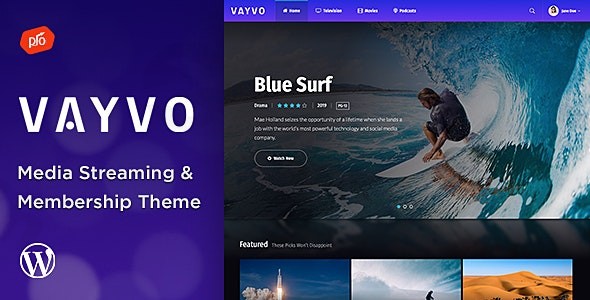
Building a professional video-on-demand platform or a premium content hub used to require a massive budget and a team of developers. The Vayvo WordPress Theme changes that narrative by offering an all-in-one solution for creators who want to launch a site similar to Netflix, Hulu, or a niche streaming service. Whether you are a vlogger, a podcaster, or an online educator, this theme provides the infrastructure to host, protect, and monetize your media.
In this guide, we will explore why Vayvo is a top-tier media streaming WordPress theme, how its integrated membership features work, and the best way to set it up for your brand.
Key Features: Design, Layout & Performance
Vayvo isn’t just a generic skin; it is a specialized tool built for media consumption. Its design philosophy centers on a “content-first” approach, ensuring that your videos and audio files are the stars of the show.
1. Robust Membership Management (ARMember Integrated)
The standout feature of the Vayvo WordPress Theme is its deep integration with the ARMember plugin. This is a premium membership solution that comes pre-built into the theme. It allows you to:
- Create multiple subscription tiers (Free, Silver, Gold, etc.).
- Restrict content based on membership levels.
- Offer “pay-per-post” options for exclusive one-time purchases.
- Manage user registrations and profiles with ease.
2. High-End Media Experience
To compete with major streaming platforms, Vayvo includes dedicated media features:
- Built-in Video Player: Supports local hosting, YouTube, and Vimeo.
- Watchlist Feature: Logged-in users can save videos to watch later.
- User Ratings & Reviews: Foster a community by allowing users to rate your content.
- Advanced Search Engine: A specialized search tool that helps users find specific media files instantly.
3. Design Flexibility with Elementor
Vayvo is highly compatible with the Elementor Page Builder, giving you drag-and-drop control over your layouts. It also features a front-end theme customizer for real-time visual changes.
- Typography: Access to over 800 Google Fonts.
- Colors: Unlimited color customization to match your branding.
- Responsive & Retina Ready: Your site will look crisp on everything from a 4K monitor to a smartphone.
4. Performance & SEO Readiness
The theme is built with clean markup and a responsive layout, which are essential for SEO optimization. By providing a fast, mobile-friendly experience, Vayvo helps your content rank better in search engines and provides a smooth UX that keeps bounce rates low.
Installation & Demo Import
Getting started with Vayvo is straightforward, even for beginners. Follow these steps to get your streaming site live:
- Theme Installation: Upload the Vayvo theme files via Appearance > Themes > Add New in your WordPress dashboard.
- Plugin Activation: Upon activation, the theme will prompt you to install required plugins, including ARMember and the Boosted Elements Add-on. Ensure all these are active to unlock the full feature set.
- One-Click Demo Import: Navigate to the demo importer tool provided in the theme options. This will import sample media, layouts, and settings so your site looks exactly like the professional demo.
4. Check Server Requirements: Because streaming themes handle large amounts of data, ensure your hosting environment has sufficient memory (at least 256MB) to avoid timeouts during the demo import process.
Customization Guide: Branding & Layout
Personalizing your membership WordPress theme is the key to standing out in a crowded market. Here is how to make Vayvo yours:
- Global Styles: Use the WordPress Customizer to set your primary brand colors and typography. These settings will apply across all pages to ensure visual consistency.
- Header & Footer: While the theme comes with professional defaults, you can use the Elementor integration to build custom headers that include user login buttons or search bars.
- Setting Up Content Restriction: Head to the ARMember settings to define which videos are “Premium” and which are “Public.” This is where you will also configure your payment gateways (like PayPal or Stripe) to start accepting subscriptions.
* Homepage Construction: Use the pre-built Elementor blocks to create “Featured Video” sliders or “Newly Added” grids to keep your homepage dynamic and engaging.
FAQ & Troubleshooting
Is the Vayvo WordPress Theme compatible with Elementor?
Yes, Vayvo is highly compatible with Elementor. It uses a drag-and-drop workflow, allowing you to build custom pages and modify layouts without touching a single line of code.
Does Vayvo support WooCommerce for online stores?
Yes, Vayvo supports WooCommerce. While its primary focus is media streaming and memberships, you can easily add a shop section to sell physical merchandise or digital downloads alongside your streaming content.
Can I use Vayvo for a podcast website?
Absolutely. While many use it for video, Vayvo is an excellent audio streaming WordPress theme. It supports audio files and includes the same membership restriction and watchlist features for podcasters looking to monetize their shows.
What should I do if the demo import fails?
If a demo import fails, it is usually due to server “maxexecutiontime” or “memory_limit” settings. Increase these values in your php.ini file or contact your hosting provider to ensure your server can handle the import of large media files.
Verdict: Is Vayvo Right for You?
The Vayvo WordPress Theme is a powerhouse for niche streaming services and membership-based content creators. By bundling the ARMember plugin, it saves you the cost and headache of integrating third-party membership tools.Choose Vayvo if:
- You want to build a Netflix-style subscription site quickly.
- You need built-in tools like watchlists and user ratings.
- You prefer using Elementor for visual design.For entrepreneurs and creators looking to professionalize their media delivery, Vayvo offers the perfect balance of aesthetic appeal and technical robustness. Ready to launch your platform? Head over to wppick.com for more tips on optimizing your WordPress experience!
I. Download Limits & Account Benefits
- Free Downloads: Each email address receives 3 downloads per day for free products
- Upgrade Benefits: Purchase any paid product to increase your daily download limit by 3 for each paid product
- No Account Required: You can download immediately by receiving the download link via email
- Account Recommended: Create an account for easier access to your order history and direct update downloads
II. Understanding GPL vs Official Versions
Important: The products available on WPPick are GPL-licensed versions, which differ from official developer versions. Before purchasing, please read our comprehensive guide: Understanding GPL & Official Differences at WPPick
Key Points:
- GPL versions may not include premium support from original developers
- Updates may be delayed compared to official releases
- Some premium features might have limitations
- Always consider your specific needs and support requirements
III. Support & Assistance
We’re here to help through multiple channels:
- Email Support: Direct email assistance for all inquiries
- Live Chat: Real-time support during business hours
- Comprehensive Documentation: Detailed guides and tutorials
IV. Order Tracking
Access your complete purchase history and download links anytime: Order History
V. Account Access
New to WPPick? Login or Create Account to manage your downloads and orders efficiently.
VI. Refund Protection
We stand behind our products with a clear refund policy. Review our terms: Refund Policy
VII. Privacy & Security
Your data security is our priority. Learn how we protect your information: Privacy Policy
VII. Terms of Service
Understanding our service terms ensures a smooth experience: Terms of Use
Quick Tips for Best Experience
- Verify Compatibility: Check plugin/theme compatibility with your WordPress version
- Backup First: Always backup your site before installing new plugins or themes
- Test Environment: Consider testing on a staging site first
- Stay Updated: Regularly check for updates in your account dashboard
- Read Documentation: Review any included documentation for optimal setup
Need Help?
If you have questions about downloads, licensing, or need technical assistance, don’t hesitate to contact our support team. We’re committed to ensuring you have the best possible experience with WPPick products.
Ready to get started? Your download adventure begins with just one click!
- Update search rating output in header search
- Updated Files: /header/search-header.php, /header/search-mobile.php