

Vedbo – Elementor Woocommerce WordPress Theme
/Year
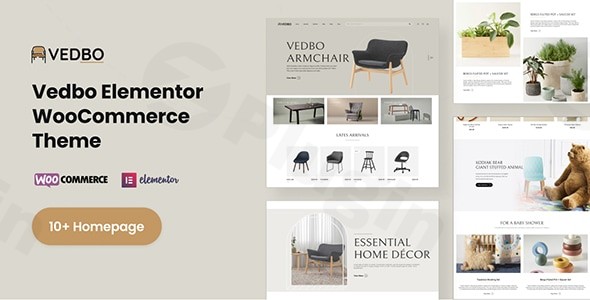
Finding a balance between high-end aesthetics and technical performance is the “holy grail” for online retailers. VEDBO – Elementor WooCommerce WordPress Theme is a premium solution designed specifically to bridge that gap. Built with a creative, drag-and-drop philosophy, VEDBO empowers store owners and designers to build sophisticated eCommerce platforms without touching a single line of code.
Whether you are launching a minimalist furniture brand or a high-traffic fashion boutique, the Vedbo WordPress Theme provides a clean, Scandinavian-inspired canvas that prioritizes user experience and conversion optimization. In this guide, we will explore its core features, technical specifications, and a step-by-step setup process to help you get your store live.
Key Features: Design, Layout & Performance
VEDBO stands out in the crowded market of multipurpose themes by offering a specialized focus on the Elementor ecosystem. It doesn’t just “work” with page builders; it is architected around them.
Versatile Layout Options
While VEDBO is often cited as the best WordPress theme for furniture stores due to its clean lines and airy whitespace, its layout flexibility makes it a true multipurpose powerhouse.
- Grid & Masonry Systems: Perfect for creative portfolios or lookbooks.
- Advanced Shop Layouts: Includes specialized product filters, AJAX-powered shop functionalities, and quick-view modals that keep users engaged on the page.
- Prebuilt Templates: The theme comes with multiple “Starter Sites” that can be imported instantly, covering niches from lifestyle products to agency portfolios.
Deep Customization Capabilities
Personalizing your brand is seamless with VEDBO’s integration of the Live Customizer and Elementor.
- Typography & Color: Access over 600 Google Fonts and unlimited color schemes to match your brand identity.
- Header & Footer Builder: Unlike basic themes that lock you into a few header styles, VEDBO includes a dedicated builder to create custom navigation menus and footer areas.
- Mega Menus: Organize large inventories effortlessly with built-in Mega Menu support.
Performance & SEO Excellence
Is the Vedbo theme good for SEO? Yes. The developers have optimized the code for “Incredible load times,” which is critical for both Core Web Vitals and user retention.
- Lightweight Core: You can disable unused widgets to prevent code bloat.
- SEO-Ready Markup: The theme uses clean HTML5/CSS3 and structured schema markup to help search engines understand your content.
* Mobile Responsiveness: VEDBO is fully responsive, ensuring your WooCommerce store looks pixel-perfect on iPhones, tablets, and desktops.
How to Set Up an Online Store with Vedbo Theme
Setting up a professional website doesn’t have to be a technical headache. Follow these steps to get your VEDBO site up and running:
- Install & Activate: Upload the VEDBO theme files via Appearance > Themes > Add New in your WordPress dashboard.
- Plugin Requirements: Upon activation, you will be prompted to install required plugins. This typically includes Elementor, WooCommerce, and the theme’s core companion plugin.
- One-Click Demo Import: Navigate to the theme options panel and locate the Demo Importer. Select your preferred design (e.g., Furniture, Fashion, or Portfolio) and click import.
- Pro Tip: Ensure your hosting has sufficient memory limits (256M+) to avoid timeouts during the import of high-resolution demo images.
- Configure WooCommerce: Follow the WooCommerce setup wizard to set your currency, shipping zones, and payment gateways (like Stripe or PayPal).
5. Assign Menus & Widgets: Once the demo is imported, go to Appearance > Menus to set your primary navigation and Appearance > Widgets to configure your sidebars and footers.
Customization Guide: Branding Your Site
Once the foundation is laid, you can begin personalizing the VEDBO – Elementor WooCommerce WordPress Theme to reflect your unique brand voice.
Global Styles & Elementor
Using the Elementor interface, you can set global colors and fonts. This ensures that every new page you create automatically adopts your brand’s visual language. The “Global Sections” feature allows you to update a section once (like a promotional banner) and have it change across the entire site.
Custom Post Types
VEDBO isn’t just for selling products. It includes robust support for:
- Portfolios: Showcase your latest projects with custom grid layouts.
- Team Members: Introduce your staff with dedicated carousels.
* Testimonials: Build social proof with styled review elements.
FAQ & Troubleshooting
Is VEDBO compatible with other page builders like WPBakery?Yes. While VEDBO is optimized for Elementor, it maintains compatibility with Gutenberg and WPBakery, giving you the freedom to choose your preferred editing environment.Does VEDBO support child themes?Absolutely. VEDBO includes child theme support in its package. It is highly recommended to activate the child theme before making any CSS or PHP modifications to ensure your changes are not lost during future theme updates.How can I customize the VEDBO theme header?You can customize the header using the built-in Header Builder or via the WordPress Live Customizer. This allows you to change logos, adjust sticky header settings, and modify navigation layouts in real-time.What should I do if the demo import fails?
Most demo import issues are caused by server resource limits. Check your PHP max_execution_time and memory_limit. If the import looks different from the demo, ensure all required plugins (especially Elementor) are active.
Final Verdict
The VEDBO – Elementor WooCommerce WordPress Theme is an excellent choice for entrepreneurs and agencies who prioritize a high-end, visual-first approach to eCommerce. Its deep integration with Elementor provides a level of design freedom rarely found in standard WooCommerce themes.While it is a powerful tool, it is most effective for those who want a “boutique” feel—clean lines, elegant typography, and smooth AJAX interactions. If you are looking for a fast, SEO-optimized, and highly customizable theme for your next furniture, fashion, or creative project, VEDBO is a top-tier contender.For more WordPress theme reviews and tutorials, visit us at wppick.com.
I. Download Limits & Account Benefits
- Free Downloads: Each email address receives 3 downloads per day for free products
- Upgrade Benefits: Purchase any paid product to increase your daily download limit by 3 for each paid product
- No Account Required: You can download immediately by receiving the download link via email
- Account Recommended: Create an account for easier access to your order history and direct update downloads
II. Understanding GPL vs Official Versions
Important: The products available on WPPick are GPL-licensed versions, which differ from official developer versions. Before purchasing, please read our comprehensive guide: Understanding GPL & Official Differences at WPPick
Key Points:
- GPL versions may not include premium support from original developers
- Updates may be delayed compared to official releases
- Some premium features might have limitations
- Always consider your specific needs and support requirements
III. Support & Assistance
We’re here to help through multiple channels:
- Email Support: Direct email assistance for all inquiries
- Live Chat: Real-time support during business hours
- Comprehensive Documentation: Detailed guides and tutorials
IV. Order Tracking
Access your complete purchase history and download links anytime: Order History
V. Account Access
New to WPPick? Login or Create Account to manage your downloads and orders efficiently.
VI. Refund Protection
We stand behind our products with a clear refund policy. Review our terms: Refund Policy
VII. Privacy & Security
Your data security is our priority. Learn how we protect your information: Privacy Policy
VII. Terms of Service
Understanding our service terms ensures a smooth experience: Terms of Use
Quick Tips for Best Experience
- Verify Compatibility: Check plugin/theme compatibility with your WordPress version
- Backup First: Always backup your site before installing new plugins or themes
- Test Environment: Consider testing on a staging site first
- Stay Updated: Regularly check for updates in your account dashboard
- Read Documentation: Review any included documentation for optimal setup
Need Help?
If you have questions about downloads, licensing, or need technical assistance, don’t hesitate to contact our support team. We’re committed to ensuring you have the best possible experience with WPPick products.
Ready to get started? Your download adventure begins with just one click!