

Veen – Minimal & Lightweight Blog For WordPress
/Year
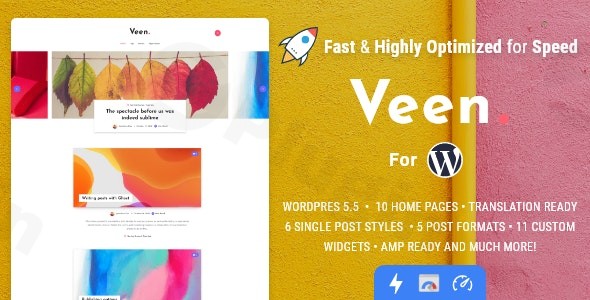
If you are a content creator who values speed, elegance, and a distraction-free reading experience, the Veen WordPress theme is engineered specifically for you. As a premium minimalist WordPress theme, Veen strips away the unnecessary bloat found in multipurpose themes, providing a lightweight WordPress theme framework that prioritizes content delivery and user experience. Whether you are a professional photographer, a travel blogger, or a digital storyteller, Veen offers a refined aesthetic that looks modern on every device.
Key Features: Design, Layout & Performance
Veen stands out in the crowded WordPress marketplace by focusing on what matters most: readability and performance. It is widely recognized as one of the best choices for those who want a “plug-and-play” experience without sacrificing high-end design.
Sophisticated Design & Layout Options
The theme’s philosophy is “less is more.” It offers a super modern design with “nice effects” that enhance the user experience without slowing down the site.
- Single Post Layouts: Veen provides three distinct styles for your articles: Fullwidth with Sidebar, Fullwidth without Sidebar, and a Classic layout (image within the article).
- Homepage Flexibility: Choose from multiple ready-to-use homepage layouts, including minimalist lists, post sliders, and grid sliders to showcase your latest stories.
- Visual Elements: The theme includes subtle animations and professional typography (supporting Google Fonts and Font Awesome) that give your site a premium feel.
Unrivaled Performance & SEO Readiness
Veen is a powerhouse when it comes to technical optimization. On a fresh install, the theme is approximately 1.5MB, making it one of the most lightweight WordPress themes available.
- Blazing Speed: It is optimized to achieve scores of up to 100% on Google PageSpeed Insights and A-grade results on GTmetrix.
- AMP Integration: Veen includes built-in AMP (Accelerated Mobile Pages) support in transitional mode, ensuring your mobile visitors get an instant loading experience.
- Native Lazy Loading: The theme implements lazy loading for images, post content, and embeds (YouTube, Vimeo, Soundcloud), which significantly reduces initial page load times.
* Clean Markup: The minified code and integrated Open Graph support ensure that your site is SEO optimized and looks professional when shared on social media.
Installation & Demo Import
Setting up Veen is straightforward, making it accessible for both beginners and experienced developers. Follow these steps to get your site running:
- Install & Activate: Upload the
veen.zipfile via your WordPress Dashboard (Appearance > Themes > Add New) and activate it. - Required Plugins: Upon activation, the theme will prompt you to install a few essential plugins, such as Contact Form 7. Veen is also Gutenberg optimized, so no heavy page builders are required.
- One-Click Demo Import: Navigate to the theme options to access the demo importer. You can choose from several pre-designed layouts (Minimal, Slider, Grid) to populate your site with sample content instantly.
- Finalize Setup: Once the import is complete, your menus, widgets, and homepage settings will be configured to match the demo. Check your “Reading” settings to ensure the correct homepage is selected.
Note: For a smooth import, ensure your hosting environment has adequate memory (at least 256MB) to handle the process without timeouts.
Customization Guide: Branding & Layout
Personalizing Veen to match your brand identity is handled through a powerful theme options panel and the standard WordPress Customizer.
Branding and Typography
Within the theme options, you can easily upload your logo and favicon. Because Veen supports Google Fonts, you can match your site’s typography to your brand’s voice—whether you prefer a classic serif for long-form reading or a modern sans-serif for a tech blog.
Color Systems and Global Styles
The theme allows for “custom colors,” giving you control over primary accents. Since the design is minimalist, a single accent color change can dramatically shift the mood of the entire site, from a professional portfolio to a vibrant lifestyle blog.
Interactive Widgets
Veen includes 11 custom widgets designed to improve engagement:
- Advertising Widgets: Easily place banners to monetize your content.
- Author & Social Profiles: Beautifully styled boxes to introduce yourself and link to your social channels.
* Sticky Sidebar: Keep your most important widgets (like newsletter signups or recent posts) visible as users scroll through long articles.
FAQ & Troubleshooting
Is Veen compatible with the WordPress Block Editor (Gutenberg)?
Yes, Veen is Gutenberg optimized. It is designed to work seamlessly with the native WordPress block editor, allowing you to use block patterns and standard blocks to create rich content layouts without the need for a heavy third-party page builder.
Does Veen support AMP?
Yes, Veen is an AMP WordPress theme. It supports Accelerated Mobile Pages in transitional mode, which helps your blog rank better in mobile search results and provides a lightning-fast experience for mobile users.
Does Veen support WooCommerce for online stores?
Veen is primarily a content-focused theme designed for bloggers and photographers. While you can install WooCommerce, the theme does not explicitly advertise specialized styling for eCommerce shop pages. It is best suited for those whose primary goal is blogging or portfolio display.
Does it support child themes?
Yes, Veen includes a child theme in the download package. It is highly recommended to activate the child theme if you plan on making advanced code customizations, as this ensures your changes are not lost during theme updates.
How do I update the Veen theme?
You can update Veen by downloading the latest version from ThemeForest and replacing the old files via FTP, or by using the Envato Market plugin to enable one-click updates directly from your WordPress dashboard.
Conclusion
The Veen WordPress theme is a masterclass in minimalist design and performance optimization. It successfully bridges the gap between high-end aesthetics and technical excellence, making it a top-tier choice for anyone searching for a fast WordPress theme that doesn’t compromise on style.Who is Veen for?
- Professional Bloggers who want to maximize SEO and user retention through speed.
- Photographers and Creatives looking for a clean, gallery-focused layout.
- Minimalists who want an elegant site that works perfectly out of the box.While it may lack the complex “all-in-one” features of massive multipurpose themes, its focus on being lightweight and AMP-ready makes it far superior for content-driven websites. If your goal is to provide a premium reading experience that ranks well on search engines, Veen is an investment that pays off in performance.Explore more theme reviews and WordPress tips at wppick.com.
I. Download Limits & Account Benefits
- Free Downloads: Each email address receives 3 downloads per day for free products
- Upgrade Benefits: Purchase any paid product to increase your daily download limit by 3 for each paid product
- No Account Required: You can download immediately by receiving the download link via email
- Account Recommended: Create an account for easier access to your order history and direct update downloads
II. Understanding GPL vs Official Versions
Important: The products available on WPPick are GPL-licensed versions, which differ from official developer versions. Before purchasing, please read our comprehensive guide: Understanding GPL & Official Differences at WPPick
Key Points:
- GPL versions may not include premium support from original developers
- Updates may be delayed compared to official releases
- Some premium features might have limitations
- Always consider your specific needs and support requirements
III. Support & Assistance
We’re here to help through multiple channels:
- Email Support: Direct email assistance for all inquiries
- Live Chat: Real-time support during business hours
- Comprehensive Documentation: Detailed guides and tutorials
IV. Order Tracking
Access your complete purchase history and download links anytime: Order History
V. Account Access
New to WPPick? Login or Create Account to manage your downloads and orders efficiently.
VI. Refund Protection
We stand behind our products with a clear refund policy. Review our terms: Refund Policy
VII. Privacy & Security
Your data security is our priority. Learn how we protect your information: Privacy Policy
VII. Terms of Service
Understanding our service terms ensures a smooth experience: Terms of Use
Quick Tips for Best Experience
- Verify Compatibility: Check plugin/theme compatibility with your WordPress version
- Backup First: Always backup your site before installing new plugins or themes
- Test Environment: Consider testing on a staging site first
- Stay Updated: Regularly check for updates in your account dashboard
- Read Documentation: Review any included documentation for optimal setup
Need Help?
If you have questions about downloads, licensing, or need technical assistance, don’t hesitate to contact our support team. We’re committed to ensuring you have the best possible experience with WPPick products.
Ready to get started? Your download adventure begins with just one click!
- Incorrect Url on About Me widget.
- Recommended Plugins
- Dashboard notifications.
- PHP compatibility with older versions.
- Now Twitter uses X icon and colors.
- Several links in Theme Options.
- WP 6.9 compatibility.
- Twitter Widget is no longer compatible.
- Custom Social networks on Theme Options -> Social Profiles