

Venture – Karting, Trampoline & Kids Park WordPress Theme
/Year
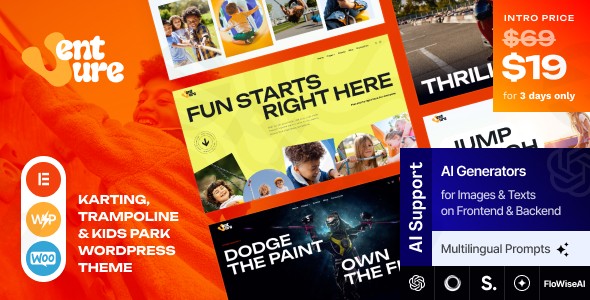
Welcome to the vibrant world of Venture, a dynamic and exciting WordPress theme specifically designed to bring the thrill of amusement parks, kids parks, and festivals online. If you’re looking for a robust and visually engaging platform for your Venture Karting Trampoline Kids Park WordPress Theme, street festival, music event, or any attraction-based business, Venture offers a powerful solution with its festive design and comprehensive feature set.
Introduction: Creating an Exciting Online Presence
Venture is more than just a theme; it’s a digital gateway to fun and excitement. Crafted for amusement parks, theme parks, kids activity centers, and a wide array of festivals, this theme empowers you to showcase your attractions, events, and unique atmosphere with captivating design. Its core philosophy revolves around delivering a modern, vibrant, and highly functional website that resonates with visitors, encouraging engagement and attendance. Whether you manage roller coasters, carousels, laser tag arenas, or grand music festivals, Venture provides the perfect canvas to highlight your offerings and create a memorable online experience for your audience.
Key Features: Design, Layout & Performance for Entertainment Venues
Venture is packed with features engineered to help entertainment businesses thrive online, blending stunning aesthetics with robust functionality.
Modern Festive Design & Layout Options
The theme boasts a modern festive design with a colorful, engaging layout that truly captures the excitement of your park or event. It’s built to grab attention and immerse visitors in your brand.
- Fully Responsive & Retina-Ready: Venture ensures your site looks spectacular and performs flawlessly on any device, from desktops to smartphones, thanks to its 100% responsive and Retina-ready design. Images and text will appear crisp and clear on high-resolution screens.
- Flexible Layouts: Choose between boxed and full-width page layouts to best suit your content and design preferences.
- Header & Footer Customization: Utilizing the power of Elementor Page Builder, you gain extensive control over your header and footer layouts, allowing you to craft unique navigation and branding areas.
- Prebuilt Demos & One-Click Import: Get your site up and running in minutes with the one-click demo installation feature. This allows you to import pre-built demo content, replicating the theme’s live preview and providing a strong starting point for your customization.
- Advanced Blog Settings: Engage your audience with over 20 post animations and multiple blog styles, perfect for sharing news, updates, and stories from your park or festival.
Powerful Customization Capabilities
Venture provides extensive customization tools, enabling you to tailor every aspect of your website to match your brand’s unique identity.
- Flexible Color Schemes: Easily adjust your site’s color palette to align with your brand’s vibrant aesthetic using the flexible color options.
- Typography Control: With support for Google Fonts and Fontello & Image Icons, you have vast choices to define your site’s typography, ensuring readability and visual appeal.
- Deep Customizer & Theme Options: A powerful Theme Framework offers over 750 Customizer Options and a dedicated Custom Theme Options Panel, giving you granular control over virtually every element of your site without touching a line of code.
- Elementor Integration: Beyond headers and footers, Venture’s deep integration with Elementor (including Elementor Pro and advanced Elementor FlexBox Containers & Grids AI) allows for unparalleled drag-and-drop design control over your page content, spacing, containers, sections, and backgrounds.
Performance & SEO Features
Built with modern web standards, Venture is designed for optimal performance and discoverability, crucial for any WordPress theme for amusement parks.
- Optimized Performance: The underlying theme framework is engineered for the best performance, contributing to faster loading times and a smoother user experience.
- SEO Optimized: Venture is built with best practices for search engine optimization, helping your park or festival rank higher in search results and attract more visitors.
- Gutenberg Optimized: The theme is fully optimized for the WordPress Block Editor (Gutenberg), ensuring a seamless content creation experience.
- Mobile-First Approach: Beyond responsiveness, Venture’s design principles prioritize mobile users, ensuring an excellent experience on smaller screens.
Plugin & Cross-Browser Compatibility
Venture ensures broad compatibility with essential WordPress plugins and all major web browsers.
- Elementor & Elementor Pro: Enjoy seamless integration with the industry-leading page builder for intuitive drag-and-drop page creation. This is a key feature for anyone building a Karting park WordPress theme Elementor website.
- WooCommerce Compatible: Easily set up an online store for merchandise, tickets, or bookings with full Venture theme WooCommerce support.
- Revolution Slider: Create stunning, animated content sliders to showcase your main attractions and events dynamically.
- The Events Calendar: Essential for festivals and event-based businesses, this plugin helps you manage and display your event schedule effectively.
- WPML Compatibility: Build multilingual websites to reach a wider, international audience.
- Cross-Browser Support: Your website will look and function consistently across Firefox, Safari, and Chrome.
Installation & Demo Import: Getting Started with Venture
Setting up your new Trampoline park website template with Venture is a straightforward process, even for beginners. Here’s a step-by-step guide to get your site looking like the demo in no time.
- Download the Theme: After purchasing Venture from a reputable source like ThemeForest, you will receive a downloadable theme file (usually a
.ziparchive). - Install & Activate the Theme:
- Log in to your WordPress admin dashboard.
- Navigate to Appearance > Themes.
- Click the “Add New” button, then “Upload Theme”.
- Choose the Venture theme
.zipfile from your computer and click “Install Now”. - Once installed, click “Activate” to make Venture your active theme.
- Install Required Plugins: Upon activation, Venture will prompt you to install a set of recommended and required plugins (e.g., Elementor, Revolution Slider, The Events Calendar). It’s crucial to install and activate these to ensure full theme functionality. Follow the on-screen prompts to do so.
- One-Click Demo Import: This is where the magic happens!
- Look for a “Demo Importer” or “Import Demo Data” option in your WordPress dashboard (often found under Appearance or a dedicated “Venture” menu item).
- Follow the instructions, typically involving selecting the demo you wish to import and clicking a button.
- What to Expect: The demo import will populate your site with pages, posts, images (placeholders, but sometimes real), menus, widgets, and theme settings that mirror the live demo. This provides an excellent foundation for your content.
- Important Note: Importing a large demo can take several minutes. Ensure your server’s PHP memory limit and execution time are sufficient to prevent timeouts. If you encounter issues, consult your hosting provider or the theme’s documentation.
- Set Up Menus and Homepage: After import, you may need to manually assign the imported menus to their respective locations (e.g., Primary Menu) under Appearance > Menus. Also, navigate to Settings > Reading to set your desired static homepage and posts page if they weren’t configured automatically.
Customization Guide: Branding Your Kids Park WordPress Design
Venture offers incredible flexibility to personalize your website and make it truly reflect your brand. The customization experience is intuitive, primarily relying on the WordPress Customizer and Elementor.
- WordPress Customizer & Global Styles:
- Go to Appearance > Customize in your WordPress dashboard. This live customizer allows you to make changes and see them in real-time.
- Here, you can modify global settings such as flexible colors, typography (including font families, sizes, and weights), and overall site layout options.
- Experiment with different color schemes and font combinations to find the perfect look for your Kids park WordPress design.
- Changing Logos: Upload your park’s or festival’s logo and favicon through the Customizer’s Site Identity section to establish your brand presence.
- Header & Footer Layouts with Elementor: Since Venture integrates deeply with Elementor, you’ll use this powerful page builder to customize your header and footer areas.
- Look for specific “Header Builder” or “Footer Builder” sections within Elementor or your theme options.
- Drag and drop widgets, add your social media links, contact information, and navigation elements to craft a unique and functional top and bottom section for your site.
- Setting Up Your Homepage and Blog Page:
- After demo import, your homepage is likely already set. If not, go to Settings > Reading and choose a static page for your homepage and another for your blog posts.
- Edit your homepage content directly with Elementor. This is where Venture truly shines, allowing you to visually design every section, showcase attractions, events, and calls to action with ease.
- Menu Management: Organize your site’s navigation under Appearance > Menus. Create custom menus, add pages, posts, or custom links, and assign them to the desired menu locations (e.g., main navigation, footer navigation).
FAQ & Troubleshooting: Venture Theme Queries Answered
Here are answers to some common questions about the Venture WordPress theme, helping you leverage its full potential.
Is Venture compatible with Elementor / Gutenberg?
Yes, Venture is fully compatible with Elementor and Elementor Pro, offering deep integration for visual page building, header/footer customization, and advanced design elements like FlexBox Containers & Grids AI. It is also Gutenberg Optimized, ensuring a smooth experience with the native WordPress block editor for content creation.
Does Venture support WooCommerce for online stores?
Absolutely. Venture comes with full WooCommerce compatibility, making it an excellent choice for selling tickets, merchandise, or services directly from your amusement park or festival website. You can set up an online shop, manage products, and process payments seamlessly.
How to install Venture WordPress theme?
To install the Venture theme, first, download the theme .zip file. Then, log into your WordPress dashboard, navigate to Appearance > Themes, click “Add New,” then “Upload Theme.” Choose the .zip file and click “Install Now,” followed by “Activate.” You’ll then be prompted to install any required companion plugins.
What should I do if the Venture theme demo import fails or looks different from the demo site?
If your Venture theme demo import fails or doesn’t match the live demo, first, check your server’s PHP settings (memory limit, execution time) as large imports can require more resources. Increase these limits if possible, or contact your hosting provider. Ensure all recommended plugins were installed and activated before importing. Sometimes, re-importing after clearing cache can resolve issues. If problems persist, consult the theme’s official documentation or support channels.
What is the Venture theme pricing and license?
The Venture theme is typically available for a regular license fee, often around $69 on ThemeForest, which usually includes future updates and 6 months of support from the developer, AncoraThemes. This license allows use on a single end product (website). Be cautious of significantly lower prices from unofficial GPL resellers, as these often do not include official developer support, although they may offer the GPL-licensed theme for unlimited sites.
Conclusion: A Vibrant Choice for Entertainment Websites
The Venture WordPress theme is an outstanding choice for anyone in the amusement, kids park, or festival industry seeking to create a visually striking and highly functional online presence. Its modern festive design, coupled with comprehensive customization options through the WordPress Customizer and deep Elementor integration, provides unparalleled flexibility to match any brand.With excellent performance optimization, SEO readiness, and crucial compatibility with plugins like WooCommerce and The Events Calendar, Venture ensures your site is fast, visible, and capable of handling all your business needs. It’s ideally suited for business owners, marketers, and event organizers who need a reliable, engaging, and easy-to-manage platform. For those looking to make a splash online and truly capture the excitement of their entertainment venue, Venture offers a balanced and confident verdict as a top-tier solution.
I. Download Limits & Account Benefits
- Free Downloads: Each email address receives 3 downloads per day for free products
- Upgrade Benefits: Purchase any paid product to increase your daily download limit by 3 for each paid product
- No Account Required: You can download immediately by receiving the download link via email
- Account Recommended: Create an account for easier access to your order history and direct update downloads
II. Understanding GPL vs Official Versions
Important: The products available on WPPick are GPL-licensed versions, which differ from official developer versions. Before purchasing, please read our comprehensive guide: Understanding GPL & Official Differences at WPPick
Key Points:
- GPL versions may not include premium support from original developers
- Updates may be delayed compared to official releases
- Some premium features might have limitations
- Always consider your specific needs and support requirements
III. Support & Assistance
We’re here to help through multiple channels:
- Email Support: Direct email assistance for all inquiries
- Live Chat: Real-time support during business hours
- Comprehensive Documentation: Detailed guides and tutorials
IV. Order Tracking
Access your complete purchase history and download links anytime: Order History
V. Account Access
New to WPPick? Login or Create Account to manage your downloads and orders efficiently.
VI. Refund Protection
We stand behind our products with a clear refund policy. Review our terms: Refund Policy
VII. Privacy & Security
Your data security is our priority. Learn how we protect your information: Privacy Policy
VII. Terms of Service
Understanding our service terms ensures a smooth experience: Terms of Use
Quick Tips for Best Experience
- Verify Compatibility: Check plugin/theme compatibility with your WordPress version
- Backup First: Always backup your site before installing new plugins or themes
- Test Environment: Consider testing on a staging site first
- Stay Updated: Regularly check for updates in your account dashboard
- Read Documentation: Review any included documentation for optimal setup
Need Help?
If you have questions about downloads, licensing, or need technical assistance, don’t hesitate to contact our support team. We’re committed to ensuring you have the best possible experience with WPPick products.
Ready to get started? Your download adventure begins with just one click!
No changelog available.