
Verdantia – Landscaping And Garden WordPress Theme
/Year
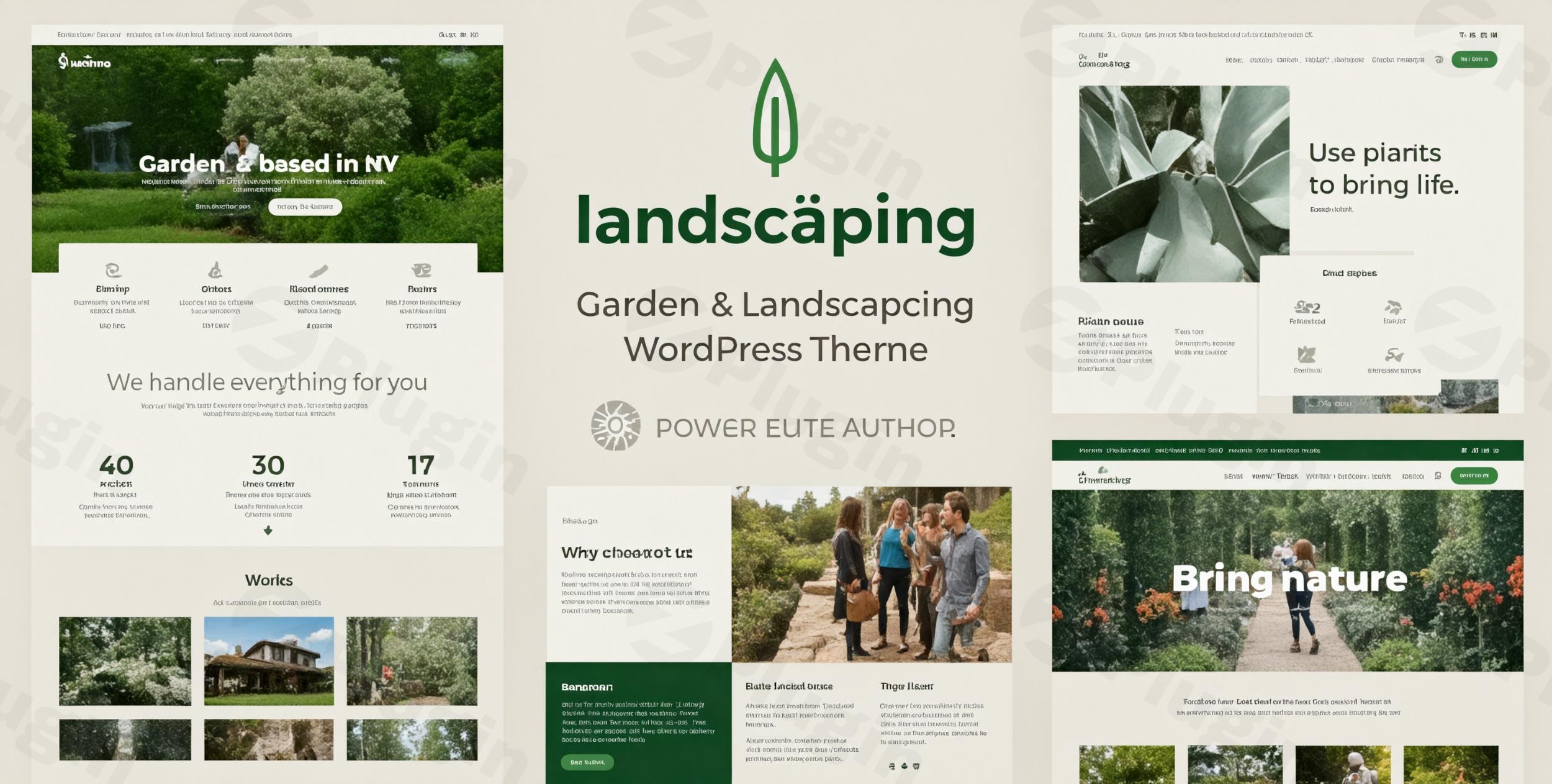
Elevate your online presence with Verdantia, a beautifully crafted landscaping WordPress theme designed specifically for the green industry. Whether you’re a landscape architect, garden designer, florist, or lawn care professional, Verdantia offers a visually stunning and highly functional platform to showcase your services and attract more clients. This comprehensive review delves into its design philosophy, features, setup, and customization options, providing insights for anyone looking to build a professional website in the gardening sector.
Introduction: Cultivating Your Online Garden with Verdantia
Verdantia is more than just a theme; it’s a dedicated solution for businesses and professionals within the landscaping and gardening industry. It provides a visually stunning and fully responsive design that aims to help you establish a strong online presence. The theme’s design philosophy encapsulates the essence of nature within a digital framework, blending modern UI/UX with earthy tones and textures. It’s ideal for showcasing portfolios, detailing services, and integrating client testimonials, ensuring you can build trust and credibility effectively online.
Key Features: Design, Layout & Performance
Verdantia is packed with features tailored to help your landscaping or gardening business flourish online, focusing on aesthetic appeal, robust layout options, and top-tier performance.
Design & Layout Options
Verdantia provides endless layout possibilities to truly reflect your brand. It offers a dedicated mobile responsive design, ensuring your site looks impeccable on any device, from desktops to smartphones. Key design features include:
- Header Variations: Choose from four distinct header types, with separate logo versions for normal, sticky, and mobile headers, giving you complete control over your site’s initial impression.
- Portfolio & Gallery Layouts: Showcase your work with over 10 diverse portfolio layouts and a flexible masonry gallery layout for plant and design photos, making your projects truly shine.
- Pre-built Templates: Get a head start with pre-built homepages, gallery, services, and contact pages. Dedicated sections for services, testimonials, and team bios are also included, designed to engage your visitors immediately.
- Unique Visual Elements: The theme features eco-inspired layouts, smooth page transitions, and elegant parallax effects, all contributing to a modern and dynamic user experience that resonates with the natural world.
Customization Capabilities
Personalizing your Verdantia site is intuitive and powerful, ensuring your website aligns perfectly with your brand identity.
- Advanced Color Schemes: Utilize extensive color customization options, featuring retina-ready visuals and an eco-friendly color palette that truly brings your design to life.
- Typography Control: Advanced typography options allow you to select fonts and styles that perfectly match your brand’s aesthetic.
- Dynamic Backgrounds: Implement video backgrounds for rows and columns, and create engaging parallax sections with full-height options for a truly immersive experience.
- Theme Options Panel: Customization is facilitated through a powerful Theme Option Panel and live editing via the WordPress Customizer, making design tweaks highly accessible even without coding knowledge.
Performance & SEO Features
Verdantia is engineered not just for beauty, but for speed and discoverability.
- Optimized for Speed: The theme boasts exceptional page-load performance straight out of the box and adheres to Core Web Vitals, ensuring a fast and smooth experience for your visitors.
- SEO-Optimized Structure: Built with an SEO-optimized structure, Verdantia helps your business get found online by search engines like Google and AI search engines such as Google SGE and Perplexity.
- Mobile-First & Cross-Browser Compatibility: Fully responsive and retina-ready, the theme ensures a flawless appearance on all devices and is compatible with major browsers including Firefox, Safari, Chrome, and Edge.
Installation & Demo Import
Setting up your Verdantia site is a straightforward process, designed to get your landscaping business online quickly.
- Install & Activate the Theme:
- Log in to your WordPress dashboard.
- Navigate to Appearance > Themes > Add New.
- Click Upload Theme, choose the Verdantia theme zip file, and click Install Now.
- Once installed, click Activate.
- Install Required Plugins:
- After activation, Verdantia will likely prompt you to install a few recommended or required plugins. These often include a theme companion plugin, and potentially a page builder like Elementor. Follow the on-screen instructions to install and activate these.
- One-Click Demo Content Import:
- Verdantia features a one-click demo content import functionality, allowing you to replicate the beautiful landscaping layouts seen in the theme’s demos.
- Look for a section in your WordPress dashboard, typically under Appearance > Import Demo Data or a dedicated “Verdantia” menu item.
- Click the import button and allow the process to complete.
- Post-Import Expectations:
- After a successful demo import, your site will have pre-built homepages, gallery pages, services sections, contact pages, and more.
- Menus, widgets, and some global settings will also be populated, providing a solid foundation that closely matches the live demo.
- Tip for Large Imports: If you encounter issues during demo import (e.g., incomplete data, timeouts), it might be due to low server memory or execution limits. Contact your hosting provider to temporarily increase PHP memory limit (
memory_limit) and maximum execution time (max_execution_time).
Customization Guide: Branding Your Green Business
Verdantia empowers you to personalize every aspect of your website to match your unique brand identity, even without coding knowledge.
- Using the WordPress Customizer: Most of your visual customizations can be done through the native WordPress Customizer (Appearance > Customize). Here, you can live-preview changes to:
- Colors: Adjust primary, secondary, and accent colors to align with your brand palette.
- Typography: Select fonts, sizes, and line heights for headings and body text.
- Header & Footer Layouts: Choose from the four distinct header types, configure logo versions (normal, sticky, mobile), and customize footer widgets and content.
- Global Styles: Apply sitewide changes that ensure consistency across all your pages.
- Leveraging Page Builders: Verdantia integrates seamlessly with leading drag-and-drop page builders like Elementor and Front End Beaver Builder. This allows you to:
- Visually design and edit any page without touching a line of code.
- Drag and drop elements, sections, and blocks to create bespoke layouts.
- Utilize pre-designed blocks and sections to quickly build stunning pages.
- Setting Up Your Homepage & Menus:
- Go to Settings > Reading to set your desired homepage (usually one of the demo homepages) and a dedicated blog page.
- Manage your navigation menus under Appearance > Menus, arranging links to your services, portfolio, about page, and contact information.The intuitive customization options provided by Verdantia make it easy to craft a professional, visually stunning, and highly functional site that truly represents your landscaping business.
FAQ & Troubleshooting
Here are answers to common questions about the Verdantia WordPress theme to help you make informed decisions and troubleshoot potential issues.
Is Verdantia compatible with popular page builders like Elementor or Beaver Builder?
Yes, Verdantia is highly compatible and integrates seamlessly with both Elementor and Front End Beaver Builder. It is built with Elementor for easy customization, allowing users to create bespoke pages with drag-and-drop functionality without requiring any coding knowledge. The theme is also optimized for the native Gutenberg Block Editor.
Does Verdantia support WooCommerce for online stores?
Absolutely. Verdantia is fully compatible with WooCommerce 9.x.x, enabling you to easily set up an online store. You can sell anything from gardening tools and plants to gift cards for your landscaping services directly from your website.
Is the Verdantia theme SEO friendly?
Yes, Verdantia is designed with SEO in mind. It features an SEO-optimized structure to help search engines crawl and index your site effectively. Furthermore, it’s optimized for speed and adheres to Core Web Vitals, which are crucial ranking factors for Google, ensuring your site performs well in search results.
How can I customize the header layouts in Verdantia?
Verdantia offers extensive header customization options. You can choose from four distinct header types and configure separate logo versions for normal, sticky, and mobile headers. These options are typically accessible via the theme’s Theme Options Panel or through the WordPress Customizer under the Header settings.
What should I know about support for the Verdantia theme?
While Verdantia is developed by vamtam, a “Power Elite Author,” it is important to note that vamtam explicitly states that direct support is not provided for the regular ThemeForest license of this item. If you purchase a GPL-licensed version from a reseller like ZeroPlugin.com, they often promise lifetime updates from their platform but also do not include original author support. Users will need to rely on community resources, documentation, or their own expertise for assistance.
Conclusion
Verdantia stands out as an exceptional garden WordPress theme for anyone in the landscaping and gardening industry. Its visually stunning, eco-inspired design, combined with robust customization options and top-tier performance, makes it a powerful tool for establishing a strong online presence.The theme offers remarkable design flexibility with numerous layout options for portfolios, galleries, and headers, ensuring your site accurately reflects your brand. Its seamless customization options via the WordPress Customizer and deep integration with Elementor and Beaver Builder mean you can create a unique website without needing to write code. Furthermore, Verdantia is built for performance and SEO readiness, ensuring fast loading times and better visibility in search engines.Verdantia is an ideal choice for landscaping companies, garden designers, florists, and lawn care providers, whether you’re a beginner looking for an intuitive platform or an advanced developer seeking a flexible foundation. While the lack of direct developer support for the official ThemeForest license is a consideration, the theme’s comprehensive features, ease of use, and compatibility with essential plugins like WooCommerce make it a highly recommended solution for cultivating a thriving online presence for your green business.
I. Download Limits & Account Benefits
- Free Downloads: Each email address receives 3 downloads per day for free products
- Upgrade Benefits: Purchase any paid product to increase your daily download limit by 3 for each paid product
- No Account Required: You can download immediately by receiving the download link via email
- Account Recommended: Create an account for easier access to your order history and direct update downloads
II. Understanding GPL vs Official Versions
Important: The products available on WPPick are GPL-licensed versions, which differ from official developer versions. Before purchasing, please read our comprehensive guide: Understanding GPL & Official Differences at WPPick
Key Points:
- GPL versions may not include premium support from original developers
- Updates may be delayed compared to official releases
- Some premium features might have limitations
- Always consider your specific needs and support requirements
III. Support & Assistance
We’re here to help through multiple channels:
- Email Support: Direct email assistance for all inquiries
- Live Chat: Real-time support during business hours
- Comprehensive Documentation: Detailed guides and tutorials
IV. Order Tracking
Access your complete purchase history and download links anytime: Order History
V. Account Access
New to WPPick? Login or Create Account to manage your downloads and orders efficiently.
VI. Refund Protection
We stand behind our products with a clear refund policy. Review our terms: Refund Policy
VII. Privacy & Security
Your data security is our priority. Learn how we protect your information: Privacy Policy
VII. Terms of Service
Understanding our service terms ensures a smooth experience: Terms of Use
Quick Tips for Best Experience
- Verify Compatibility: Check plugin/theme compatibility with your WordPress version
- Backup First: Always backup your site before installing new plugins or themes
- Test Environment: Consider testing on a staging site first
- Stay Updated: Regularly check for updates in your account dashboard
- Read Documentation: Review any included documentation for optimal setup
Need Help?
If you have questions about downloads, licensing, or need technical assistance, don’t hesitate to contact our support team. We’re committed to ensuring you have the best possible experience with WPPick products.
Ready to get started? Your download adventure begins with just one click!
- Updated style.css
- Updated vamtam/admin/helpers/updates/version-checker.php
- Updated vamtam/classes/framework.php
- Updated style.css
- Updated vamtam/classes/enqueues.php
- style.css