
Vikinger – Buddypress And Gamipress Social Community
/Year
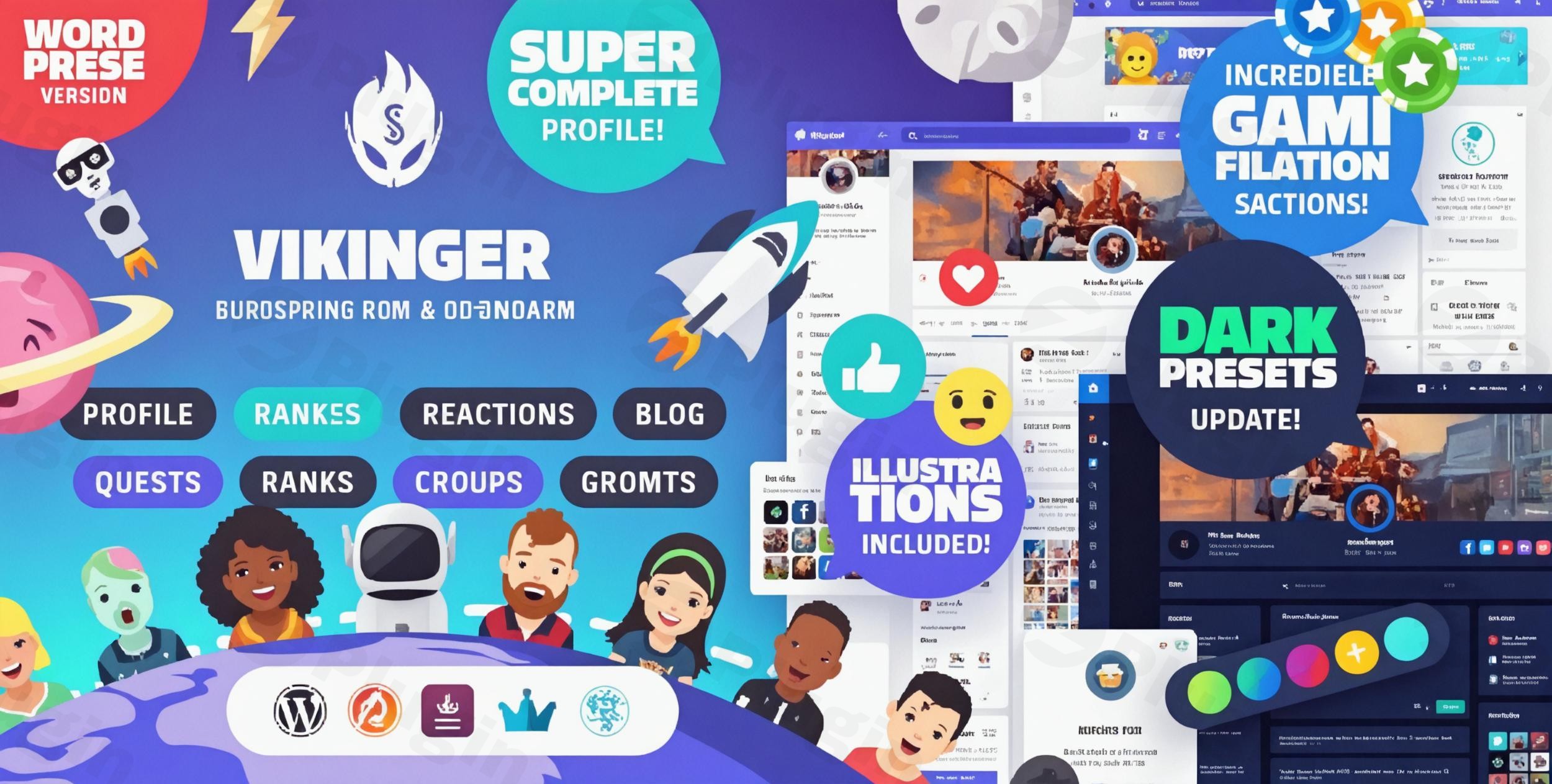
The Vikinger WordPress theme is a meticulously designed solution for anyone looking to create a vibrant, interactive, and gamified social community website. It transforms a standard WordPress installation into a full-fledged social network, making it an ideal choice for community managers, gaming enthusiasts, membership site owners, and freelancers who aim to foster high user engagement. With deep integrations for BuddyPress and GamiPress, Vikinger provides a powerful platform for connecting friends, sharing content, and rewarding active members.
Key Features: Design, Layout & Performance
Vikinger stands out with its ornate design and a comprehensive suite of features tailored for an immersive social experience, blending aesthetics with robust functionality.
Design & Layout Options
Vikinger offers a visually rich experience with numerous meticulously crafted pages and flexible layout options:
- Complete Profile & Newsfeed Pages: Enjoy super complete user profiles featuring sliders and dedicated boxes for sections like About, Images, Badges, Quests, and Posts. The newsfeed, profile settings, and member/group directories are all designed for optimal user interaction.
- Enhanced Status Updates: Revolutionize how users share content. The theme allows for easy upload of photos, GIFs, and YouTube videos by simply pasting a URL. Posts can be pinned, favorited, or marked private with custom icons.
- Flexible Group & Blog Layouts: Support for both public and private groups, allowing for diverse community structures. For blogging, choose from three distinct views: list, small grid, and big grid. It supports standard, video, audio, and gallery post types, all integrated with reactions.
Customization Capabilities
Personalizing your community hub is intuitive with Vikinger’s extensive customization tools:
- Color Schemes & Dark Mode: Users can select from various color presets, including “Dark color presets,” and benefit from a user-friendly dark/light version toggle, allowing members to switch between modes.
- Extensive Typography: The theme provides robust typography options, empowering you to change the theme font, specifically supporting Google Fonts, directly through the WordPress Customizer.
- Comprehensive Customizer & Admin Panel Options: Vikinger offers a wide range of customization options via the WordPress Customizer for general design elements. Additionally, the admin panel provides over 200 theme options to fine-tune logos, fonts, headers, and footers, ensuring “no coding required” for deep personalization.
Performance & SEO Features
Built for speed and search engine visibility, Vikinger ensures a smooth experience for both users and administrators:
- Lightweight & Lightning-Fast: Described as “very lightweight” and designed for “lightning-fast performance,” Vikinger is optimized to ensure quick loading times, crucial for interactive social platforms.
- Code Quality & Compression: It supports “compression of JavaScript and CSS to speed up website” and is built with “actual and secure code,” compatible with the latest PHP versions.
- Advanced SEO Optimization: The theme incorporates “advanced SEO optimization” to give your community a head start in search engine rankings.
- Fully Responsive & Retina-Ready: Vikinger is “fully responsive,” ensuring an optimal display across all devices (desktops, tablets, smartphones) and is “Retina-ready” for crisp visuals on high-resolution screens.
Unique Visual Elements & Gamification Systems
Vikinger’s unique design philosophy centers on rich visuals and an immersive gamified experience:
- Custom Illustrations & Avatars: The theme comes packed with numerous unique illustrations (credits, rank shields, badges, quest tokens, section banners) in PSD files with PS vectors, alongside SVG icons, and 16 custom avatars—all designed for easy customization.
- React.js Elements for Dynamic Interaction: Several dynamic parts of the template, such as filtering activities or reacting to posts, are built with React.js. This ensures a smoother, more modern user experience with dynamic interactions without constant page reloads.
- Post Reactions: A custom reactions plugin, specifically developed for Vikinger, offers 8 distinct reactions (Like, Love, Dislike, Happy, Funny, Wow, Angry, Sad) seamlessly integrated with BuddyPress for posts, comments, and replies, boosting user engagement.Beyond reactions, Vikinger integrates a complete gamification system:
- Badges: Unlock badges and earn credits to level up your profile, showcasing achievements with the dedicated badges widget.
- Quests: Complete quests to earn credits and unlock ranks, with progress displayed via the quests widget.
- Credits: Collect Gold, Gems, and Emeralds, which are essential for unlocking new ranks. Track your balance with the credits widget and a top bar display.
- Ranks: Progress through 6 distinct ranks by collecting credits and meeting specific requirements, with your current rank and progress visible on your profile avatar.
Installation & Demo Import
Setting up your Vikinger-powered social community is designed to be straightforward, even for those new to WordPress.
- Install & Activate the Theme:
- After purchasing Vikinger, download the theme package.
- From your WordPress dashboard, navigate to
Appearance > Themes > Add New > Upload Theme. - Choose the Vikinger theme
.zipfile and clickInstall Now. - Once installed, click
Activate.
- Install Required Companion Plugins:
- Upon activation, Vikinger will prompt you to install and activate its essential companion plugins, including BuddyPress and GamiPress, which are core to its social and gamification functionalities.
- It also recommends Elementor for page building, and supports bbPress for forums and WooCommerce for e-commerce. Install and activate all recommended plugins for full functionality.
- Use the Theme’s One-Click Demo Import:
- Vikinger includes various “demo pages” and pre-built templates for essential community sections.
- Look for a “Demo Import” option in your WordPress dashboard (often under
Appearanceor a dedicated theme menu). - Follow the on-screen instructions to import the demo content. This will populate your site with layouts, images, and settings similar to the theme’s demo site.
- What to Expect During/After Demo Import:
- The demo import will typically set up your homepage, various community pages (profiles, groups, newsfeed), blog layouts, menus, and widgets.
- Common Pitfalls: Large demo imports can be resource-intensive. Ensure your server has sufficient memory and PHP execution time. If you encounter issues, increase your
memory_limitandmax_execution_timein yourphp.inifile or contact your hosting provider. After import, you may need to manually assign navigation menus and set your homepage underSettings > Reading.
Customization Guide (Branding & Layout)
Vikinger provides robust options to personalize your social community and align it with your brand identity without needing to write any code.
- Using the WordPress Customizer:
- Navigate to
Appearance > Customizein your WordPress dashboard. This live customizer allows you to see changes in real-time. - Here, you can easily tweak colors, select from various color presets (including dark mode options), and upload your logo and favicon.
- Access extensive typography settings to choose Google Fonts and adjust font sizes for different elements, ensuring brand consistency.
- Navigate to
- Header & Footer Layouts:
- Configure your header and footer areas directly from the Customizer or through the theme’s dedicated admin panel. Options include customizing elements, social links, and even hiding the footer if desired.
- The integrated “Account Hub” provides a front-end management area for users to control their profile information, avatars, cover uploads, and email settings, adding to the theme’s user-centric design.
- Homepage, Blog Page, and Menus:
- After demo import, you might need to specify your homepage under
Settings > Reading. - Set up your navigation menus under
Appearance > Menus, creating main navigation, footer menus, and specialized menus for your community sections.
- After demo import, you might need to specify your homepage under
- Intuitive Design & Elementor Integration:
- Vikinger’s customization experience is designed for ease of use, making design adjustments accessible for beginners.
- For more intricate page layouts, the theme is fully integrated with Elementor, the recommended page builder. This allows for drag-and-drop design of any page, offering unparalleled flexibility to create unique layouts and styles that match your vision.
FAQ & Troubleshooting
Here are answers to some common questions about the Vikinger WordPress theme:
Is Vikinger compatible with Elementor, WPBakery, or Gutenberg?
Yes, Vikinger is fully integrated with Elementor, which is its recommended page builder for easy drag-and-drop customization. While it doesn’t explicitly mention WPBakery, it does utilize the standard WordPress blog features from the backend, implying compatibility with the Gutenberg (Block Editor) for content creation.
Does Vikinger support WooCommerce for online stores?
Yes, Vikinger is fully compatible with WooCommerce. This allows you to integrate e-commerce functionalities directly into your social community, enabling you to create an online store, sell products, or monetize membership features.
How can I update the Vikinger theme without losing my customizations?
To ensure your customizations are safe during theme updates, it is highly recommended to use a child theme. A child theme inherits the functionality and styling of the parent theme (Vikinger) but allows you to make modifications in separate files, preserving them even after the main theme is updated.
What should I do if the demo import fails or looks different from the demo site?
If the demo import fails, check your server’s PHP memory limit and execution time (often memory_limit and max_execution_time in php.ini). Large demo imports require adequate resources. If it looks different, ensure all recommended plugins were installed and activated, and then manually set your main navigation menus and homepage under Appearance > Menus and Settings > Reading, respectively. Refer to the official Vikinger documentation for detailed troubleshooting steps.
Why choose Vikinger for a gaming community?
Vikinger is an excellent choice for a gaming community due to its deep GamiPress integration, offering badges, quests, ranks, and credits to reward players and foster engagement. Its detailed design elements, custom illustrations, and dynamic React.js features create an immersive and modern environment perfect for gaming clans, guilds, or general gaming social networks.
Conclusion
The Vikinger BuddyPress and GamiPress Social Community WordPress Theme is a powerhouse for anyone serious about building a highly interactive, visually appealing, and engaging online community. Its meticulous design, deep integration with essential social and gamification plugins, and robust customization options make it an outstanding choice.From its stunning, super-complete profile pages and dynamic newsfeeds to its comprehensive gamification systems (badges, quests, credits, ranks), Vikinger offers unparalleled functionality out-of-the-box. The theme’s commitment to performance, SEO readiness, and full responsiveness ensures a smooth experience across all devices and a strong foundation for organic growth.Whether you are a freelancer building a client’s social platform, an agency creating a niche membership site, a blogger seeking to foster a loyal community, or a gamer establishing a vibrant guild, Vikinger provides the tools, flexibility, and unique aesthetic to make your project shine. While deeply specialized for community and gamification, its Elementor compatibility ensures design freedom, making Vikinger a confident recommendation for a visually rich, high-converting social hub.
I. Download Limits & Account Benefits
- Free Downloads: Each email address receives 3 downloads per day for free products
- Upgrade Benefits: Purchase any paid product to increase your daily download limit by 3 for each paid product
- No Account Required: You can download immediately by receiving the download link via email
- Account Recommended: Create an account for easier access to your order history and direct update downloads
II. Understanding GPL vs Official Versions
Important: The products available on WPPick are GPL-licensed versions, which differ from official developer versions. Before purchasing, please read our comprehensive guide: Understanding GPL & Official Differences at WPPick
Key Points:
- GPL versions may not include premium support from original developers
- Updates may be delayed compared to official releases
- Some premium features might have limitations
- Always consider your specific needs and support requirements
III. Support & Assistance
We’re here to help through multiple channels:
- Email Support: Direct email assistance for all inquiries
- Live Chat: Real-time support during business hours
- Comprehensive Documentation: Detailed guides and tutorials
IV. Order Tracking
Access your complete purchase history and download links anytime: Order History
V. Account Access
New to WPPick? Login or Create Account to manage your downloads and orders efficiently.
VI. Refund Protection
We stand behind our products with a clear refund policy. Review our terms: Refund Policy
VII. Privacy & Security
Your data security is our priority. Learn how we protect your information: Privacy Policy
VII. Terms of Service
Understanding our service terms ensures a smooth experience: Terms of Use
Quick Tips for Best Experience
- Verify Compatibility: Check plugin/theme compatibility with your WordPress version
- Backup First: Always backup your site before installing new plugins or themes
- Test Environment: Consider testing on a staging site first
- Stay Updated: Regularly check for updates in your account dashboard
- Read Documentation: Review any included documentation for optimal setup
Need Help?
If you have questions about downloads, licensing, or need technical assistance, don’t hesitate to contact our support team. We’re committed to ensuring you have the best possible experience with WPPick products.
Ready to get started? Your download adventure begins with just one click!
- Updated theme to latest version of plugins
- Made the mobile chat button compatible with theme color presets
- Removed Paid Memberships Pro plugin from the backend Setup page, as the plugin has been removed from the WordPress plugins page. If you want to use the plugin, please refer to their page.
- The vikinger_groups_meta_valid_social_networks filter now also modifies valid social networks used by the GroupManagePopup component.
- The vikinger_members_xprofile_valid_social_networks filter has been deprecated, social networks are now identified as valid if they exist as a field in the BuddyPress Social_Links profile field group. In order for an appropiate icon to show for each social network added, ensure an icon that is named the same as the social link profile field name (in lowercase) is available as an SVG by following the steps indicated here or here.
- Fixes for bugs / security issues
- Updated templates to WooCommerce v9.7.0