

Viseo – News, Video, & Podcast WordPress Theme
/Year
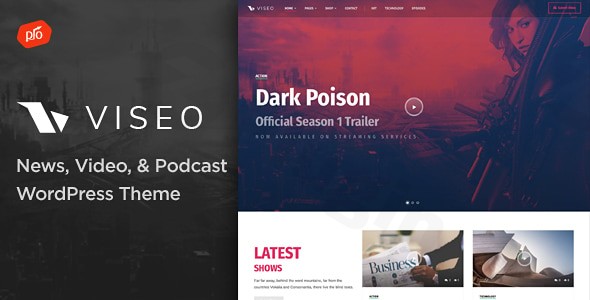
The digital landscape for content creators is evolving, demanding more than just a standard blog layout. The Viseo WordPress theme is a high-performance, multimedia-centric solution specifically engineered for the needs of modern news outlets, vloggers, and podcasters. Designed with a focus on seamless audio and video integration, Viseo bridges the gap between traditional journalism and modern digital media, offering a professional aesthetic that prioritizes engagement and visual storytelling.
1. Key Features: Design, Layout & Performance
Viseo stands out by moving away from generic “all-purpose” layouts and focusing on what multimedia creators actually need: high-impact visuals and robust media handling.
Advanced Multimedia Handling
At the heart of Viseo is its built-in audio and video player. Unlike many themes that rely on third-party embeds that can slow down your site, Viseo’s integrated player is fully responsive and supports all devices. This ensures that whether your audience is listening to a podcast on their commute or watching a news clip on a desktop, the experience is seamless.
Design & Layout Options
Viseo offers incredible flexibility through its layout systems:
- Responsive & Retina Ready: The theme is built with a mobile-first philosophy, ensuring crisp visuals on high-resolution displays.
- Customizable Headers & Footers: You can tailor the navigation experience with built-in Mega Menus and adjustable footer columns (ranging from 1 to 4 columns).
- Boosted Elements Add-on: This premium inclusion allows you to create sliders, maps, and popups without needing additional expensive plugins.
SEO & Performance Readiness
Is the Viseo theme good for SEO? Yes. It is built using clean markup and follows the latest WordPress coding standards. This helps search engines crawl your content more effectively. Furthermore, the theme is optimized for speed and high-resolution performance, which are critical ranking factors in Google’s Core Web Vitals.
2. Installation & One-Click Demo Import
Setting up a news video podcast WordPress theme shouldn’t be a technical hurdle. Viseo simplifies the process so you can focus on creating content.
- Theme Installation: Upload the Viseo zip file via your WordPress Dashboard (Appearance > Themes > Add New).
- Plugin Activation: Upon activation, the theme will prompt you to install required plugins, including Elementor and the Boosted Elements Add-on.
- One-Click Demo Import: Navigate to the demo import section in the theme options. With a single click, Viseo will import pre-designed pages, menus, and sample posts.
- Final Polish: Once the import is complete, simply replace the placeholder content with your own news stories, videos, or podcast episodes.Pro Tip: Before starting the demo import, ensure your server’s memory limit is set to at least 256MB to prevent timeouts during the data transfer.
3. Customization Guide: Personalizing Your Brand
Viseo provides a user-friendly customization experience, making it an excellent WordPress theme for video content creators who may not have deep coding knowledge.
Using the Front-End Customizer
Viseo utilizes the native WordPress Customizer, allowing you to see changes in real-time. Here, you can manage:
- Unlimited Color Schemes: Match your brand identity perfectly by changing primary and accent colors across the site.
- Typography: Access advanced font settings to ensure your news articles are readable and professional.
Building with Elementor
Because Viseo is fully Elementor compatible, you can use drag-and-drop functionality to build custom page layouts. Whether you want a dedicated video gallery or a landing page for your latest podcast season, the integration with Elementor and Boosted Elements makes it intuitive.
4. FAQ & Troubleshooting
Is Viseo compatible with the Block Editor (Gutenberg)?
While Viseo is optimized for the Elementor page builder, it follows modern WordPress standards and is compatible with the Block Editor for standard post and page creation.
Does Viseo support WooCommerce for online stores?
Yes, the Viseo WordPress theme is fully WooCommerce compatible. This allows content creators to sell merchandise, digital downloads, or premium subscriptions directly from their website.
How do I update the theme without losing my customizations?
Viseo supports the use of Child Themes. By using a child theme for your CSS or functional changes, you can safely update the parent Viseo theme to receive the latest security and performance patches without overwriting your design work.
What should I do if the demo import fails?
Most demo import issues are caused by server “Timeouts” or low “Max Execution Time” settings. Contact your host to increase these limits, or ensure you have deactivated any heavy security plugins during the initial import process.
5. Conclusion: Is Viseo Right for You?
The Viseo WordPress theme is a powerhouse for anyone whose primary currency is multimedia. It successfully avoids the “bloat” of generic themes by focusing on high-quality video playback, podcast management, and clean news layouts.Who is it for?
- Podcasters who need a professional home for their RSS feeds and show notes.
- Vloggers and News Agencies who want a premium, high-resolution platform for their video reports.
- Digital Marketers who need a landing page that converts through engaging sliders and popups.With its Elementor integration, one-click setup, and SEO-friendly foundation, Viseo is a top-tier choice for building a modern media empire. To learn more about optimizing your WordPress site, visit wppick.com for the latest tips and theme guides.
I. Download Limits & Account Benefits
- Free Downloads: Each email address receives 3 downloads per day for free products
- Upgrade Benefits: Purchase any paid product to increase your daily download limit by 3 for each paid product
- No Account Required: You can download immediately by receiving the download link via email
- Account Recommended: Create an account for easier access to your order history and direct update downloads
II. Understanding GPL vs Official Versions
Important: The products available on WPPick are GPL-licensed versions, which differ from official developer versions. Before purchasing, please read our comprehensive guide: Understanding GPL & Official Differences at WPPick
Key Points:
- GPL versions may not include premium support from original developers
- Updates may be delayed compared to official releases
- Some premium features might have limitations
- Always consider your specific needs and support requirements
III. Support & Assistance
We’re here to help through multiple channels:
- Email Support: Direct email assistance for all inquiries
- Live Chat: Real-time support during business hours
- Comprehensive Documentation: Detailed guides and tutorials
IV. Order Tracking
Access your complete purchase history and download links anytime: Order History
V. Account Access
New to WPPick? Login or Create Account to manage your downloads and orders efficiently.
VI. Refund Protection
We stand behind our products with a clear refund policy. Review our terms: Refund Policy
VII. Privacy & Security
Your data security is our priority. Learn how we protect your information: Privacy Policy
VII. Terms of Service
Understanding our service terms ensures a smooth experience: Terms of Use
Quick Tips for Best Experience
- Verify Compatibility: Check plugin/theme compatibility with your WordPress version
- Backup First: Always backup your site before installing new plugins or themes
- Test Environment: Consider testing on a staging site first
- Stay Updated: Regularly check for updates in your account dashboard
- Read Documentation: Review any included documentation for optimal setup
Need Help?
If you have questions about downloads, licensing, or need technical assistance, don’t hesitate to contact our support team. We’re committed to ensuring you have the best possible experience with WPPick products.
Ready to get started? Your download adventure begins with just one click!
- Updates to support WordPress 6.9+
- Updated WooCommerce Templates
- Updated Premium Plugins