

Werk – Multipurpose Woocommerce Theme
/Year
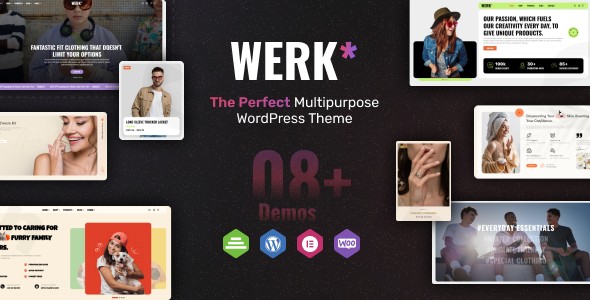
The digital marketplace demands both beauty and brawn, especially for online stores. The Werk Multipurpose WooCommerce Theme is engineered to deliver exactly that: a robust, visually stunning, and highly flexible foundation for your e-commerce venture. This in-depth review explores how Werk empowers store owners, freelancers, and agencies to craft high-converting online shops for any niche, from fashion to electronics, built on the powerful WordPress and WooCommerce platforms.
Introduction: Build Your Dream eCommerce Store with Werk
Designed by “designthemes,” Werk is a versatile WooCommerce WordPress theme built with a singular focus: helping you create captivating and efficient online stores. Its core philosophy revolves around providing extensive customization options and a user-friendly experience, making it an ideal choice for establishing an online presence for fashion boutiques, electronics retailers, furniture shops, grocery markets, and countless other product categories. Werk combines a sleek, modern design with powerful e-commerce functionalities, ensuring your products are showcased beautifully across all devices.
Key Features: Design, Layout & Performance for Modern eCommerce
Werk stands out by offering a comprehensive suite of features that address both the aesthetic and functional demands of contemporary online stores.
Design & Layout Options
Werk provides the creative freedom necessary to establish a unique brand identity.
- Multiple Pre-Designed Layouts: Kickstart your store with a selection of professionally designed homepage and product page layouts. These pre-built sections offer a solid starting point, which you can then customize to perfectly align with your brand.
- Flexible Header & Footer Layouts: Take control over your site’s navigation and identity with customizable header and footer builders. This allows for tailored user experiences and enhanced branding opportunities.
- Responsive Design & Retina Ready: In today’s mobile-first world, Werk ensures your store looks flawless and functions perfectly on all devices—desktops, tablets, and smartphones. Its retina-ready display capabilities guarantee sharp, high-resolution images, providing a premium viewing experience.
- Elementor Integration: As an “Elementor Ready” theme, Werk fully leverages the intuitive drag-and-drop capabilities of the Elementor page builder. This integration offers unparalleled control over page content, sections, containers, and backgrounds, enabling users to craft complex layouts without writing a single line of code.
Customization Capabilities
Personalizing your online store is effortless with Werk’s extensive customization tools.
- Unlimited Color Options: Tailor your site’s color schemes to perfectly match your brand’s palette, creating a cohesive and memorable visual experience.
- Advanced Typography: With advanced typography options, you can personalize text styles across your site, ensuring readability and brand consistency.
- Intuitive Options Panel & Live Customizer: Werk includes a wide range of customization options accessible through an intuitive options panel and a Live Customizer. This allows for real-time adjustments of colors, fonts, layouts, and other visual elements, making the branding process straightforward and immediate.
Performance & SEO Features
A fast, visible store is a successful store, and Werk is built with these principles in mind.
- Fast Loading Speed: Optimized code and performance enhancements ensure your online store loads quickly. This is crucial for reducing bounce rates, improving user experience, and positively impacting your search engine rankings.
- SEO Optimized: Werk is built with best practices for search engine optimization (SEO). This means clean markup and a structure that helps search engines understand and rank your content effectively, driving organic traffic to your products.
Installation & Demo Import: Get Your Store Up and Running
Setting up your Werk Multipurpose WooCommerce Theme is designed to be a straightforward process, even for beginners. Here’s a step-by-step guide to get your store online:
- Download and Upload the Theme:
- After purchasing Werk from ThemeForest, you will download a ZIP file.
- Log in to your WordPress dashboard.
- Navigate to Appearance > Themes.
- Click on Add New at the top, then Upload Theme.
- Choose the Werk theme ZIP file and click Install Now.
- Activate the Theme:
- Once installed, click on the Activate button to make Werk your active theme.
- Install Required Plugins:
- Upon activation, Werk will typically prompt you to install a set of recommended plugins. Essential plugins often include WooCommerce, Elementor, and a companion plugin specific to the theme (like the “WEDESIGNTECH SHOP PLUGIN” for Werk). Install and activate all recommended plugins for full theme functionality.
- One-Click Demo Import:
- Werk includes a one-click demo importer, a critical feature for quick setup. This allows you to replicate the beautiful demo content and layouts you see in the theme’s preview with minimal effort.
- Look for a menu item like “Werk Demos,” “Import Demo Data,” or “Theme Options > Demo Importer” in your WordPress dashboard.
- Select the demo you wish to import and initiate the process.
- What to expect: The demo import will populate your site with pages, posts, sample products, widgets, and menu structures. Depending on your server’s resources and the size of the demo, this process can take several minutes. It’s advisable to ensure your server has sufficient PHP memory limits (
memory_limit,max_execution_time) to prevent timeouts during large imports. - Post-Import: After a successful import, you may need to manually set your homepage (Settings > Reading) and main navigation menus (Appearance > Menus) to match the demo exactly.
Customization Guide: Branding & Layout with Werk
Personalizing your Werk-powered online store to reflect your brand’s unique identity is a seamless experience, thanks to its integration with the WordPress Customizer and Elementor.
- WordPress Customizer / Global Styles:
- Navigate to Appearance > Customize in your WordPress dashboard. This will open the WordPress Live Customizer, allowing you to see changes in real-time.
- Here, you’ll find global options for your theme, including:
- Colors: Easily change primary, secondary, accent colors, and background colors to match your brand palette.
- Typography: Select fonts from a vast library (often Google Fonts), adjust sizes, line heights, and weights for headings and body text.
- Header & Footer Layouts: Customize the overall structure of your header and footer, including logo placement, navigation menus, and widget areas.
- Site Identity: Upload your brand logo and favicon.
- Werk’s intuitive options panel complements the Customizer, providing additional granular controls over various theme elements without requiring any coding knowledge.
- Elementor for Page & Product Layouts:
- Since Werk is “Elementor Ready,” the popular drag-and-drop page builder becomes your primary tool for crafting custom page and product layouts.
- Editing Pages: To customize any page imported from a demo or a new page, simply click “Edit with Elementor” at the top of the page.
- Building with Elementor:
- Drag and drop widgets (sections, columns, text blocks, images, product grids, call-to-action buttons) onto your page.
- Customize every aspect of these elements: spacing, containers, sections, backgrounds, typography, colors, and more.
- Leverage Elementor’s template library to insert pre-designed blocks or save your own custom designs for reuse.
- This visual builder makes it incredibly easy to create unique landing pages, tailor product description layouts, and design any content area exactly as you envision it.
- Setting Up Essential Pages & Menus:
- Homepage: Go to Settings > Reading and select your desired page (often “Home” or “Shop”) as your static homepage.
- Blog Page: If your store also includes a blog, create a new page named “Blog” (or similar) and assign it as your Posts Page in Settings > Reading.
- Navigation Menus: Head to Appearance > Menus to create and assign menus to your header, footer, or any other designated menu locations. Werk’s Mega Menu functionality also allows for creating rich, multi-column dropdown menus.
FAQ & Troubleshooting: Common Questions About Werk
Here are answers to some frequently asked questions about the Werk Multipurpose WooCommerce Theme, designed to be clear and helpful for common queries.
Is Werk compatible with Elementor and Gutenberg?
Werk is explicitly “Elementor Ready,” meaning it integrates seamlessly with the Elementor drag-and-drop page builder for extensive page and layout customization. However, it is noted as “Gutenberg Optimized, No,” indicating that it may not fully leverage or be designed around the native WordPress Block Editor.
Does Werk support WooCommerce for online stores?
Yes, Werk is a premium WooCommerce theme and offers seamless, deep integration with WooCommerce. It is specifically designed and optimized to power online stores, enabling easy management of products, orders, and payments with enhanced features to boost conversions.
Does the Werk theme support child themes?
While not explicitly stated in all provided snippets, child theme support is a standard and recommended best practice for WordPress themes. Werk supports child themes, allowing users to make modifications and customizations without altering the parent theme’s core files. This ensures that your customizations are preserved when the main theme receives updates.
How can I update the Werk theme without losing my customizations?
To update the Werk theme safely, always use a child theme for any custom code or styling. When an update is available (usually through your ThemeForest account or WordPress dashboard if integrated), download the latest version and update the parent theme. Using a child theme ensures your specific modifications are kept separate and will not be overwritten by the update.
What should I do if the demo import fails or looks different from the demo site?
If the Werk theme demo import fails, common causes include low server resources (PHP memory limit, execution time) or conflicting plugins. Check your server’s PHP configuration and temporarily deactivate non-essential plugins. If it looks different, ensure all recommended plugins were installed and activated prior to import. Post-import, you might need to manually set your homepage and navigation menus in WordPress settings to perfectly match the demo layout.
Conclusion: Is Werk the Right Choice for Your eCommerce Venture?
The Werk Multipurpose WooCommerce Theme positions itself as a robust and versatile solution for anyone looking to create a professional online store. Its strength lies in its deep WooCommerce integration, comprehensive Elementor compatibility, and a wealth of pre-designed layouts that cater to diverse product niches. This theme provides significant design flexibility, allowing users to customize almost every aspect of their site, from global styles to specific page layouts.For store owners, freelancers, and agencies prioritizing a visual building experience and rapid deployment for their e-commerce projects, Werk offers a compelling package. Its focus on fast loading speeds and SEO optimization means your store will not only look good but also perform well in search results. While the current user rating on ThemeForest (2.33/5) is a point of concern that potential buyers should investigate further, the theme’s feature set suggests it is a powerful tool for building dynamic, responsive, and conversion-focused online shops. If you’re building an e-commerce site where visual customization and seamless WooCommerce functionality are paramount, Werk is definitely worth considering for taking your online business to the next level.
I. Download Limits & Account Benefits
- Free Downloads: Each email address receives 3 downloads per day for free products
- Upgrade Benefits: Purchase any paid product to increase your daily download limit by 3 for each paid product
- No Account Required: You can download immediately by receiving the download link via email
- Account Recommended: Create an account for easier access to your order history and direct update downloads
II. Understanding GPL vs Official Versions
Important: The products available on WPPick are GPL-licensed versions, which differ from official developer versions. Before purchasing, please read our comprehensive guide: Understanding GPL & Official Differences at WPPick
Key Points:
- GPL versions may not include premium support from original developers
- Updates may be delayed compared to official releases
- Some premium features might have limitations
- Always consider your specific needs and support requirements
III. Support & Assistance
We’re here to help through multiple channels:
- Email Support: Direct email assistance for all inquiries
- Live Chat: Real-time support during business hours
- Comprehensive Documentation: Detailed guides and tutorials
IV. Order Tracking
Access your complete purchase history and download links anytime: Order History
V. Account Access
New to WPPick? Login or Create Account to manage your downloads and orders efficiently.
VI. Refund Protection
We stand behind our products with a clear refund policy. Review our terms: Refund Policy
VII. Privacy & Security
Your data security is our priority. Learn how we protect your information: Privacy Policy
VII. Terms of Service
Understanding our service terms ensures a smooth experience: Terms of Use
Quick Tips for Best Experience
- Verify Compatibility: Check plugin/theme compatibility with your WordPress version
- Backup First: Always backup your site before installing new plugins or themes
- Test Environment: Consider testing on a staging site first
- Stay Updated: Regularly check for updates in your account dashboard
- Read Documentation: Review any included documentation for optimal setup
Need Help?
If you have questions about downloads, licensing, or need technical assistance, don’t hesitate to contact our support team. We’re committed to ensuring you have the best possible experience with WPPick products.
Ready to get started? Your download adventure begins with just one click!
- Minor Fixes and Improvements
- Compatible: Latest WordPress Version