

Wikilogy – Wiki & Blog WordPress Theme
/Year
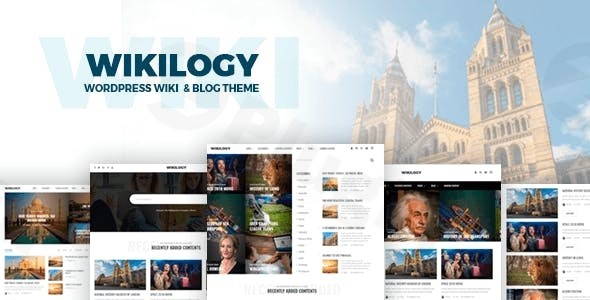
In today’s dynamic digital landscape, a website is more than just an online presence; it’s a meticulously crafted experience designed to inform, engage, and inspire. For content creators, educators, businesses, and knowledge base curators, the need for a robust, visually appealing, and highly functional platform is paramount. Enter Wikilogy – Wiki & Blog WordPress Theme, a premium solution meticulously engineered to transform your content into an engaging and authoritative online hub.Wikilogy stands out as a versatile and powerful WordPress theme, expertly balancing the informational density of a wiki or knowledge base with the engaging aesthetics of a modern blog or magazine. Developed by Gloria Themes, it’s a testament to professional web design, offering unparalleled flexibility and a user-centric experience, ensuring your expertise shines through with clarity and style.
The Wikilogy Design Philosophy: Clarity, Engagement, and Professionalism
At its core, Wikilogy is built on a design philosophy that prioritizes enhanced readability, intuitive navigation, and a visually captivating presentation. It understands that whether you’re building a comprehensive encyclopedia, a dynamic blog, or a corporate knowledge base, the user’s ability to easily consume and interact with your content is key. This premium theme delivers advanced, professional-grade design capabilities that empower you to:
- Create Engaging Experiences: With unique visual elements like categorized archiving, content tables, and interactive listing styles, Wikilogy transforms static information into a dynamic journey for your readers.
- Ensure Optimal Readability: A clean, organized design, complemented by features like the reading bar and adaptive images, ensures your content is not only easy to read but a pleasure to consume.
- Reflect Your Brand’s Identity: Extensive customization options allow you to tailor every aspect of your site to perfectly match your brand’s aesthetic and voice, ensuring a cohesive and professional online presence.
Unpacking Wikilogy’s Professional Features
Wikilogy is packed with a suite of features designed to cater to both technical and non-technical users, simplifying website creation while delivering sophisticated results.
Versatile Design & Visual Appeal
Wikilogy offers an impressive array of design capabilities that elevate your website’s visual appeal and functionality:
- 14+ Ready Homepages: Jumpstart your project with a diverse selection of professionally designed homepages, offering immediate impact and allowing you to quickly find a layout that suits your vision.
- Unique Visual Elements: Distinguish your content with innovative features such as categorized archiving, dynamic content tables for easy navigation, and a practical reading bar that tracks user progress. Interactive listing styles add a layer of engagement that standard themes often lack.
- Adaptive Images & Lazy Loading: Optimize performance and user experience with an intelligent adaptive image system and lazy loading, ensuring your site loads quickly and efficiently across all devices.
- Dark & Light Mode: Offer your users the choice between elegant dark and crisp light skin options, enhancing accessibility and catering to personal preferences for a superior browsing experience.
- Fully Responsive Design: Crafted with mobile-first principles, Wikilogy guarantees your content looks flawless and functions perfectly on desktops, tablets, and smartphones, ensuring a consistent experience for all visitors.
Unmatched Customization & Flexibility
Personalizing your website is effortless with Wikilogy’s extensive customization tools:
- Advanced Theme Customizer & Options Panel: Take full control over your site’s appearance with an intuitive, advanced theme customizer and a powerful theme options panel. Adjust settings, preview changes in real-time, and fine-tune every detail without touching a line of code.
- Typography & Color Customizer: Define your brand’s visual identity with comprehensive typography and color customization options. Select from a wide range of fonts, adjust sizes, and craft a color palette that perfectly reflects your aesthetic.
- Customizable Layouts & Elements: From single to multi-page designs, Wikilogy provides a variety of layout options. Rearrange content elements, define widget areas, and leverage custom post types to create a truly unique structure that enhances user engagement and readability.
- Header & Footer Options: Customize your website’s header and footer areas to include essential navigation, branding elements, social media links, and calls to action, ensuring critical information is always accessible.
- Page Builder Integration: Seamlessly integrate with popular drag-and-drop page builders like Elementor and WPBakery Page Builder. This empowers both beginners and seasoned designers to create complex layouts with ease, offering unparalleled creative freedom.
- Custom Widgets & Template Studio: Enhance functionality with a set of custom widgets and leverage the innovative Template Studio to save and reuse your favorite designs, streamlining your workflow.
Technical Excellence & Robust Performance
Wikilogy is not just about looks; it’s built on a foundation of robust technical specifications designed for optimal performance, security, and compatibility.
- WordPress Compatibility: Regular updates ensure Wikilogy remains fully compatible with the latest WordPress versions, providing access to new features and maintaining peak performance.
- SEO Friendly with Schema Markup: Built with search engine optimization (SEO) best practices, Wikilogy helps your content rank higher. The inclusion of schema markup further enhances visibility and readability for search engines, boosting your organic reach.
- Performance Optimized: Beyond lazy loading, the theme incorporates various optimizations to ensure your website loads quickly, providing a smooth and satisfying experience for your visitors, which is crucial for SEO and user retention.
- Multilingual & RTL/LTR Support: Reach a global audience with translation-ready features and full compatibility with leading multilingual plugins like WPML and Polylang. With support for both Right-to-Left (RTL) and Left-to-Right (LTR) languages, Wikilogy ensures inclusivity for diverse linguistic requirements.
- GDPR & Cross-Browser Compatibility: Rest assured with GDPR compliance, demonstrating a commitment to user privacy. Furthermore, Wikilogy is rigorously tested for cross-browser compatibility, guaranteeing a consistent experience across Chrome, Firefox, Safari, Edge, and more.
- WooCommerce Support: For those looking to integrate e-commerce functionality, Wikilogy offers full WooCommerce support, allowing you to seamlessly add an online store to your wiki or blog.
Setup & Usage Guide: Getting Started with Wikilogy
Setting up your Wikilogy theme is a straightforward process, designed for efficiency and ease of use.
- Download & Installation: After purchasing Wikilogy from ThemeForest, download the theme package. Navigate to your WordPress dashboard, go to
Appearance > Themes > Add New > Upload Theme, and select the Wikilogy.zipfile. Click “Install Now” and then “Activate.” - One-Click Demo Import: To quickly set up your site with a pre-designed layout, utilize the one-click demo import feature. This will populate your site with content and settings from one of the 14+ ready homepages, serving as an excellent starting point.
- Explore the Theme Customizer: Access the live theme customizer via
Appearance > Customize. Here, you can visually adjust colors, fonts, header/footer layouts, and other global settings. - Leverage Page Builders: For creating custom page layouts, navigate to your desired page or post and launch Elementor or WPBakery Page Builder. Drag and drop elements, utilize pre-built blocks, and arrange content to achieve your desired design.
- Configure Theme Options: Dive into the advanced theme options panel (usually found under
Appearanceor a dedicated menu item in your dashboard) to fine-tune performance settings, SEO configurations, and other intricate theme functionalities. - Add Your Content: Begin populating your site with your articles, wiki entries, blog posts, and media. Wikilogy’s intuitive content management system makes this process efficient and enjoyable.
Target Audience & Ideal Use Cases
Wikilogy is more than a theme; it’s a strategic tool for a diverse range of users and content-driven projects:
- Bloggers & Publishers: Create professional online magazines, news sites, or personal blogs with unique layouts and enhanced readability features.
- Educators & Knowledge Managers: Develop comprehensive online encyclopedias, educational portals, or corporate knowledge bases, making complex information accessible and organized.
- Businesses & Organizations: Establish professional documentation sites, FAQs, or internal wikis, streamlining information sharing and improving internal communication.
- Community Builders: Foster vibrant online communities with content directories, forums (via plugin integration), and interactive listing styles.
- E-commerce Ventures: Utilize WooCommerce integration to sell products alongside informative articles or guides, creating a powerful content-driven storefront.Whether you’re an independent content creator, a small business, or a large institution, Wikilogy provides the robust framework to build a highly functional and aesthetically pleasing website that resonates with your audience.
Why Choose Wikilogy? Expertise, Trust, and Professional Results
When investing in a premium WordPress theme, trust and expertise are paramount. Wikilogy, developed by the reputable Gloria Themes, embodies these principles:
- User-Friendly Interface & Enhanced Readability: Designed with the end-user in mind, Wikilogy ensures an intuitive navigation experience and a clean, organized layout that makes content consumption effortless and enjoyable.
- Positive Reviews & Developer Credibility: Praised for its versatile design, user-friendly interface, and extensive customizability, Wikilogy has garnered positive feedback from users, reflecting the developer’s commitment to quality.
- Unique Layout & Balance: Unlike many traditional wiki themes, Wikilogy strikes a unique balance between text-heavy informational content and engaging visual elements, preventing information overload and maintaining user interest.
- Comprehensive Support & Documentation: With extensive online documentation, FAQs, and premium support available, you’re never alone in your website building journey.
Conclusion: Empower Your Content with Wikilogy
The Wikilogy – Wiki & Blog WordPress Theme offers an unparalleled combination of professional design, cutting-edge functionality, and robust performance. It’s a premium solution for anyone serious about creating a compelling, user-friendly, and authoritative online presence. By choosing Wikilogy, you’re not just selecting a theme; you’re investing in a sophisticated platform that empowers you to manage, present, and scale your content with confidence and style, ensuring your expertise reaches and engages your audience effectively.Available for purchase on ThemeForest, Wikilogy represents a valuable investment in professional web design, delivering the tools you need to build a truly exceptional wiki, blog, or knowledge base website.
I. Download Limits & Account Benefits
- Free Downloads: Each email address receives 3 downloads per day for free products
- Upgrade Benefits: Purchase any paid product to increase your daily download limit by 3 for each paid product
- No Account Required: You can download immediately by receiving the download link via email
- Account Recommended: Create an account for easier access to your order history and direct update downloads
II. Understanding GPL vs Official Versions
Important: The products available on WPPick are GPL-licensed versions, which differ from official developer versions. Before purchasing, please read our comprehensive guide: Understanding GPL & Official Differences at WPPick
Key Points:
- GPL versions may not include premium support from original developers
- Updates may be delayed compared to official releases
- Some premium features might have limitations
- Always consider your specific needs and support requirements
III. Support & Assistance
We’re here to help through multiple channels:
- Email Support: Direct email assistance for all inquiries
- Live Chat: Real-time support during business hours
- Comprehensive Documentation: Detailed guides and tutorials
IV. Order Tracking
Access your complete purchase history and download links anytime: Order History
V. Account Access
New to WPPick? Login or Create Account to manage your downloads and orders efficiently.
VI. Refund Protection
We stand behind our products with a clear refund policy. Review our terms: Refund Policy
VII. Privacy & Security
Your data security is our priority. Learn how we protect your information: Privacy Policy
VII. Terms of Service
Understanding our service terms ensures a smooth experience: Terms of Use
Quick Tips for Best Experience
- Verify Compatibility: Check plugin/theme compatibility with your WordPress version
- Backup First: Always backup your site before installing new plugins or themes
- Test Environment: Consider testing on a staging site first
- Stay Updated: Regularly check for updates in your account dashboard
- Read Documentation: Review any included documentation for optimal setup
Need Help?
If you have questions about downloads, licensing, or need technical assistance, don’t hesitate to contact our support team. We’re committed to ensuring you have the best possible experience with WPPick products.
Ready to get started? Your download adventure begins with just one click!
- Wikilogy Core plugin updated
- Envato Market plugin updated
- User login popup responsive issue solved
- Header responsive issue solved
- Clickability issue in the reading bar of social media links solved
- In the Advanced Post Search module, select fields were only displaying a single option. This bug has been resolved