

Wpmedia WordPress Theme Update
/Year
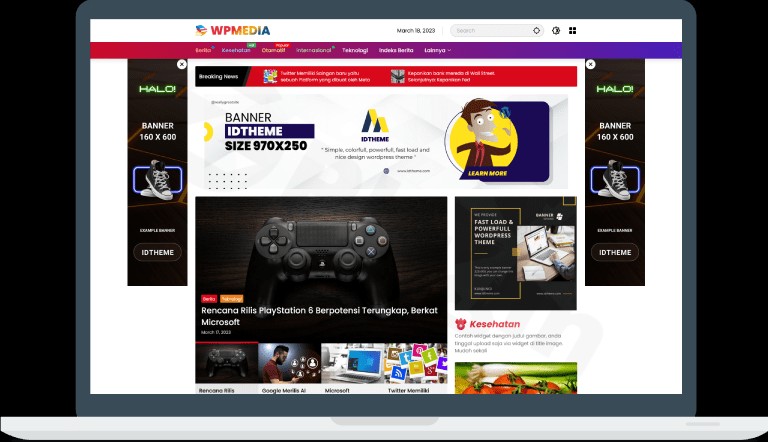
In the competitive world of digital publishing, speed and user experience are the twin pillars of success. The Wpmedia WordPress theme is a high-performance, lightweight WordPress theme specifically engineered for news portals, magazine websites, and professional bloggers. Developed by Gian MR (idtheme.com), this theme combines a vibrant, “colorful and optimal performance” aesthetic with deep technical optimization, ensuring your content reaches your audience instantly while maintaining a professional visual hierarchy.
Key Features: Design, Layout & Performance
The Wpmedia theme is more than just a pretty layout; it is a comprehensive toolkit for modern publishers who need a fast WordPress theme that doesn’t compromise on style.
Versatile Design & Layout Options
Wpmedia is built with a “mobile-first” philosophy, ensuring a seamless experience across desktops, tablets, and smartphones.
- Aesthetic Appeal: The design is characterized by modern elements like parallax banners and gradient menus, which are particularly effective for engaging Indonesian and international audiences alike.
- Flexible Layouts: Whether you are running a technology review site or a high-traffic news portal, the theme offers multiple demo versions that cater to different niches. You can switch between these layouts easily to find the perfect fit for your content density.
- Gutenberg-Ready: As a Gutenberg-ready theme, it integrates perfectly with the native WordPress block editor, allowing for easy content creation without heavy third-party dependencies.
Unmatched Performance & SEO
Performance isn’t just a buzzword for Wpmedia; it is a core feature. The theme is designed to improve Core Web Vitals through:
- Built-in Optimization: It includes advanced page caching, GZIP and Brotli compression, and lazy loading for images.
- Asset Management: Wpmedia automatically minifies CSS and JavaScript, generates critical CSS, and removes unused code to ensure “superfast” loading times.
* SEO Readiness: Clean markup and a structured heading system make this an SEO-friendly choice. It is fully compatible with Yoast SEO and Rank Math, helping your news articles rank higher in search engine results.
Installation & Demo Import: Getting Started
Setting up Wpmedia is straightforward, even for beginners. Follow these steps to get your site live:
- Install & Activate: Upload the theme zip file via your WordPress Dashboard under Appearance > Themes > Add New. Click activate once the upload is complete.
- Plugin Setup: Upon activation, the theme will prompt you to install required companion plugins. Wpmedia works exceptionally well with Elementor for those who prefer drag-and-drop building.
- One-Click Demo Import: Navigate to the theme options panel to access the one-click update and import function. This feature imports demo data, including menus, widgets, and sample pages, to give you a head start.
4. Final Checks: Ensure your server meets modern requirements (PHP 7.4 or higher is generally recommended for performance) to avoid timeouts during the import process.
Customization Guide: Branding & Layout
The Wpmedia WordPress theme leverages the native WordPress Customizer, providing a real-time preview of your changes. This makes personalizing your site intuitive and efficient.
Global Styles & Typography
With access to over 600 Google Fonts, you can adjust typography sizes and weights to match your brand’s voice. The theme supports unlimited color customization, allowing you to modify everything from the top navigation bar to the footer copyright area.
Header and Footer Management
While Wpmedia is a multipurpose WordPress theme in its flexibility, its header and footer options are specifically optimized for news sites. You can easily integrate ad placements, social media icons, and mega menus to improve site navigation and monetization.
Widgets and Sidebars
The theme includes custom widgets designed for “Related Posts,” “Trending News,” and “Newsletter Signups.” These can be placed in various sidebar areas to maximize reader engagement and time-on-site.
FAQ & Troubleshooting
What is the Wpmedia WordPress theme?
Wpmedia is a premium, superfast WordPress theme designed primarily for news, blog, and magazine websites. It focuses on high performance, mobile responsiveness, and easy customization via the WordPress Customizer.
Is Wpmedia an Elementor compatible theme?
Yes, Wpmedia is a fully Elementor compatible theme. While it works perfectly with the Gutenberg block editor, it also provides seamless integration with Elementor for users who want to build complex, custom page layouts using drag-and-drop tools.
Does Wpmedia support WooCommerce for online stores?
Yes, Wpmedia is an SEO-friendly WooCommerce WordPress theme. It allows bloggers and news publishers to easily integrate an online shop to sell merchandise, digital products, or subscriptions directly from their website.
Is the Wpmedia WordPress theme update good for SEO?
Absolutely. Recent updates (such as version 1.1.7 and compatibility with WordPress 6.8) focus on improving speed and schema markup. By optimizing Core Web Vitals, Wpmedia helps your site meet Google’s strict performance standards for better search rankings.
Conclusion: Why Choose Wpmedia?
The Wpmedia WordPress theme stands out as a top-tier choice for users who prioritize speed and specialized news layouts over the generic “bloat” often found in massive multipurpose themes. Its combination of an affordable price point, GPL licensing for unlimited sites, and high-end performance features like Brotli compression makes it an incredible value.Whether you are a professional journalist, a niche blogger, or an agency building sites for clients, Wpmedia offers the technical foundation needed to compete in today’s fast-paced digital landscape. If you are looking for a fast WordPress theme that is easy to set up and even easier to customize, Wpmedia is a highly recommended solution.Ready to build your high-performance news site? Explore more theme guides and WordPress tips at wppick.com.
I. Download Limits & Account Benefits
- Free Downloads: Each email address receives 3 downloads per day for free products
- Upgrade Benefits: Purchase any paid product to increase your daily download limit by 3 for each paid product
- No Account Required: You can download immediately by receiving the download link via email
- Account Recommended: Create an account for easier access to your order history and direct update downloads
II. Understanding GPL vs Official Versions
Important: The products available on WPPick are GPL-licensed versions, which differ from official developer versions. Before purchasing, please read our comprehensive guide: Understanding GPL & Official Differences at WPPick
Key Points:
- GPL versions may not include premium support from original developers
- Updates may be delayed compared to official releases
- Some premium features might have limitations
- Always consider your specific needs and support requirements
III. Support & Assistance
We’re here to help through multiple channels:
- Email Support: Direct email assistance for all inquiries
- Live Chat: Real-time support during business hours
- Comprehensive Documentation: Detailed guides and tutorials
IV. Order Tracking
Access your complete purchase history and download links anytime: Order History
V. Account Access
New to WPPick? Login or Create Account to manage your downloads and orders efficiently.
VI. Refund Protection
We stand behind our products with a clear refund policy. Review our terms: Refund Policy
VII. Privacy & Security
Your data security is our priority. Learn how we protect your information: Privacy Policy
VII. Terms of Service
Understanding our service terms ensures a smooth experience: Terms of Use
Quick Tips for Best Experience
- Verify Compatibility: Check plugin/theme compatibility with your WordPress version
- Backup First: Always backup your site before installing new plugins or themes
- Test Environment: Consider testing on a staging site first
- Stay Updated: Regularly check for updates in your account dashboard
- Read Documentation: Review any included documentation for optimal setup
Need Help?
If you have questions about downloads, licensing, or need technical assistance, don’t hesitate to contact our support team. We’re committed to ensuring you have the best possible experience with WPPick products.
Ready to get started? Your download adventure begins with just one click!
- Version update