

Xtra – WordPress Website Builder + Rtl
/Year
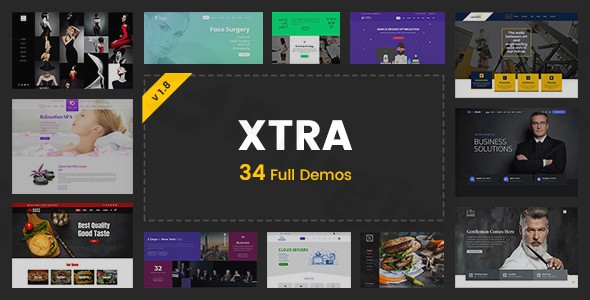
The Xtra WordPress theme is a robust and highly versatile solution designed for anyone looking to build a professional, visually stunning, and high-performing website without extensive coding knowledge. It’s particularly well-suited for creatives, agencies, small businesses, online stores, and bloggers who demand flexibility, advanced customization, and a seamless user experience. With its intuitive drag-and-drop builder, extensive pre-built content, and native RTL (Right-to-Left) language support, Xtra empowers users to craft unique web presences that stand out.
Key Features: Design, Layout & Performance
Xtra distinguishes itself through a comprehensive suite of features that address both aesthetic appeal and technical efficiency, making it a powerful Xtra website builder.
Design & Layout Options
Xtra offers unparalleled control over your site’s visual presentation. You can choose between full-width and boxed layouts, including nuanced options like boxed with margins, providing foundational design flexibility. For content presentation, the theme boasts over 30 styles for galleries and posts, along with multiple dedicated layouts for portfolios and blogs, ensuring your content is always showcased beautifully.A significant advantage is the inclusion of 100-130+ pre-built websites (demos) and more than 200 pre-made section templates. These serve as fantastic starting points, allowing for rapid website development across various niches like business, corporate, creative agency, photography, fashion, and more. Beyond structure, Xtra incorporates unique visual elements such as parallax scrolling effects with multi-depth options, a rich icons library with over 1500 icons, and dynamic CSS3 animations on scroll to add a modern, engaging feel to your site. Custom mobile and tablet headers ensure a perfect look on every device.
Customization Capabilities
Personalizing your website is central to the Xtra experience. The theme provides a Live Theme Options panel with over 1000 options, enabling real-time previews of your changes before they go live. This includes comprehensive control over unlimited color schemes, supporting both light and dark modes, allowing you to perfectly match your brand’s aesthetic.Typography is equally flexible, with integration of 875+ (or up to 1705+) Google Fonts. You gain complete control over font sizes, families, margins, letter spacing, and line-height for all heading levels (H1-H6), body text, footers, and sidebars, with the ability to adjust typography specifically for different devices.For structural customization, Xtra features a robust Header & Footer Builder, allowing you to create unlimited custom designs, including specific styles for sticky and mobile headers. Footer columns are highly customizable with 20 layout options. Additionally, it supports mega menus with 1-8 column arrangements, ideal for complex navigation. The theme also provides unlimited background options for various sections and supports child themes, custom CSS, and JavaScript for advanced users seeking deeper customization.
Performance & SEO Features
The Xtra WordPress theme is engineered for speed and efficiency. It’s highlighted as a lightweight WordPress theme with fast loading speeds, often outperforming many competitors in GTmetrix and Pingdom tests. This is achieved through optimized, dynamically generated CSS, lightweight code, lazy loading images, and GPU-accelerated animations. The theme is built with HTML5 and CSS3, emphasizing modern cross-browser compatibility and low server requests.For search engine optimization (SEO), Xtra offers a clean, well-structured codebase that is inherently SEO-friendly. It’s compatible with popular SEO plugins like Yoast SEO, ensuring you have all the tools needed to improve your site’s visibility and rankings. Its mobile responsiveness and fast loading times are also significant advantages for modern SEO.
Installation & Demo Import
Setting up your website with Xtra is designed to be straightforward, even for beginners.
- Install & Activate the Theme:
- After downloading Xtra, navigate to your WordPress dashboard.
- Go to
Appearance > Themes > Add New > Upload Theme. - Choose the Xtra theme zip file and click
Install Now. - Once installed, click
Activate.
- Install Required Companion Plugins:
- Upon activation, Xtra will prompt you to install any necessary plugins, such as Elementor or WPBakery Page Builder (included free with the theme), and potentially other extensions like Slider Revolution. Follow the on-screen instructions to install and activate these.
- One-Click Demo Import:
- Xtra comes with a powerful one-click demo import feature, allowing you to quickly set up a website identical to one of its 100-130+ pre-built demos.
- Look for a “Demo Importer” or similar option within the theme’s settings or dashboard menu.
- Select your desired demo and initiate the import process.
- What to Expect:
- The demo import will populate your site with pages, posts, images, menus, widgets, and theme settings from the chosen demo.
- This process can take a few minutes, especially for larger demos, and requires adequate server memory and execution time to prevent timeouts. It’s recommended to have at least 128MB of PHP memory limit.
- After import, you’ll have a fully functional website structure that you can then customize with your own content and branding.
Customization Guide: Branding & Layout
Xtra offers an intuitive customization experience that lets you personalize every aspect of your site.
- Accessing Live Theme Options: Most global settings are accessible through Xtra’s “Live Theme Options” panel, often found under
Appearance > Customizeor a dedicated “Xtra” menu in your WordPress dashboard. This panel allows you to see changes in real-time. - Changing Colors & Fonts: Within the Theme Options, navigate to sections like “Colors” and “Typography” to adjust your site’s primary, secondary, and accent colors, as well as select from hundreds of Google Fonts. You can define specific font styles for headings, body text, and more.
- Uploading Your Logo: Typically found in the “Header” or “Site Identity” section of the Theme Options, you can easily upload your brand’s logo. Xtra also allows you to set different logos for sticky headers or mobile views.
- Customizing Headers & Footers: Utilize the powerful Header & Footer Builder (often accessible via the Xtra dashboard or a specific page builder interface). This allows you to design unique header and footer layouts with drag-and-drop elements, controlling everything from navigation styles and contact information to social media icons and widget areas.
- Setting Up Homepage & Blog Page:
- Go to
Settings > Readingin your WordPress dashboard. - Under “Your homepage displays,” select “A static page.”
- Choose an existing page (or create a new one) for your homepage and another for your blog posts page.
- Go to
- Managing Menus: Navigate to
Appearance > Menus. Create new menus or assign existing ones to Xtra’s various menu locations (e.g., Primary Menu, Footer Menu, Mobile Menu). For mega menus, the theme’s options often integrate directly with the standard WordPress menu editor.The customization experience with Xtra is fluid and highly visual, thanks to its deep integration with Elementor and WPBakery Page Builder. These page builders provide a drag-and-drop interface, allowing you to easily arrange content, add sections, and apply styling without touching code.
FAQ & Troubleshooting
Here are answers to some common questions about the Xtra WordPress Theme:
Is Xtra compatible with Elementor / WPBakery / Gutenberg?
The Xtra WordPress theme is fully compatible with both Elementor and WPBakery Page Builder (formerly Visual Composer), offering dedicated elements and templates for both popular drag-and-drop builders. While the theme integrates deeply with these page builders for content creation, it also implicitly supports the Gutenberg block editor for basic post and page content.
Does Xtra support WooCommerce for online stores?
Yes, Xtra is 100% WooCommerce ready and fully compatible with the WooCommerce plugin, making it an excellent choice for building online stores. It includes dedicated shop demos, over 50 options for shop page design, and seamlessly integrates all aspects of an e-commerce site, from product pages to cart and checkout processes. It also supports Easy Digital Downloads (EDD) for selling digital products.
Does Xtra theme support child themes?
Yes, the Xtra theme is compatible with child themes. Using a child theme is highly recommended for any custom modifications to your site’s code or styling. This ensures that your customizations are preserved when the main Xtra theme receives updates.
Is Xtra WordPress theme SEO friendly?
Yes, Xtra is designed with SEO best practices in mind. It features lightweight and optimized code, fast loading speeds, and a responsive design, all of which contribute positively to search engine rankings. Furthermore, it is fully compatible with leading SEO plugins like Yoast SEO, allowing you to implement advanced on-page optimization strategies.
How can I customize the Xtra theme header?
You can customize the Xtra theme header using its robust Header Builder. This feature, typically found within the theme’s Live Theme Options or a dedicated builder interface, allows you to create unlimited custom headers using drag-and-drop elements. You can design different headers for sticky and mobile views, control navigation styles, add logos, contact information, and social icons with ease.
Conclusion
The Xtra – Multipurpose WordPress Theme + RTL is a powerhouse solution for creating diverse and dynamic websites. Its blend of extensive design flexibility, powerful customization options, and strong performance optimization makes it a top contender in the premium WordPress theme market.Xtra shines with its intuitive drag-and-drop page builder integrations (Elementor & WPBakery), a vast library of pre-built websites and section templates, and comprehensive controls over every visual element, from typography to header and footer layouts. Its commitment to speed, mobile responsiveness, and SEO readiness ensures that your website will not only look great but also perform exceptionally.Ideal for agencies and freelancers serving multiple clients, small business owners needing a professional online presence, e-commerce store owners leveraging WooCommerce, and even bloggers seeking a stylish and fast platform, Xtra delivers. Its native RTL support is a significant advantage for websites targeting right-to-left languages. For anyone seeking a feature-rich, high-performing, and highly customizable WordPress theme that prioritizes a seamless user experience, Xtra is a smart and reliable choice.
I. Download Limits & Account Benefits
- Free Downloads: Each email address receives 3 downloads per day for free products
- Upgrade Benefits: Purchase any paid product to increase your daily download limit by 3 for each paid product
- No Account Required: You can download immediately by receiving the download link via email
- Account Recommended: Create an account for easier access to your order history and direct update downloads
II. Understanding GPL vs Official Versions
Important: The products available on WPPick are GPL-licensed versions, which differ from official developer versions. Before purchasing, please read our comprehensive guide: Understanding GPL & Official Differences at WPPick
Key Points:
- GPL versions may not include premium support from original developers
- Updates may be delayed compared to official releases
- Some premium features might have limitations
- Always consider your specific needs and support requirements
III. Support & Assistance
We’re here to help through multiple channels:
- Email Support: Direct email assistance for all inquiries
- Live Chat: Real-time support during business hours
- Comprehensive Documentation: Detailed guides and tutorials
IV. Order Tracking
Access your complete purchase history and download links anytime: Order History
V. Account Access
New to WPPick? Login or Create Account to manage your downloads and orders efficiently.
VI. Refund Protection
We stand behind our products with a clear refund policy. Review our terms: Refund Policy
VII. Privacy & Security
Your data security is our priority. Learn how we protect your information: Privacy Policy
VII. Terms of Service
Understanding our service terms ensures a smooth experience: Terms of Use
Quick Tips for Best Experience
- Verify Compatibility: Check plugin/theme compatibility with your WordPress version
- Backup First: Always backup your site before installing new plugins or themes
- Test Environment: Consider testing on a staging site first
- Stay Updated: Regularly check for updates in your account dashboard
- Read Documentation: Review any included documentation for optimal setup
Need Help?
If you have questions about downloads, licensing, or need technical assistance, don’t hesitate to contact our support team. We’re committed to ensuring you have the best possible experience with WPPick products.
Ready to get started? Your download adventure begins with just one click!
- Added Custom menu list type for quick contact box
- Fixed WooCommerce categories bar mask gradient conflict with body background
- Fixed WooCommerce products' hover image when the product page is created with Elementor
- Fixed Logo tooltip hover pointer issue on Elementor demos
- Fixed Elementor stretch container on website boxed mode
- Fixed PHP 8.5.3 deprecated integer fatal errors
- Fixed theme activation conflict with cached admin files
- Fixed Posts views counter issue in single posts
- Fixed minor CSS and JS issues
- Thanks To @TassieNZ
- Compatibility with WooCommerce 10.4.x
- Compatibility with Elementor v3.34.x
- Compatibility with WPBakery 8.x
- Added advanced WP Text Editor for category and tags descriptions
- Added thumbnail support for posts category and tag taxonomy archives
- Added four positions and photo gallery support for the marquee element
- Added caching system for sidebar and footer widgets HTML output
- Added render delay components settings, improving site speed & performance
- Added quick featured image set/remove buttons for all post types
- Fixed WooCommerce variation change issues in the quick view popup
- Fixed WooCommerce duplicated gallery items in the single product carousel
- Fixed WooCommerce hover effects on both gallery and single featured images
- Fixed WooCommerce form notification message issues on the My Account page
- Fixed WooCommerce product gallery order on RTL websites
- Fixed WooCommerce widget styling for categories and attributes
- Fixed WooCommerce attribute active selection color inconsistency
- Fixed WooCommerce sticky add to cart product title when the page title is disabled
- Fixed WooCommerce quantity input issue on grouped products
- Fixed video post format issues, specifically YouTube iframe output
- Fixed Mega Menu center and reverse mode positioning on RTL websites
- Fixed Demo importer RTL sites styles in widgets, menus and page settings
- Fixed Elementor default kit post_title error when uninstalling demos
- Fixed Contact Form 7 reinitialization issues in off-canvas and popup layouts
- Fixed menu indicator icon visibility when using custom HTML as a mega menu
- Fixed menus with droprodnw custom three dots placeholder for Google CLS
- Fixed demo importer issues on newer PHP versions
- Fixed uninstall demo button and modal JavaScript issues
- Fixed StyleKit number inputs issue with keyboard/mousewheel on first load
- Fixed Google Maps JavaScript's wrong multiple API calls
- Fixed missing or wrong WordPress images alt and title attribute output
- Fixed set issue for the home page after multiple imported demos
- Fixed Theme options live preview changes issue with WP 6.8.x
- Fixed Magic mouse issues and Hide default cursor option CSS issue
- Fixed Cookie notice position for mobile and tablet
- Fixed Gallery fitRow layout auto fit row issue on mobile
- Fixed Caching of the custom StyleKit selector and output issue
- Fixed & Removed unwanted links and unused shortcodes from posts excerpt
- Optimized JS/CSS files and reduced widget/element CSS by up to 40 KB
- Optimized database autoload calls and disabled all theme autoloads
- Optimized database tables for posts, pages, terms, and menus meta settings
- Improved the theme file size and reduced its size by up to 250 KB
- Improved the Codevz Plus plugin and reduced its size by up to 650 KB
- Improved theme performance, making it 2× faster than previous versions
- Improved all premade-demos styles on Desktop for both English and RTL
- Reduced DOM size elements by up to 20% in frontend and 10% in the backend
- Updated plugins and language files
- Compatibility with latest WordPress v6.9.
- Compatibility with Elementor v3.x, WooCommerce 10.x, WPBakery 8.x.
- Added New demo [ Corporate 3 ] for Elementor.
- Added WooCommerce new horizontal categories list before shop products.
- Added WooCommerce new Next/Previous Navigation for single product page.
- Added WooCommerce new premium marquee text bar on thumbnail for on sale products.
- Added WooCommerce new flexbox mode for quantity and add to cart section.
- Added WooCommerce new sticky rating breakdown section in product reviews tab.
- Added Radius type for header custom shapes of inner row's.
- Added Posts grid element option to set equal height grid mode.
- Added Cookie notice 'bottom center' position for desktop.
- Added Title option and CSS mask for header extra hidden panel.
- Added Search form for easy find widgets in Appearance > Widgets.
- Fixed WPML language selector CSS layer priority & mobile touch issue.
- Fixed Cookie banner bottom position issue in mobile.
- Fixed Posts and gallery carousel swipe/touch issue.
- Fixed Live carousel changes on Elementor and WPBakery editors.
- Fixed WooCommerce sale and other badges position on product page.
- Fixed WooCommerce Enlarge image icon position overlaping sale badge.
- Fixed WooCommerce image size issue on sticky add to cart section.
- Fixed StyleKit copy/paste issue between Theme options and Elementor.
- Fixed StyleKit custom CSS loading issue when using !important to value.
- Fixed AJAX search posts category and post type name issue.
- Fixed Menus hover effect when menu title contains icon or is empty.
- Fixed Menus hover ghost title position issue on RTL websites.
- Fixed Mega menu custom code output issue and headline tag issue for SEO.
- Fixed Loading all carousel items when browser JS disabled.
- Fixed Theme options responsive connection issue with StyleKit.
- Improved JS/CSS files and reduced upto 30kb of core CSS files.
- Improved CSS Responsive sizes and margins.
- Compatibility with Elementor v3.33.x
- Compatibility with WooCommerce 10.3.x
- Added New demo [ Moving 2 ]
- Added Tilt hover effect settings for the website image logo
- Added Separator settings for Title and Breadcrumbs in theme options
- Added Title tag option for the posts grids element in Elementor
- Added Link new tab option for fixed mobile navigation menus
- Added 300+ single template sections from demos to the Elementor library
- Fixed WooCommerce deprecated wp_enqueue_script PHP functions
- Fixed Google Maps loading issue when used inside hidden tabs & accordions
- Fixed Mobile menu search form URL issue in the multisite network
- Fixed Cookie notice container z-index issue in mobile and tablet
- Fixed Elementor experiment container conflict with stretched sections in the footer
- Fixed Elementor gallery element aria-label and title issue for SEO purposes
- Fixed Demo RTL styles when importing English version on the RTL direction website
- Fixed Gallery widget edit issue conflict with the media library
- Fixed Colorpicker showing issue in the widgets settings
- Fixed Service box element background issue in the WPBakery editor
- Fixed Shop mini cart buttons border radius CSS issue
- Fixed Hotspot element touch issue conflict with the image on iOS devices
- Fixed Social icons & Carousel dots alignment issue on iOS devices
- Improved all CSS codes when JavaScript is disabled or stopped due to any plugin conflicts
- Updated all language files
- Compatibility with Elementor v3.32.x
- Compatibility with WooCommerce v10.2.x
- Added Smooth page scroll option from Lenis script
- Added WooCommerce phone/WhatsApp assistance box for product page
- Added WooCommerce waitlist box when product is out of stock
- Added 650+ section templates from demos to the Elementor library
- Fixed Expandable menus icon position conflict with others
- Fixed WooCommerce quantity max count issue of in stock
- Fixed Blog title background replacement issue
- Fixed Anchor to the section jumping issue on first load
- Fixed Menu rotate hover effect on RTL sites
- Fixed Elementor full-stretch section issue in the footer and header
- Fixed Elementor content box element link output issue
- Fixed Elementor service box icon background color on hexagon style
- Fixed Google Maps Unexpected end of input JS error when using multiple maps
- Fixed Animated text element conflict animation between letters
- Fixed WPBakery custom footer template inner row width issue
- Fixed Menu anchor issue with the target position on first page load
- Fixed Popup element background issue on product's quick view
- Fixed Sticky sidebar issue when the header smart sticky is enabled
- Fixed minor CSS, JS issues
- Compatibility with WPBakery v8.6.x
- Compatibility with WooCommerce v10.1.x
- Compatibility with Elementor v3.31.x and Editor v4
- Added Elementor section export feature to live demos
- Added Elementor Premium templates section (250+ section templates)
- Added Option to disable the loading of Google fonts files
- Added WooCommerce custom badge for each product
- Added Tripadvisor and 8 new outline arrow icons
- Added CSS Loader for Google Maps when loading resources
- Fixed Image element icon box StyleKit issue in Elementor
- Fixed Button two borders effect issue in Elementor
- Fixed Carousel arrows issue in single post page
- Fixed WooCommerce compare products empty table cell issue
- Fixed WooCommerce compare products and brands without image
- Fixed WooCommerce sale badge output issue with the percentage
- Fixed WooCommerce sticky sale badge in the single product page
- Fixed Elementor stretch section issue on first load paint CLS
- Fixed Elementor gallery widget PHP error on empty group value
- Fixed Show more less shortcode issue in the term description
- Fixed Page importer builder checkbox selector issue
- Updated admin CSS and JS files and reduced in size
- Updated language files
- Compatibility with PHP 8.3 and PHP 8.4
- Compatibility with WordPress v6.8.x
- Compatibility with Elementor v3.30.x
- Compatibility with WooCommerce v9.9.x
- Compatibility with WPBakery v8.5.x
- Added new demo [ Cafe ]
- Added new demo [ GYM 2 ]
- Added new demo [ Kids 2 ]
- Added new demo [ Hosting 2 ]
- Added new demo [ Bike Shop ]
- Added new demo [ Architect 3 ]
- Added new demo [ Restaurant 2 ]
- Added new demo [ Fashion Shop 3 ]
- Added new demo [ Cryptocurrency 3 ]
- Added new feature Special Expandable Menus to mobile fixed navigation section
- Added new 30+ hover effect options for menu items and dropdowns (Theme Options > Header > Menu Hover Effects)
- Added new 60+ separator style settings for the footer (Theme Options > Footer > Separator)
- Added new element Toggle Expanding Cards by click or hover for Elementor and WPBakery page builders
- Added new typography font uploader for adding custom font to your site (Theme Options > Typography)
- Added new search form and account icon above off-canvas mobile menu
- Added native forms lazyload functions to customizer controls to make theme options loading lightweight
- Added Classic Theme Options mode — now you can choose between Classic Theme Options or the Live Customizer
- Added 6 new magic mouse effects to change browser cursor mode
- Added new focus overlay between header and content when opening dropdowns or cart
- Added new Particles effect settings for Title and Breadcrumbs area
- Added new info box settings for image elements in four positions
- Added new inverted radius settings for image, banner, content box, video, and service box
- Added new name field and AJAX functions to subscribe element for collecting users as WP subscriber
- Added new header element popup login & registration forms with all settings
- Added new welcome banner for login & registration elements
- Added max-width setting & forms StyleKit for login & registration elements
- Added new SVG cursor effect for carousel mouse movement (Options > General > Advanced)
- Added popup preview edit button for Elementor and WPBakery editors
- Added parent and child categories to product search dropdown in header
- Added carousel mode to all post types related posts and WooCommerce related products
- Added theme colors to swatches list in WPBakery and Elementor page builders
- Added automatic restoration of inactive sidebar widgets backup when switching themes
- Added primary theme color support for tablet and mobile browsers scheme
- Added missing center alignment option for countdown element on mobile
- Added quick access edit button for Revolution Slider in page builder editor
- Added WooCommerce new StyleKit for all shop archives container
- Added WooCommerce free shipping progress bar with specific amount for cart and checkout
- Added WooCommerce carousel settings for Product by Category element
- Added WooCommerce carousel settings for Categories element
- Added WooCommerce brands list with thumbnails and brands carousel
- Added WooCommerce checkout process button in WooCommerce mini cart
- Added WooCommerce countdown timer for sales products in shop and single product pages
- Added WooCommerce option to hide single product page title
- Added WooCommerce subtitle brand feature for archive products
- Added WooCommerce icons support for single product page tabs
- Added WooCommerce inverted columns for single product page summary section
- Added page builder selector radio for page importer to avoid conflicts
- Added WPBakery header/footer navigation menu elements
- Added WPBakery single attribute box element for project details
- Added 3D Panorama settings for Carousel/Gallery/Posts/Products
- Added center mode option for Show More/Less element
- Added center title settings for free line element
- Added back to archive icon in next and previous posts section
- Added hover tooltip title support for gallery items in four positions
- Added animated background for gradient title element and H1,H2,H3 StyleKit settings
- Added low-opacity hover effect for menu items (non-hovered items dim)
- Added quick edit link access for custom used Elementor templates in any page
- Added new button hover effect: Two outline borders light and dark
- Added gradient overlay options for Gallery and Text marquee elements
- Added headline tag option in WooCommerce inner page titles for SEO
- Added some new improvement to StyleKit design UI/UX
- Added banner group element from Elementor to WPBakery page builder
- Added live preview settings for cookie banner in customizer
- Added new design to cookie banner for better user experience
- Added H3 and H4 StyleKit for team member content area
- Added Inset mode for box shadow settings in StyleKit
- Added carousel loader icon spinner before initializing
- Fixed Theme options Header/footer elements dragging issue between locations
- Fixed blog archive page settings, title background and sidebar conflict with other plugins
- Fixed dashboard language mismatch when WordPress and user profile languages differ
- Fixed incorrect number formatting in RTL countdown elements
- Fixed Elementor missing demo images in page importer
- Fixed Elementor Posts Grid and Gallery custom positioning limits
- Fixed Elementor JS height conflict in Show More/Less element
- Fixed Elementor empty link issue for button, 2 buttons, and banner elements
- Fixed Google Maps loading issue after editing maps widget in editor mode
- Fixed Security issue XSS vulnerability in the Google Maps element
- Fixed visibility issues for custom sticky headers on tablets and mobile devices
- Fixed parallax group visibility issues on tablet and mobile
- Fixed blog archive post excerpt length conflicts with other plugins
- Fixed last menu item delimiter display in header/footer menus
- Fixed sticky header/sidebar conflict on small devices
- Fixed border visibility issues in Mega Menu first/last columns
- Fixed popup selection and detection in WPBakery Page Builder
- Fixed child theme style.css loading issue in the latest version
- Fixed layer priority for sticky captions in the image element
- Fixed WooCommerce Quickview carousel and variation form issues
- Fixed WooCommerce get_regular_price error in the Posts Grid element
- Fixed WooCommerce search results by removing duplicate product variations
- Fixed WooCommerce search page accuracy and pagination behavior
- Fixed WooCommerce search page products counts according to shop settings
- Fixed WooCommerce sanitized attributes data in compare products list
- Fixed WooCommerce conflict with other custom post type queries when there are some out of stock items
- Fixed WooCommerce posts per page dropdown default value from options
- Fixed WooCommerce double H1 title fixed and changed to H2 in all archive pages
- Fixed WooCommerce posts clauses filter conflict with other plugins and post types
- Fixed WooCommerce brand page logo alignment & size in the mobile
- Fixed WooCommerce checkout page copun input visibility issue
- Fixed WooCommerce taxonomy archive description conflicts after latest WooCommerce updates
- Fixed WooCommerce product meta saving issue when custom fields are empty
- Fixed first item background visibility issue in banner group element
- Fixed AJAX search input user typing issue conflict with data container
- Fixed blocks.css file URL double slash in page HTML source
- Fixed posts grid element filters uppercase words issue
- Fixed posts widget post views counter issue
- Fixed undefined key "HTTP_USER_AGENT" in the PWA class
- Fixed container and inner sections background layer issue in latest Elementor updates
- Fixed two button line breaks issue & conflict with next element
- Fixed dropdown menus intro effect issue and fast hover issue
- Fixed back to top transtion scroll behavior problem with Elementor page builder
- Fixed and removed duplicated wishlist and products compare pages
- Fixed StyleKit placeholder loading issue between tablet and mobile views
- Fixed Missing tablet and mobile StyleKit for certain widgets and options
- Fixed Carousel slides are positioned incorrectly to the right on RTL websites
- Fixed Custom category dropdown in the search form displays with incorrect height
- Fixed Dropdown fails to open on mobile when a parent menu item has no link
- Fixed Background overlay behaves incorrectly when multiple popups are opened
- Fixed StyleKit rotate field does not handle negative values correctly
- Fixed menu item data-title text issue conflict with menu badge text
- Fixed CSS font family issue with double slash escape issue
- Fixed Tilt effect loading issue in WPBakery page builder
- Fixed lazyload feature by replacing it with loading="lazy" attribute
- Fixed browser resize conflict between mobile fixed navigation and back to top icon
- Fixed carousel live changes issue in Elementor editor mode
- Fixed important issues reported by customers in support tickets
- Fixed RTL styles & script issue according to latest WordPress & plugins updates
- Fixed Page title CSS conflict with latest version of WPBakery page builder
- Improved PHP memory limit and CPU usage by descreasing class methods & adding trait instance
- Updated Google fonts library up to 1825+ font family
- Updated JavaScrip libraries to latest versions
- Updated Theme/plugin language files