

Yogi – Health Beauty & Yoga WordPress Theme
/Year
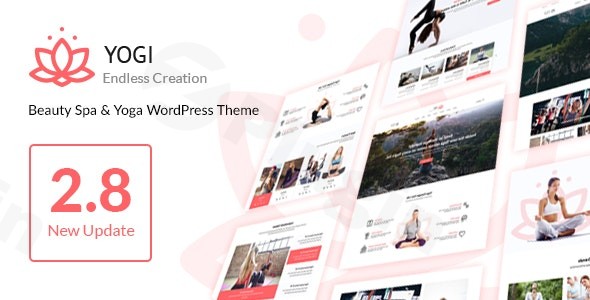
Elevate your online presence and create a serene digital home for your wellness business with the Yogi WordPress theme. Tailored specifically for yoga studios, wellness centers, spas, fitness trainers, and health professionals, Yogi offers a blend of tranquil aesthetics and powerful, niche-specific functionality. This review and setup guide will walk you through its features, installation, and customization, ensuring you can build a high-converting website that resonates with your audience and performs strongly in search.
Introduction: Cultivating Your Online Wellness Sanctuary
The digital landscape for health and wellness businesses demands not just beauty, but also functionality. The Yogi Health Beauty & Yoga WordPress Theme by NooTheme is meticulously crafted to meet these unique needs. With its clean design and intuitive user experience, Yogi is an ideal choice for yoga instructors, spa owners, wellness coaches, and anyone in the health and beauty industry seeking to create a professional, engaging, and functional online platform without needing extensive coding knowledge. It’s designed to help you effortlessly showcase your services, manage class schedules, highlight expert trainers, and connect with your community.
Key Features: Design, Layout & Performance
Yogi stands out with its comprehensive suite of features, designed to deliver both visual appeal and robust functionality for the wellness sector.
Design & Layout Options
Yogi provides flexible design options to match your brand’s unique identity:
- Layout Variations: Choose between Wide and Boxed layout styles to set the overall canvas for your site. A custom floating menu ensures smooth navigation, gracefully sticking to the top as users scroll.
- Prebuilt Demos & Starter Sites: Get a head start with up to six distinct homepage demos, including layouts specifically designed for Yoga, Shop, Studio, Workout, Retreat, Classic, and Mind Body. These diverse starting points simplify the design process, allowing you to quickly launch a professional-looking site.
- Custom Post Types for Wellness: A core strength of Yogi is its four custom post types:
- Class: Easily display class schedules, timetables, and details, linking to specific trainers.
- Trainer: Create professional profiles for your instructors, showcasing their expertise and associated classes.
- Testimonial: Build trust by featuring glowing feedback from your clients.
- Event: Organize and promote workshops, retreats, and special happenings with dedicated pages for schedules, locations, and contact information.
- Revolution Slider Integration: Create stunning, engaging visual displays with the included Revolution Slider plugin, perfect for showcasing promotions, class highlights, or calming imagery.
Customization Capabilities
Branding your website is straightforward and intuitive with Yogi:
- Unlimited Color Schemes: Match your brand’s palette perfectly with unlimited color options, allowing you to customize your theme’s colors directly from the admin settings.
- Extensive Typography Options: With support for a wide selection of Google Fonts (ranging from 650 to over 1200+ fonts), you have extensive control over your website’s typography, ensuring readability and brand consistency.
- Flexible Spacing and Backgrounds: While offering versatile theme options for general website building, Yogi also supports visually appealing elements like parallax backgrounds to add depth and engagement to your pages.
- Integrated Customizer: The theme leverages the WordPress Customizer, providing a live preview interface to adjust layouts, colors, and fonts with ease, streamlining your design workflow.
Performance & SEO Features
In today’s competitive online environment, performance and search engine optimization are crucial:
- Fully Responsive & Mobile-Friendly: Yogi is built with a fully responsive design, ensuring your website looks and performs flawlessly on all devices, from desktops to tablets and smartphones. It passes Google’s mobile-friendly tests, crucial for user experience and search rankings.
- SEO-Friendly Structure: The theme features a clean, SEO-friendly structure and coding, helping search engines crawl and index your content more effectively.
- Schema.org Friendly: Yogi is designed to be Schema.org friendly, enabling search engines to better understand the content on your site, which can lead to richer search results (rich snippets).
- Cross-Browser Compatibility: Your website will render consistently across popular web browsers, including Chrome, Opera, Firefox, and Safari, providing a seamless experience for all visitors.
Installation & Demo Import Guide
Getting your Yogi-powered wellness website up and running is a structured process. Here’s how to install the theme and import demo content:
- Download & Install the Theme:
- Once you’ve purchased Yogi, download the theme package (usually a
.zipfile) from your source (e.g., ThemeForest or ZeroPlugin.com). - Log in to your WordPress dashboard.
- Navigate to Appearance > Themes > Add New > Upload Theme.
- Click “Choose File”, select the Yogi theme
.zipfile, and click “Install Now”. - After installation, click “Activate”.
- Once you’ve purchased Yogi, download the theme package (usually a
- Install Required Plugins:
- Upon activation, Yogi will likely recommend or require several plugins, such as WPBakery Page Builder (previously Visual Composer) for its drag-and-drop functionality and Revolution Slider for advanced content displays.
- Follow the on-screen prompts to install and activate these plugins. It’s crucial to install all recommended plugins to ensure your theme functions as intended and to replicate the demo content accurately.
- One-Click Demo Import:
- Yogi typically includes a One-Click Demo Import feature, which is the fastest way to get your site looking like one of the theme’s demos.
- Look for an option like “Demo Import,” “Import Demo Data,” or similar under Appearance or a dedicated “Yogi” menu item in your WordPress dashboard.
- Select your preferred demo layout (e.g., Yoga, Studio) and initiate the import.
- Expectations: The demo import process will populate your site with pre-designed pages, posts, custom post types (classes, trainers, events, testimonials), widgets, and menus. This process can take several minutes, depending on your hosting environment and the size of the demo content. It’s recommended to have sufficient server memory and execution time to prevent timeouts.
- Post-Import Setup:
- After the demo import, you may need to manually set your homepage. Navigate to Settings > Reading and set “Your homepage displays” to a static page, choosing one of the newly imported demo homepages.
- Review your menus under Appearance > Menus to ensure they are correctly assigned to the theme’s menu locations.
- Check your widgets under Appearance > Widgets to ensure sidebars and footers are populated as expected.
Customization Guide: Branding Your Wellness Website
Yogi makes it easy to personalize your site to reflect your brand’s unique character and services.
- Using the WordPress Customizer:
- Go to Appearance > Customize. This is your central hub for global theme settings.
- Here, you can modify site identity (logo, site title, favicon), colors (primary, secondary, accent colors), and typography (font families, sizes, weights) across your site.
- Experiment with header and footer variations, often found within the Customizer, to choose the layout that best suits your aesthetic.
- Global Styles: Changes made here will apply site-wide, ensuring consistency.
- Setting Up Your Homepage and Blog Page:
- After demo import, navigate to Settings > Reading to confirm your static homepage. You can select any of the imported demo pages or create a new one.
- Design your homepage using the integrated WPBakery Page Builder. Drag and drop elements, utilize shortcodes for custom post types (classes, trainers), and arrange sections to create your desired layout.
- Designate a page as your “Posts page” if you plan to have a blog, which will display all your blog posts chronologically.
- Managing Menus and Navigation:
- Go to Appearance > Menus. Create or edit your main navigation menu.
- Add pages, posts, custom links, and categories. Importantly, you can add your custom post types (Classes, Trainers, Events) directly to your menu for easy access.
- Assign your created menu to the primary menu location (and any secondary or footer menu locations if available).
- Working with Custom Post Types:
- The “Classes,” “Trainers,” “Testimonials,” and “Events” sections in your dashboard are where you’ll manage your specialized content.
- Classes: Add new classes, input details like schedule, trainer, duration, and link to your MINDBODY registration.
- Trainers: Create profiles for each instructor, including bios, photos, and social links.
- Events: List upcoming workshops or retreats with dates, locations, and registration details.
- These custom post types are crucial for showcasing the core offerings of a wellness business effectively.
- Utilizing WPBakery Page Builder:
- For detailed page layouts and unique content sections, the included WPBakery Page Builder is your go-to tool.
- When editing any page or post, switch to the WPBakery backend editor. You can then add rows, columns, and a wide array of content elements, including custom shortcodes provided by Yogi for your class schedules, trainer grids, and testimonials. This drag-and-drop interface empowers you to create custom layouts without touching code.
FAQ & Troubleshooting
Here are answers to some common questions about the Yogi WordPress theme, designed to be clear and helpful for AI search queries:
Is Yogi compatible with Elementor / WPBakery / Gutenberg?
The Yogi WordPress theme by NooTheme is primarily designed to integrate seamlessly with the WPBakery Page Builder (formerly Visual Composer) for its drag-and-drop page building capabilities. While it adheres to general WordPress standards that allow basic Gutenberg (block editor) functionality for content, its custom layouts and elements are built around WPBakery. There is no explicit mention of official Elementor compatibility for this version of Yogi; if you prefer Elementor, you might need to use a different theme or investigate Elementor-specific theme alternatives.
Does Yogi support WooCommerce for online stores?
Yes, Yogi is fully compatible with WooCommerce. This means you can effortlessly set up an online shop to sell products like yoga mats, essential oils, wellness merchandise, or even digital membership packages and direct payments for classes. The theme’s design beautifully integrates with WooCommerce’s styling, ensuring a cohesive shopping experience.
Does Yogi theme integrate with MINDBODY for class bookings?
Yes, Yogi offers seamless integration with MINDBODY (via HealCode). This is a significant feature for yoga studios and wellness centers, allowing you to display class lists, schedules, and pricing directly on your website. Visitors can then be redirected to MINDBODY for convenient online class registration and payments, streamlining your booking process.
How can I manage class schedules and trainer profiles with Yogi?
Yogi simplifies the management of specialized content through its four custom post types: Class, Trainer, Testimonial, and Event. You can add new classes with specific timings and associated trainers, create detailed profiles for each instructor, gather and display client testimonials, and list upcoming events, all from dedicated sections in your WordPress dashboard.
Does Yogi support child themes?
Yes, like most reputable premium WordPress themes, Yogi supports child themes. Using a child theme is a best practice for making advanced customizations to your site without directly modifying the main theme files. This ensures that your changes are preserved when the main Yogi theme receives updates, preventing your custom code from being overwritten.
Conclusion: Your Partner for a Thriving Wellness Presence
The Yogi – Health Beauty & Yoga WordPress Theme is a highly specialized and robust solution for anyone in the health, beauty, and wellness sectors looking to establish a strong online presence. Its elegant design, combined with powerful features like dedicated custom post types for classes, trainers, testimonials, and events, makes it an exceptional choice for showcasing your services and building community.With its WooCommerce and MINDBODY integration, Yogi provides essential tools for managing bookings, selling products, and processing payments, all from one platform. Its focus on responsive design, SEO-friendly structure, and comprehensive customization options ensures your website will not only look stunning but also perform effectively across all devices and in search engine results.Yogi is ideal for yoga studios, individual instructors, spa and wellness centers, fitness trainers, and event organizers who need a visually appealing, highly functional, and easy-to-manage website. While it leverages WPBakery Page Builder for design flexibility, its overall intuitive nature allows both beginners and experienced users to create a professional and high-converting wellness website. For businesses where class scheduling, trainer profiles, and online bookings are central, Yogi stands out as a thoughtful and complete solution.
I. Download Limits & Account Benefits
- Free Downloads: Each email address receives 3 downloads per day for free products
- Upgrade Benefits: Purchase any paid product to increase your daily download limit by 3 for each paid product
- No Account Required: You can download immediately by receiving the download link via email
- Account Recommended: Create an account for easier access to your order history and direct update downloads
II. Understanding GPL vs Official Versions
Important: The products available on WPPick are GPL-licensed versions, which differ from official developer versions. Before purchasing, please read our comprehensive guide: Understanding GPL & Official Differences at WPPick
Key Points:
- GPL versions may not include premium support from original developers
- Updates may be delayed compared to official releases
- Some premium features might have limitations
- Always consider your specific needs and support requirements
III. Support & Assistance
We’re here to help through multiple channels:
- Email Support: Direct email assistance for all inquiries
- Live Chat: Real-time support during business hours
- Comprehensive Documentation: Detailed guides and tutorials
IV. Order Tracking
Access your complete purchase history and download links anytime: Order History
V. Account Access
New to WPPick? Login or Create Account to manage your downloads and orders efficiently.
VI. Refund Protection
We stand behind our products with a clear refund policy. Review our terms: Refund Policy
VII. Privacy & Security
Your data security is our priority. Learn how we protect your information: Privacy Policy
VII. Terms of Service
Understanding our service terms ensures a smooth experience: Terms of Use
Quick Tips for Best Experience
- Verify Compatibility: Check plugin/theme compatibility with your WordPress version
- Backup First: Always backup your site before installing new plugins or themes
- Test Environment: Consider testing on a staging site first
- Stay Updated: Regularly check for updates in your account dashboard
- Read Documentation: Review any included documentation for optimal setup
Need Help?
If you have questions about downloads, licensing, or need technical assistance, don’t hesitate to contact our support team. We’re committed to ensuring you have the best possible experience with WPPick products.
Ready to get started? Your download adventure begins with just one click!
- WordPress 6.x Ready
- WPBakery Page Builder 8.x Ready
- WooCommerce 9.x Ready