

Yootheme Pro For WordPress
/Year
Premium WordPress Site Building with YOOtheme Pro
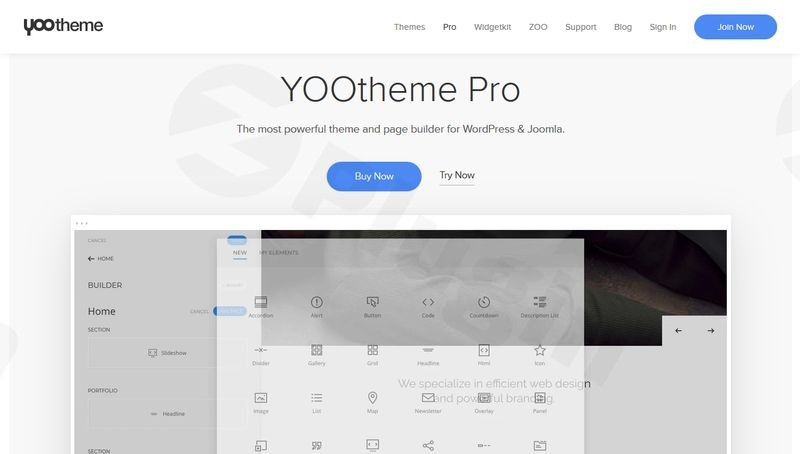
YOOtheme Pro is an advanced theme framework and drag-and-drop page builder created specifically for designers, developers, and agency teams who want to build custom WordPress websites quickly. Operating as an all-in-one theme solutions toolkit, it combines full-site layout customization, granular visual control, and a comprehensive library of design components. Instead of patching multiple plugins together, users gain a cohesive ecosystem that manages global styles, content architecture, and responsive layouts inside a unified dashboard interface.
Latest Version 5.0.36 Changes
YOOtheme Pro version 5.0.36 was released on June 24, 2026. This version introduced support for responsive embedded content in WordPress, added the creation date to Smart Search item sources in Joomla, and fixed an issue regarding the Vimeo video lightbox links in both Grid and Gallery elements.
- Added: Add support for responsive embedded content (WordPress)
- Added: Add created date to Smart Search item source (Joomla)
- Fixed: Fix Vimeo video lightbox link in Grid and Gallery elements.
What YOOtheme Pro Does
The primary function of YOOtheme Pro is to transform the native WordPress management workspace into a modern drag-and-drop website design application. It gives creators absolute control over every aspect of a theme, from global color palettes and responsive typography grids to structural header layouts and custom post type archives. This eliminates the necessity of writing extensive CSS or PHP snippets to achieve personalized designs, allowing developers to configure fully styled production websites visually from header to footer.
Who It Is For
This powerful framework is tailored for several professional use cases across the WordPress web development space:
- Freelance web designers looking for precise creative freedom without encountering structural code barriers.
- Digital agencies requiring a standardized, scalable framework that accelerates deployment timelines across multiple client projects.
- WordPress developers seeking a sophisticated system that supports advanced dynamic fields and semantic data mapping.
- Business owners aiming to create content-rich corporate sites, landing pages, and portfolio showcases with refined style.
Key Design and Structural Capabilities
YOOtheme Pro comes equipped with a suite of architectural features that set it apart from basic drag-and-drop alternatives:
- Visual Drag-and-Drop Editor: Assemble pages directly with clean, standards-compliant structural logic.
- Global Style Customizer: Adjust colors, structural grid columns, utility spacing, and font sizes globally across an entire system.
- Comprehensive Element Library: Deploy interactive components including grid galleries, video sliders, accordions, and overlays instantly.
- Dynamic Content Integration: Map layout structures straight to WordPress custom post types, custom fields, and taxomony fields.
- Integrated Asset Manager: Access thousands of curated layout presets and high-quality vector graphics inside the design workspace.
Practical WordPress Use Cases
In production environments, YOOtheme Pro excels at simplifying complex site configurations. For instance, when designing complex directory services or real estate showcases, developers can create a custom post type with Advanced Custom Fields (ACF). Using YOOtheme Pro, they can map those custom metadata points directly into elegant, repeating Grid elements without editing structural templates. Additionally, it handles complex content presentation for online educational courses, multi-author blogging properties, corporate portfolios, and standard informational marketing funnels efficiently.
Setup and System Compatibility Context
Deploying YOOtheme Pro follows standard theme installation protocols through the WordPress administrative dashboard. Since it serves as both the active structural theme and the page-building utility, it mitigates compatibility problems commonly triggered when standalone theme templates conflict with external visual editors. It operates cleanly alongside popular plugins such as Yoast SEO, WooCommerce, and standard security firewalls, ensuring your architectural foundation remains stable during automated site maintenance updates.
Reasons to Choose It on WPPick
Procuring YOOtheme Pro through WPPick delivers distinct operational advantages for builders and businesses. WPPick provides scanned, safe packages that undergo rigorous evaluation to ensure absolute deployment safety. Users can test advanced custom field implementations, try pre-configured template variations, and experience full visual design freedoms before choosing expensive developer subscription licensing paths, resulting in optimal cost efficiencies for growing web design businesses.
Latest Version Context
YOOtheme Pro is under active engineering cycles to maintain performance parity with core software releases. In version 5.0.36, several critical additions and adjustments have been engineered to refine platform reliability. This deployment introduces built-in support for responsive embedded media formats inside WordPress environments, optimizing media presentation across viewport widths. Furthermore, it resolves a known layout bug with Vimeo video lightbox links embedded inside Grid and Gallery layouts, ensuring media assets open reliably without workflow degradation.
Frequently Asked Questions
Does YOOtheme Pro require a separate core theme to function?
No. YOOtheme Pro operates as a fully integrated theme framework. It functions simultaneously as your active structural WordPress theme and your primary visual page builder tool, eliminating conflicts between theme systems and design layouts.
Can I map custom dynamic content fields into layout elements?
Yes. YOOtheme Pro features native dynamic content mapping. You can connect layout assets like titles, images, lists, and grids to standard WordPress post attributes, custom taxonomies, or metadata fields created via Advanced Custom Fields (ACF).
How does YOOtheme Pro impact page loading speeds and core web vitals?
Unlike heavy block builders, YOOtheme Pro uses modern asset loading logic. It compiles clean HTML and minified styling assets, optimizes image scaling automatically, and features modular code loading protocols to deliver fast performance metrics.
Is it safe to run YOOtheme Pro alongside WooCommerce storefronts?
Yes. YOOtheme Pro features deep integration with WooCommerce architecture. It allows builders to customize item archives, product pages, filtering widgets, and checkouts visually while keeping standard e-commerce transaction workflows secure.
What options are available for translating sites designed with this framework?
YOOtheme Pro is built with internationalization standards. It works cleanly alongside prominent multi-language management setups like WPML and Polylang, allowing you to establish independent design layouts for different regional language variations.
I. Download Limits & Account Benefits
- Free Downloads: Each email address receives 3 downloads per day for free products
- Upgrade Benefits: Purchase any paid product to increase your daily download limit by 3 for each paid product
- No Account Required: You can download immediately by receiving the download link via email
- Account Recommended: Create an account for easier access to your order history and direct update downloads
II. Understanding GPL vs Official Versions
Important: The products available on WPPick are GPL-licensed versions, which differ from official developer versions. Before purchasing, please read our comprehensive guide: Understanding GPL & Official Differences at WPPick
Key Points:
- GPL versions may not include premium support from original developers
- Updates may be delayed compared to official releases
- Some premium features might have limitations
- Always consider your specific needs and support requirements
III. Support & Assistance
We’re here to help through multiple channels:
- Email Support: Direct email assistance for all inquiries
- Live Chat: Real-time support during business hours
- Comprehensive Documentation: Detailed guides and tutorials
IV. Order Tracking
Access your complete purchase history and download links anytime: Order History
V. Account Access
New to WPPick? Login or Create Account to manage your downloads and orders efficiently.
VI. Refund Protection
We stand behind our products with a clear refund policy. Review our terms: Refund Policy
VII. Privacy & Security
Your data security is our priority. Learn how we protect your information: Privacy Policy
VII. Terms of Service
Understanding our service terms ensures a smooth experience: Terms of Use
Quick Tips for Best Experience
- Verify Compatibility: Check plugin/theme compatibility with your WordPress version
- Backup First: Always backup your site before installing new plugins or themes
- Test Environment: Consider testing on a staging site first
- Stay Updated: Regularly check for updates in your account dashboard
- Read Documentation: Review any included documentation for optimal setup
Need Help?
If you have questions about downloads, licensing, or need technical assistance, don’t hesitate to contact our support team. We’re committed to ensuring you have the best possible experience with WPPick products.
Ready to get started? Your download adventure begins with just one click!
- Add support for responsive embedded content (WordPress)
- Add created date to Smart Search item source (Joomla)
- Fix Vimeo video lightbox link in Grid and Gallery elements
- Fix image resolving for images with space character in name (Joomla)
- Fix resolving directory for imagelist fields (Joomla)
- Fix using global field plugin settings when resolving fields (Joomla)
- Fix menu location assignment in Customizer preview (WordPress)
- Fix regression when clicking the manage settings button in the consent banner
- Fix the dropdown alignment of the WooCommerce Filter element (WordPress)