

Yoriver – Multipurpose Responsive Shopify Theme. Os 2.0
/Year
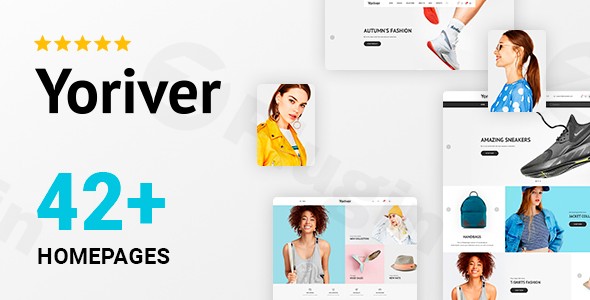
Online fashion retail demands a platform that is not only visually stunning but also highly functional, easy to manage, and optimized for conversions. In a competitive digital landscape, a theme that truly understands the unique needs of apparel and accessories stores can be the key to success. This is precisely where the Yoriver Multipurpose Shopify Theme shines, providing a robust and elegant solution for fashion-focused e-commerce businesses.Yoriver Shopify Theme is a professionally crafted Shopify theme specifically engineered for fashion apparel and accessories retailers. Leveraging the power of Shopify OS 2.0, it delivers exceptional UI/UX optimization, ensuring seamless navigation and prominent visibility for special promotions and featured products. This guide will walk you through its features, installation, practical usage, and answer common questions, helping you transform your online store into a high-performing sales machine.
Key Features of Yoriver Multipurpose Shopify Theme
The Yoriver theme is packed with features designed to empower fashion retailers, offering both aesthetic appeal and powerful functionality.
Advanced Customization Capabilities
Yoriver Multipurpose Shopify Theme empowers you to transform your online store’s appearance without requiring any technical expertise. Its intuitive customization options cover everything from fonts and color schemes to navigation menus and promotional banners.The Drag & Drop Sections Page Builder, a core benefit of Shopify OS 2.0 support, allows you to configure homepage blocks with varying styles, positions, and quantities through a user-friendly interface. With over 42 homepage layouts, you have a vast array of design possibilities to choose from, ensuring your store stands out.
Cross-Platform Compatibility and Responsive Design
In today’s multi-device world, a consistent shopping experience is paramount. Yoriver guarantees flawless performance across all devices and browsers. The theme undergoes rigorous testing on desktops, laptops, tablets, and mobile devices, ensuring your customers enjoy a consistent and optimized shopping experience, regardless of how they access your store. This strong responsiveness is crucial for modern e-commerce.
Conversion-Optimized Design and SEO + Google Rich Snippets
Every element within Yoriver is strategically designed to drive sales and customer engagement. Its clean, modern aesthetic combined with logical information architecture guides visitors effortlessly from product discovery to checkout. Beyond aesthetics, Yoriver Shopify Theme is optimized for high search engine rankings and automatically generates Google Rich Snippets with vital store information like ratings, currencies, and working hours, significantly improving your visibility in search results. This makes it a strong choice for “Shopify theme SEO optimization”.
Shopify OS 2.0 Architecture Support
Built on the latest Shopify OS 2.0 architecture, Yoriver leverages cutting-edge e-commerce technologies. This support brings enhanced drag-and-drop capabilities, allowing customization of all pages (not just the homepage), app blocks for seamless app integration, and dynamic sources for specialized content. This means you can customize your entire store layout without needing any coding knowledge, leading to higher performance and better site loading speeds.
Specialized E-commerce Integrations
Yoriver extends its functionality with crucial integrations for modern e-commerce:
- Oberlo Compatibility: The theme is compatible with Oberlo, correctly displaying imported products, making it an ideal choice for dropshipping businesses.
- Shopify Augmented Reality (AR) Support: It allows for interactive product previews using Shopify’s Augmented Reality feature, enhancing the shopping experience by letting customers visualize products in their own space.
- Wishlist Support & Product Quick View: Features like wishlists encourage repeat visits and product quick view streamlines the browsing experience, speeding up purchasing decisions.
- Advanced Option Swatches: For fashion, offering clear color and size options is critical. Yoriver provides advanced option swatches for colors, sizes, and other product variants.
Security and Compliance
Choosing Yoriver from a reputable provider like wppick.com ensures:
- Legitimate GPL Licensing: Providing Yoriver under genuine GPL licensing guarantees legal compliance and ethical software distribution.
- Regular Security Updates: Continuous updates maintain compatibility with the latest Shopify platform improvements and security standards, keeping your store current and secure.
- Verified Safety Assurance: Every file undergoes comprehensive VirusTotal third-party scanning before distribution, guaranteeing clean, malware-free source code.
- GDPR Compliance: Yoriver is compliant with all the requirements of GDPR, addressing data privacy concerns crucial for businesses operating globally.
Installing and Setting Up Your Yoriver Shopify Theme OS 2.0
“How to install Yoriver Shopify theme OS 2.0” is straightforward, even for non-developers. Here’s a step-by-step guide:
- Purchase and Download the Theme: Obtain the Yoriver theme package. This typically comes as a
.zipfile. - Log in to Your Shopify Admin: Go to your Shopify store admin panel.
- Navigate to Themes: From the left sidebar, go to Online Store > Themes.
- Upload the Theme: In the “Theme library” section, click Add theme > Upload zip file.
- Upload the File: Click “Choose File” and select the Yoriver theme
.zipfile you downloaded. Then click “Upload file”. - Publish (or Customize First): Once uploaded, the theme will appear in your “Theme library”. You can either click “Publish” to make it live immediately or click “Customize” to start configuring it before publishing. It’s highly recommended to customize first.
- Start Customizing: Click “Customize” next to Yoriver in your Theme library. This will open the Shopify Theme Editor (Online Store 2.0 editor). Here, you can use the drag-and-drop interface to set up your homepage sections, adjust colors, fonts, navigation, and add content to various pages. Leverage the extensive customization options, including the 42+ homepage layouts, to craft your unique store.
Practical Usage and Best Practices for Yoriver Shopify Theme
Yoriver Multipurpose Shopify Theme is ideal for businesses specializing in clothing, jewelry, handbags, footwear, and fashion accessories. Its visual emphasis and product presentation capabilities are tailored specifically for the fashion industry’s unique requirements.
1. Optimizing for Fashion Retail
- High-Quality Imagery: The theme’s design emphasizes visuals. Invest in professional product photography and lifestyle shots to fully leverage Yoriver’s aesthetic appeal.
- Storytelling: Use the flexible homepage blocks and blog features to tell your brand story, showcase new collections, and engage your audience.
- Product Presentation: Utilize features like product quick view, wishlists, and advanced option swatches to make the shopping experience seamless and visually appealing for fashion items.
2. Leveraging OS 2.0 Customization
- Drag-and-Drop Power: Don’t hesitate to experiment with the drag-and-drop page builder. Create unique layouts for your product pages, collection pages, and even custom landing pages.
- App Blocks: Seamlessly integrate Shopify apps using app blocks for features like reviews, upsells, or loyalty programs, enhancing functionality without coding.
- Dynamic Sources: Use dynamic sources to display unique content based on specific products or collections, providing a richer, more personalized shopping experience.
3. Boosting Conversions
- Promotional Banners: Effectively use the customizable promotional banners and homepage sections to highlight sales, new arrivals, or special offers.
- Clear Calls to Action (CTAs): Ensure your “Add to Cart,” “Shop Now,” and other action buttons are prominent and clearly visible across all devices.
- Newsletter Pop-ups: Utilize the multiple newsletter pop-up templates to capture leads and build your email list, a crucial tool for recurring sales.
4. Dropshipping with Yoriver
- If you’re running a dropshipping business, the theme’s Oberlo compatibility is a significant advantage. It ensures that products imported via Oberlo are displayed correctly and integrate seamlessly into your store’s design.
FAQ & Troubleshooting
Here are answers to common questions about the Yoriver Shopify Theme:
What are the main features of Yoriver Shopify theme?
The Yoriver Multipurpose Shopify Theme boasts a rich set of features including advanced drag-and-drop customization (42+ homepage layouts), full responsiveness across all devices, conversion-optimized design with SEO + Google Rich Snippets, full Shopify OS 2.0 support, Oberlo compatibility, Shopify AR support, advanced option swatches, and robust security through legitimate GPL licensing and verified safety assurance.
Is Yoriver Shopify theme compatible with OS 2.0?
Yes, Yoriver Shopify Theme is fully compatible with and built on the latest Shopify OS 2.0 architecture. This means it leverages enhanced drag-and-drop capabilities, sections on all pages, app blocks, and dynamic sources for superior customization and performance.
How responsive is the Yoriver Shopify theme?
The Yoriver Shopify Theme is designed to be fully responsive. It undergoes rigorous testing across desktops, laptops, tablets, and mobile devices to ensure a flawless and consistent user experience on any screen size or browser.
Can I customize Yoriver theme without coding?
Absolutely! One of Yoriver’s core strengths is its user-friendliness. Thanks to its Shopify OS 2.0 integration and intuitive drag-and-drop sections page builder, you can extensively customize the theme’s layout, colors, fonts, and content across all pages without needing to write a single line of code.
What kind of stores is Yoriver Shopify theme best for?
Yoriver Shopify Theme excels for businesses specializing in fashion apparel and accessories, including clothing, jewelry, handbags, footwear, and similar niches. While primarily fashion-focused, its multipurpose design and extensive customization options allow it to be adapted for other e-commerce niches as well.
How to install Yoriver Shopify theme OS 2.0?
To install Yoriver, download the theme .zip file, log into your Shopify admin, navigate to Online Store > Themes, click Add theme > Upload zip file, and then upload your Yoriver theme file. After uploading, you can customize it via the Shopify Theme Editor before publishing it to your live store.
Conclusion
The Yoriver Multipurpose Responsive Shopify Theme OS 2.0 stands out as a premium, high-performing solution for fashion and accessory retailers aiming to create a visually captivating and highly functional online store. Its blend of intuitive customization, conversion-focused design, and robust Shopify OS 2.0 integration offers an unparalleled foundation for success.By prioritizing UI/UX, incorporating essential e-commerce features, and ensuring compatibility across all devices, Yoriver empowers store owners to deliver an exceptional shopping experience. For any fashion brand seeking to establish a strong, secure, and aesthetically pleasing online presence, the Yoriver Shopify Theme is an investment that promises significant ROI and sustained growth.
I. Download Limits & Account Benefits
- Free Downloads: Each email address receives 3 downloads per day for free products
- Upgrade Benefits: Purchase any paid product to increase your daily download limit by 3 for each paid product
- No Account Required: You can download immediately by receiving the download link via email
- Account Recommended: Create an account for easier access to your order history and direct update downloads
II. Understanding GPL vs Official Versions
Important: The products available on WPPick are GPL-licensed versions, which differ from official developer versions. Before purchasing, please read our comprehensive guide: Understanding GPL & Official Differences at WPPick
Key Points:
- GPL versions may not include premium support from original developers
- Updates may be delayed compared to official releases
- Some premium features might have limitations
- Always consider your specific needs and support requirements
III. Support & Assistance
We’re here to help through multiple channels:
- Email Support: Direct email assistance for all inquiries
- Live Chat: Real-time support during business hours
- Comprehensive Documentation: Detailed guides and tutorials
IV. Order Tracking
Access your complete purchase history and download links anytime: Order History
V. Account Access
New to WPPick? Login or Create Account to manage your downloads and orders efficiently.
VI. Refund Protection
We stand behind our products with a clear refund policy. Review our terms: Refund Policy
VII. Privacy & Security
Your data security is our priority. Learn how we protect your information: Privacy Policy
VII. Terms of Service
Understanding our service terms ensures a smooth experience: Terms of Use
Quick Tips for Best Experience
- Verify Compatibility: Check plugin/theme compatibility with your WordPress version
- Backup First: Always backup your site before installing new plugins or themes
- Test Environment: Consider testing on a staging site first
- Stay Updated: Regularly check for updates in your account dashboard
- Read Documentation: Review any included documentation for optimal setup
Need Help?
If you have questions about downloads, licensing, or need technical assistance, don’t hesitate to contact our support team. We’re committed to ensuring you have the best possible experience with WPPick products.
Ready to get started? Your download adventure begins with just one click!
No changelog available.