

Zenfy – Software, Saas & Digital Agency WordPress Theme
/Year
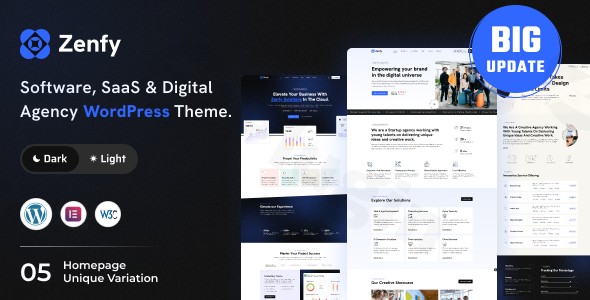
In the fast-paced world of technology, your website is often the first point of contact for potential clients and investors. The Zenfy WordPress theme is a premium, high-performance solution specifically engineered for software companies, SaaS startups, and digital agencies. By blending aesthetic precision with functional clarity, Zenfy provides a professional platform that allows tech-focused businesses to showcase complex products with ease and style. Whether you are launching a new application or rebranding a creative agency, this SaaS WordPress theme offers the modern UI/UX required to establish instant authority in the digital marketplace.
Key Features: Modern Design meets High-Speed Performance
Zenfy is more than just a skin; it is a comprehensive design system tailored for the technology sector. It focuses on a “mobile-first” philosophy, ensuring your software or service looks impeccable on any device.
Versatile Layout & Design Options
Zenfy provides a diverse range of pre-designed templates that cater to different niches within the tech industry:
- 5+ Unique Homepages: Includes specialized layouts for SaaS products, software landing pages, and multi-service digital agencies.
- 30+ Inner Pages: Pre-built designs for “About Us,” “Services,” “Case Studies,” and “Pricing Plans” ensure you don’t have to build from scratch.
- Light and Dark Modes: Easily toggle between a clean, corporate light aesthetic or a sleek, modern dark mode to match your brand’s personality.
- Case Study & Portfolio Layouts: Dedicated sections to demonstrate your agency’s results or software success stories with professional visual hierarchy.
Deep Elementor Integration
The theme is built from the ground up to be an Elementor compatible theme. This means you have full drag-and-drop control over every element. You don’t need to touch a single line of code to move sections, change backgrounds, or adjust spacing.
Performance & SEO Optimization
In an era where core web vitals matter, Zenfy is marketed as a fast loading WordPress theme.
- Speed: Developed with clean code to ensure high scores on GTmetrix and PageSpeed Insights.
* SEO Ready: The theme uses semantic HTML5 and is structured to help search engines understand your content, making it a strong contender for a digital agency WordPress theme looking to rank for competitive keywords.
Installation and Demo Import Guide
Setting up Zenfy is designed to be intuitive, even for those new to WordPress. Follow these steps to get your site looking like the professional demo in minutes.
- Theme Installation: Log in to your WordPress dashboard, navigate to Appearance > Themes > Add New, and upload the
zenfy.zipfile purchased from ThemeForest. - Plugin Activation: Upon activation, Zenfy will prompt you to install required companion plugins. This typically includes Elementor, a contact form plugin, and the theme’s core functional library. Click “Begin Installing Plugins” and then “Activate.”
- One-Click Demo Import: Navigate to the Zenfy Options or Tools section in your dashboard. Select your preferred demo (e.g., SaaS Landing or Digital Agency) and click Import.
- Expert Tip: Ensure your server’s
max_execution_timeis set to at least 300 to avoid timeouts during the import of high-quality images and layouts.
- Expert Tip: Ensure your server’s
4. Final Polish: Once the import is complete, your menus, widgets, and homepage settings will be configured automatically to match the live demo.
Customization: Personalizing Your Brand
Zenfy excels in flexibility through its “Comprehensive Customization Panel.” This allows you to maintain brand consistency across all touchpoints.
Global Styles & Branding
Through the WordPress Customizer and Elementor’s Global Settings, you can define your unlimited color schemes and typography once and see them applied across all 30+ pages. This ensures that your brand’s specific shade of blue or custom font remains consistent.
Flexible Header & Footer Builder
One of Zenfy’s standout features is its proprietary header and footer creation tool. Unlike themes that lock you into 2 or 3 styles, Zenfy allows you to build unique headers with:
- Sticky navigation options.
- Custom “Call to Action” buttons for SaaS signups.
* Multi-column footer layouts for SEO links and contact info.
FAQ & Troubleshooting
Is Zenfy theme good for WooCommerce?
Yes, Zenfy is a WordPress theme designed for seamless integration with WooCommerce. This allows software companies to sell digital downloads, subscriptions, or agency service packages directly through their website with a styled checkout experience.
How do I customize the Zenfy theme header?
You can customize the Zenfy header using the built-in “Flexible Header Creation” tool. This allows you to use Elementor to drag and drop elements like logos, navigation menus, and social icons into your header area, giving you total design freedom.
Does Zenfy support child themes?
Yes, Zenfy supports child themes. Using a child theme is highly recommended if you plan on making advanced code-level customizations, as it ensures your changes are not overwritten during theme updates.
What should I do if the demo import fails?
If a demo import fails, it is usually due to server resource limits. Check with your hosting provider to ensure your PHP memory_limit is at least 256M and upload_max_filesize is sufficient. You can also try importing individual page templates via Elementor if the full site import hits a snag.
Conclusion: A Modern Powerhouse for Tech Brands
The Zenfy WordPress theme stands out as a specialized, high-performance tool for the modern technology sector. While multipurpose themes often feel bloated, Zenfy remains lean and focused on the specific needs of software WordPress themes: speed, professional aesthetic, and ease of lead generation.Zenfy is the ideal choice for:
- SaaS Startups needing a high-converting landing page.
- Digital Agencies wanting to showcase a sleek, creative portfolio.
- IT Companies that require a professional, trustworthy online presence.With its deep Elementor integration and one-click demo setup, Zenfy reduces the barrier to entry for businesses that want a world-class website without the world-class price tag of a custom-coded solution. For more tips on optimizing your WordPress site, visit wppick.com.
I. Download Limits & Account Benefits
- Free Downloads: Each email address receives 3 downloads per day for free products
- Upgrade Benefits: Purchase any paid product to increase your daily download limit by 3 for each paid product
- No Account Required: You can download immediately by receiving the download link via email
- Account Recommended: Create an account for easier access to your order history and direct update downloads
II. Understanding GPL vs Official Versions
Important: The products available on WPPick are GPL-licensed versions, which differ from official developer versions. Before purchasing, please read our comprehensive guide: Understanding GPL & Official Differences at WPPick
Key Points:
- GPL versions may not include premium support from original developers
- Updates may be delayed compared to official releases
- Some premium features might have limitations
- Always consider your specific needs and support requirements
III. Support & Assistance
We’re here to help through multiple channels:
- Email Support: Direct email assistance for all inquiries
- Live Chat: Real-time support during business hours
- Comprehensive Documentation: Detailed guides and tutorials
IV. Order Tracking
Access your complete purchase history and download links anytime: Order History
V. Account Access
New to WPPick? Login or Create Account to manage your downloads and orders efficiently.
VI. Refund Protection
We stand behind our products with a clear refund policy. Review our terms: Refund Policy
VII. Privacy & Security
Your data security is our priority. Learn how we protect your information: Privacy Policy
VII. Terms of Service
Understanding our service terms ensures a smooth experience: Terms of Use
Quick Tips for Best Experience
- Verify Compatibility: Check plugin/theme compatibility with your WordPress version
- Backup First: Always backup your site before installing new plugins or themes
- Test Environment: Consider testing on a staging site first
- Stay Updated: Regularly check for updates in your account dashboard
- Read Documentation: Review any included documentation for optimal setup
Need Help?
If you have questions about downloads, licensing, or need technical assistance, don’t hesitate to contact our support team. We’re committed to ensuring you have the best possible experience with WPPick products.
Ready to get started? Your download adventure begins with just one click!