

Ziston – Directory Listing WordPress Theme
/Year
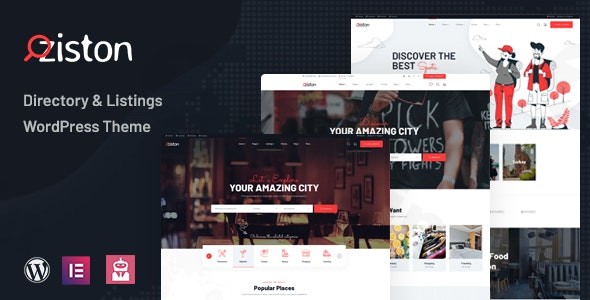
Creating a robust and user-friendly online directory can seem like a monumental task, but with the right tools, it becomes an exciting journey. The Ziston Directory Listing WordPress Theme is engineered precisely for this purpose, offering a powerful and visually appealing solution for anyone looking to build a local business directory, a global venue guide, or any other listing-based platform. Whether you’re an entrepreneur, an agency, or a business owner, Ziston provides an intuitive framework to manage and monetize your directory website.
What is Ziston and Who is it For?
Ziston is a specialized WordPress theme meticulously designed for crafting comprehensive directory listing websites. It empowers you to create, manage, and even monetize platforms for a wide range of listings, from restaurants and hotels to museums, spas, and various entertainment venues. Its clean, modern design philosophy focuses on clear aesthetics and high-resolution optimization, ensuring your listings shine.This theme is ideal for:
- Entrepreneurs launching a new local business guide or niche directory.
- Agencies building listing websites for clients in hospitality, tourism, or retail.
- Business Owners seeking to create a dedicated platform for their industry or community.
- Travelers and explorers who want a trusted source for discovering new places.With Ziston, both business owners can effortlessly add their listings through a user-friendly dashboard, while visitors enjoy a seamless browsing experience to discover new places and services.
Key Features: Design, Layout & Performance
Ziston stands out with a rich array of features tailored specifically for directory websites, blending sophisticated design with powerful functionality.
Design & Layout Options
The theme comes equipped with 3 professionally designed homepage layouts, offering distinct starting points to match your vision. Its commitment to fully responsive and mobile-friendly design ensures that your directory looks impeccable and functions flawlessly across all devices—desktops, tablets, and smartphones. The overall aesthetic is modern and clean, optimized for high-resolution displays to provide crisp, professional visuals.Key design elements include:
- Diverse Homepage Styles: Quickly switch between pre-designed layouts to find the perfect fit.
- Modern Visuals: A clear and clean aesthetic that emphasizes user experience.
- High-Resolution Ready: All elements are optimized for crisp display on high-DPI screens.
Customization Capabilities
Ziston offers extensive control over your site’s appearance, making branding straightforward and flexible:
- Elementor Page Builder Integration: Built with the free version of Elementor, Ziston provides advanced drag-and-drop design capabilities. This allows for intuitive control over spacing, containers, sections, and backgrounds, enabling you to visually craft your pages without coding.
- Unlimited Color Schemes: Powered by the Redux framework, the theme offers unlimited color options, allowing you to perfectly match your brand identity.
- Advanced Typography: Customize Google Fonts or standard fonts, with a wide selection available through the Redux framework.
- Header & Footer Builder: Design custom header and footer layouts with multiple pre-defined styles to choose from, enhancing site navigation and branding.
Performance & SEO Features
Performance and search engine optimization (SEO) are critical for any online directory. Ziston addresses this with several built-in optimizations:
- Optimized Codebase: The theme is described as well-optimized for fast loading speeds, which is crucial for user experience and search engine rankings.
- 100% Mobile Responsive: Its fully responsive design adapts fluidly to any screen size, meeting modern SEO requirements for mobile-first indexing.
- Conversion Rate Optimization: Ziston is designed with conversion in mind, aiming to provide a smooth user journey that encourages exploration and interaction.
- SEO-Friendly Structure: With clean markup and compatibility with popular SEO plugins like Rank Math and Yoast SEO, Ziston provides a solid foundation for achieving higher search engine rankings.
Installation & Demo Import
Getting started with Ziston is designed to be user-friendly, even for those new to WordPress. The one-click demo import feature is a standout, allowing you to quickly replicate the demo site’s structure and content.Here’s a general guide to setting up your Ziston-powered directory:
- Install and Activate Ziston:
- From your WordPress dashboard, navigate to
Appearance > Themes > Add New > Upload Theme. - Upload the Ziston theme file (a
.zipfile you received upon purchase). - Click
Install Nowand thenActivate.
- From your WordPress dashboard, navigate to
- Install Required Plugins:
- Upon activation, Ziston will typically prompt you to install a set of recommended or required plugins. These usually include Elementor, Revolution Slider, The Events Calendar, and WooCommerce (if you plan to monetize listings).
- Follow the on-screen instructions to install and activate all necessary plugins.
- One-Click Demo Import:
- Locate the “Demo Import” or “Import Demo Data” option in your WordPress dashboard, often found under
Appearanceor a dedicated theme options panel. - Select your desired demo layout from the available 3 professionally designed homepage layouts.
- Click the “One-Click Demo Import” button.
- What to Expect: This process will import demo pages, posts, sample listings, widgets, menus, and theme options, giving you a ready-made structure identical to the demo site. Be patient, as this can take a few minutes depending on your hosting environment. Ensure your server memory limits and execution time are sufficient to prevent timeouts during large demo imports.
- Locate the “Demo Import” or “Import Demo Data” option in your WordPress dashboard, often found under
- Initial Setup:
- After the demo import, navigate to
Appearance > Menusto ensure your navigation menus are correctly assigned. - Go to
Settings > Readingto set your newly imported homepage as the static front page.
- After the demo import, navigate to
Customization Guide: Branding & Layout
Personalizing Ziston to align with your brand and specific directory needs is a flexible process, largely driven by the WordPress Customizer and Elementor Page Builder.
- WordPress Customizer (Global Styles):
- Navigate to
Appearance > Customizein your WordPress dashboard. - Here, you’ll find extensive options for customizing color schemes (with unlimited options), typography (selecting Google Fonts), and global layout settings. This is your go-to for applying site-wide changes without touching code.
- Navigate to
- Elementor Page Builder for Layouts:
- For specific page layouts, head to the page you wish to edit and click “Edit with Elementor.”
- Leverage Elementor’s intuitive drag-and-drop interface to modify existing sections, add new elements, and rearrange content. This is where you’ll fine-tune the structure and visual hierarchy of your listing pages, submission forms, and other static content.
- Header and Footer Customization:
- Utilize Ziston’s dedicated Header & Footer Builder to select from multiple header and footer styles. Customize elements like your logo, navigation menus, contact information, and social media links to perfectly match your brand.
- Setting Up Your Listings:
- Ziston functions as a complete solution for creating and managing directory listings. Explore its custom post types designed for listings, and configure how business owners submit and manage their entries through the user dashboard.
- Child Theme Compatibility:
- For advanced customizations or if you plan to make significant code changes, Ziston is child theme compatible and includes a basic child theme. This ensures that your modifications are safe from being overwritten during theme updates, making your site more resilient and future-proof.The overall customization experience with Ziston is intuitive, particularly with the power of Elementor. It allows for detailed control over every aspect of your directory, ensuring it looks and functions exactly as you envision.
FAQ & Troubleshooting
Here are some common questions and answers about the Ziston Directory Listing WordPress Theme:
Q: Is Ziston compatible with popular page builders and the Block Editor (Gutenberg)?
A: Yes, Ziston is robustly compatible with both. It is built with Elementor Page Builder (free version), providing extensive drag-and-drop design capabilities. It also works seamlessly with WPBakery Page Builder and is compatible with the WordPress Block Editor (Gutenberg).
Q: Does Ziston support WooCommerce for online stores or paid listings?
A: Absolutely. Ziston is fully compatible with WooCommerce, allowing you to set up online shops, manage products, and most importantly, facilitate paid listings, membership plans, or other monetization strategies for your directory.
Q: Can I use a child theme with Ziston to protect my customizations?
A: Yes, Ziston is child theme compatible and includes a basic child theme. This is highly recommended for any advanced customizations, as it allows you to modify the theme’s code safely without losing your changes when the main theme is updated.
Q: How can I create a local business directory with Ziston?
A: To create a local business directory with Ziston, first install and activate the theme, then use the one-click demo import to get a head start. From there, you’ll utilize the theme’s built-in listing features, user dashboards for submissions, and Elementor to design your pages. Integrate Ziston Google Maps integration to display business locations effectively.
Q: What should I do if the Ziston demo import fails or doesn’t look like the live demo?
A: If the demo import fails, check your server’s PHP memory limit, execution time, and max upload size. Increasing these values often resolves the issue. If it looks different, ensure all recommended plugins were installed and activated before running the demo import. Also, verify your static front page and menu assignments in WordPress settings.
Conclusion
The Ziston Directory Listing WordPress Theme presents itself as a highly capable and specialized solution for building online directories. Its strong focus on features specific to listing websites—from advanced search and filtering to user dashboards and Ziston Google Maps integration—sets it apart from generic multipurpose themes.With its Elementor compatibility, you gain immense design flexibility, allowing for deep customization of layouts, colors, and typography. The theme’s commitment to Ziston responsive design and optimization for speed and SEO means your directory will perform well across devices and in search results. Furthermore, Ziston WooCommerce integration opens up significant opportunities for monetizing your platform.Ziston is an excellent choice for entrepreneurs, agencies, and businesses aiming to establish professional, high-performing directory or city guide websites. While specific WordPress and PHP version requirements are not explicitly documented, its modern technology stack (Bootstrap 4, HTML5, CSS3) suggests it’s built for current standards. For anyone seeking a comprehensive, intuitive, and feature-rich platform to create, manage, and monetize listings, Ziston offers a compelling and reliable foundation.
I. Download Limits & Account Benefits
- Free Downloads: Each email address receives 3 downloads per day for free products
- Upgrade Benefits: Purchase any paid product to increase your daily download limit by 3 for each paid product
- No Account Required: You can download immediately by receiving the download link via email
- Account Recommended: Create an account for easier access to your order history and direct update downloads
II. Understanding GPL vs Official Versions
Important: The products available on WPPick are GPL-licensed versions, which differ from official developer versions. Before purchasing, please read our comprehensive guide: Understanding GPL & Official Differences at WPPick
Key Points:
- GPL versions may not include premium support from original developers
- Updates may be delayed compared to official releases
- Some premium features might have limitations
- Always consider your specific needs and support requirements
III. Support & Assistance
We’re here to help through multiple channels:
- Email Support: Direct email assistance for all inquiries
- Live Chat: Real-time support during business hours
- Comprehensive Documentation: Detailed guides and tutorials
IV. Order Tracking
Access your complete purchase history and download links anytime: Order History
V. Account Access
New to WPPick? Login or Create Account to manage your downloads and orders efficiently.
VI. Refund Protection
We stand behind our products with a clear refund policy. Review our terms: Refund Policy
VII. Privacy & Security
Your data security is our priority. Learn how we protect your information: Privacy Policy
VII. Terms of Service
Understanding our service terms ensures a smooth experience: Terms of Use
Quick Tips for Best Experience
- Verify Compatibility: Check plugin/theme compatibility with your WordPress version
- Backup First: Always backup your site before installing new plugins or themes
- Test Environment: Consider testing on a staging site first
- Stay Updated: Regularly check for updates in your account dashboard
- Read Documentation: Review any included documentation for optimal setup
Need Help?
If you have questions about downloads, licensing, or need technical assistance, don’t hesitate to contact our support team. We’re committed to ensuring you have the best possible experience with WPPick products.
Ready to get started? Your download adventure begins with just one click!
- Version 1.4.7 released on 15 November 2025
- 30 August 2025