

Zyno – Digital Marketing Agency Gutenverse Fse WordPress Block Theme
/Year
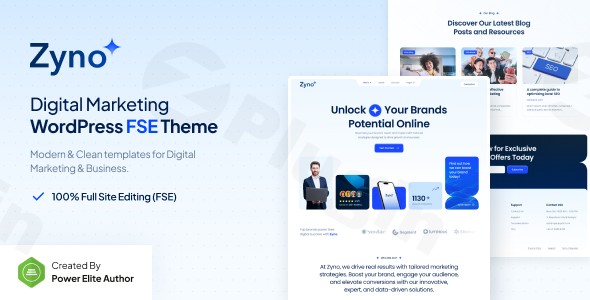
In the rapidly evolving world of web design, the shift toward Full Site Editing (FSE) is the most significant change for agency owners and developers. The Zyno Digital Marketing Agency Gutenverse FSE WordPress Block Theme is at the forefront of this movement, offering a sleek, high-performance solution specifically crafted for SEO firms, social media marketers, and creative studios. This Zyno WordPress theme combines a modern professional aesthetic with the cutting-edge power of block-based architecture, ensuring your agency’s digital presence is as innovative as the services you provide.
Modern Design Meets Full Site Editing Power
The Zyno Digital Marketing Agency Gutenverse FSE WordPress Block Theme is built on a design philosophy of “total control.” Unlike traditional themes that lock you into rigid layouts, Zyno leverages the native WordPress Block Editor and the Gutenverse ecosystem to provide a flexible, code-free building experience.
Layout & Design Flexibility
As a dedicated WordPress FSE theme for agencies, Zyno allows you to edit every square inch of your site. Whether you need a full-width landing page for a PPC campaign or a structured grid layout for a portfolio, the theme utilizes template parts to give you control over:
- Headers and Footers: Build custom navigation menus and footer sections directly in the Site Editor.
- Dynamic Archives: Design how your blog posts and case studies appear to potential clients.
- Visual Hierarchy: The theme uses professional typography and strategic whitespace to guide visitors toward your primary Calls to Action (CTAs).
Performance & SEO Excellence
In the agency world, speed is a ranking factor and a conversion tool. Zyno is optimized for lightning-fast loading times, directly impacting your Core Web Vitals.
- Clean Code: Built with optimized block-based coding to minimize bloat.
- SEO Ready: The theme features a clean markup structure and is fully compatible with plugins like Yoast SEO.
- Mobile-First Approach: The design is 100% responsive, ensuring a flawless experience across desktops, tablets, and smartphones.
Step-by-Step Installation & Demo Import
Setting up a professional website should not take weeks. The Zyno theme is designed for efficiency with a streamlined onboarding process.
- Install & Activate: Upload the Zyno theme zip file via Appearance > Themes in your WordPress dashboard.
- Required Plugins: Upon activation, you will be prompted to install the Gutenverse plugin. This is the core engine that powers Zyno’s advanced design blocks and patterns.
- One-Click Demo Import: Navigate to the Gutenverse dashboard to access the demo importer. Choose your preferred agency starter site and click “Import.”
- Finalize Setup: The importer will bring in all pages, menus, and block patterns. Ensure your server has sufficient memory limits to prevent timeouts during the media import process.
Customization Guide: Branding Your Agency
One of the standout features of this Gutenverse FSE theme is how easily it adapts to your brand identity without writing a single line of CSS.
Using the Site Editor
To begin customizing, go to Appearance > Editor. This is where you can access Global Styles. Here, you can define your brand’s color palette and typography (including Google Fonts) that will apply across every page of the site instantly.
Block Patterns for Quick Layouts
Zyno includes a library of pre-designed block patterns. Instead of building a “Services” or “Meet the Team” section from scratch, you can simply drop a pattern into your page and swap out the text and images. This is the best block theme for digital marketing professionals who need to spin up high-quality landing pages quickly.
Advanced Design with Gutenverse
The integrated Gutenverse addon expands the standard WordPress block library. It introduces advanced spacing controls, container settings, and background overlays that allow for a “page builder” feel while maintaining the lightweight performance of the native block editor.
FAQ & Troubleshooting
Is Zyno theme good for SEO?
Yes, Zyno is highly optimized for SEO. It features clean, semantic HTML5 markup and fast loading speeds, which are critical factors for search engine rankings. It also integrates seamlessly with Yoast SEO and Rank Math.
How to customize the header in the Zyno theme?
Because Zyno is an FSE theme, you customize the header by going to Appearance > Editor, selecting Patterns, and then choosing Header. You can move elements, add logos, and change navigation styles directly within the block editor.
Can I use the Zyno theme with Elementor?
While Zyno is primarily a Gutenberg and Gutenverse-focused theme, it is built on standard WordPress coding practices. However, to get the most out of its performance and FSE features, we recommend using the native Block Editor rather than a third-party page builder like Elementor.
Does Zyno support child themes?
Yes, like most professional WordPress themes, Zyno supports child themes. This allows developers to make advanced code modifications without losing them during future theme updates.
Final Verdict: Is Zyno Right for Your Agency?
The Zyno Digital Marketing Agency Gutenverse FSE WordPress Block Theme is a premier choice for modern agencies that want to stay ahead of the curve. By embracing Full Site Editing, it removes the friction between design and development, allowing you to build a high-converting website that is both beautiful and technically sound.Ideal For:
- Digital Marketing Agencies looking for a fast, modern storefront.
- SEO Professionals who prioritize site speed and clean code.
- Freelancers who want a flexible, block-based system to build client sites quickly.If you are looking for a fast WordPress theme for agencies that offers total creative freedom via the Site Editor, Zyno is a top-tier investment for your business. For more theme reviews and WordPress tips, visit wppick.com.
I. Download Limits & Account Benefits
- Free Downloads: Each email address receives 3 downloads per day for free products
- Upgrade Benefits: Purchase any paid product to increase your daily download limit by 3 for each paid product
- No Account Required: You can download immediately by receiving the download link via email
- Account Recommended: Create an account for easier access to your order history and direct update downloads
II. Understanding GPL vs Official Versions
Important: The products available on WPPick are GPL-licensed versions, which differ from official developer versions. Before purchasing, please read our comprehensive guide: Understanding GPL & Official Differences at WPPick
Key Points:
- GPL versions may not include premium support from original developers
- Updates may be delayed compared to official releases
- Some premium features might have limitations
- Always consider your specific needs and support requirements
III. Support & Assistance
We’re here to help through multiple channels:
- Email Support: Direct email assistance for all inquiries
- Live Chat: Real-time support during business hours
- Comprehensive Documentation: Detailed guides and tutorials
IV. Order Tracking
Access your complete purchase history and download links anytime: Order History
V. Account Access
New to WPPick? Login or Create Account to manage your downloads and orders efficiently.
VI. Refund Protection
We stand behind our products with a clear refund policy. Review our terms: Refund Policy
VII. Privacy & Security
Your data security is our priority. Learn how we protect your information: Privacy Policy
VII. Terms of Service
Understanding our service terms ensures a smooth experience: Terms of Use
Quick Tips for Best Experience
- Verify Compatibility: Check plugin/theme compatibility with your WordPress version
- Backup First: Always backup your site before installing new plugins or themes
- Test Environment: Consider testing on a staging site first
- Stay Updated: Regularly check for updates in your account dashboard
- Read Documentation: Review any included documentation for optimal setup
Need Help?
If you have questions about downloads, licensing, or need technical assistance, don’t hesitate to contact our support team. We’re committed to ensuring you have the best possible experience with WPPick products.
Ready to get started? Your download adventure begins with just one click!